
IPEVO CDCU-06IP
Manuale utente telecamera IPEVO VC-Z4K UHD 4K PTZ
Model: CDCU-06IP
Marca: IPEVO
1. Introduzione
This user manual provides comprehensive instructions for the setup, operation, and maintenance of your IPEVO VC-Z4K UHD 4K PTZ Camera. The VC-Z4K is designed to enhance educational and worship spaces with its 4K UHD resolution and 8.29-MP Sony CMOS sensor. It features advanced pan-tilt-zoom capabilities, AI auto-tracking, and a powerful 12X Optical + 15X Digital Zoom, making it ideal for capturing detailed and engaging remote sessions. Its AI functionality helps minimize the need for additional personnel, and its easy setup allows seamless integration with popular platforms like YouTube, OBS, and Zoom.
2. Informazioni sulla sicurezza
Please read and understand all safety instructions before using the IPEVO VC-Z4K camera to prevent injury or damage to the device. Keep this manual for future reference.
- Fonte di energia: Use only the provided power adapter. Ensure the power outlet meets the camera's voltage requisiti.
- Ventilazione: Do not block ventilation openings. Ensure adequate airflow around the camera to prevent overheating.
- Ambiente: Avoid exposing the camera to water, moisture, extreme temperatures, or direct sunlight. Operate in a clean, dry environment.
- Gestione: Maneggiare la fotocamera con cura. Non lasciarla cadere e non sottoporla a forti vibrazioni.
- Pulizia: Scollegare l'alimentazione prima della pulizia. Utilizzare un panno morbido e asciutto. Non utilizzare detergenti liquidi o spray.
- Manutenzione: Non tentare di smontare o riparare la fotocamera da soli. Per qualsiasi intervento di assistenza, rivolgersi a personale qualificato.
3. Contenuto della confezione
Verifica che tutti gli articoli elencati di seguito siano inclusi nel tuo pacchetto:
- IPEVO VC-Z4K Camera
- Power adapter (8.2 ft / 2.5 m)
- USB 3.0 cable (4.9 ft / 1.5 m)
- RS232 cable (6.5 ft / 2 m)
- Telecomando (batteria non inclusa)
- Manuale d'uso (questo documento)
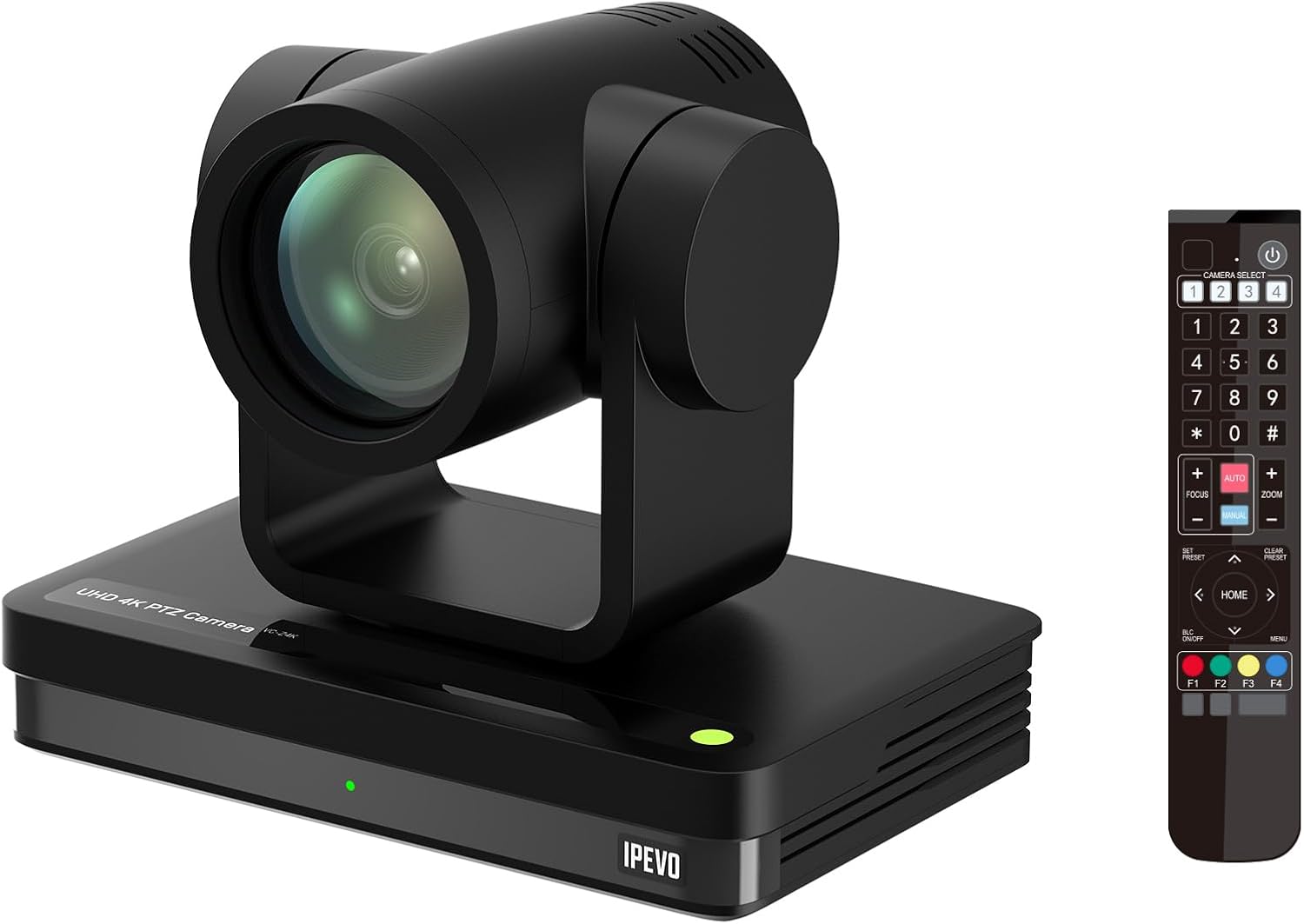
Image: The IPEVO VC-Z4K camera unit shown alongside its remote control, illustrating the main components included in the package.
4. Prodotto finitoview
4.1 Caratteristiche principali
- Risoluzione Ultra HD 4K: Equipped with a 1/2.8" HD CMOS sensor for stunning 4K video output.
- Zoom ottico 12X: Provides clear, detailed close-ups without loss of quality.
- Monitoraggio automatico dell'intelligenza artificiale: Automatically follows speakers or presenters, ensuring they remain in frame.
- Connettività flessibile: Features HDMI, USB-C, LAN (PoE), and SDI outputs for versatile integration.
- Wide Pan and Tilt Range: Offers 340° pan and 120° tilt for comprehensive room coverage.
- Riduzione avanzata del rumore: 2D/3D noise reduction ensures clear video in various lighting conditions.
4.2 Camera Components and Ports

Immagine: Posteriore view of the IPEVO VC-Z4K camera showing its various connectivity ports including USB 3.0, HDMI, SDI, LAN (PoE), and power input.
The VC-Z4K camera features a range of ports for diverse connectivity options:
- Uscita HDMI: For high-definition video output to displays or capture devices.
- Porta USB-C: For direct connection to computers for video and control.
- LAN (PoE) Port: For network connectivity and Power over Ethernet, simplifying installation.
- Uscita SDI: For professional video workflows requiring longer cable runs.
- Porta RS232: For serial control via external control systems.
- Potenza in ingresso: Per collegare l'adattatore di alimentazione incluso.
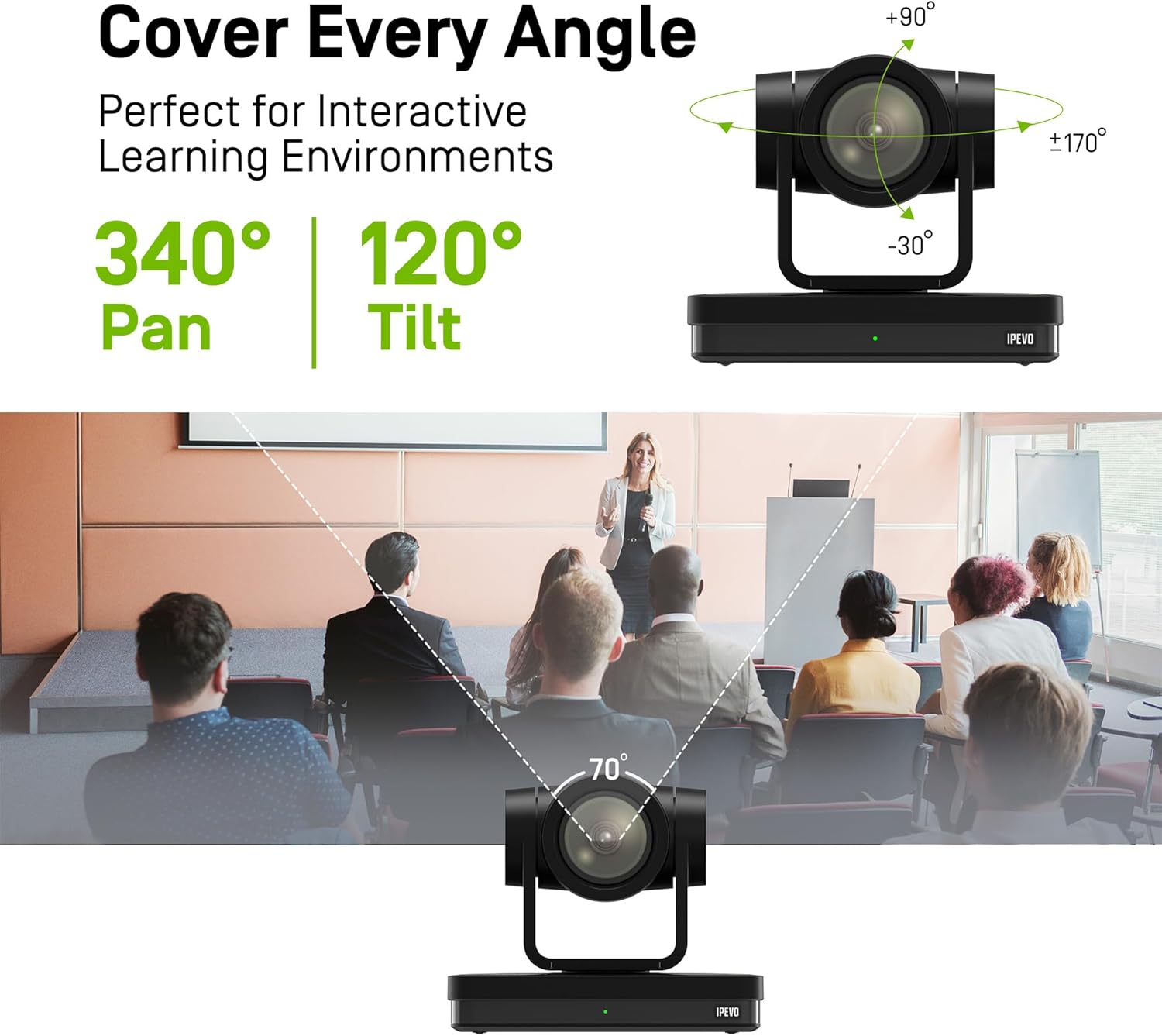
Image: Diagram illustrating the IPEVO VC-Z4K camera's pan (340°) and tilt (120°) ranges, highlighting its ability to cover a wide area.
The camera's motorized head allows for precise pan and tilt movements, enabling comprehensive coverage of your space. The pan range is 340 degrees, and the tilt range is 120 degrees (-30° to +90°).
5. Impostazione
Follow these steps for the initial setup of your IPEVO VC-Z4K camera:
- Posizionamento: Choose a stable surface or mount the camera securely in your desired location. Ensure it has a clear line of sight to the area you wish to capture.
- Collegamento elettrico:
- Utilizzo dell'adattatore di alimentazione: Connect the provided power adapter to the camera's power input port and then plug it into a wall outlet.
- Utilizzo di PoE (Power over Ethernet): If your network switch supports PoE, connect an Ethernet cable from the PoE-enabled switch to the camera's LAN (PoE) port. This will provide both power and network connectivity.
- Video Output Connection (Choose one or more):
- HDMI: Connect an HDMI cable from the camera's HDMI output to a display, projector, or video capture card.
- USB-C: Connect the USB 3.0 cable from the camera's USB-C port to a USB 3.0 port on your computer. This enables the camera as a webcam per applicazioni di videoconferenza.
- LAN: Connect an Ethernet cable from the camera's LAN port to your network router or switch for IP streaming and control.
- ISD: Connect an SDI cable from the camera's SDI output to a professional video switcher or recorder.
- Impostazione del telecomando: Insert two AAA batteries (not included) into the remote control. The remote control is essential for initial configuration and operation.
- Accensione: Once all connections are secure, power on the camera. The indicator light will illuminate.
6. Istruzioni per l'uso
6.1 Basic Camera Control (via Remote Control)
- Panoramica/Inclinazione: Use the directional arrows on the remote control to move the camera horizontally (pan) and vertically (tilt).
- Ingrandisci: Use the 'ZOOM +' and 'ZOOM -' buttons to adjust the optical zoom.
- Messa a fuoco: Press 'AUTO FOCUS' for automatic focus. Use 'FOCUS +' and 'FOCUS -' for manual adjustment if needed.
- Preselezioni: The camera supports up to 255 presets. You can save and recall up to 10 presets directly from the remote control using the number buttons (0-9). To save a preset, position the camera, then press 'PRESET' followed by a number (e.g., '1'). To recall, press the number button.

Image: The IPEVO VC-Z4K camera demonstrating its 12X optical zoom capability, highlighting its 8.29-MP Sony CMOS sensor for high-quality video.
6.2 Monitoraggio automatico dell'intelligenza artificiale
The VC-Z4K features advanced AI auto-tracking to keep a presenter or subject automatically in frame.
- Enabling Tracking: Refer to the remote control or camera's web interface for specific buttons or settings to activate AI tracking.
- Zone Tracking: Configure specific zones within the camera's view where tracking should occur.
- Monitoraggio del presentatore: The camera can identify and follow a designated presenter as they move within the defined area.

Image: A visual representation of the IPEVO VC-Z4K's AI auto-tracking and auto-focus features, showing how it maintains focus on a moving subject in a classroom setting.
6.3 Integration with Platforms
The VC-Z4K seamlessly integrates with various video conferencing and streaming platforms:
- Connessione USB: When connected via USB-C, the camera will be recognized as a standard webcam by applications like Zoom, OBS Studio, Microsoft Teams, Google Meet, GoTo Meeting, and Skype. Select "IPEVO VC-Z4K" as your video input device within the application settings.
- LAN/IP Streaming: For advanced streaming setups, use the LAN connection to stream video via RTSP/RTMP protocols to platforms like YouTube Live or OBS Studio. Refer to the camera's web interface for IP configuration and streaming settings.
7. Manutenzione
Proper maintenance ensures the longevity and optimal performance of your IPEVO VC-Z4K camera.
- Pulizia della lente: Utilizzare un panno morbido e privo di lanugine, specificamente progettato per lenti ottiche. Pulire delicatamente la lente per rimuovere polvere o macchie. Evitare l'uso di materiali abrasivi o prodotti chimici aggressivi.
- Pulizia del corpo: Pulire il corpo della fotocamera con un panno morbido e asciutto. Per lo sporco ostinato, leggermente dampen the cloth with water, then wipe dry immediately. Do not allow liquids to enter the camera.
- Magazzinaggio: Quando non viene utilizzata per lunghi periodi, conservare la fotocamera in un luogo fresco e asciutto, lontano dalla luce solare diretta e da temperature estreme.
- Aggiornamenti del firmware: Periodically check the IPEVO official websito per gli aggiornamenti del firmware. Mantenere aggiornato il firmware della fotocamera può migliorare le prestazioni e aggiungere nuove funzionalità.
8. Risoluzione Dei Problemi
If you encounter issues with your IPEVO VC-Z4K camera, refer to the following common problems and solutions:
| Problema | Possibile causa | Soluzione |
|---|---|---|
| Nessuna alimentazione/La fotocamera non si accende | Power adapter not connected or faulty; no PoE connection. | Ensure power adapter is securely connected and plugged into a working outlet. If using PoE, verify the network switch is PoE-enabled and the Ethernet cable is functional. |
| Nessuna uscita video | Incorrect cable connection; wrong input selected on display; software issue. | Check HDMI, USB-C, LAN, or SDI cable connections. Ensure the display is set to the correct input source. Restart the computer/application if connected via USB. |
| Il telecomando non funziona | Batteries are dead or inserted incorrectly; IR sensor blocked. | Replace batteries (AAA). Ensure batteries are inserted with correct polarity. Point the remote directly at the camera's IR receiver. |
| AI tracking not functioning | Tracking feature not enabled; subject out of tracking range; poor lighting. | Activate AI tracking via remote or web interface. Ensure the subject is within the optimal tracking area. Improve lighting conditions if too dark. |
| Poor video quality (blurry, noisy) | Lens is dirty; focus issue; low light conditions; network bandwidth. | Clean the lens. Adjust focus manually or use auto-focus. Ensure adequate lighting. For IP streaming, check network bandwidth and camera's streaming settings. |
9. Specifiche
Detailed technical specifications for the IPEVO VC-Z4K UHD 4K PTZ Camera:
| Dimensioni del prodotto | 7.1 x 5.9 x 4.5 pollici |
| Peso dell'articolo | 2.64 libbre |
| Numero modello articolo | CDCU-06IP |
| Tecnologia del sensore fotografico | CMOS (1/2.8" HD CMOS Sensor) |
| Risoluzione di acquisizione video | Risoluzione 4K Ultra HD |
| Zoom ottico | 12X |
| Digital Zoom | 15X |
| Apertura massima | 2.8 millimetri |
| Tecnologia di connettività | USB, HDMI, LAN (PoE), SDI, RS232 |
| Caratteristiche speciali | AI Tracking and Auto Focus, Low Noise and High SNR, Multiple Presets (up to 255) |
| Colore | Nero |
| Produttore | IPEVO |
10. Garanzia e supporto
IPEVO products are designed for reliability and performance. For warranty information, technical support, or service inquiries, please visit the official IPEVO webo contattare direttamente l'assistenza clienti. Conservare la ricevuta d'acquisto come prova d'acquisto per eventuali reclami in garanzia.
Per ulteriore assistenza, visitare: www.ipevo.com
Ask a question about this manual
Ask about setup, troubleshooting, compatibility, parts, safety, or missing instructions. Manuals+ will review the question and use this page’s manual context to help answer it.