
I-SHUNFA WIFI-E27
Manuale utente della lampadina LED E27 Wi-Fi Smart I-SHUNFA
Model: WIFI-E27
1. Prodotto finitoview
The I-SHUNFA Wi-Fi Smart E27 LED Bulb offers advanced lighting control for your smart home. Featuring stepless dimming, adjustable color temperature from warm white (2700K) to cool white (6500K), and compatibility with voice assistants like Amazon Alexa, these bulbs provide versatile illumination. Control your lighting remotely via the Smart Life or Tuya Smart app, set schedules, and create custom scenes to enhance your daily life.

Immagine: Oltreview of the I-SHUNFA Smart LED Bulbs, showing their design, app control interface on a smartphone, and an icon indicating voice control capability.
Caratteristiche principali:
- Connettività Wi-Fi: Connects directly to your 2.4GHz home Wi-Fi network.
- Dimmerabile: Luminosità regolabile dal 1% al 100%.
- Bianco regolabile: Color temperature adjustable from 2700K (warm white) to 6500K (cool white).
- Controllo vocale: Compatibile con Amazon Alexa e Google Assistant.
- Controllo app: Controllo remoto tramite l'app Smart Life o Tuya Smart.
- Pianificazione e scene: Set timers, schedules, and pre-defined lighting scenes.
2. Guida all'installazione
2.1. Installazione
- Prima dell'installazione, assicurarsi che l'alimentazione dell'apparecchio di illuminazione sia disattivata.
- Carefully screw the I-SHUNFA Smart E27 LED Bulb into a standard E27 light socket.
- Turn on the power to the light fixture. The bulb should flash rapidly, indicating it's in pairing mode. If not, turn the bulb off and on 3-5 times until it flashes.
2.2. Download e associazione dell'app
To control your smart bulb, you need to download the "Smart Life" or "Tuya Smart" app on your smartphone.
- Scarica l'app "Smart Life" o "Tuya Smart" dall'App Store (iOS) o dal Google Play Store (Android).
- Registrati o accedi al tuo account.
- Ensure your smartphone is connected to a 2.4GHz Wi-Fi network. The smart bulb only supports 2.4GHz Wi-Fi.
- Nell'app, tocca l'icona "+" (solitamente nell'angolo in alto a destra) per aggiungere un dispositivo.
- Selezionare "Illuminazione" o "Sorgente luminosa (Wi-Fi)" dall'elenco dei dispositivi.
- Confirm that the bulb is flashing rapidly. If it's not, reset it by turning it off and on 3-5 times until it flashes.
- Quando richiesto, inserisci la password della tua rete Wi-Fi a 2.4 GHz.
- The app will begin pairing with the bulb. Once connected, you can rename the bulb for easier control.

Image: Visual guide to the bulb's features and compatibility, including app logos and Wi-Fi requirements.
3. Istruzioni per l'uso
3.1. Controllo app
Once paired, you can control your I-SHUNFA Smart LED Bulb using the Smart Life or Tuya Smart app from anywhere with an internet connection.
- Acceso/Spento: Tap the power icon next to the bulb's name to turn it on or off.
- Regolazione della luminosità: Slide the brightness bar (1%-100%) to adjust the light intensity.
- Regolazione della temperatura del colore: Slide the color temperature bar to switch between warm white (2700K) and cool white (6500K).
- Scene: Select from pre-defined scenes like "Reading," "Working," "Good Night," or "Relax," or create your own custom scenes.
- Timer e programmazione: Set specific times for the bulb to turn on or off, or to activate certain scenes.

Image: The app interface for adjusting brightness and color temperature, illustrating the range from warm to cool white light.

Image: Setting timers and schedules through the app, allowing automated lighting control for convenience and security.
3.2. Controllo vocale
The I-SHUNFA Smart LED Bulb is compatible with Amazon Alexa and Google Assistant. To enable voice control, link your Smart Life/Tuya Smart account to your voice assistant app (e.g., Alexa app).
- Collegamento dell'account: Open your Alexa or Google Home app, navigate to "Skills" or "Works with Google," search for "Smart Life" or "Tuya Smart," and enable the skill. Log in with your app account credentials.
- Scopri i dispositivi: After linking, ask your voice assistant to "Discover devices" or manually discover them in the app.
- Comandi vocali Examples:
- "Alexa, accendi la luce del soggiorno."
- "Ehi Google, abbassa la luce della camera da letto al 50%."
- "Alexa, imposta la luce della cucina su bianco caldo."
- "Hey Google, change the office light to cool white."

Image: Demonstrating voice control functionality with Amazon Alexa, allowing hands-free operation of the smart bulbs.
4. Manutenzione
The I-SHUNFA Smart E27 LED Bulbs are designed for long-term use with minimal maintenance.
- Pulizia: Prima di pulire, assicurarsi che la lampadina sia spenta e fredda. Pulire la lampadina con un panno morbido e asciutto. Non utilizzare detergenti liquidi o materiali abrasivi.
- Magazzinaggio: Se si conservano i bulbi, tenerli in un luogo fresco e asciutto, lontano dalla luce solare diretta e da temperature estreme.
- Sostituzione: These LED bulbs have an average lifespan of 30,000 hours. Replacement is only necessary at the end of their operational life.
5. Risoluzione Dei Problemi
If you encounter issues with your I-SHUNFA Smart E27 LED Bulb, please refer to the following common solutions:
| Problema | Possibile causa | Soluzione |
|---|---|---|
| La lampadina non si associa/non lampeggia. | Not in pairing mode; power cycle issue. | Turn the bulb off and on 3-5 times until it flashes rapidly. Ensure your Wi-Fi is 2.4GHz. |
| Impossibile connettersi al Wi-Fi. | Banda Wi-Fi errata; segnale debole; password errata. | Ensure your router is broadcasting a 2.4GHz signal. Move the bulb closer to the router. Double-check your Wi-Fi password. |
| Il controllo vocale non funziona. | Account not linked; device not discovered. | Ensure your Smart Life/Tuya Smart account is correctly linked to Alexa/Google Assistant. Ask your voice assistant to "Discover devices." |
| Bulb unresponsive in app. | Loss of Wi-Fi connection; app glitch. | Check your Wi-Fi connection. Restart the app. Power cycle the bulb. |
| Bulb not dimming or changing color. | Not compatible with external dimmer switches. | These bulbs are controlled via the app or voice assistant. Do not use with traditional dimmer switches. |
6. Specifiche
| Caratteristica | Dettaglio |
|---|---|
| Numero di modello | WIFI-E27 |
| Tipo di base | E27 |
| Consumo energetico | 7 Watt (equivalenti a 70 W a incandescenza) |
| Flusso luminoso | 800 lumen |
| Temperatura del colore | 2700K - 6500K (da bianco caldo a bianco freddo) |
| Dimmerabilità | 1% - 100% (via app/voice control only) |
| Voltage | CA 220-240 V |
| Wi-Fi standard | 2.4 GHz (IEEE 802.11 b/g/n) |
| Durata | 30,000 ore |
| Angolo del fascio | 360 gradi |
| Dimensioni (L x P x A) | Dimensioni: 3 x 3 x 8.45 cm |
| Peso | 64 grammi |
| Certificazione | Efficienza energetica |
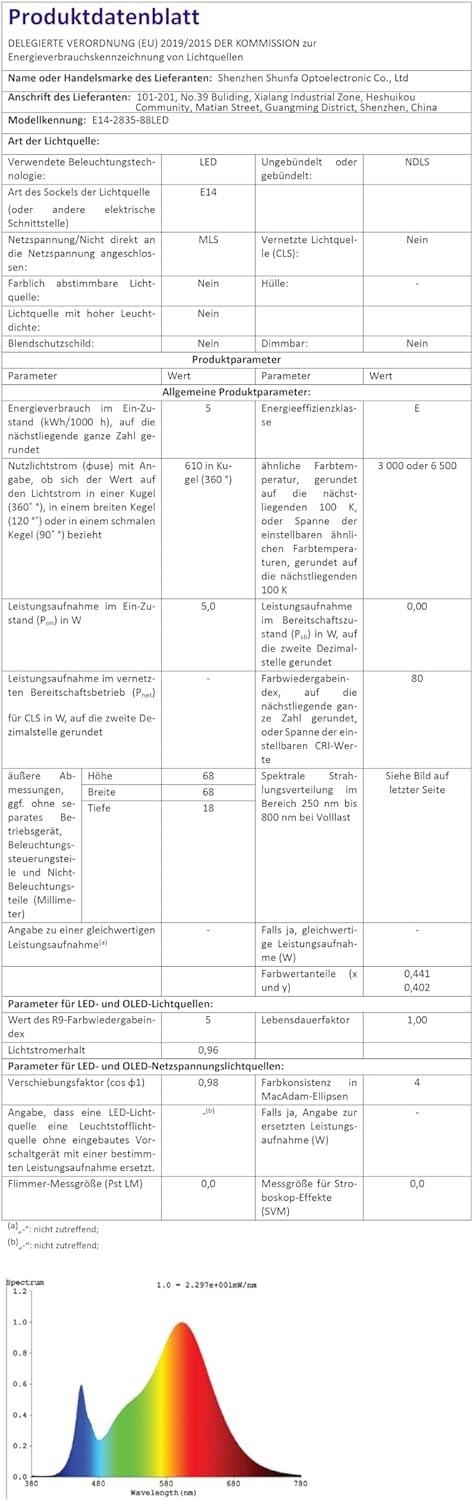
Image: Official product data sheet providing comprehensive technical specifications.
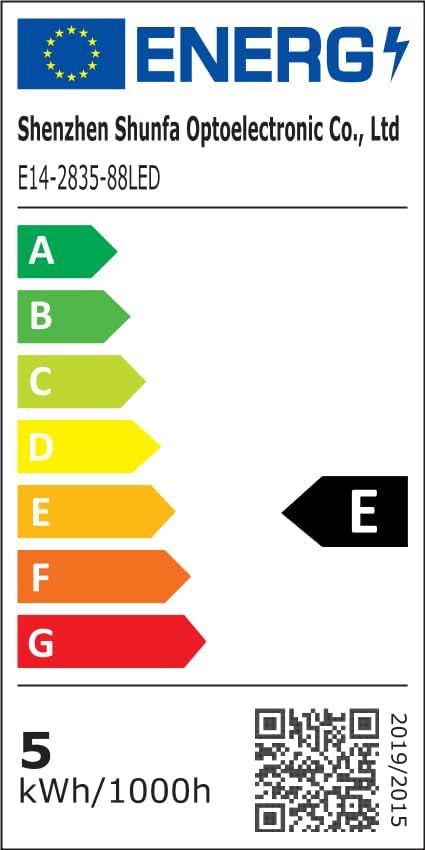
Image: EU Energy Label indicating the bulb's energy efficiency class and consumption. More details can be found via the QR code or by visiting eprel.ec.europa.eu/qr/1250502.
7. Garanzia e supporto
I-SHUNFA is committed to providing high-quality products. For any issues or inquiries regarding your smart LED bulbs, please refer to your purchase documentation or contact our customer support.
- Garanzia: Please refer to your purchase documentation or the retailer's policy for specific warranty details.
- Assistenza clienti: For technical assistance or product support, please visit the I-SHUNFA brand store on Amazon or contact the seller directly.
- Pezzi di ricambio: Non vengono fornite informazioni sulla disponibilità dei pezzi di ricambio.

Image: The official I-SHUNFA brand logo.
Ask a question about this manual
Ask about setup, troubleshooting, compatibility, parts, safety, or missing instructions. Manuals+ will review the question and use this page’s manual context to help answer it.