
1. Introduzione
Thank you for choosing the ieGeek 5MP Outdoor Wi-Fi Security Camera. This manual provides essential information for the proper installation, operation, and maintenance of your camera. Please read these instructions carefully before use and retain them for future reference. This camera is designed to provide reliable outdoor surveillance with advanced features for enhanced security.
2. Prodotto finitoview
The ieGeek 5MP Outdoor Wi-Fi Security Camera offers high-definition monitoring with flexible connectivity and smart detection capabilities.
Caratteristiche principali:
- Risoluzione HD da 5 MP: Provides clear and vivid images and videos with 2880x1600 resolution and 4x digital zoom.
- Dual-Band Wi-Fi (2.4/5 GHz): Supports both 2.4 GHz and 5 GHz Wi-Fi for stable and faster network connection.
- 360° PTZ Monitoring: Pan (355° horizontal) and Tilt (120° vertical) functionality allows for comprehensive area coverage.
- Visione notturna a colori: Three night vision modes (color, infrared, smart) with a range of up to 15 meters (50 feet).
- Rilevamento umanoide PIR: Advanced human detection reduces false alarms caused by non-human movements.
- Allarme sonoro e luminoso: Deters intruders with customizable sound and light alerts.
- Registrazione continua 24 ore su 24, 7 giorni su 7: Supports continuous recording and event-based recording.
- Archiviazione locale e cloud: Compatible with Micro SD cards (up to 128GB, not included) and cloud storage options.
- Condivisione multiutente: Share camera access with family members via the dedicated app.
- Resistenza alle intemperie IP65: Progettato per l'uso esterno, resistente alla polvere e all'acqua.
Componenti della fotocamera:
The camera unit typically includes the main camera body, dual Wi-Fi antennas, a power input port, and a Micro SD card slot.
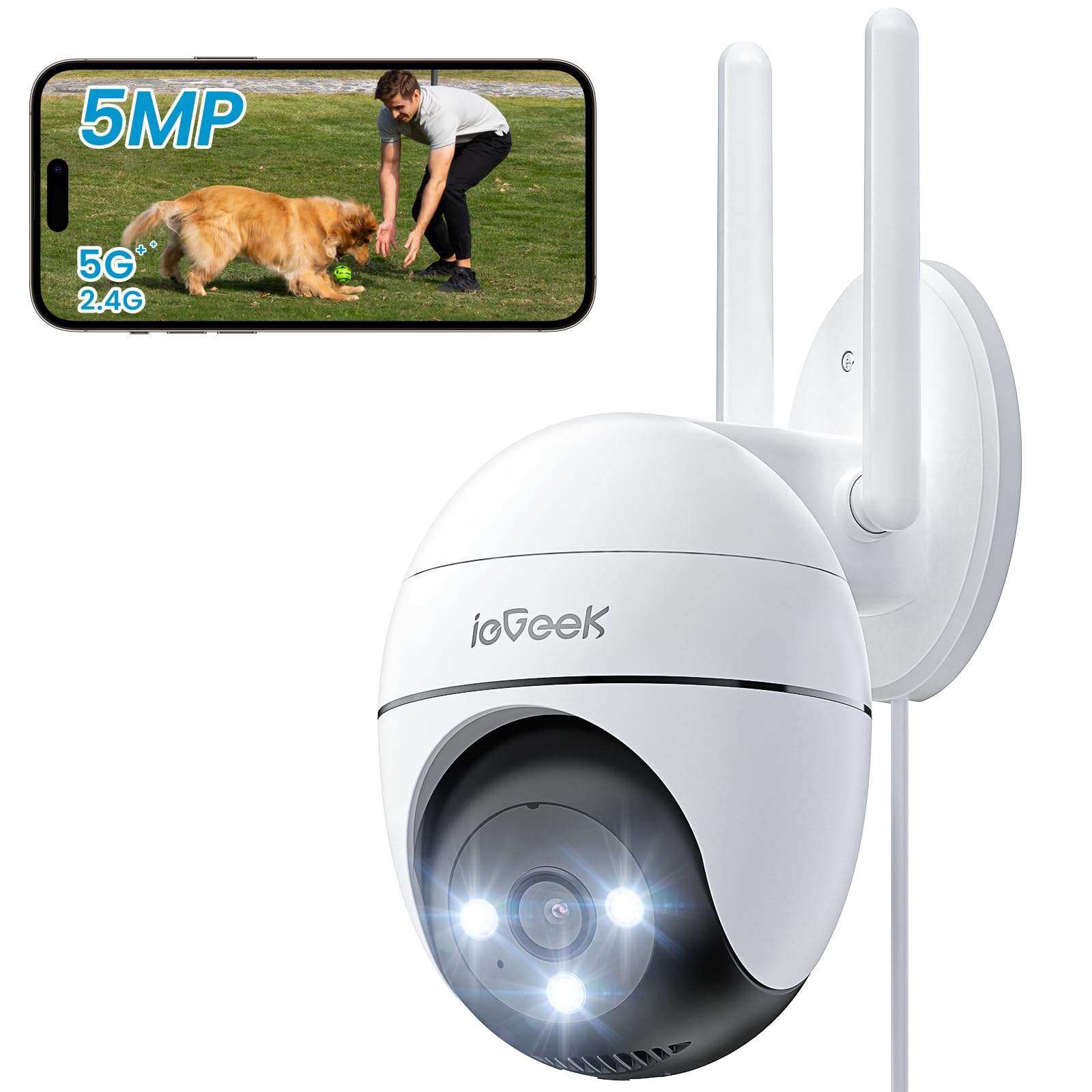
Figure 2.1: ieGeek 5MP Outdoor Wi-Fi Security Camera (Model ZS-GQ4)

Figura 2.2: Oltreview of ieGeek 5MP Camera Features including PTZ, 24/7 recording, 2-way audio, humanoid tracking, Alexa compatibility, local and cloud storage, multi-user sharing, customizable alert areas, AI detection, and acoustic/light alarms.

Figure 2.3: The camera features a 5dBi antenna for improved Wi-Fi signal strength and stability.
3. Istruzioni per l'installazione
3.1 Contenuto della confezione
- ieGeek 5MP Outdoor Wi-Fi Security Camera
- Adattatore di alimentazione
- Viti e ancoraggi di montaggio
- Manuale d'uso
3.2 Download dell'app e registrazione dell'account
- Scarica il ieGeek Cam or CloudEdge app dall'app store del tuo smartphone (iOS/Android).
- Register for an account using your email address and create a secure password.
3.3 Collegamento della telecamera
- Power on the camera by connecting it to a power outlet using the provided adapter.
- Open the ieGeek Cam/CloudEdge app and tap the "+" icon to add a new device.
- Follow the on-screen instructions to connect the camera to your 2.4 GHz or 5 GHz Wi-Fi network. Ensure your phone is connected to the same Wi-Fi network during setup.
- Quando richiesto, scansiona il codice QR visualizzato sul tuo telefono con l'obiettivo della fotocamera.
- Una volta connesso, puoi dare un nome alla tua telecamera e iniziare a trasmettere in diretta viewing.

Figure 3.1: Connecting the power adapter to the camera.
3.4 Installazione fisica
- Scegli una posizione esterna adatta con una chiara view e un segnale Wi-Fi potente.
- Utilizzare la dima di montaggio fornita per contrassegnare i fori da praticare.
- Drill holes, insert anchors, and secure the camera base with screws.
- Regola l'angolazione della telecamera secondo necessità.

Figure 3.2: Ensure optimal Wi-Fi signal strength at the chosen installation location for stable performance.
4. Istruzioni per l'uso
4.1 Vivere View e controllo PTZ
- Open the ieGeek Cam/CloudEdge app and select your camera to view il feed dal vivo.
- Utilizzare il joystick sullo schermo o i gesti di scorrimento per controllare i movimenti di panoramica (orizzontale 355°) e inclinazione (verticale 120°) della telecamera.

Figure 4.1: Control the camera's 355° horizontal and 120° vertical rotation directly from your smartphone app.
4.2 Modalità di visione notturna
La telecamera offre tre modalità di visione notturna:
- Visione notturna a colori: Utilizza faretti integrati per fornire immagini a colori in condizioni di scarsa illuminazione.
- Visione notturna a infrarossi: Utilizza LED a infrarossi per immagini in bianco e nero in completa oscurità.
- Visione notturna intelligente: Automatically switches between infrared and color night vision upon detection of motion.
4.3 Rilevamento del movimento e allarmi
- Rilevamento umanoide PIR: Configure sensitivity levels in the app to minimize false alarms.
- Zone di rilevamento personalizzabili: Imposta aree specifiche per il rilevamento del movimento, concentrandoti sulle zone critiche.
- Allarme sonoro e luminoso: When motion is detected, the camera can activate a siren and/or spotlights to deter intruders. You can choose between silent, spotlight only, siren only, or both siren and spotlight modes.

Figure 4.2: Select from silent, spotlight only, siren only, or both siren and spotlight alarm modes to suit your security needs.

Figure 4.3: The camera's humanoid motion tracking follows detected human figures, reducing false alarms from other movements.

Figure 4.4: AI smart monitoring can differentiate between various detection types such as people, animals, packages, and vehicles (some features may require a subscription).
4.4 Registrazione e archiviazione
- Registrazione continua: The camera supports 24/7 continuous recording to a Micro SD card (not included).
- Registrazione dell'evento: Registra clip video quando viene rilevato un movimento.
- Micro SD Card: Inserire una scheda Micro SD (fino a 128 GB) nello slot designato per l'archiviazione locale.
- Archiviazione cloud: Optional cloud storage plans are available through the app for secure off-site backup.

Figure 4.5: The camera supports 24/7 continuous recording, ensuring constant surveillance.
5. Manutenzione
5.1 Pulizia della fotocamera
- Prima di procedere alla pulizia, assicurarsi che la fotocamera sia spenta.
- Utilizzare un morbido, damp panno per pulire il corpo della fotocamera.
- For the lens, use a specialized lens cleaning cloth to avoid scratches. Do not use harsh chemicals or abrasive cleaners.
5.2 Considerazioni ambientali
- The camera has an IP65 weather resistance rating, making it suitable for outdoor use in various weather conditions.
- Intervallo di temperatura di funzionamento: da -20°C a 50°C (da -4°F a 122°F).

Figure 5.1: The camera is designed with IP65 weather resistance to withstand outdoor elements like rain.

Figure 5.2: The camera operates effectively within a wide temperature range of -20°C to 50°C.
6. Risoluzione Dei Problemi
If you encounter issues with your ieGeek camera, please refer to the following common troubleshooting steps:
6.1 Problemi di connessione
- Fotocamera non in linea: Ensure the camera is powered on and within range of your Wi-Fi router. Check your Wi-Fi signal strength in the app. Try restarting the camera and your router.
- Impossibile connettersi al Wi-Fi: Verify your Wi-Fi password is correct. Ensure you are connecting to a 2.4 GHz or 5 GHz network as supported. If using a dual-band router, ensure the camera is connecting to the correct band.
6.2 Problemi di rilevamento del movimento
- Troppi falsi allarmi: Adjust the PIR detection sensitivity in the app. Define specific detection zones to exclude areas with frequent irrelevant movements (e.g., trees swaying).
- Nessun rilevamento del movimento: Ensure motion detection is enabled in the app settings. Check the camera's field of view for obstructions. Increase detection sensitivity if necessary.
6.3 Problemi di qualità dell'immagine
- Immagine sfocata: Clean the camera lens carefully. Ensure there is no condensation on the lens.
- Visione notturna scarsa: Ensure the night vision mode is set correctly (color, infrared, or smart). Check for any obstructions blocking the infrared LEDs or spotlights.
6.4 Altri problemi
- La scheda SD non registra: Ensure the Micro SD card is inserted correctly and is not full. Format the SD card via the app if it's a new card or if issues persist.
- L'app non risponde: Close and restart the app. Ensure your smartphone's operating system is up to date.
If these steps do not resolve your issue, please contact ieGeek customer support for further assistance.
7. Specifiche
| Modello | ZS-GQ4 |
| Risoluzione | 5MP (2880 x 1600) |
| Lente | 3.6 millimetri |
| Digital Zoom | 4x |
| Distanza di visione notturna | Fino a 15 metri (50 piedi) |
| Connettività Wi-Fi | Doppia banda 2.4 GHz / 5 GHz |
| Gamma di panoramica/inclinazione | Pan 355 °, inclinazione 120 ° |
| Opzioni di archiviazione | Scheda Micro SD (fino a 128 GB, non inclusa), archiviazione cloud |
| Resistenza alle intemperie | Grado di protezione IP65 |
| Temperatura di esercizio | -20°C a 50°C (-4°F a 122°F) |
| Dimensioni | Dimensioni: 17 x 9 x 10 cm |
| Metodo di controllo | Mobile App (ieGeek Cam / CloudEdge) |
| Tipo di allarme | PIR Humanoid Motion Detection, Sound & Light Alarm |
8. Garanzia e supporto
ieGeek si impegna a fornire prodotti di alta qualità e un eccellente servizio clienti.
8.1 Informazioni sulla garanzia
- Garanzia di 2 anni: Your ieGeek camera is covered by a 2-year warranty from the date of purchase, protecting against manufacturing defects.
- Garanzia soddisfatti o rimborsati entro 30 giorni: If you are not satisfied with your purchase, you may return the product for a full refund within 30 days.

Figure 8.1: ieGeek offers a 2-year warranty and a 30-day money-back guarantee, along with lifetime support.
8.2 Assistenza clienti
For any questions, technical assistance, or warranty claims, please contact ieGeek customer support. Refer to the contact information provided with your product packaging or visit the official ieGeek websito per i dettagli del supporto.
- Supporto online: Visita www.iegeek.com/support (example link, please refer to actual websito)
- Supporto via e-mail: support@iegeek.com (example email, please refer to actual contact)
- Supporto tecnico a vita: ieGeek provides lifetime technical support for its products.