
Introduzione
Thank you for choosing PureGear PureBoom Wireless Earbuds. These earbuds are designed to provide high-quality audio and convenient hands-free communication. This manual will guide you through the setup, operation, and maintenance of your new earbuds to ensure optimal performance and longevity.
Cosa è incluso
Your PureGear PureBoom Wireless Earbuds package includes the following items:
- PureBoom True Wireless Earbuds
- Custodia di ricarica wireless
- Adjustable Earbud Ear Tips (S, M, L sizes)
- Cavo di ricarica da USB-A a USB-C

Image: All items included in the PureGear PureBoom Wireless Earbuds package.
Prodotto finitoview
The PureGear PureBoom Wireless Earbuds offer a compact, lightweight, and ergonomic design for comfortable use. They feature high-quality sound and intuitive touch controls.
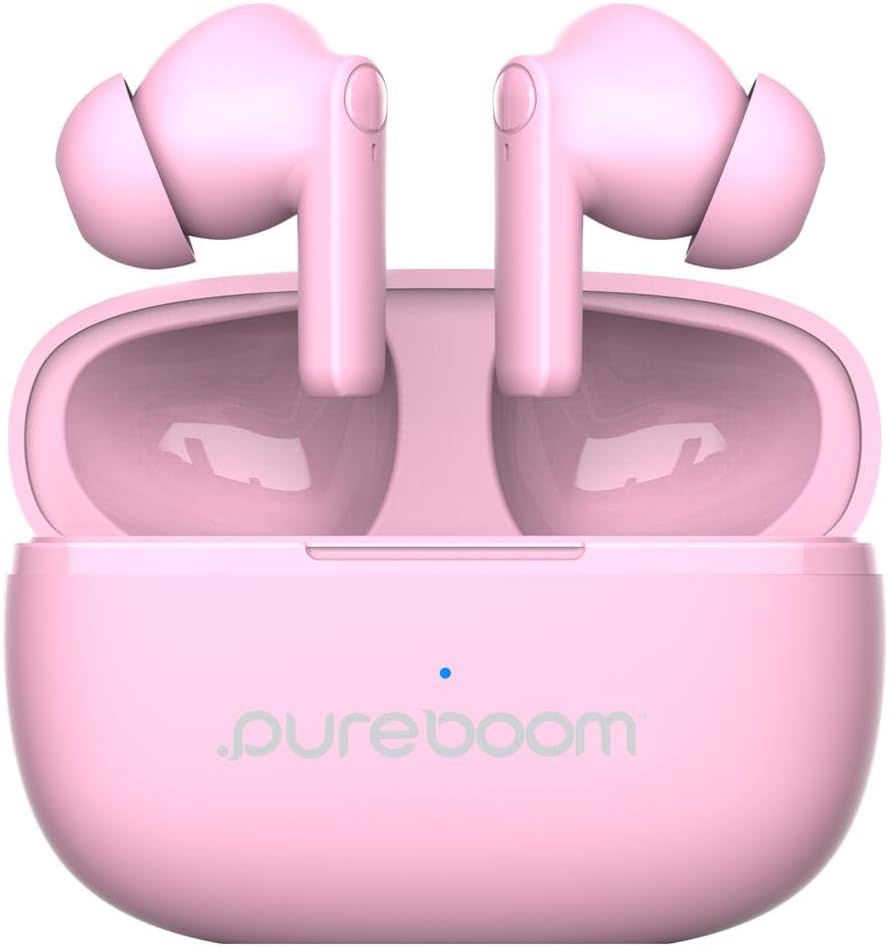
Image: PureGear PureBoom Wireless Earbuds and charging case.

Image: The compact design of the charging case, fitting easily into a pocket.

Image: User enjoying music with PureGear PureBoom Wireless Earbuds.
Impostare
Carica iniziale
Before first use, fully charge your earbuds and charging case. Place the earbuds into the charging case and connect the USB-C cable to the case and a power source. The indicator light on the case will show charging status.
Associazione con un dispositivo Bluetooth
- Assicurati che gli auricolari siano nella custodia di ricarica e che la custodia sia aperta.
- Sul tuo dispositivo (smartphone, tablet, laptop), vai alle impostazioni Bluetooth.
- Select "PureBoom" from the list of available devices.
- Una volta collegati, gli auricolari sono pronti per l'uso.
The earbuds are broadly compatible with Bluetooth devices including iOS (iPhone 16, 15, 14, 13, 12 series, SE, 11 series) and Android (Galaxy S25, S24, S23, S22, S21, S20 series, Note 20 series, Google Pixel 9/8/7/6/5) phones, laptops, PCs, tablets, iPads, smart TVs, gaming consoles, and smartwatches.
Istruzioni per l'uso
Controlli touch
The PureBoom earbuds feature convenient touch controls for managing your audio and calls. The touch-sensitive area is located on the outer surface of each earbud.
- Riproduci/Pausa: Tocca una volta su uno degli auricolari.
- Rispondi alla chiamata: Tocca una volta su uno degli auricolari.
- Termina chiamata: Durante una chiamata, tocca una volta uno degli auricolari.
- Salta traccia: Double-tap the right earbud for next track, double-tap the left earbud for previous track.
- Controllo del volume: Triple-tap the right earbud to increase volume, triple-tap the left earbud to decrease volume.
- Assistenza vocale: Press and hold either earbud for 2 seconds to activate your device's voice assistant.

Immagine: Guida visiva ai comandi touch sugli auricolari.
Durata della batteria e ricarica
The earbuds provide up to 18 hours of listening time with the included charging case. The charging case itself offers additional charges to extend your usage throughout the day.

Image: Demonstrating the extended battery life with the charging case.

Image: Enjoying extended listening time with the earbuds.
Chiamata a mani libere
With a built-in microphone, the earbuds allow for clear, hands-free calls within a 32-foot range from your connected device.
Video: Un oltreview of the PureGear Wireless Earbuds, showcasing features like high-quality sound, 18 hours of listening time, and tap touch controls for music and phone calls.
Manutenzione
To ensure the longevity and optimal performance of your PureGear PureBoom Wireless Earbuds, follow these maintenance guidelines:
- Pulizia: Pulisci regolarmente gli auricolari e la custodia di ricarica con un panno morbido, asciutto e privo di lanugine. Evita di utilizzare materiali abrasivi o sostanze chimiche aggressive.
- Suggerimenti per le orecchie: Rimuovere e pulire periodicamente i gommini auricolari. È possibile lavarli delicatamente con acqua e sapone neutro, assicurandosi che siano completamente asciutti prima di riapplicarli.
- Magazzinaggio: Quando non li usi, riponi gli auricolari nella custodia di ricarica per proteggerli da polvere e danni.
- Resistenza all'acqua: Gli auricolari sono impermeabili. Tuttavia, evitare immersioni prolungate in acqua e assicurarsi che siano asciutti prima di riporli nella custodia di ricarica per evitare danni ai contatti di ricarica.
- Temperatura: Evitare di esporre gli auricolari a temperature estreme (calde o fredde), poiché ciò potrebbe compromettere la durata e le prestazioni della batteria.
Risoluzione dei problemi
If you encounter issues with your PureGear PureBoom Wireless Earbuds, refer to the following common solutions:
| Problema | Soluzione |
|---|---|
| Gli auricolari non si accoppiano | Ensure earbuds are charged. Turn off and on Bluetooth on your device. Forget "PureBoom" from your device's Bluetooth list and re-pair. |
| Nessun suono da un auricolare | Place both earbuds back in the case, close it, then open again. Ensure both are charged. Re-pair with your device. |
| Basso volume | Increase volume using touch controls or your connected device. Ensure ear tips are properly sealed in your ear. |
| La custodia di ricarica non si ricarica | Check the USB-C cable and power adapter connection. Try a different cable or power source. |
| I controlli touch non rispondono | Assicurati che gli auricolari siano puliti e asciutti. Riavvia gli auricolari riponendoli nella custodia e rimuovendoli. |
If the issue persists, please contact PureGear customer support for further assistance.
Specifiche
Detailed technical specifications for the PureGear PureBoom Wireless Earbuds:
- Numero modello: 64719PG
- Connettività: Senza fili (Bluetooth 5.0)
- Gamma Bluetooth: Fino a 32 piedi
- Posizionamento dell'orecchio: Nell'orecchio
- Controllo del rumore: Isolamento acustico
- Metodo di controllo: Tocco
- Tipo di driver audio: Driver dinamico
- Gamma di frequenza: 20 Hz - 20,000 Hz
- Battery Average Life (Earbuds): Fino a 18 ore (con custodia di ricarica)
- Tempo di carica della batteria: Circa 1.5 ore
- Livello di resistenza all'acqua: Impermeabile
- Materiale: Plastica, Silicone
- Peso dell'articolo: 3.04 once
- Codice UPC: 810096258236
Garanzia e supporto
PureGear PureBoom Wireless Earbuds come with a Garanzia a vita. For warranty claims, technical support, or any inquiries, please visit the official PureGear websito o contattare il loro servizio clienti.
Puoi trovare maggiori informazioni e risorse di supporto su Negozio PureGear su Amazon.