
1. Introduzione
Thank you for choosing the Fitonme Smart Watch. This manual provides detailed instructions on how to set up, operate, and maintain your new smartwatch. Please read this manual carefully before use to ensure proper functionality and to maximize your experience with the device.
2. Informazioni sulla sicurezza
- The health data provided by this device (heart rate, blood pressure, SpO2, sleep) is for reference only and should not be used as a basis for medical diagnosis or treatment. Consult a medical professional for any health concerns.
- Do not wear the watch in sea water or during hot water baths/showers. While the watch is IP67 water and dust resistant for daily activities like hand washing, prolonged exposure to high pressure water or hot water can damage the device.
- Tenere il dispositivo lontano da temperature estreme, dalla luce solare diretta e da forti campi magnetici.
- Non tentare di smontare o riparare l'orologio da soli. Ciò invaliderà la garanzia e potrebbe causare danni.
3. Contenuto della confezione
Si prega di controllare il contenuto della confezione al momento dell'apertura per assicurarsi che siano presenti tutti gli articoli:
- Fitonme Smart Watch Unit
- Black Gold Stainless Steel Strap
- Cinturino in silicone rosa
- Cavo di ricarica
- Manuale dell'utente (questo documento)
Immagine: in alto view of the Fitonme Smart Watch packaging box, showing the 'SMART WATCH' text.

Immagine: In basso view of the Fitonme Smart Watch packaging box, displaying regulatory marks like CE and FC.
4. Prodotto finitoview
The Fitonme Smart Watch features a 1.39-inch HD touch screen with a 360 x 360 HD resolution, offering clear visuals and responsive touch interaction. It includes a built-in speaker and a high-performance microphone for communication features.

Image: The smartwatch display highlighting the 1.39-inch HD touch screen, Always-on Display (AOD) options (analog and numeric), and examples of DIY dials and over 100 watch faces available in the app.
5. Impostazione
5.1 Ricarica del dispositivo
Before first use, fully charge your smartwatch. Connect the charging cable to the charging port on the back of the watch and plug the USB end into a compatible power adapter (not included) or a computer's USB port. A full charge takes approximately 2 hours. The watch can operate for 3-5 days with normal use and has a standby time of 7-10 days.
5.2 Installazione e associazione dell'app
To unlock the full features of your Fitonme Smart Watch, you need to download and connect it to the FitCloudPro app sul tuo smartphone.
- Scarica l'App: Cercare "FitCloudPro" in your smartphone's app store (Google Play Store for Android or Apple App Store for iOS) and install it.
- Abilita Bluetooth: Assicurati che il Bluetooth sia abilitato sul tuo smartphone.
- Apri l'app e associa: Open the FitCloudPro app, create an account if prompted, and follow the on-screen instructions to add your device. The app will search for available devices. Select "S51" or the corresponding device name to pair.
- Concedi permessi: Concedi le autorizzazioni necessarie (ad esempio notifiche, posizione, contatti) affinché l'app funzioni correttamente.
The smartwatch is compatible with most smartphones running iOS 9.0 and Android 6.0 and above, including iPhone, Samsung, Huawei, Xiaomi, and OnePlus devices.
6. Istruzioni per l'uso
6.1 Effettuare e ricevere chiamate
With the built-in speaker and microphone, you can make, receive, and reject calls directly from your smartwatch when it's connected to the FitCloudPro app via Bluetooth.
- Per effettuare una chiamata: Access the phone function on your watch, select a contact, or dial a number.
- To Receive/Reject a Call: Quando ricevi una chiamata, puoi rispondere o rifiutarla direttamente dallo schermo dell'orologio.

Image: The smartwatch showing an incoming call screen, alongside a smartphone's call interface and a user receiving various app notifications on their wrist, illustrating Bluetooth call and smart notification features.
6.2 Notifiche
The smartwatch can receive all synchronized calls and messages from your phone, including SMS, Facebook, Instagram, Twitter, WhatsApp, and more. Ensure notification permissions are granted in the FitCloudPro app. Note: This smartwatch does not support sending text messages.
6.3 Always-on Display (AOD)
The watch supports an Always-on Display feature. To enable or customize:
- On the watch, navigate to Impostazioni.
- Selezionare Display.
- Choose your preferred AOD style (digital or analog).
6.4 Assistente vocale
The smartwatch is equipped with a voice assistant function. Simply speak to the watch to activate the voice assistant on your connected phone.
6.5 Controllo della musica
Controlla la riproduzione musicale sul tuo smartphone direttamente dall'orologio. Puoi riprodurre, mettere in pausa, saltare le tracce e regolare il volume.

Image: A person wearing headphones and a smartwatch, using the watch to control music playback on their smartphone.
6.6 Other Useful Tools
The smartwatch offers a variety of practical tools for daily convenience:
- Sveglia
- Pedometro
- Previsioni del tempo
- Controllo della telecamera remota
- Timer
- Allenamento della respirazione
- Promemoria sedentario
- Promemoria per bere acqua
- Regolazione della luminosità
- Trova Telefono
- Cronometro
- Torcia elettrica
7. Funzionalità di monitoraggio della salute
The Fitonme Smart Watch is designed to help you monitor key health metrics and promote a healthy lifestyle.
- Monitoraggio della frequenza cardiaca: Tiene traccia in modo continuo della tua frequenza cardiaca durante tutto il giorno.
- Monitoraggio della pressione sanguigna: Fornisce stime della pressione sanguigna.
- Monitoraggio dell'ossigeno nel sangue (SpO2): Misura i livelli di saturazione dell'ossigeno nel sangue.
- Monitoraggio del sonno: Analizza i tuoi schemi di sonno, inclusi sonno leggero e profondotages, to provide detailed sleep reports in the app.
- Monitoraggio della salute femminile: Includes unique reminders for menstrual cycle and pregnancy care.
Tutti i dati sanitari possono essere viewed and analyzed in detail within the FitCloudPro app, helping you understand your health status in real-time and adapt to a healthier lifestyle.
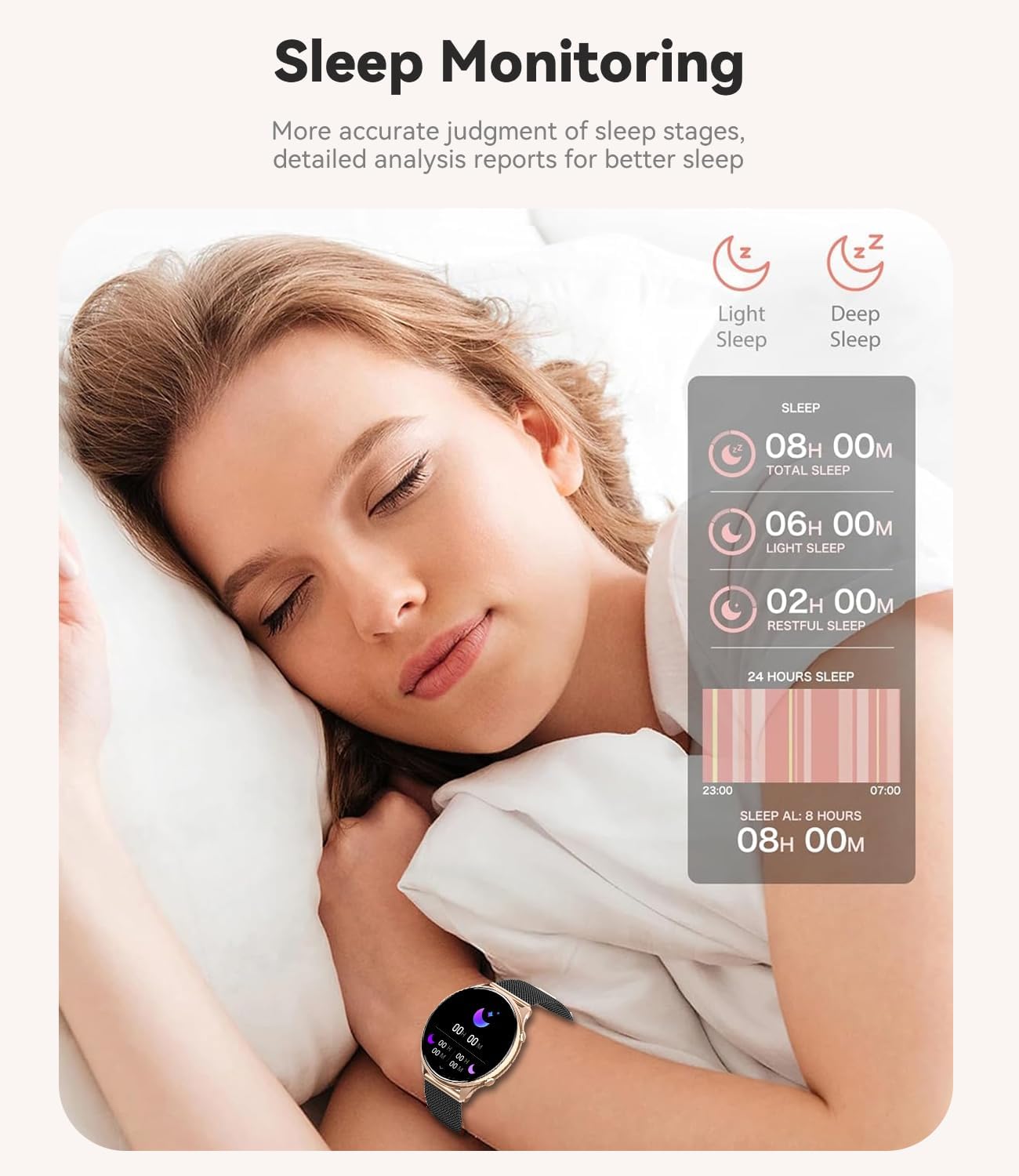
Image: A woman sleeping with the smartwatch on her wrist, illustrating the sleep monitoring feature. An overlay shows detailed sleep data including total sleep, light sleep, deep sleep, and restful sleep duration.
8. Modalità sportive
The smartwatch supports over 110 sports modes to track your physical activities accurately. You can select the appropriate mode for your exercise:
- A piedi
- Corsa
- Ciclismo
- Calcio
- Pallacanestro
- Nuoto
- Salto con la corda
- Badminton
- E molti altri ancora...
The watch also tracks your daily activity, including steps taken, calories burned, distance covered, and active hours.
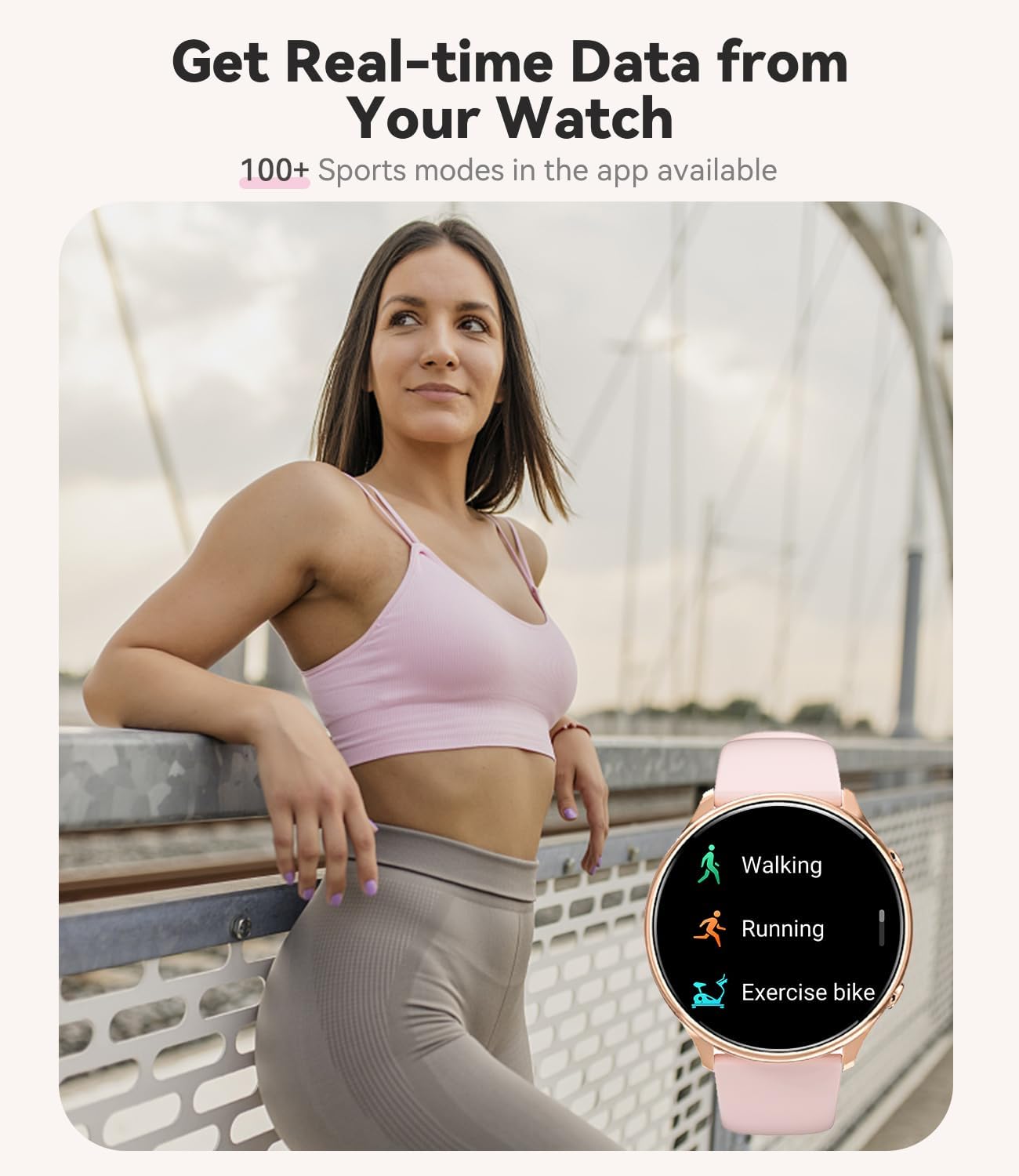
Image: A woman in athletic wear outdoors, with her smartwatch displaying icons for various sports modes such as walking, running, and exercise bike, indicating real-time data tracking.
9 Personalizzazione
Personalize your Fitonme Smart Watch to match your style:
- Volti dell'orologio: Choose from over 100 different watch faces available in the FitCloudPro app.
- Quadranti fai da te: Upload your personal photos to create custom watch faces.
- Cinturini intercambiabili: The watch comes with two straps – a sophisticated black and gold stainless steel bracelet for classic looks and a more casual pink silicone bracelet for sports or everyday wear.
10. Manutenzione
10.1 Pulizia
Regularly clean your smartwatch and straps to ensure hygiene and prolong their lifespan. Wipe the watch screen and body with a soft, dry, lint-free cloth. For the straps, use a damp panno e sapone neutro se necessario, quindi asciugare accuratamente.
10.2 Resistenza all'acqua
The Fitonme Smart Watch has an IP67 water and dust resistance rating. This means it is protected against dust ingress and can withstand immersion in water up to 1 meter for 30 minutes. It is suitable for daily use, such as washing hands or light rain. However, it is non consigliato for swimming in sea water, diving, or hot water baths/showers, as these conditions can compromise the water seal.
11. Risoluzione Dei Problemi
Se riscontri problemi con il tuo smartwatch, fai riferimento alle seguenti soluzioni comuni:
| Problema | Possibile soluzione |
|---|---|
| L'orologio non si accende | Assicurati che l'orologio sia completamente carico. Se ancora non si accende, prova a tenere premuto il pulsante di accensione per 10-15 secondi. |
| Impossibile associare il telefono | Ensure Bluetooth is enabled on your phone. Make sure the FitCloudPro app is open and searching for devices. Restart both the watch and your phone, then try pairing again. |
| Nessuna notifica ricevuta | Check notification permissions in the FitCloudPro app settings on your phone. Ensure the app is running in the background and not being optimized by your phone's battery saving features. |
| Dati sanitari imprecisi | Ensure the watch is worn snugly on your wrist (not too tight, not too loose). Clean the sensor on the back of the watch. Remember that data is for reference only. |
| Durata breve della batteria | Reduce screen brightness, disable Always-on Display if not needed, limit frequent heart rate monitoring, and close unnecessary background apps on the watch. |
Se il problema persiste, contatta l'assistenza clienti per assistenza.
12. Specifiche
| Caratteristica | Dettaglio |
|---|---|
| Numero di modello | S51 |
| Produttore | Fitonme |
| Dimensioni dello schermo | 1.39 pollici |
| Forma dello schermo | Girare |
| Risoluzione dello schermo | Risoluzione 360 x 360 HD |
| Sistema operativo | AsteroidOS (secondo i dati del prodotto) |
| Capacità di archiviazione della memoria | 128 MB |
| Tecnologia di connettività | Bluetooth |
| Tipo di batteria | Polimero di litio |
| Capacità della batteria | 260 mAh |
| Tempo di ricarica | Circa 2 ore |
| Tempo di utilizzo normale | 3-5 giorni |
| Tempo di standby | 7-10 giorni |
| Resistenza all'acqua | Grado di protezione IP67 |
| GPS | Tramite Smartphone |
| Dimensioni del pacco | Dimensioni: 28.2 x 9.9 x 1.9 cm |
| Peso del pacco | 210 grammi |
| Prima data disponibile | 21 settembre 2024 |
| Caratteristiche speciali | Bluetooth Make/Answer Call, Contact Person, Phone Call, Call Recording, 110+ Sport Modes, Messages/SNS Notifications, Heart Rate/Blood Pressure/SpO2 Monitor, Sleep Monitor, Calculator, Find Phone, DIY Watch Face, Menu Style, Weather, Activity Tracker, Alarm Clock, Calendaring, Pedometer, Calorie Tracker, Distance Tracker, Multisport Tracker, Music Player, Sedentary Reminder, Time Display, AI Voice Assistant, Brightness Adjustment, Vibration Adjustment, Theater Mode, Stopwatch, Timer |
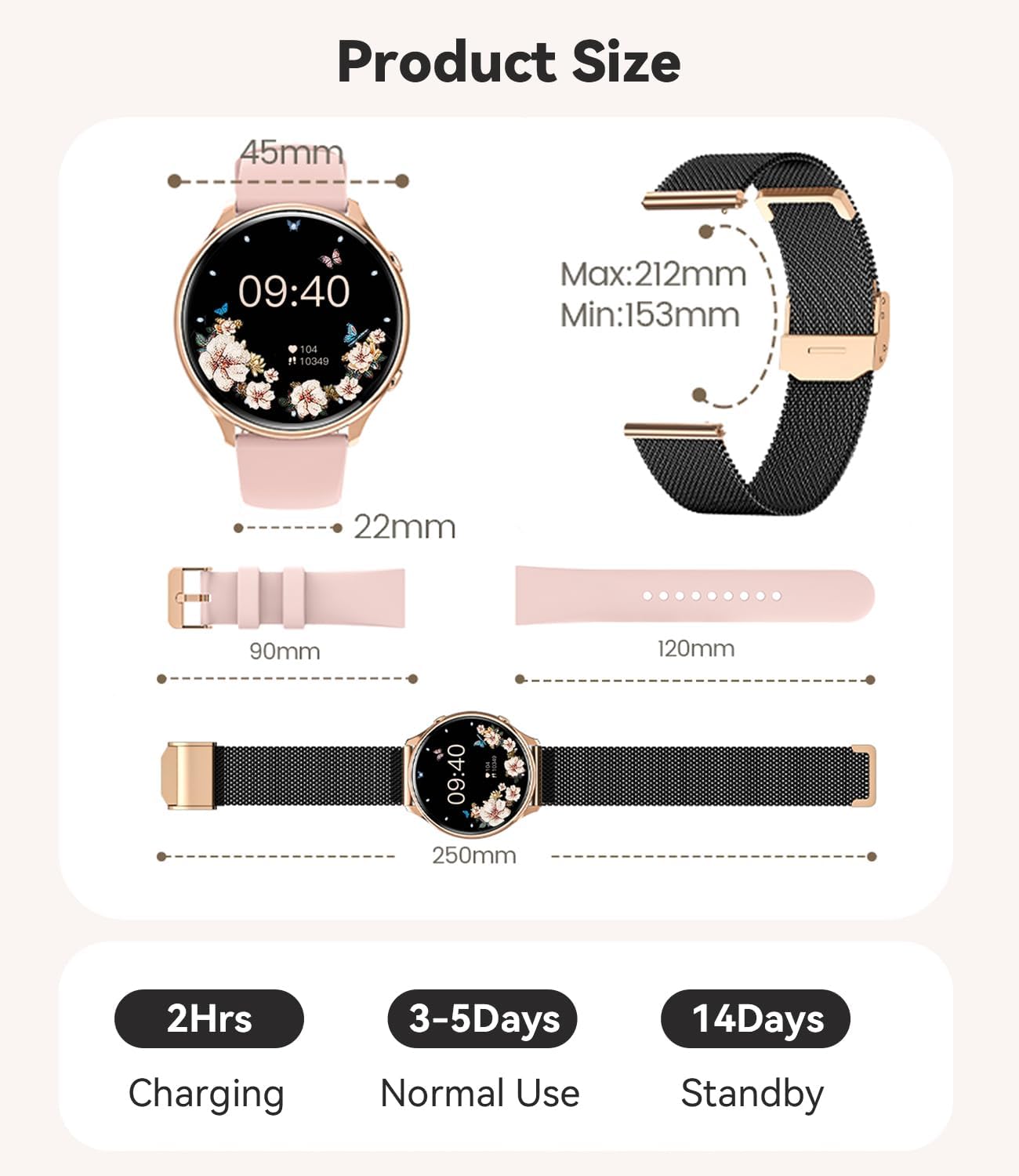
Image: A diagram illustrating the product size, including the watch face diameter (45mm), strap width (22mm), and strap lengths (90mm and 120mm), along with total watch length (250mm) and strap adjustment range (Min: 153mm, Max: 212mm).
13. Garanzia e supporto
Fitonme offers a 12-month money-back or replacement service for your smartwatch. If you have any questions or encounter any issues with your Fitonme smartwatch, please do not hesitate to contact our customer support. We are committed to providing solutions that satisfy you.
For support, please refer to the contact information provided on the product packaging or the official Fitonme websito.