
Comgrow K1C
Manuale utente della stampante 3D Creality K1C
Brand: Comgrow | Model: K1C
Your guide to seamless 3D printing.
1. Impostazione
This section guides you through the initial setup of your Creality K1C 3D Printer, from unboxing to preparing for your first print.
1.1 Disimballaggio e ispezione iniziale
Carefully remove all components from the packaging. Ensure all parts are present and undamaged. The printer comes pre-assembled for quick setup.

Figure 1: Creality K1C 3D Printer, ready for unboxing.
1.2 Power On and Network Configuration
Connect the power cable and switch on the printer. Follow the on-screen prompts to select your language and configure network settings. The boot-up guide is similar to that of a new smartphone, allowing you to start printing quickly.

Figure 2: Quick start guide and initial power-on steps.
1.3 Calibrazione automatica
The Creality K1C features convenient auto-calibration. With one tap, the printer performs auto Z-offset, auto-leveling, and auto input shaping tests, eliminating the need for manual bed leveling.

Figure 3: Auto Calibration with One Tap for hassle-free setup.
1.4 Caricamento del filamento
Load your desired filament into the printer. The clog-free direct extruder is enhanced with a bolster spring and a ball plunger, ensuring a tight grip on the filament. The durable steel-tipped copper nozzle is integrated with a titanium alloy heatbreak, preventing heat creep and supporting 300℃ high-temperature printing.
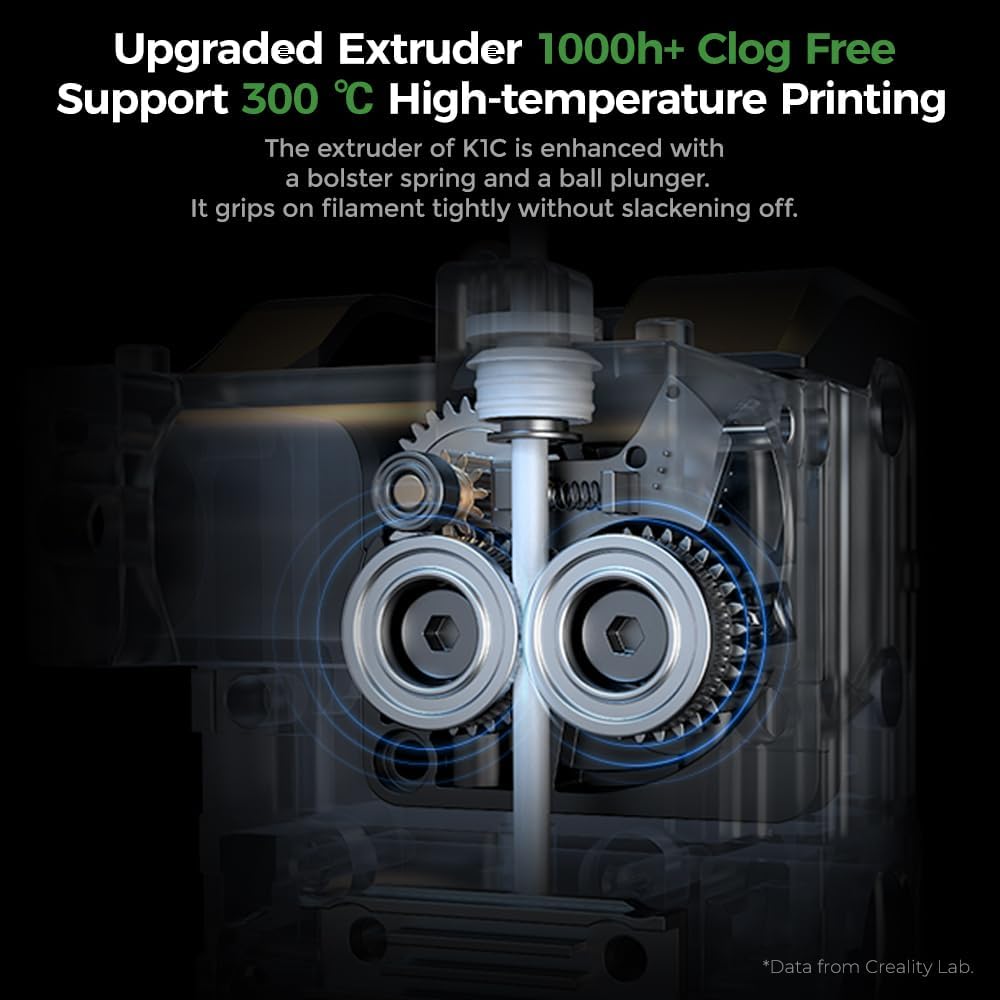
Figura 4: dettagliata view of the upgraded clog-free direct extruder.
Video 1: How to assemble, setup, and operate the Creality K1C 3D printer. This video demonstrates the initial setup process, including filament loading.
2. Operativo
Understand the key features that enable efficient and high-quality 3D printing with your K1C.
2.1 Stampa ad alta velocità
The Creality K1C boasts a 600mm/s printing speed and 20000mm/s² acceleration, making it significantly faster than many other 3D printers. This allows for rapid model production.
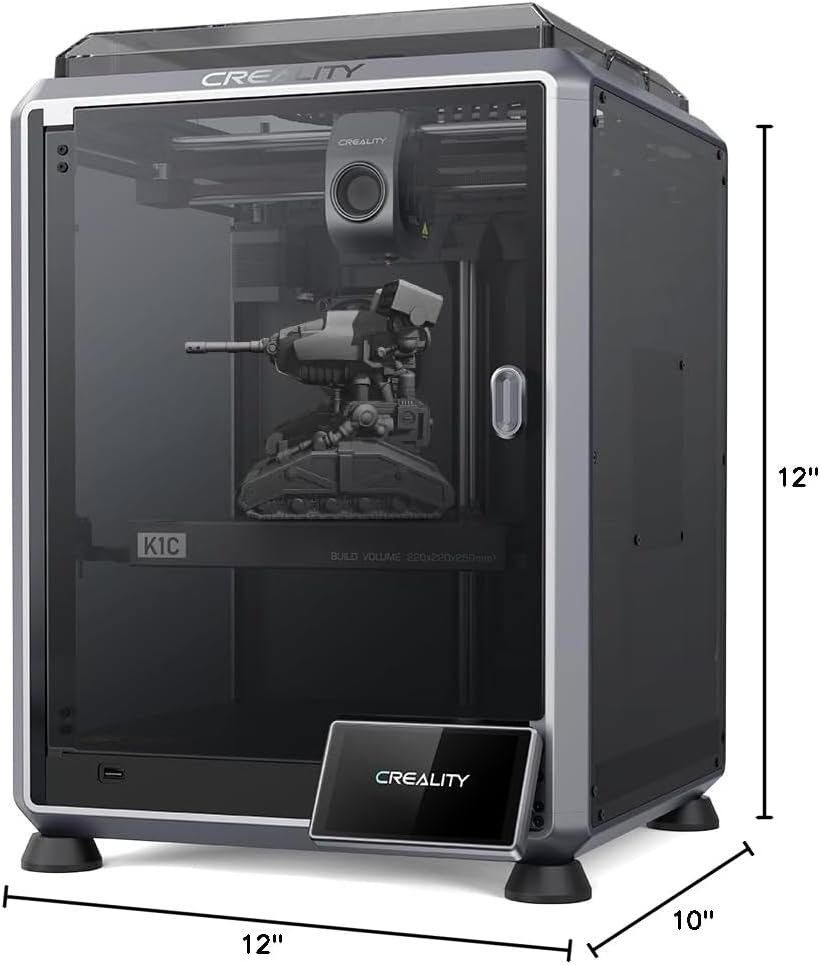
Figure 5: Printing speed comparison and build volume dimensions.
2.2 Smart AI Functions
Equipped with an observant AI Camera, the K1C can recognize common printing failures like 'spaghetti' and foreign matter. It supports real-time monitoring and time-lapse filming, providing visual oversight of your prints.

Figure 6: AI Camera functionality for print monitoring and error detection.
Video 2: Demonstration of printing a Thor's axe model with the Creality K1C 3D printer, showcasing le sue capacità.
2.3 Filamenti supportati
The K1C supports a wide range of filaments, including carbon fiber filaments (PLA-CF/PET-CF) for jigs, fixtures, and prototypes requiring amazing mechanical strength and dimensional stability. It also handles common filaments like PLA, ASA, ABS, and TPU for various applications.

Figura 7: Esamples of parts printed with carbon fiber filaments.
3. Manutenzione
Regular maintenance ensures the longevity and optimal performance of your Creality K1C.
3.1 Cura dell'estrusore e dell'ugello
The clog-free direct extruder is designed for durability. The steel-tipped copper nozzle with a titanium alloy heatbreak can be swapped easily. Regular inspection and cleaning of the extruder and nozzle are recommended to prevent clogs and ensure consistent print quality.
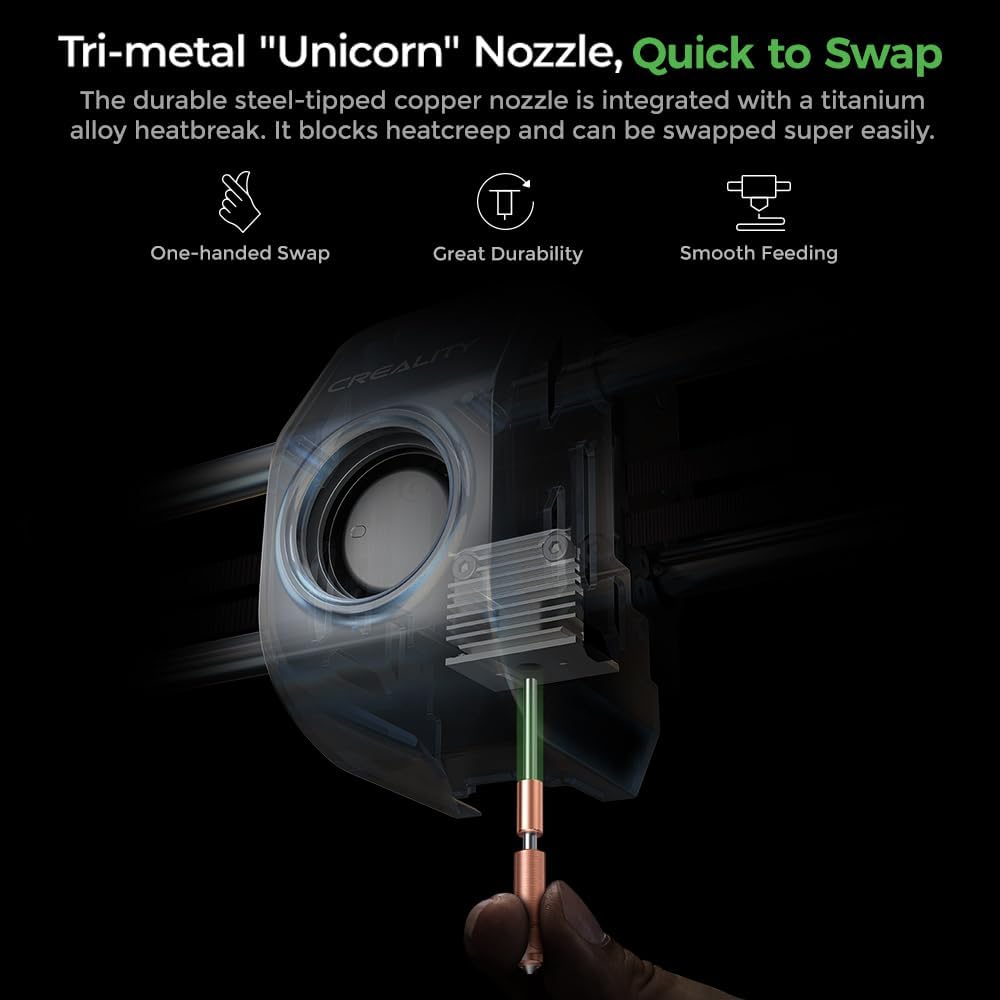
Figure 8: Tri-metal 'Unicorn' Nozzle for quick and easy swapping.
3.2 Manutenzione del sistema di raffreddamento
The upgraded cooling structure includes a hotend fan for minimal heat creep, a part cooling fan for instant hardening of extrusion, and an auxiliary fan for overall print quality. Keep these fans clean and free from obstructions to maintain effective cooling and prevent issues like stringing and warping.

Figure 9: The 'Cooling Trio' system for refining print quality.
3.3 Filtrazione dell'aria
The K1C employs an active carbon filter to purify compounds and particles arising from molten filaments, ensuring a pleasant printing environment. Periodically check and replace the carbon filter as needed to maintain air quality.

Figure 10: Active carbon filter for pleasant air while printing.
4. Risoluzione Dei Problemi
This section provides guidance on resolving common issues you might encounter with your 3D printer.
4.1 Problemi di qualità di stampa
- Spaghetti Failure: If the AI Camera detects a spaghetti failure, the printer will prompt you to stop or continue. Clear any tangled filament and restart the print.
- Scarsa adesione del primo strato: Ensure your build plate is clean and properly calibrated. Re-run the auto-leveling process if necessary. Applying a thin layer of glue stick to the build plate can also improve adhesion.
- Warping/Stringing: Adjust cooling settings and ensure proper chamber temperature. For bridges and overhangs, the auxiliary fan can help minimize these issues.
4.2 Extrusion Problems
- Intasamento: If the nozzle is clogged, ensure the filament is properly loaded and the extruder is clean. The easy-swap nozzle allows for quick replacement if the clog persists.
- Estrusione sotto/sopra: Check filament diameter settings in your slicing software and ensure the extruder gears are clean and gripping the filament correctly.
4.3 Printer Malfunctions
- Self-Check Errors: If the self-check process fails, review the specific error message on the screen. Ensure the build plate is clear of debris and all components are properly installed.
- Problemi di connettività: Verify your network settings and ensure the printer is connected to your Wi-Fi. If using the Creality Cloud APP, ensure proper binding via the QR code.
5. Specifiche
| Caratteristica | Dettaglio |
|---|---|
| Dimensioni del prodotto | 25 x 15 x 22 pollici |
| Peso dell'articolo | 27.3 libbre |
| Numero di modello | Numero di modello: K1C |
| Materiale | Glass and Aluminum |
| Produttore | Crealità 3D |
| Dispositivi compatibili | Laptop, personal computer, tablet |
| Velocità di stampa | Fino a 600 mm/s |
| Accelerazione massima | 20000mm/s² |
| High-Temp Printing | Fino a 300℃ |
| Fotocamera AI | Yes (Spaghetti failure, foreign matter detection, real-time monitoring, time-lapse filming) |
| Tipo di estrusore | Clog-free Direct Extruder |
| Filamenti supportati | Carbon Fiber (PLA-CF/PET-CF), PLA, ASA, ABS, TPU |
5.1 Cosa c'è nella scatola
- Creality K1C 3D Printer
6. Garanzia e supporto
Comgrow, the brand behind Creality 3D, offers various protection plans for your product. For detailed information on warranty coverage and support options, please visit the official Comgrow store or contact their customer service.
- Piano di protezione biennale: Disponibile per una copertura estesa.
- Piano di protezione biennale: Disponibile per una copertura estesa.
- Protezione completa: Un piano mensile che copre gli acquisti idonei passati e futuri.
Per ulteriore assistenza, è possibile visitare il Negozio Comgrow su Amazon.
Ask a question about this manual
Ask about setup, troubleshooting, compatibility, parts, safety, or missing instructions. Manuals+ will review the question and use this page’s manual context to help answer it.