
Introduzione
Thank you for choosing the arVin D8 Pro Wireless Gamepad Controller. This manual provides detailed instructions for setting up, operating, and maintaining your controller to ensure an optimal gaming experience across various platforms including iOS, Android, PC, and Xbox consoles. Please read this manual thoroughly before use.
Impostare
1. Ricarica del controller
Before first use, fully charge the controller using the provided USB-C cable. Connect the cable to the controller's charging port and a compatible USB power source. The indicator lights will show charging status.
2. Accensione/spegnimento
To power on, press and hold the 'HOME' button for 2 seconds until the indicator lights flash. To power off, press and hold the 'HOME' button for 5 seconds until the lights turn off.
3. Montaggio del dispositivo
The arVin D8 Pro features a stretched design that supports tablets and phones from 128-289mm in length and up to 13mm thick. This allows for use with various devices, including iPad Pro (M4) 13 inch, without needing to remove most phone cases.

Image: The arVin D8 Pro controller demonstrating its compatibility with various devices, including a Nintendo Switch, an iPhone, and an iPad, highlighting its adjustable length from 128-289mm.
4. Bluetooth Connection (iOS/iPad)
Follow these steps to connect your controller to an iOS device or iPad:
- Assicurarsi che il controller sia spento.
- Hold down the 'RB' key, then press the 'HOME' key for 2 seconds. The indicator lights will flash quickly.
- On your iOS/iPad device, go to Impostazioni > Bluetooth.
- Cercare e seleziona "Controller wireless Xbox" tra i dispositivi disponibili.
- Once connected, the indicator light on the controller will remain solid.
Video: Instructions for connecting the arVin D8 Pro controller to an iPad or iPhone via Bluetooth, demonstrating the button presses and device pairing process.
5. Bluetooth Connection (Android Phone/Tablet)
There are two modes for Android connection:
Mode 1: Standard Android Connection
- Assicurarsi che il controller sia spento.
- Hold down the 'RB' key, then press the 'HOME' key for 2 seconds. The indicator lights will flash quickly.
- Sul tuo dispositivo Android, vai a Impostazioni > Bluetooth.
- Cercare e seleziona "Controller wireless Xbox" tra i dispositivi disponibili.
- Once connected, the indicator light on the controller will remain solid.
Mode 2: Direct Play Android Connection (for specific games)
- Assicurarsi che il controller sia spento.
- Hold down the 'X' key, then press the 'HOME' key for 2 seconds. The indicator lights will flash quickly.
- Sul tuo dispositivo Android, vai a Impostazioni > Bluetooth.
- Cercare and select 'BSP-D8Pro' from the available devices.
- Once connected, the indicator light on the controller will remain solid.
Video: A guide on how to connect the arVin D8 Pro controller to an Android phone or tablet, detailing the pairing process for different connection modes.
6. Connessione Bluetooth (PC)
To connect your controller to a PC via Bluetooth:
- Assicurarsi che il controller sia spento.
- Hold down the 'RB' key, then press the 'HOME' key for 2 seconds. The indicator lights will flash quickly.
- On your PC, enable Bluetooth and go to Impostazioni > Dispositivi > Bluetooth e altri dispositivi.
- Seleziona "Aggiungi dispositivo Bluetooth o altro" e scegli "Bluetooth".
- Cercare and select 'Xbox Wireless Controller'.
- Once connected, the indicator light on the controller will remain solid.
- For Steam games, ensure 'Xbox Configuration Support' is enabled in Steam's controller settings.
Video: Demonstrates how to connect the arVin D8 Pro controller to a PC via Bluetooth and set it up for Steam streaming, including enabling Xbox Configuration Support.
Funzionamento del controller
1. Caratteristiche principali
- Joystick e trigger ad effetto Hall: Designed for precise control with accuracy up to 0.1mm, minimizing drift and dead zones.
- Macro Programming (M1/M2): Two programmable buttons (M1/M2) support single or multiple programming modes to customize your gameplay.
- Funzione Turbo: Three adjustable turbo speeds (8, 15, 25 shoots/s) can be set for A/B/X/Y/LT/LB/RT/RB/cross keys.
- Luci RGB regolabili: Customize the controller's lighting with various modes (Breathing, Fixed 7 colors, Off) by pressing the 'Programming key + L3 key'.
- Three Joystick Modes: Switch between FPS Mode, Normal Mode, and Racing Mode for optimized control in different game genres.
- ABXY Key-value Interchange: Allows swapping the functions of the ABXY buttons.
- Axis Calibration Function: For maintaining joystick accuracy.
- Controller Sleep/Wake Up/Off Function: Per la gestione dell'alimentazione.
- Funzione di doppia vibrazione: Provides haptic feedback (Note: Not supported on iOS and Android devices).
- 6-Axis Gyroscope Function: Enhances motion control (Note: Not supported on iOS and Android devices).

Immagine: Un overview of the arVin D8 Pro controller's key features, including six-axis gyro, dual vibration, macro buttons, and turbo function.

Immagine: dettagliata view of the Hall Effect Joysticks and Triggers, emphasizing their precision and durability.
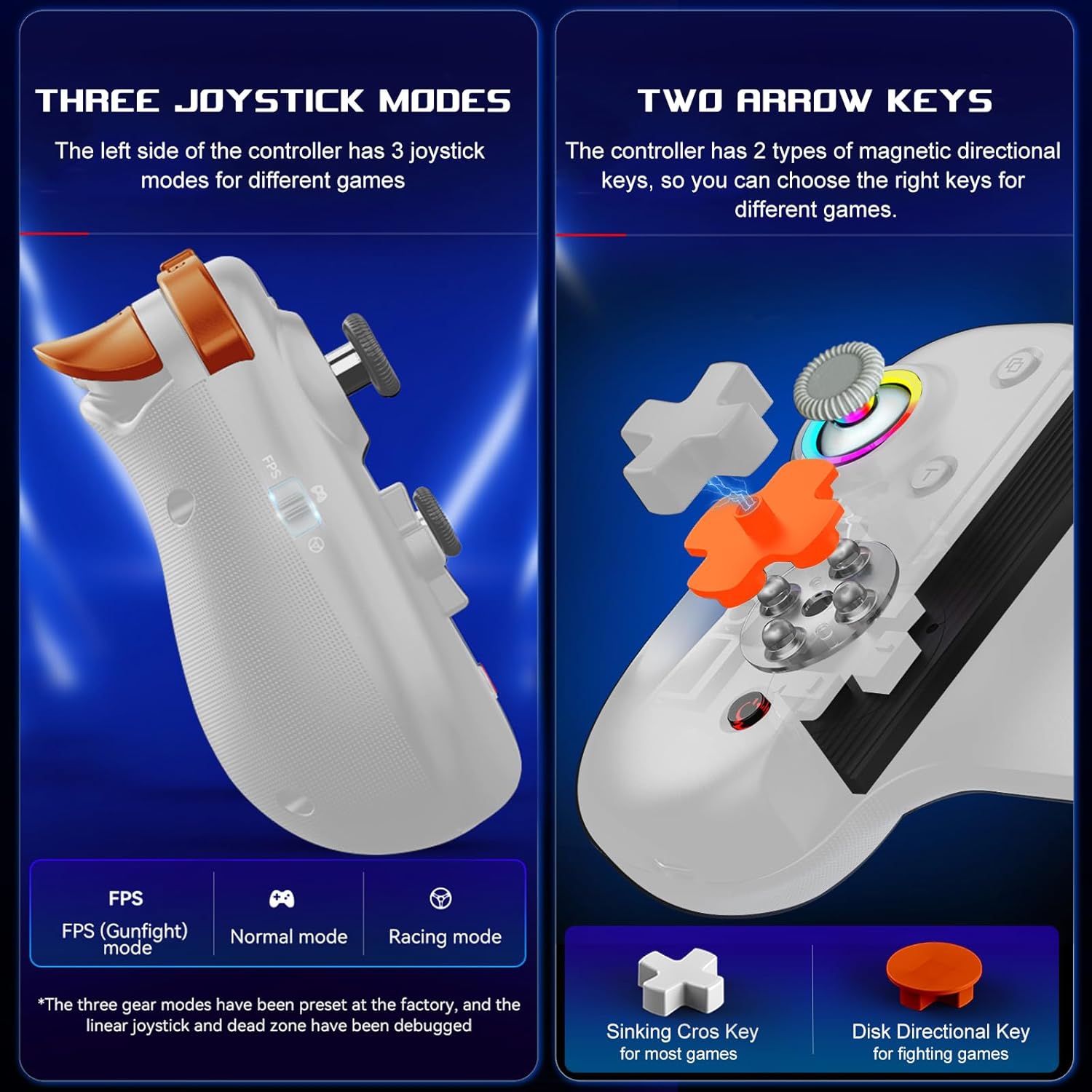
Image: Illustration of the three distinct joystick modes and the interchangeable magnetic arrow keys for varied gameplay.
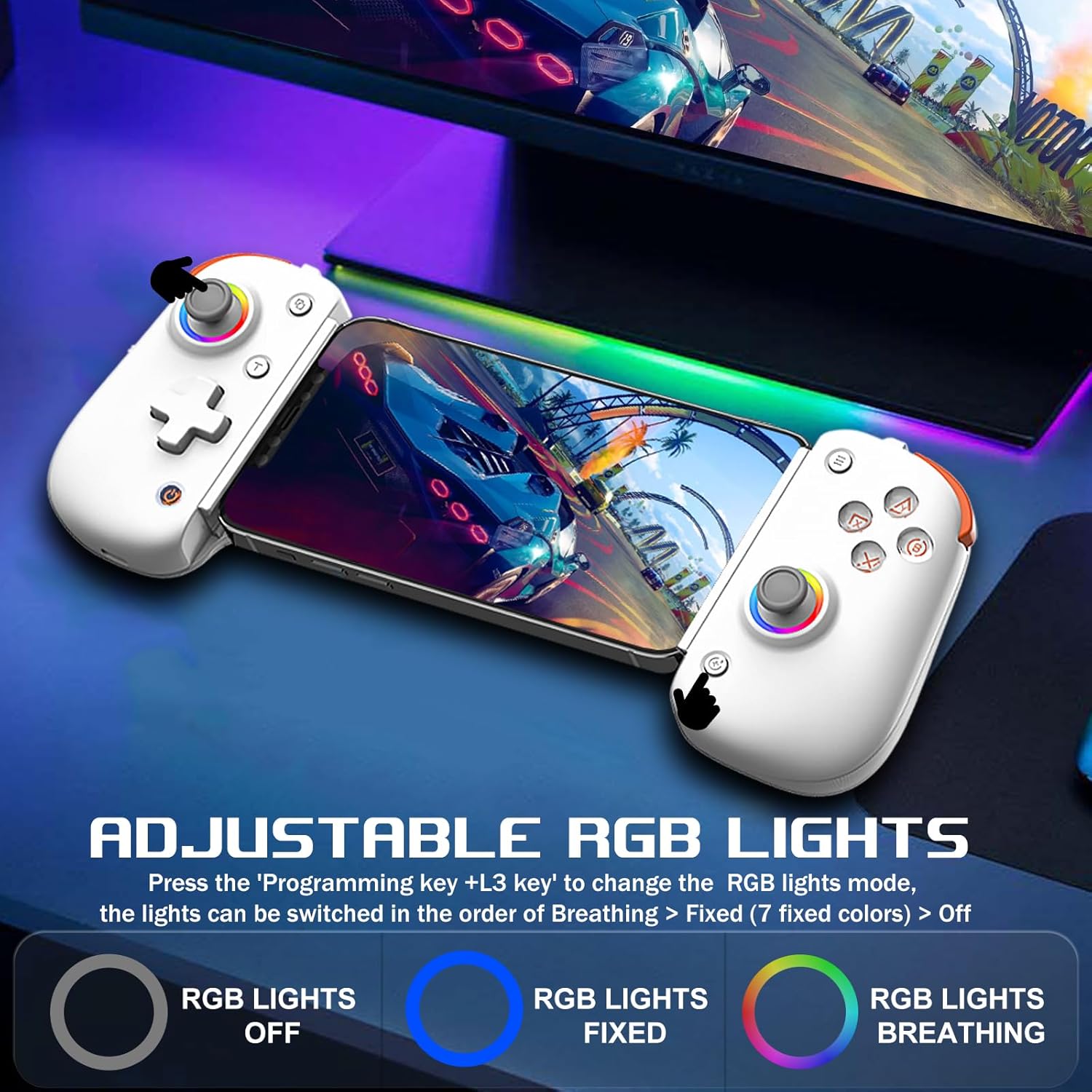
Image: Demonstrates the adjustable RGB lighting features of the controller, including different light modes.
Compatibilità
The arVin D8 Pro Wireless Gamepad Controller offers broad compatibility:
- Sistemi operativi: iOS 13.0+, Android 6.0+, Windows 7/8/10/11.
- Dispositivi: iPad/iPad mini/Air/Pro/iPhone/Macbook, Android phones/tablets (Galaxy Tab, Lenovo Tab, HUAWEI MatePad, Yoga Tab), PC/Laptop/Desktop, Nintendo Switch/Switch Lite/Switch OLED, PS3/PS4.
- Note on PS5: Compatible with PS5 for playing PS4 games only; does not support PS5 games.
- Esclusioni: Not compatible with Apple TV, iPod, Fire TV/TV Box.
1. Supporto per il cloud gaming
The controller is compatible with most cloud gaming services and platforms:
- Pass di gioco Xbox
- Nvidia GeForce ora
- Luna amazzonica
- Google Stadia
- Rainway
- Apple Arcade and MFi games
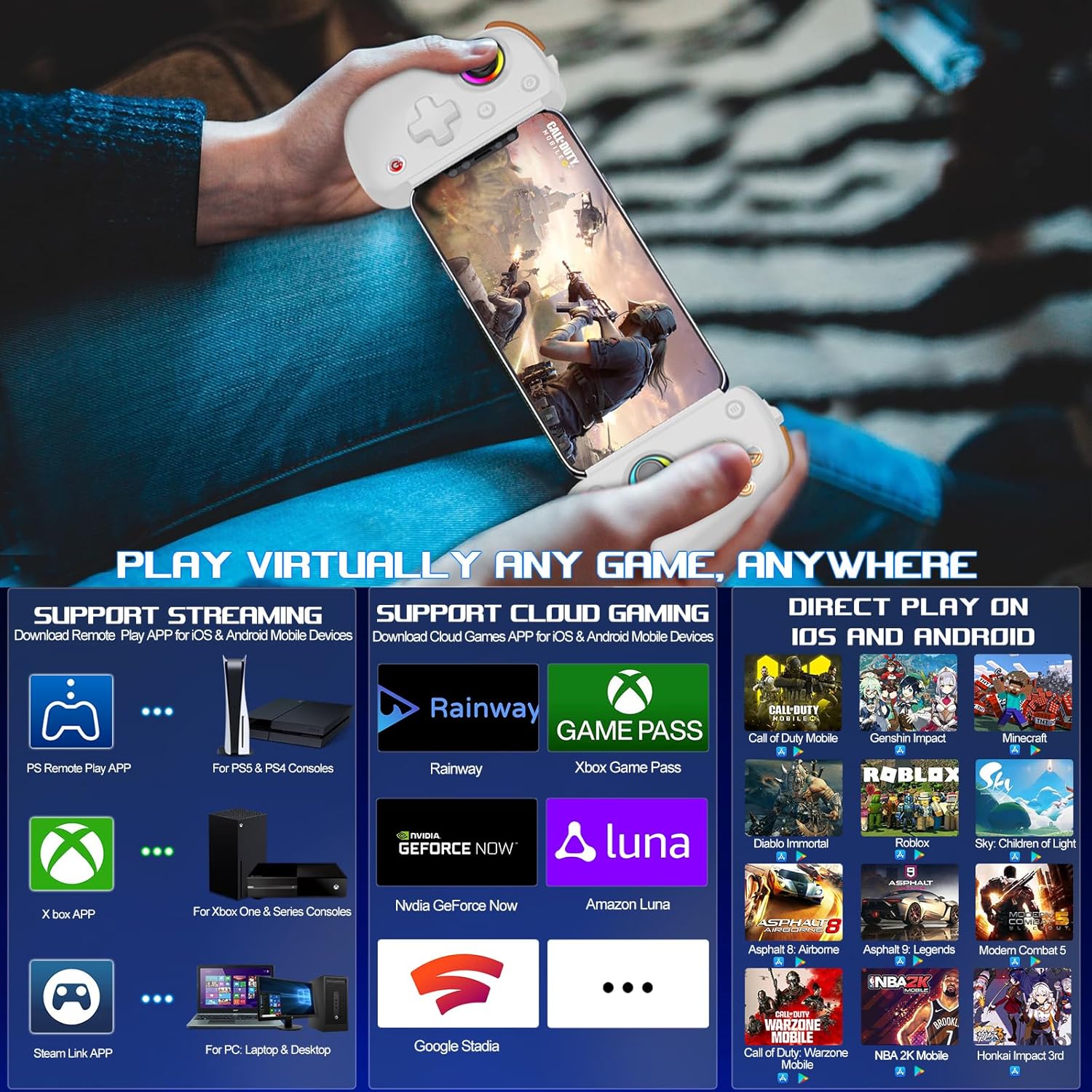
Image: Visual representation of the controller's support for popular cloud gaming platforms and direct play mobile titles.
2. Remote Play Support
Stream console games to your mobile device or tablet:
- PS Remote Play App: For PS5 and PS4 consoles.
- Xbox App: For Xbox One, Xbox Series S, and Xbox Series X consoles.
- Steam Link App: For PC/Laptop/Desktop.
Video: A demonstration of connecting the arVin D8 Pro controller for Xbox Remote Play, showing the setup process and gameplay.
3. Direct Play Games
The controller supports direct play for many popular mobile games, including:
- Call of Duty Mobile (CODM)
- Call of Duty: Warzone Mobile
- Impatto Genshin
- Sky: Children of Light
- Minecraft
- Diablo Immortal
- Combat Modern 5
- Asphalt 9: Leggende
- Asphalt 8: Airborne
- And many more controller-supported titles.
Manutenzione
To ensure the longevity and optimal performance of your arVin D8 Pro controller, follow these maintenance guidelines:
- Pulizia: Use a soft, dry cloth to wipe the controller. Avoid using harsh chemicals, solvents, or abrasive cleaners.
- Magazzinaggio: Conservare il controller in un luogo fresco e asciutto, lontano dalla luce solare diretta e da temperature estreme.
- Cura della batteria: Non esporre la batteria ad alte temperature né tentare di smontarla. Caricare regolarmente il controller, anche se non in uso, per preservare la salute della batteria.
- Gestione: Evitare di far cadere il controller o di sottoporlo a forti urti.
Risoluzione dei problemi
If you encounter issues with your arVin D8 Pro controller, please refer to the following common solutions:
- Il controller non si accende: Ensure the controller is fully charged. Connect it to a power source and try again.
- Impossibile connettersi tramite Bluetooth:
- Ensure the controller is in the correct pairing mode for your device (e.g., 'RB' + 'HOME' for iOS/PC, 'X' + 'HOME' for Android Mode 2).
- Assicurati che il Bluetooth sia abilitato sul tuo dispositivo.
- Elimina il dispositivo dalle impostazioni Bluetooth del tuo dispositivo e riprova ad associarlo.
- Riavviare sia il controller che il dispositivo.
- Pulsanti/joystick non rispondono:
- Assicurarsi che il controller sia collegato correttamente.
- Try calibrating the joysticks (refer to the full manual for specific calibration steps if needed).
- Test the controller with a different game or application to determine if the issue is game-specific.
- Ritardo o disconnessioni:
- Ensure your device is within range of the controller.
- Ridurre al minimo le interferenze provenienti da altri dispositivi wireless.
- For streaming, ensure a stable and strong Wi-Fi connection for both your device and the host PC/console.
- Vibration/Gyro Not Working on iOS/Android: These functions are not supported on iOS and Android devices due to system limitations.
Specifiche
| Caratteristica | Dettaglio |
|---|---|
| Modello | D8 Pro |
| Connettività | Wireless (Bluetooth) |
| Sistema operativo compatibile | iOS 13.0+, Android 6.0+, Windows 7/8/10/11 |
| Lunghezza del dispositivo supportata | 128-289mm |
| Supported Device Thickness | Fino a 13 mm |
| Capacità della batteria | 600mAh |
| Playtime (Full Charge) | Fino a 15 ore |
| Tipo di joystick | Hall Effect Sensing Joystick |
| Tipo di trigger | Hall Linear Trigger |
| Pulsanti macro | M1/M2 (Programmable) |
| Velocità Turbo | 8, 15, 25 shoots/s |
| Caratteristiche speciali | RGB Light, Dual Vibration (not iOS/Android), 6-Axis Gyroscope (not iOS/Android), ABXY Key-value Interchange, Axis Calibration |
| Peso dell'articolo | 12.8 once |
| Dimensioni del pacco | 10.43 x 5.12 x 2.44 pollici |
Garanzia e supporto
arVin products are designed and manufactured to the highest quality standards. This product is covered by a limited warranty from the date of purchase. Please retain your proof of purchase for warranty claims.
For technical support, troubleshooting assistance, or warranty inquiries, please contact arVin customer service through the retailer's platform or visit the official arVin websito per le informazioni di contatto.