
Introduzione
Grazie per l'acquistoasing the 7artisans AF 50mm F1.8 Full Frame Lens. This manual provides essential information for the safe and effective use of your new lens. Please read it thoroughly before use and keep it for future reference.
This 50mm F1.8 lens is designed for Sony E-Mount full-frame cameras, offering a large aperture, fast autofocus, and support for advanced features like face and eye recognition. Its versatile focal length makes it suitable for a wide range of photographic applications, from portraits to street photography.
Informazioni sulla sicurezza
- Do not look at the sun or bright light sources through the lens, as this may cause permanent vision impairment.
- Keep the lens away from direct sunlight when not in use to prevent fire hazards or damage to internal components.
- Avoid exposing the lens to extreme temperatures, high humidity, or dust.
- Non tentare di smontare o riparare l'obiettivo da soli. Contattare il personale di assistenza autorizzato per assistenza.
- Tenere fuori dalla portata dei bambini.
Contenuto della confezione
Verifica che tutti gli articoli siano presenti nel tuo pacco:
- 7artisans AF 50mm F1.8 Full Frame Lens
- Copriobiettivo anteriore
- Copriobiettivo posteriore
- Paraluce
- Custodia per lenti
- Manuale di istruzioni (questo documento)

Image: The 7artisans AF 50mm F1.8 lens shown with its included accessories: front and rear lens caps, lens hood, and a soft pouch.
Prodotto finitoview
The 7artisans AF 50mm F1.8 lens features a robust metal construction with a sleek black finish. Key components include:
- Anello di messa a fuoco: For manual focusing.
- Anello di apertura: Allows switching between automatic and manual aperture control.
- Interruttore AF/MF: Alterna tra la modalità di messa a fuoco automatica e quella manuale.
- Attacco obiettivo: Sony E-Mount compatible.
- Porta USB-C: Per gli aggiornamenti del firmware.
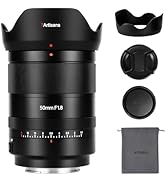
Immagine: un primo piano view of the lens barrel, highlighting the AF/MF switch for mode selection.

Immagine: Un dettaglio view of the lens mount, showing the electronic contacts and the integrated USB-C port for firmware updates.
Impostare
- Fissaggio dell'obiettivo:
- Align the white dot on the lens barrel with the white dot on your camera's lens mount.
- Inserire delicatamente l'obiettivo nel supporto della fotocamera.
- Ruotare l'obiettivo in senso orario finché non scatta in posizione, indicando che è bloccato saldamente.
- Rimozione dell'obiettivo:
- Tieni premuto il pulsante di rilascio dell'obiettivo sul corpo della fotocamera.
- Rotate the lens counter-clockwise until it detaches from the camera mount.
- Fissare i tappi anteriore e posteriore dell'obiettivo per proteggere gli elementi dell'obiettivo.
- Collegamento del paraluce:
- Allineare il paraluce con la parte anteriore dell'obiettivo.
- Ruotare il cofano in senso orario fino a bloccarlo saldamente.
- The lens hood helps reduce flare and provides physical protection to the front element.

Image: The 7artisans AF 50mm F1.8 lens securely mounted on a Sony mirrorless camera, viewed di lato.
Utilizzo dell'obiettivo
1. Focus Mode Selection (AF/MF)
Use the AF/MF switch on the lens barrel to select your desired focus mode:
- AF (messa a fuoco automatica): The camera will automatically focus on the subject. This lens features a high-speed STM stepping motor for quick and accurate autofocus performance.
- MF (messa a fuoco manuale): You can manually adjust the focus by rotating the focus ring on the lens.
Immagine: Un dettaglio view of the AF/MF switch, allowing users to toggle between autofocus and manual focus modes.
2. Controllo dell'apertura
The lens features an aperture ring that can be switched between automatic and manual control:
- Automatic Aperture: Set the aperture ring to the 'A' position. The camera will control the aperture settings.
- Manual Aperture: Rotate the aperture ring to select your desired F-stop (F1.8 to F16). This provides precise control over depth of field and exposure.
The large F1.8 aperture allows for excellent low-light performance and the creation of beautiful background blur (bokeh).
3. Face/Eye Recognition Support
This lens supports your camera's face and eye recognition functions. When enabled on your camera, the lens will automatically set accurate focusing points and exposure for human faces or eyes, ensuring sharp portraits.

Image: A photograph illustrating the camera's eye recognition feature actively focusing on a subject's eye.
4. Aggiornamenti del firmware
The integrated USB-C port allows for easy firmware updates. Connect the lens to your computer using a USB-C cable and follow the instructions provided on the 7artisans official websito per aggiornare il firmware. Ciò garantisce prestazioni ottimali e compatibilità con i futuri modelli di fotocamere.
Immagine: Un dettaglio view of the lens mount, showing the electronic contacts and the integrated USB-C port for firmware updates.
Manutenzione
- Pulizia: Use a soft, lint-free cloth to clean the lens barrel. For lens elements, use a lens brush to remove dust, then gently wipe with a lens cleaning cloth and lens cleaning solution.
- Magazzinaggio: When not in use, store the lens with both caps attached in a cool, dry place away from direct sunlight and moisture. Consider using a desiccant to prevent mold growth.
- Gestione: Avoid dropping or subjecting the lens to strong impacts, as this can damage internal optical elements.
Risoluzione dei problemi
1. Lens not focusing:
- Ensure the AF/MF switch is set to the desired mode (AF for autofocus).
- Check camera settings to ensure autofocus is enabled and the correct focus area is selected.
- Pulisci i contatti dell'obiettivo e del corpo della fotocamera.
2. Images are blurry:
- Verify that the lens is properly focused.
- Check shutter speed to avoid camera shake, especially in low light.
- Ensure the lens elements are clean and free from smudges or dust.
3. Lens not recognized by camera:
- Rimuovere e ricollegare l'obiettivo, assicurandosi che scatti saldamente in posizione.
- Pulire i contatti elettronici sia sull'obiettivo che sul corpo della fotocamera con un panno pulito e asciutto.
- Check for available firmware updates for both the lens and your camera.
Specifiche
| Caratteristica | Dettaglio |
|---|---|
| Marca | 7artigiani |
| Numero di modello | AF5018EB |
| Lunghezza focale | 50mm |
| Apertura massima | F1.8 |
| Apertura minima | F16 |
| Tipo di lente | Obiettivo primario standard |
| Supporti compatibili | Attacco Sony E |
| Struttura ottica | 11 elementi in 9 gruppi |
| Lame del diaframma | 11 pezzi |
| Angolo di View | D:46.8°, H:39.6°, V:27.0° |
| Distanza di messa a fuoco più vicina | 0.5M - ∞ |
| Dimensione del filtro | 58mm |
| Peso dell'articolo | 1.78 libbre (circa 807 g) |
| Dimensioni del prodotto | 40.94 x 28.35 x 28.35 pollici |
Garanzia e supporto
For warranty information, technical support, or service inquiries, please visit the official 7artisans webo contattare il rivenditore autorizzato. Conservare la prova d'acquisto per eventuali reclami in garanzia.
For the latest firmware updates and additional resources, please visit: 7artisans Official Store
Video ufficiali dei prodotti
Watch these official videos for more information on the 7artisans AF 50mm F1.8 lens:
7artisans AF50mm F1.8
Video: Un video ufficiale del prodotto mostraasing the features and capabilities of the 7artisans AF 50mm F1.8 lens.
7artisans AutoFocus 50mm F1.8
Video: Another official product video demonstrating the autofocus performance and image quality of the 7artisans 50mm F1.8 lens.