
nuphy Air96 v2
Manuale utente della tastiera meccanica wireless NuPhy Air96 V2
Model: Air96 v2 | Brand: NuPhy
Introduzione
The NuPhy Air96 V2 is a versatile 100-key wireless mechanical keyboard designed for an efficient and comfortable typing experience. It features an ultra-slim profile, RGB backlighting, and multiple connectivity options, making it suitable for various operating systems and environments.
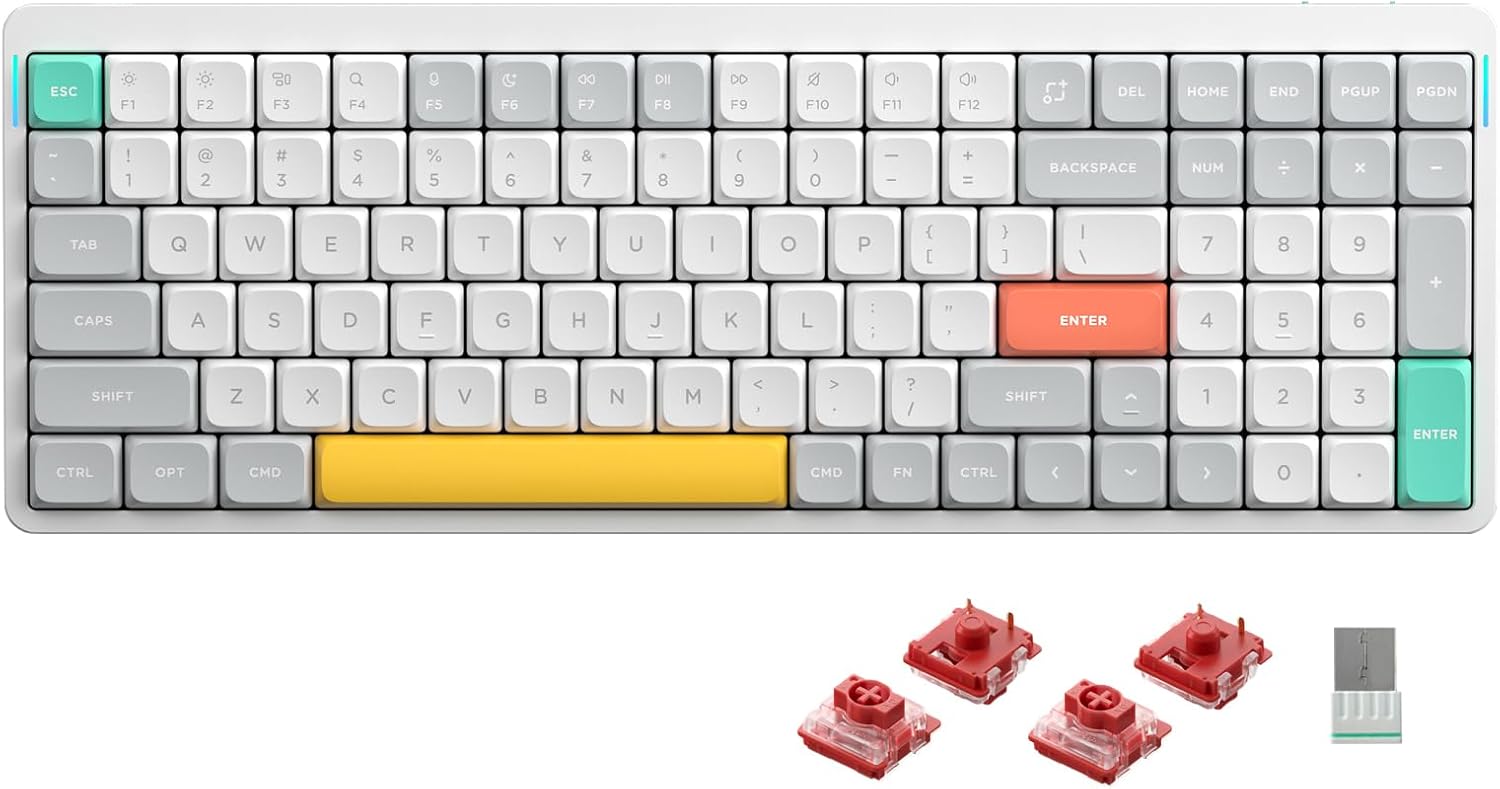
Figura 1: in alto view of the NuPhy Air96 V2 Wireless Mechanical Keyboard in white with Gateron Cowberry switches.
Impostare
Contenuto della confezione
- NuPhy Air96 V2 Keyboard
- Cavo USB-C
- Two-tone PBT Keycaps (pre-installed)
- Tasti extra (per la personalizzazione)
- Strumento per estrarre tasti/interruttori
- Wireless 2.4GHz Receiver
Regolazione dell'angolazione della tastiera
The Air96 V2 features adjustable feet on the underside to change the typing angle. These feet offer two levels of inclination for ergonomic comfort.

Figure 2: Underside of the keyboard with adjustable feet for ergonomic positioning.

Figura 3: lato view illustrating the mode switches for Windows/Mac and connection type (Off/Wired/Wireless).
Opzioni di connettività
The Air96 V2 supports three connection modes:
- Cablato (USB-C): Collega la tastiera direttamente al tuo dispositivo utilizzando il cavo USB-C in dotazione.
- Wireless a 2.4 GHz: Insert the 2.4GHz receiver into a USB port on your device. Switch the keyboard to 2.4GHz mode.
- Bluetooth 5.1: The keyboard can connect to up to 4 devices simultaneously via Bluetooth. Refer to your device's Bluetooth settings for pairing instructions.

Figure 4: Visual representation of the three available connection methods.
The keyboard is compatible with Windows, macOS, and Linux operating systems. Use the dedicated switch on the side of the keyboard to select the appropriate operating system mode (Win/Mac).

Figure 5: Keyboard compatibility across various operating systems.
Istruzioni per l'uso
Funzioni chiave
The Air96 V2 features a 100-key layout, providing a compact yet full-featured typing experience. Standard alphanumeric keys, function row (F1-F12), navigation keys, and a numeric keypad are included.
Retroilluminazione RGB
The keyboard is equipped with RGB backlighting. The console allows for adjustment of the keyboard's RGB backlighting effects and brightness. The LED light bar on the side of the keyboard indicates the current power level.
Tasso di sondaggio
Utilizing Nordic's NRF52810 SoC and STM32F072 MCU, the Air96 V2 achieves a polling rate of up to 1000Hz in wireless mode, minimizing latency for both gaming and office use.

Figure 6: Internal components contributing to the keyboard's high polling rate.
Personalizzazione
Supporto QMK/VIA
The Air96 V2 supports QMK/VIA, allowing users to fully define and customize key assignments, macros, and lighting effects according to their preferences. Software for QMK/VIA can be downloaded from the official NuPhy websito.

Figura 7: Esample of the VIA software interface for advanced keyboard customization.
Interruttori sostituibili a caldo
The keyboard features hot-swappable mechanical switches, allowing users to easily replace switches with different models without soldering. This enables customization of typing feel and sound.

Figure 8: Gateron Brown 2.0 (Tactile, 55gf) switch details.

Figure 9: Gateron Red 2.0 (Linear, 45gf) switch details.

Figure 10: Gateron Blue 2.0 (Clicky, 65gf) switch details.
Additional switch types like Gateron Moss, Wisteria, Aloe, and Cowberry are also compatible and can be installed.

Figure 11: Included extra keycaps for aesthetic customization.
Manutenzione
The Air96 V2 features durable PBT keycaps, known for their resistance to wear and shine over time. To clean the keyboard, gently wipe the keycaps and frame with a soft, damp cloth. For deeper cleaning or switch replacement, use the provided keycap/switch puller tool.
Avoid exposing the keyboard to excessive moisture or extreme temperatures. Store in a dry, cool environment when not in use.
Risoluzione dei problemi
Problemi di connettività
- Ensure the keyboard's mode switch is set correctly for your desired connection type (Wired, 2.4GHz, or Bluetooth).
- For 2.4GHz, verify the receiver is securely plugged into a USB port.
- For Bluetooth, ensure the keyboard is in pairing mode and visible to your device. Try re-pairing if connection is lost.
- Check battery level. A low battery can affect wireless performance.
Key Not Responding / Repeated Keys
- Assicurarsi che la tastiera sia completamente carica.
- If using wireless mode, try connecting via USB-C to rule out wireless interference.
- Carefully remove the affected keycap and switch using the provided tool. Re-seat the switch firmly. If the issue persists, consider replacing the switch.
Problemi di retroilluminazione
- Adjust RGB settings via the console software.
- Ensure the keyboard is sufficiently charged, as low battery can dim or disable backlighting.
Specifiche
| Caratteristica | Dettaglio |
|---|---|
| Numero di modello | Air96 v2 |
| Dimensioni | 14.69 x 5.2 x 0.53 pollici (373.4 x 132.5 x 13.5 mm) |
| Peso | 1.46 libbre (663 grammi) |
| Capacità della batteria | 4000mAh |
| Connettività | Bluetooth 5.1, wireless a 2.4 GHz, USB-C cablato |
| Tasso di sondaggio | Up to 1000Hz (wireless mode) |
| keycaps | PBT a doppio colpo |
| Interruttori | Hot-swappable Gateron Low-Profile Interruttori meccanici |
| Compatibilità | Windows, macOS, Linux |
| Retroilluminazione | Colore RGB |

Figure 12: Detailed dimensions and specifications of the Air96 V2 keyboard.
Garanzia e supporto
For product support, troubleshooting assistance, or warranty inquiries, please visit the official NuPhy websito o contattare il servizio clienti. Conservare la ricevuta d'acquisto per la convalida della garanzia.
The product includes a USB-C cable and two-tone PBT keycaps as standard accessories.
Documenti correlati - Air96 v2
 |
Guida rapida NuPhy AIR96: installazione, funzionalità e configurazione VIA Una guida rapida completa per la tastiera meccanica wireless NuPhy AIR96, che copre la selezione del sistema, le modalità di connessione, l'illuminazione RGB, la modalità di sospensione, le scorciatoie e la configurazione del software VIA. |
 |
Guida rapida alla tastiera meccanica NuPhy AIR96 V2 Una guida rapida per la tastiera meccanica NuPhy AIR96 V2, che copre la selezione del sistema, le modalità di connessione, l'associazione wireless, le impostazioni della retroilluminazione e della luce laterale, la modalità di sospensione, le scorciatoie, il ripristino delle impostazioni di fabbrica e la configurazione della mappa dei tasti VIA. |
 |
Guida rapida e istruzioni per l'installazione di NuPhy Air96 Guida rapida completa per la tastiera NuPhy Air96, che comprende la selezione del sistema, le modalità di connessione, i tasti multimediali, l'illuminazione e gli indicatori della batteria. Include informazioni sulla configurazione e sulla risoluzione dei problemi. |
 |
Keychron K3 Version 2 Keyboard Bluetooth Troubleshooting Guide Comprehensive troubleshooting guide for the Keychron K3 Version 2 mechanical keyboard, covering Bluetooth connection issues, re-connection problems, and typing experience. |
 |
Guida per l'utente della tastiera da gioco meccanica cablata Camiysn STAR100 Manuale utente completo per la tastiera meccanica da gaming cablata Camiysn STAR100, con dettagli su caratteristiche, specifiche, istruzioni per l'uso e informazioni sulla garanzia. |
 |
kebidumei RGB Wired Mechanical Keyboard - 104 Keys, Backlit, Gaming & Office Dettagliato sopraview of the kebidumei RGB Wired Mechanical Keyboard, featuring 104 keys, colorful lighting, mechanical operation, USB interface, and compliance with EU regulations. Includes specifications and safety warnings. |
Ask a question about this manual
Ask about setup, troubleshooting, compatibility, parts, safety, or missing instructions. Manuals+ will review the question and use this page’s manual context to help answer it.