
MiCODUS MV930G
Manuale utente del localizzatore GPS MiCODUS MV930G 4G
Modello: MV930G
Introduzione
This manual provides comprehensive instructions for the installation, operation, and maintenance of your MiCODUS MV930G 4G GPS Tracker. This device is designed for real-time location tracking and anti-theft alarming for various vehicles including cars, motorcycles, trucks, and taxis. It features 4G LTE+2G GSM network compatibility, GPS+LBS dual positioning, and multiple alarm functions.
Caratteristiche del prodotto
- 4G LTE + 2G GSM Network Compatibility: Ensures faster and more stable connectivity.
- Batteria ricaricabile integrata: 3.7V 60mAh polymer lithium-ion battery, charges when the engine starts.
- GPS + LBS Dual Positioning: Provides accurate real-time location tracking with up to 10-meter accuracy.
- Riproduzione traccia storica: View and playback track history for the past 180 days via the MiCODUS app and websito.
- Design impermeabile: Adatto per l'uso in varie condizioni atmosferiche.
- Funzioni di allarme multiple: Includes overspeed alarm, vibration alarm, geofencing, low voltage alarm, dialing alarm, engine start/stall alarm, remote engine disconnection, and engine recovery.
- Installazione semplice: Designed for straightforward installation, resembling a standard vehicle relay.
- Ampio volumetage Compatibilità: Supports 9-95V DC, suitable for cars, trucks, electric vehicles, motorcycles, and buses.
- Automatic Arming: Intelligent automatic arming and disarming based on ACC status.
- Firmware OTA: Supports remote firmware upgrades to keep the device updated.

Contenuto della confezione
The MiCODUS MV930G package includes the following items:
- MiCODUS MV930G GPS Tracker Unit
- SIM Card (Complimentary Spionlink SIM card)
- Manuale d'uso
- Cavo di alimentazione
Configurazione e installazione
The MV930G is designed to resemble a standard vehicle relay for discreet installation. It supports a wide voltage range (9-95V DC) making it compatible with various vehicle types.
1. Installazione della scheda SIM
- Assicurarsi che il tracker sia spento.
- Individua lo slot della scheda SIM sul dispositivo.
- Insert the provided Spionlink SIM card into the slot. Ensure it is correctly oriented.
- The SIM card is pre-configured for direct use upon power-on, eliminating complex APN configuration.
2. Cablaggio e collegamento di alimentazione
The tracker requires a 12V power supply from the vehicle. It is recommended to have a professional install the device if you are unsure about vehicle wiring.
- Connect the red wire to the positive terminal of the vehicle's battery (constant 12V).
- Connect the black wire to the negative terminal of the vehicle's battery (ground).
- Connect the yellow wire to the ACC (Accessory) wire of the vehicle. This allows the device to detect engine status and enable automatic arming/disarming.
- Other wires (e.g., for remote engine cut-off) should be connected according to the detailed wiring diagram provided in the full user manual or by a professional installer.


Istruzioni per l'uso
1. Accesso alla piattaforma di tracciamento
The MiCODUS MV930G can be tracked via a dedicated mobile application (iOS/Android) or a web- piattaforma basata su.
- Download the MiCODUS app from your device's app store.
- Alternatively, visit the MiCODUS tracking websito.
- Log in using the credentials provided with your device or create an account if prompted.
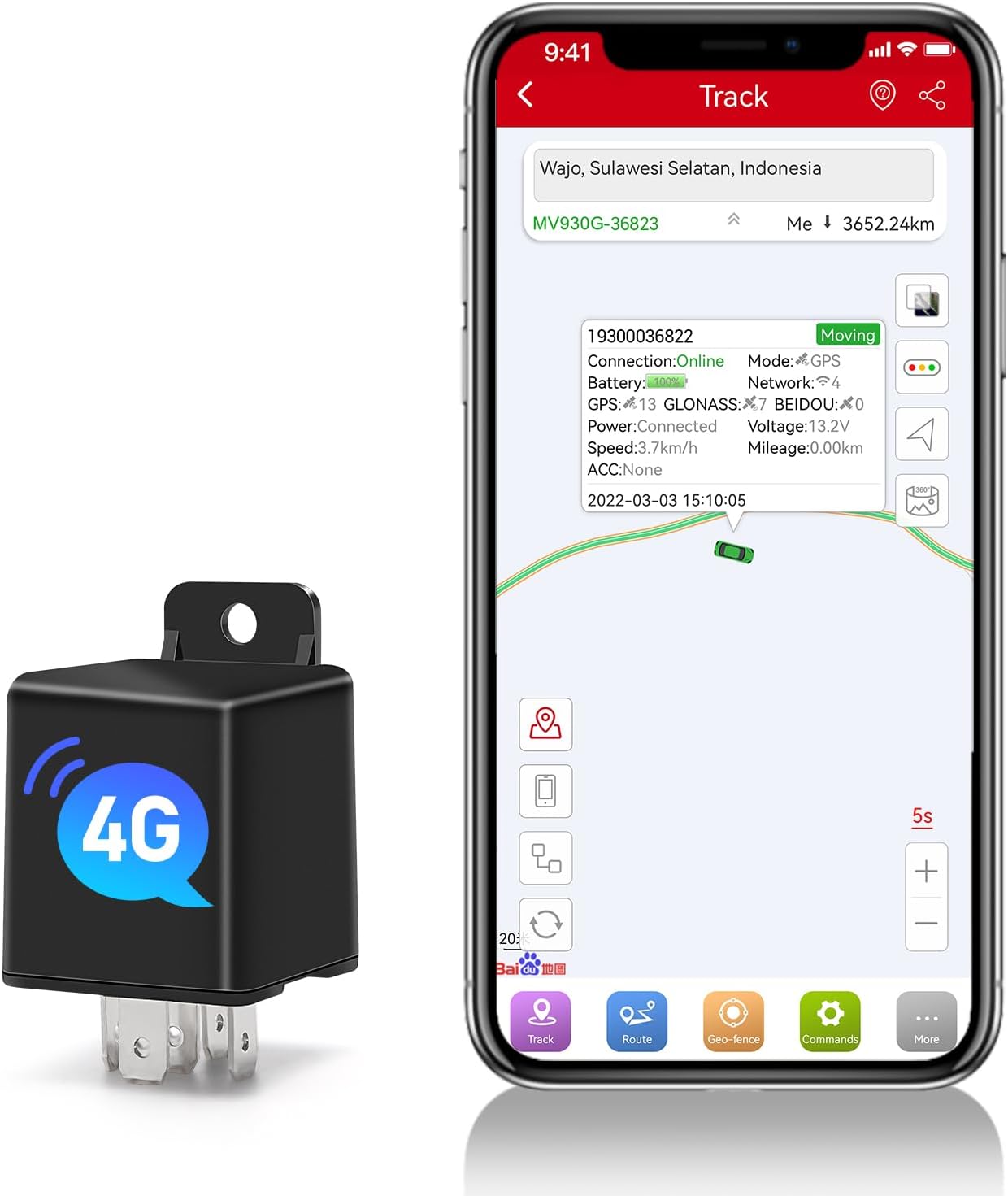

2. Monitoraggio in tempo reale
Una volta effettuato l'accesso, puoi view the real-time location of your vehicle on the map. The device updates its position every 5 seconds, providing accurate and timely information.
3. Riproduzione della traccia storica
La piattaforma ti consente di riview the vehicle's travel history for up to 180 days. This feature helps in understanding past routes and activities.
- Navigate to the "History" or "Playback" section within the app/websito.
- Select the desired date range to view la traccia storica.
4. Funzioni di allarme
The MV930G offers various alarm features to enhance vehicle security:
- Allarme di eccesso di velocità: Notifies you if the vehicle exceeds a predefined speed limit.
- Allarme vibrazione: Triggers an alert if unusual vibrations or impacts are detected.
- Geofencing: Set up virtual boundaries (geo-fences) on the map. You will receive an alert if the vehicle enters or exits these designated zones.
- Basso volumetage Allarme: Alerts you if the vehicle's battery voltage scende al di sotto di un livello di sicurezza.
- Engine Start/Stall Alarm: Notifies you when the engine is started or turned off.
- Remote Engine Disconnection/Recovery: Allows you to remotely cut off or restore the vehicle's engine power (requires proper wiring and setup).
- Allarme traino: Alerts if the vehicle is moved without the engine running.

5. Automatic Arming/Disarming
The device supports intelligent automatic arming and disarming based on the vehicle's ACC status, eliminating the need for manual operation.

Manutenzione
- Controlli regolari: Periodically check the physical connection of the device to ensure it is securely installed and wires are not damaged.
- Aggiornamenti software: The device supports Firmware Over-The-Air (OTA) updates. Ensure your device's firmware is always up to date for optimal performance and new features. Check the MiCODUS app or website for update notifications.
- Pulizia: Keep the device free from excessive dust or debris. Use a soft, dry cloth for cleaning. Do not use liquid cleaners.
- Batteria: The built-in battery is designed to charge when the engine is running. No specific battery maintenance is required beyond ensuring the vehicle's power supply is stable.

Risoluzione dei problemi
| Problema | Possibile causa | Soluzione |
|---|---|---|
| Il dispositivo non si accende. | Incorrect power connection; Vehicle battery low/dead. | Check power cable connections (red to positive, black to ground). Ensure vehicle battery has sufficient charge. |
| No GPS signal / Inaccurate location. | Device in an area with poor GPS reception (e.g., indoors, underground parking); Obstruction to sky view. | Spostare il veicolo in un'area aperta con cielo sereno view. Ensure the device is not covered by metal objects. |
| No data on tracking platform. | SIM card not inserted correctly; SIM card out of credit/data; Network issue. | Reinsert SIM card. Check SIM card balance and data plan. Verify network coverage in the area. |
| Gli allarmi non si attivano. | Alarm settings not configured correctly in the app; Device not armed. | Review and configure alarm settings in the MiCODUS app. Ensure the device is armed (if manual arming is enabled). |
Specifiche
| Attributo | Dettaglio |
|---|---|
| Marca | MiCODUS |
| Modello | MV930G |
| Tecnologia di connettività | 4G LTE + 2G GSM Cellular |
| Tecnologia di posizionamento | GPS + LBS Dual Positioning |
| Precisione di posizionamento | Fino a 10 metri |
| Intervallo caricamento dati | Minimum 5 seconds |
| Historical Track Storage | 180 giorni |
| Tipo di batteria | 3.7V 60mAh Polymer Lithium-ion (rechargeable) |
| Ingresso volumetage | 9-95V DC |
| Caratteristiche speciali | Waterproof, Multiple Alarm Functions, Remote Engine Disconnection, Auto Arm By ACC, Firmware OTA |
| Dimensioni del prodotto (L x P x A) | Dimensioni: 7.6 x 3.2 x 3.2 cm |
| Peso dell'articolo | 0.7 grammi |
| Dispositivi compatibili | Smartphone (iOS/Android) |
Garanzia e supporto
MiCODUS offers professional technical support for its products. While specific warranty terms are not detailed here, the company emphasizes customer satisfaction and support.
- For technical assistance, troubleshooting, or inquiries regarding your device, please refer to the contact information provided in the product packaging or on the official MiCODUS websito.
- The complimentary Spionlink SIM card comes with various recharge plans (3 months, 6 months, annual). Details on pricing and cancellation policies are available through the Spionlink service.
Ask a question about this manual
Ask about setup, troubleshooting, compatibility, parts, safety, or missing instructions. Manuals+ will review the question and use this page’s manual context to help answer it.