
Introduzione
Thank you for choosing the Vieta Pro Karaoke Party Microphone. This device combines a high-quality microphone with an integrated speaker, designed for an engaging karaoke experience. It features True Wireless technology, allowing two microphones to connect to a single device, and offers various sound modes and connectivity options.
Contenuto della confezione
- Vieta Pro Karaoke Party Microphone with Integrated Speaker
- Cavo di ricarica (USB-C)
- Manuale d'uso

Image: The retail box of the Vieta Pro Karaoke Party Microphone, showing the product and its features.
Prodotto finitoview
Familiarize yourself with the main components and controls of your Vieta Pro Karaoke Party Microphone.

Immagine: Frontale view of the Vieta Pro Karaoke Party Microphone, highlighting the control buttons for power, volume, mode, and Bluetooth.
Controlli e porte:
- Pulsante di accensione: Tenere premuto per accendere/spegnere. Premere brevemente per cambiare modalità.
- Pulsanti del volume (+/-): Regola il volume dell'altoparlante.
- Pulsante Modalità (M): Cycle through sound effects or modes.
- Pulsante Bluetooth: Avviare l'associazione Bluetooth.
- Porta USB-C: Per caricare il dispositivo.
- 3.5mm Audio Jack (Input): Collegare sorgenti audio esterne.
- 3.5mm Audio Jack (Output): Collega cuffie o altoparlanti esterni.
- Pulsante modalità luce: Change or turn off LED lighting effects.
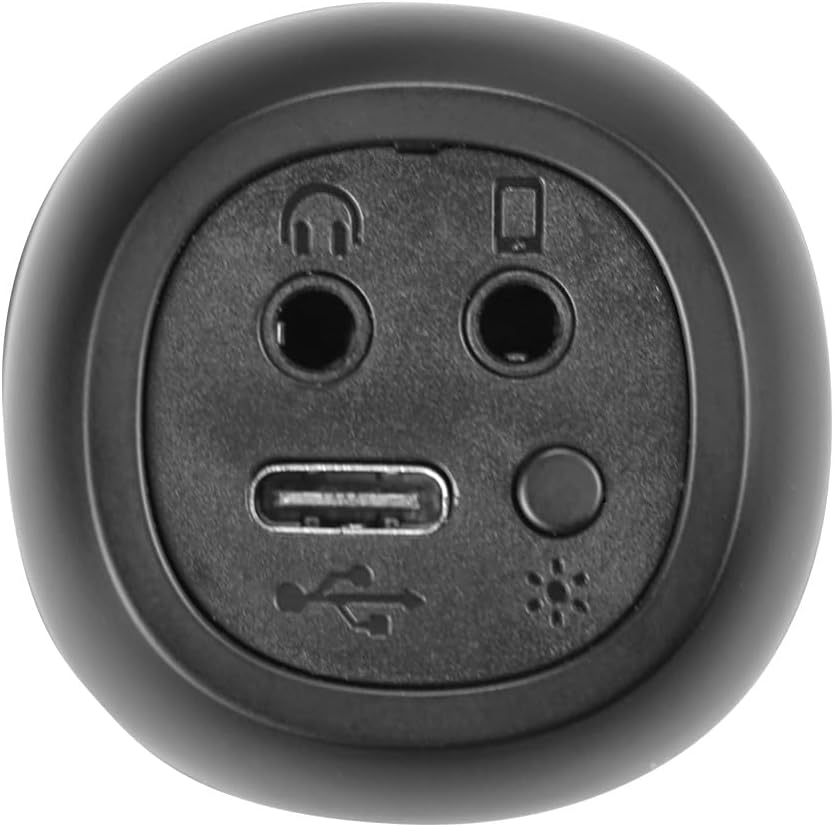
Immagine: Primo piano view of the bottom of the microphone, showing the USB-C charging port, 3.5mm audio input/output jacks, and the light mode button.
Impostazione e connessione
1. Ricarica del microfono
Before first use, fully charge the microphone. Connect the provided USB-C cable to the microphone's USB-C port and the other end to a USB power adapter (not included) or a computer's USB port. The battery indicator light will show charging status.
2. Accensione/Spegnimento
Premere e tenere premuto il tasto Pulsante di accensione for approximately 3 seconds to turn the microphone on or off. A sound prompt will indicate the power status.
3. Accoppiamento Bluetooth
- Turn on the microphone. It will automatically enter Bluetooth pairing mode, indicated by a flashing Bluetooth light.
- Attiva il Bluetooth sul tuo smartphone, tablet o computer e cerca i dispositivi disponibili.
- Select "Vieta Pro Karaoke Party" from the list of devices.
- Once connected, a sound prompt will confirm successful pairing, and the Bluetooth light will stop flashing.
4. True Wireless Connection (Connecting Two Microphones)
To use two Vieta Pro Karaoke Party microphones simultaneously with one device:
- Assicurarsi che entrambi i microfoni siano accesi e non collegati ad altri dispositivi Bluetooth.
- On one microphone (this will be the primary), double-press the Pulsante Bluetooth. It will enter True Wireless pairing mode.
- The primary microphone will search for the second microphone. Once connected, a sound prompt will confirm the True Wireless connection.
- Now, connect the primary microphone to your device via Bluetooth as described in step 3. Both microphones will now output audio from your device.

Image: Two individuals holding and using Vieta Pro Karaoke Party Microphones, demonstrating the True Wireless feature.
5. Connessione cablata (AUX)
Connect an external audio source (e.g., MP3 player) to the microphone using a 3.5mm audio cable (not included) plugged into the 3.5mm audio input jack.
Istruzioni per l'uso
1. Regolazione del volume
Utilizzare il Volume + E Volume - buttons on the microphone to adjust the speaker output volume. You can also control the volume from your connected device.
2. Changing Sound Modes/Effects
Premere il tasto Pulsante modalità (M) repeatedly to cycle through the four available sound configuration modes or voice effects. Experiment to find your preferred sound.
3. Voice Reduction Feature
This feature allows you to reduce the vocal track of a song, making it easier to sing along. To activate or deactivate this feature, refer to the specific instructions in the full manual or experiment with the Pulsante modalità (M) or a dedicated button if present (not explicitly detailed in provided data, but mentioned as a feature).
4. registrazione
The microphone supports one-touch recording. Connect the microphone to a compatible recording device (e.g., smartphone with a recording app) via Bluetooth or the 3.5mm output jack. Press the dedicated Pulsante di registrazione (if available, or refer to the full manual for specific button assignment) to start and stop recording.
5. Effetti di illuminazione a LED
Premere il tasto Pulsante modalità luce (located near the ports at the bottom) to change the LED lighting patterns or turn them off.

Image: Close-up of the Vieta Pro Karaoke Party Microphone's speaker grille, showing the integrated LED lighting effects.
Manutenzione
- Pulizia: Use a soft, dry cloth to clean the microphone's surface. Do not use abrasive cleaners or solvents.
- Magazzinaggio: Conservare il microfono in un luogo fresco e asciutto, lontano dalla luce solare diretta e da temperature estreme.
- Cura della batteria: Per prolungare la durata della batteria, evitare di scaricarla completamente frequentemente. Caricare il dispositivo regolarmente, anche se non viene utilizzato per periodi prolungati.
- Esposizione all'acqua: Questo dispositivo non è impermeabile. Evitare l'esposizione all'acqua o a umidità elevata.
Risoluzione dei problemi
| Problema | Possibile causa | Soluzione |
|---|---|---|
| Nessun potere | La batteria è scarica. | Carica il microfono utilizzando il cavo USB-C. |
| Impossibile connettersi tramite Bluetooth | Bluetooth is off on the device; microphone is already connected to another device; microphone is out of range. | Ensure Bluetooth is enabled on your device. Disconnect from other devices. Move microphone closer to your device (within 10 meters). Restart both devices. |
| Nessuna uscita audio | Volume is too low; microphone is muted; incorrect input source. | Increase volume on both the microphone and your connected device. Check if the microphone is in the correct operating mode. |
| True Wireless connection fails | One or both microphones are already paired; microphones are too far apart. | Ensure both microphones are unpaired from other devices. Place them close to each other during True Wireless pairing. Follow True Wireless pairing steps carefully. |
Specifiche
| Caratteristica | Dettaglio |
|---|---|
| Nome del modello | Festa Karaoke |
| Marca | Vieta Pro |
| Tecnologia di connettività | Vero wireless, Bluetooth |
| Tipo di connettore | USB-C, jack da 3.5 mm |
| Potenza in uscita | 18 L |
| Durata della batteria | Fino a 10 ore |
| Tipo di batteria | 1 agli ioni di litio (inclusa) |
| Gamma di frequenza | da 50 a 15,000 Hz |
| Impedenza | 600 Ohm |
| Modello polare | Unidirezionale |
| Dispositivi compatibili | Personal Computer, Smartphone |
| Caratteristiche speciali | Volume Control, 1-Touch Recording, Lighting Modes, Battery Indicator, Radio |
| Peso | 337 grammi |
| Materiale | Plastica |
Garanzia e supporto
For warranty information and technical support, please contact the manufacturer, FRAMASON AUDIO SA, or your local retailer. Keep your proof of purchase for any warranty claims.
Manufacturer: FRAMASON AUDIO SA