
1. Introduzione
Thank you for choosing the Syinix 55 Inch FHD Smart LED TV, Model 55U51. This manual provides essential information for the safe and efficient use of your new television. Please read it thoroughly before operating the device and retain it for future reference. This television combines a Full High Definition (FHD) display with smart functionalities and a built-in receiver, offering a complete entertainment solution.

Immagine 1.1: anteriore view of the Syinix 55 Inch FHD Smart LED TV displaying a vibrant landscape. The TV features a slim bezel and two stand feet.
2. Importanti istruzioni di sicurezza
Per garantire un funzionamento sicuro ed evitare danni, osservare le seguenti linee guida di sicurezza:
- Fonte di energia: Collegare il televisore solo a una presa di corrente CA con la tensione specificatatage (refer to the label on the back of the TV). Ensure the power cord is not damaged or pinched.
- Ventilazione: Do not block ventilation openings. Allow adequate space around the TV for proper airflow. Avoid placing the TV on beds, sofas, rugs, or similar surfaces that may block ventilation.
- Calore: Tenere il televisore lontano da fonti di calore come termosifoni, bocchette di ventilazione, stufe o altri apparecchi che producono calore.
- Acqua e umidità: Non esporre il televisore a pioggia o umidità. Non posizionare oggetti contenenti liquidi, come vasi, sul televisore.
- Pulizia: Unplug the TV from the wall outlet before cleaning. Use a soft, dry cloth for cleaning. Do not use liquid cleaners or aerosol cleaners.
- Ingresso di oggetti e liquidi: Non spingere mai oggetti di alcun tipo nel televisore attraverso le aperture poiché potrebbero toccare parti pericolose.tage punti o parti in cortocircuito che potrebbero causare incendi o scosse elettriche.
- Montaggio: When mounting the TV on a wall, ensure the wall mount is securely installed and capable of supporting the TV's weight. Follow the wall mount manufacturer's instructions.
- Bambini: Do not allow children to climb on the TV or stand. Ensure the TV is stable and cannot be easily tipped over.
3. Contenuto della confezione
Si prega di verificare che tutti gli articoli elencati di seguito siano inclusi nella confezione. Se alcuni articoli risultano mancanti o danneggiati, contattare il rivenditore.
- Syinix 55 Inch FHD Smart LED TV (Model 55U51)
- Cavo di alimentazione
- Telecomando
- Supporto TV (2 pezzi)
- Viti per il montaggio del supporto
- Manuale dell'utente (questo documento)

Immagine 3.1: Lato view of the Syinix 55 Inch FHD Smart LED TV, highlighting its slim profile e progettazione dello stand.
4. Guida all'installazione
4.1 Fissaggio del supporto
- Carefully place the TV screen-down on a soft, flat surface (e.g., a blanket or foam) to prevent scratches.
- Identificare il piede sinistro e quello destro del cavalletto.
- Allineare ciascun piedino del supporto con i fori delle viti corrispondenti nella parte inferiore del televisore.
- Secure each stand foot using the provided screws. Tighten firmly but do not overtighten.
- Sollevare con cautela il televisore in posizione verticale e posizionarlo su una superficie stabile e piana.
4.2 Montaggio del televisore (facoltativo)
If you intend to wall-mount your TV, you will need a VESA-compatible wall mount (not included). Consult a professional for installation to ensure safety and proper mounting. Refer to the wall mount manufacturer's instructions for specific details.
4.3 Collegamento delle periferiche
Your Syinix TV offers various ports for connecting external devices. Refer to the image below for port locations.
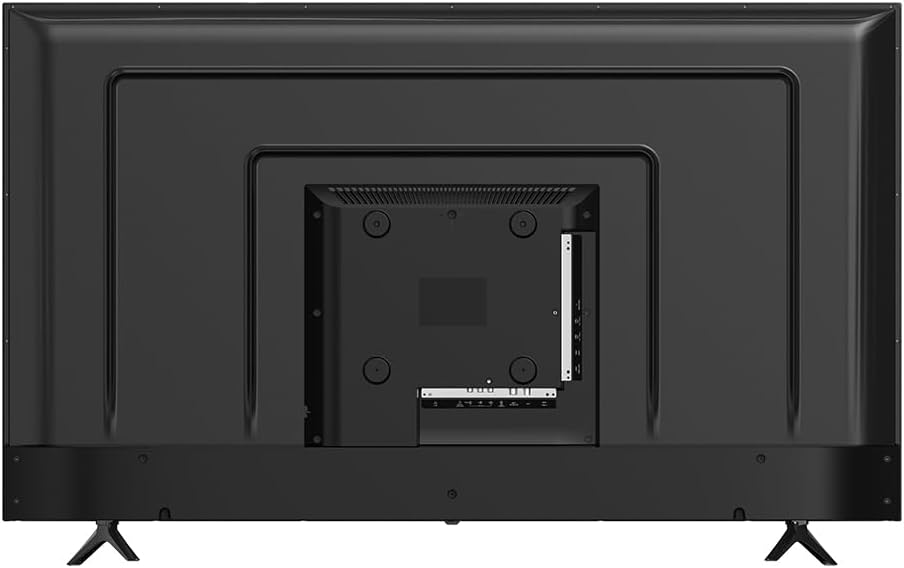
Immagine 4.1: posteriore view of the Syinix 55 Inch FHD Smart LED TV, illustrating the arrangement of connectivity ports including HDMI, USB, and antenna input.
- Porte HDMI: Collega lettori Blu-ray, console di gioco, decoder o altri dispositivi abilitati HDMI.
- Porte USB: Collegare dispositivi di archiviazione USB per riprodurre contenuti multimediali files (foto, video, musica).
- Ingresso antenna/cavo: Connect an antenna or cable TV signal for the built-in receiver.
- Porta Ethernet: Collegare un cavo Ethernet per una connessione Internet cablata.
- Uscita audio: Collegare sistemi audio esterni o soundbar.

Immagine 4.2: Prospettiva lateralefile of the Syinix 55 Inch FHD Smart LED TV, showing accessible side-mounted ports for convenience.
5. Operating Your Syinix Smart LED TV
5.1 Prima configurazione
- Collegare il cavo di alimentazione al televisore e poi a una presa a muro.
- Premere il pulsante di accensione sul telecomando o sul televisore.
- Segui le istruzioni sullo schermo per selezionare la lingua, il Paese e il fuso orario.
- Connect to your Wi-Fi network by selecting your network and entering the password, or connect via an Ethernet cable.
- Complete the initial setup steps, which may include signing into a Google account for Smart TV features.
5.2 Controllo remoto finitoview
The remote control allows you to navigate the TV's functions. Familiarize yourself with the main buttons:
- Energia: Accende/spegne la TV.
- Fonte: Seleziona le sorgenti di ingresso (HDMI, AV, TV).
- Pulsanti di navigazione (Su/Giù/Sinistra/Destra/OK): Navigare nei menu e confermare le selezioni.
- Volume +/-: Regola il volume.
- Canale +/-: Cambia canale.
- Casa: Accede alla schermata iniziale della Smart TV.
- Indietro: Ritorna alla schermata precedente.
- Netflix/YouTube/Other App Buttons: Accesso diretto ai servizi di streaming.
5.3 Funzionalità della Smart TV
Your Syinix Smart LED TV runs on an Android operating system, providing access to a wide range of applications and services.

Image 5.1: The Syinix Smart TV home screen, showing a user-friendly interface with quick access to popular streaming applications and search functions.
- Schermata iniziale: Access your favorite apps, recommended content, and settings from the customizable home screen.
- App Store: Scarica e installa applicazioni aggiuntive dal Google Play Store.
- Casting: Use built-in casting features to stream content from your smartphone or tablet to the TV.
- Controllo vocale: If your remote supports it, use voice commands for search and control.
5.4 Built-in Receiver
The integrated receiver allows you to access free-to-air digital television channels without an external set-top box. Connect a suitable antenna to the "ANT IN" port on the TV. Navigate to the TV's settings menu to perform a channel scan and discover available channels.
6. Cura e manutenzione
Una cura adeguata prolungherà la vita del tuo televisore.
- Pulizia dello schermo: Pulire delicatamente lo schermo con un panno morbido e privo di lanugine. Per macchie ostinate, strofinare leggermenteampPulire il panno con acqua o con un detergente specifico per schermi (non spruzzare mai direttamente sullo schermo).
- Pulizia del corpo: Utilizzare un panno morbido e asciutto per pulire la superficie del televisore.asing. Evitare detergenti abrasivi o solventi.
- Spolverare: Spolverare regolarmente le aperture di ventilazione per evitare il surriscaldamento.
- Cavo di alimentazione: Controllare periodicamente il cavo di alimentazione per eventuali segni di danneggiamento.
- Magazzinaggio: If storing the TV for an extended period, unplug it and cover it to protect against dust. Store in a cool, dry place.
7. Risoluzione Dei Problemi
Prima di contattare l'assistenza clienti, prova le seguenti soluzioni per i problemi più comuni:
| Problema | Possibile soluzione |
|---|---|
| Nessun potere |
|
| Nessuna immagine, ma l'audio è presente |
|
| Nessun suono, ma l'immagine è presente |
|
| Il telecomando non funziona |
|
| Impossibile connettersi al Wi-Fi |
|
8. Specifiche tecniche
Below are the key technical specifications for the Syinix 55 Inch FHD Smart LED TV, Model 55U51:
| Caratteristica | Dettaglio |
|---|---|
| Numero di modello | 55U51 |
| Dimensioni dello schermo | 55 pollici (diagonale visibile 140 cm) |
| Tecnologia di visualizzazione | LED FHD (Full High Definition) |
| Risoluzione | Formato: 1080p |
| Frequenza di aggiornamento | 240 GHz (Note: This value seems unusually high for a 1080p TV and might refer to a motion processing rate rather than native panel refresh rate. Please refer to product packaging for exact native refresh rate.) |
| Caratteristiche speciali | Smart Android TV, HDR support, A+ Panel, Built-in Receiver, Wi-Fi |
| Tecnologia di connettività | USB, HDMI, Ethernet, Wi-Fi |
| Proporzioni | 16:9 |
| Dimensioni del prodotto (P x L x A) | 25.7 x 123 x 76.9 cm (con supporto) |
| Peso dell'articolo | 11.2 kg |
| Componenti inclusi | Cavo di alimentazione, telecomando, supporto |
| Produttore | Gruppo di transizione |
9. Garanzia e supporto
Syinix products are manufactured to high-quality standards. This product is covered by a limited warranty from the date of purchase. Please refer to the warranty card included in your package for specific terms and conditions, including the warranty period and coverage details.
For technical support, service inquiries, or to report a problem, please contact your local Syinix authorized service center or the retailer from whom you purchased the product. Have your product model number (55U51) and purchase receipt ready when contacting support.