
Introduzione
Thank you for choosing the SEESII Cordless Impact Wrench WH10 Ultra Pro. This powerful and versatile tool is designed for efficient tightening and loosening of fasteners in various applications, from automotive repair to construction. This manual provides essential information for safe operation, proper maintenance, and optimal performance of your impact wrench. Please read it thoroughly before use and keep it for future reference.

Image: The SEESII Cordless Impact Wrench WH10 Ultra Pro with a battery attached.
Informazioni sulla sicurezza
Quando si utilizzano utensili elettrici, seguire sempre le precauzioni di sicurezza di base per ridurre il rischio di incendi, scosse elettriche e lesioni personali.
- Indossare protezioni per gli occhi: Indossare sempre occhiali protettivi o occhiali di sicurezza con protezioni laterali.
- Indossare protezioni acustiche: Prolonged use may cause hearing damage.
- Mantenere pulita l'area di lavoro: Le aree disordinate provocano incidenti.
- Evitare ambienti pericolosi: Non utilizzare utensili elettrici in damp o luoghi bagnati, o esporli alla pioggia.
- Tenere lontani i bambini: Tutti i visitatori devono essere tenuti a distanza di sicurezza dall'area di lavoro.
- Vestiti in modo appropriato: Non indossare abiti larghi o gioielli. Contenere i capelli lunghi.
- Pezzo sicuro: Utilizzare clampo una morsa per tenere fermo il pezzo in lavorazione.
- Non esagerare: Mantenere sempre un appoggio e un equilibrio adeguati.
- Strumenti di disconnessione: Disconnect the battery pack when not in use, before servicing, or when changing accessories.
- Usa lo strumento giusto: Non forzare lo strumento o l'accessorio a svolgere un lavoro per il quale non è stato progettato.
- Mantenere gli strumenti con cura: Mantieni gli strumenti affilati e puliti per prestazioni migliori e più sicure.
- Verificare la presenza di parti danneggiate: Prima di utilizzare ulteriormente lo strumento, una protezione o un'altra parte danneggiata deve essere attentamente controllata per determinare che funzioni correttamente e svolga la funzione prevista.
- Sicurezza della batteria: Use only specified battery packs. Do not incinerate the battery pack even if it is severely damaged.
Contenuto della confezione
Your SEESII Cordless Impact Wrench WH10 Ultra Pro package includes the following items:
- 1 chiave a impulsi
- 2 x 4.0Ah Battery Packs
- 1 x caricabatterie rapido
- 4 bussole a impatto (17 mm, 19 mm, 21 mm, 24 mm)
- Barra 1 x Extension
- 1 x Hard Portable Toolbox
- 1 x Manuale utente

Image: All components included in the SEESII Cordless Impact Wrench WH10 Ultra Pro kit, including the wrench, two batteries, charger, sockets, extension bar, and hard case.
Impostare
1. Carica della batteria
Before first use, fully charge both 21V/4.0Ah battery packs. The fast charger can charge the battery to approximately 80% capacity in 30 minutes. The 3-LED power indicator on the battery will show the charging status.
2. Installazione/rimozione della batteria
- Installazione: Allineare il pacco batteria alla base della chiave a impulsi e farlo scorrere finché non scatta saldamente in posizione.
- Rimozione: Press the battery release button (usually located on the side of the battery) and slide the battery pack out.

Image: A person installing a battery pack into the base of the SEESII Cordless Impact Wrench.
3. Collegamento delle prese
The impact wrench features a 1/2-inch square drive. To attach a socket, simply push it onto the square drive until it locks into place. To remove, pull the socket off the drive.

Image: A set of four impact sockets (17mm, 19mm, 21mm, 24mm) included with the wrench.
Istruzioni per l'uso
1. Accensione/spegnimento e grilletto a velocità variabile
To operate the wrench, insert a charged battery and press the variable-speed trigger. The speed of the wrench is controlled by how much you depress the trigger. A locking switch prevents accidental activation during transport.
2. Modalità di velocità
The SEESII impact wrench offers 3 optimized gear settings for various tasks:
- 1st Gear (Low): 0-1400 RPM / 1900 IPM - Ideal for delicate work and precise applications.
- 2nd Gear (Medium): 0-1900 RPM / 2500 IPM - Suitable for standard bolts and general tasks.
- 3rd Gear (High): 0-2400 RPM / 2900 IPM - For stubborn nuts and heavy-duty applications.
Use the mode selection button to cycle through the speed settings.

Image: Diagram illustrating the three speed modes (Low, Medium, High) with corresponding RPM and IPM values, along with an auto-stop feature.
3. Controllo avanti/indietro
A one-touch switch allows you to easily change the rotation direction for tightening or loosening fasteners. Ensure the switch is in the desired position before operating.
4. Auto-Stop Function
The auto-stop feature is designed to prevent over-tightening damage. In reverse mode, it helps prevent nuts or bolts from being flung out by automatically stopping rotation once the fastener is loose.

Image: Illustration of the auto-stop function preventing bolts from being flung out during reverse operation.
5. Luce da lavoro a LED
The integrated ultra-bright LED work light illuminates the work area, improving visibility in dark or dimly lit conditions.
6. High Torque Performance
The brushless motor delivers up to 750 ft-lbs (1000 N.m) tightening torque and 900 ft-lbs (1200 N.m) loosening torque, making it suitable for demanding tasks like removing rusted bolts or installing truck wheels.

Image: A person using the SEESII Impact Wrench to remove a lug nut from a vehicle wheel.

Image: A worker using the SEESII Impact Wrench on a scaffolding structure.
7. Prodotto finitoview Video
Video: Una panoramica completaview and feature introduction of the SEESII Cordless Impact Wrench. This video demonstrates the tool's capabilities and various components.
8. Torque Demonstration Video
Video: A short demonstration highlighting the 900 ft-lbs of power, showing the wrench breaking free stubborn bolts.
Manutenzione
Proper maintenance ensures the longevity and optimal performance of your impact wrench.
- Pulizia: Pulire regolarmente l'esterno dell'utensile con un panno morbido eamp panno. Non utilizzare prodotti chimici aggressivi o detergenti abrasivi. Mantenere le aperture di ventilazione libere da polvere e detriti.
- Cura della batteria: Conservare le batterie in un luogo fresco e asciutto, lontano dalla luce solare diretta e da temperature estreme. Non conservare batterie completamente scariche per periodi prolungati.
- Ispezione: Periodically inspect the tool for any signs of damage, loose screws, or worn parts. If any damage is found, discontinue use and contact customer support.
- Magazzinaggio: When not in use, store the impact wrench and its accessories in the provided hard portable toolbox, in a dry, secure location out of reach of children.
Risoluzione dei problemi
Se riscontri problemi con la tua chiave a impulsi, fai riferimento ai seguenti passaggi comuni per la risoluzione dei problemi:
| Problema | Possibile causa | Soluzione |
|---|---|---|
| Lo strumento non si avvia | Battery not charged or improperly installed; Locking switch engaged | Ensure battery is fully charged and correctly inserted. Disengage the locking switch. |
| Potenza/coppia ridotta | Low battery charge; Incorrect speed mode selected | Recharge battery. Select a higher speed mode (2nd or 3rd gear). |
| Surriscaldamento | Prolonged heavy use; Blocked ventilation | Allow tool to cool down. Clear any obstructions from ventilation slots. The intelligent chip includes overheating protection. |
| La presa non si collega saldamente | Debris in square drive; Worn square drive or socket | Clean the square drive. Replace worn sockets or contact support if the drive is damaged. |
Se il problema persiste dopo aver provato queste soluzioni, contattare l'assistenza clienti SEESII.
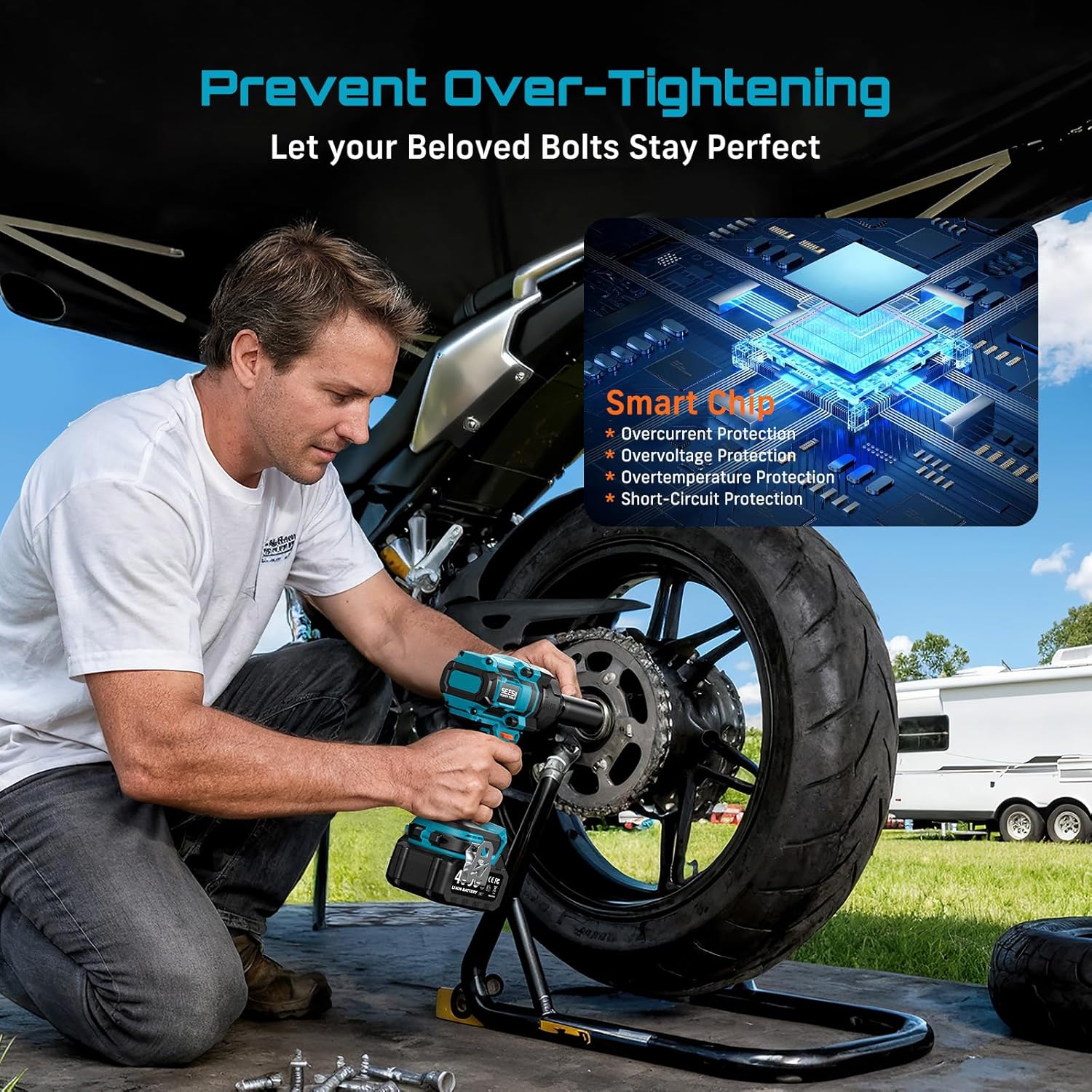
Image: A visual representation of the smart chip inside the SEESII Impact Wrench, highlighting its protection features against overcurrent, overvoltage, overtemperature, and short-circuits.
Specifiche
| Caratteristica | Dettaglio |
|---|---|
| Marca | Sesii |
| Numero di modello | WH10 Ultra Pro |
| Materiale | Metal, Chrome Vanadium Steel |
| Peso dell'articolo | 4 libbre (circa 1.8 kg) |
| Stile della testa | Attacco quadro (1/2 pollice) |
| Coppia di serraggio massima | 750 ft-lbs (1000 N.m) |
| Coppia massima di allentamento | 900 ft-lbs (1200 N.m) |
| Modalità di funzionamento | Batteria |
| Voltage | 21 Volt |
| Capacità della batteria | 2 batterie agli ioni di litio da 4.0 Ah |
| Velocità a vuoto (giri/min) | Gear 1: 0-1400 RPM Gear 2: 0-1900 RPM Gear 3: 0-2400 RPM |
| Impatti al minuto (IPM) | Gear 1: 0-1900 IPM Gear 2: 0-2500 IPM Gear 3: 0-2900 IPM |
| Dimensioni (L x P x A) | 6.46 x 2.76 x 8.58 pollici (circa) |
| Caratteristiche | Brushless Motor, Variable Speed Trigger, 3 Speed Modes, Forward/Reverse Control, Auto-Stop Function, LED Work Light, Smart Protection Chip |
Garanzia e supporto
The SEESII Cordless Impact Wrench WH10 Ultra Pro comes with a 3 anno di garanzia del produttore against defects. For warranty claims, technical assistance, or any product-related inquiries, please contact Seesii customer support. Keep your purchase receipt as proof of purchase.
Manufacturer: Seesii