
1. Introduzione
Thank you for choosing the TECLAST Mini PC N15. This compact and powerful mini computer is designed for a wide range of applications, from home entertainment and office tasks to creative work and light gaming. Featuring an Intel N5095 processor, 16GB DDR4 RAM, and a 512GB PCI-e 3.0 SSD, it offers efficient performance in a small form factor. This manual provides essential information for setting up, operating, maintaining, and troubleshooting your device.
2. Contenuto della confezione
Please verify that all items listed below are included in your package. If any items are missing or damaged, please contact TECLAST customer support.
- 1x TECLAST N15 Mini PC
- 1x Manuale utente
- 1x cavo HDMI
- 1x supporto VESA
- 1x adattatore di alimentazione
- 1x Cavo di alimentazione

Image: Package contents of the TECLAST N15 Mini PC.
3. Prodotto finitoview
3.1. Caratteristiche principali
- Processore: Intel N5095 (4 Cores, 4 Threads, up to 2.9GHz Turbo Frequency)
- Grafica: Grafica Intel UHD
- Memoria: 16 GB di RAM DDR4
- Magazzinaggio: 512GB PCI-e 3.0 SSD
- Connettività: Dual 2.5GbE RJ45 Ethernet, Wi-Fi (2.4G+5G ac), Bluetooth 4.2
- Uscita video: Supports up to three 4K displays (HDMI, DisplayPort, Full-Function Type-C)
- Porte: Multiple USB 3.2, USB 2.0, Full-Function Type-C, DisplayPort, HDMI, COM Port, Micro SD Card Reader, Headphone Output, Microphone Input
- Progetto: Compact (0.53L volume, 400g weight), Aluminum Body, VESA Mountable

Image: Intel N5095 Processor specifications and architecture.
3.2. Porte e interfacce
The TECLAST N15 Mini PC offers a comprehensive set of ports for versatile connectivity:
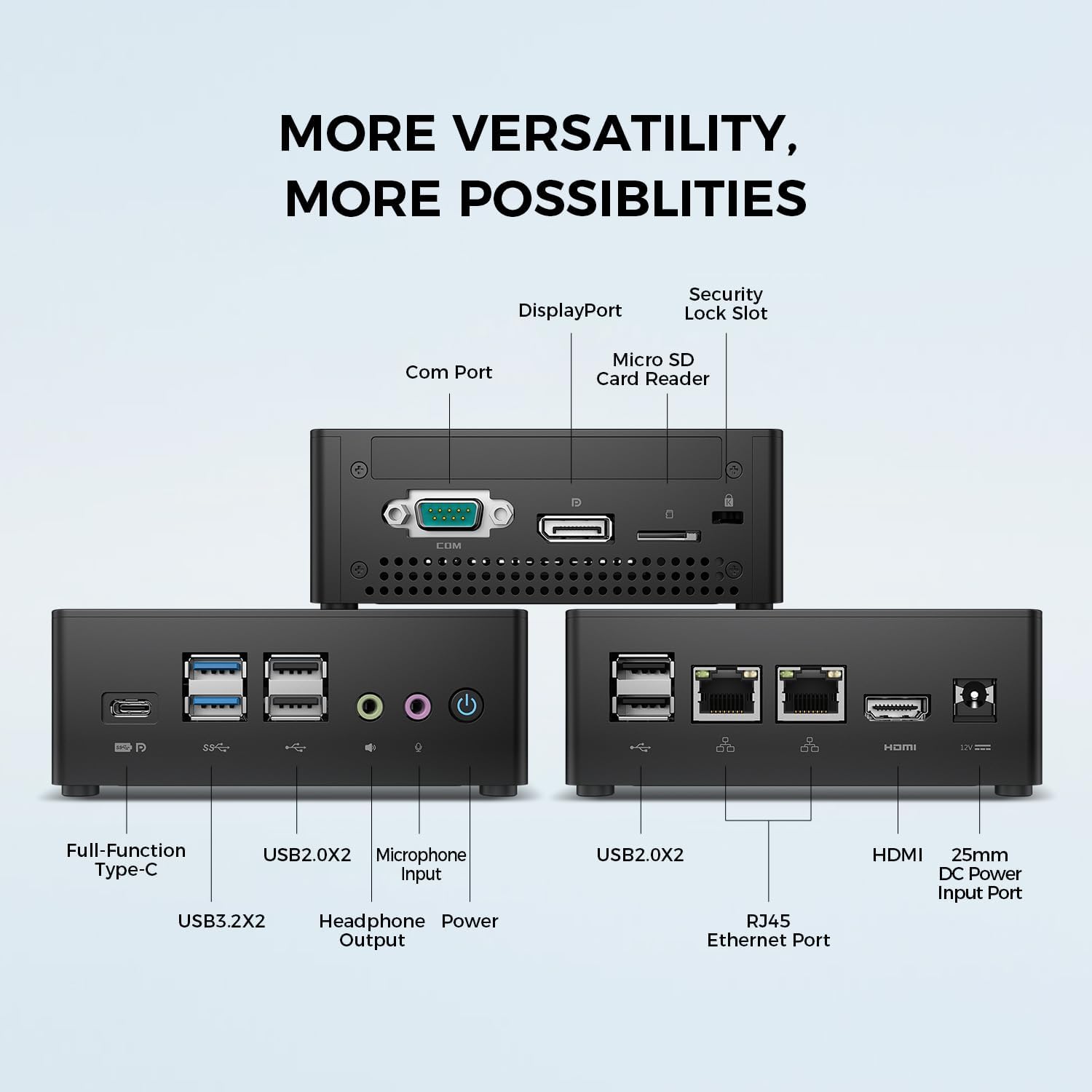
Immagine: dettagliata view of the TECLAST N15 Mini PC's front, side, and rear ports.
- Pannello frontale: Full-Function Type-C (supports charging, data, video, audio), 2x USB 3.2, 2x USB 2.0, Headphone Output, Microphone Input, Power Button.
- Pannello laterale: COM Port, DisplayPort, Micro SD Card Reader, Security Lock Slot.
- Pannello posteriore: 2x USB 2.0, 2x RJ45 Ethernet Ports (2.5GbE), HDMI, DC Power Input.

Image: Dual 2.5GbE RJ45 Ethernet Ports for high-speed networking.
3.3. Sistema di raffreddamento
The N15 Mini PC is designed for efficient heat dissipation to ensure stable and quiet operation. It features a 15W TDP, nickel-plated heat pipe, and a turbo fan, providing over 16000mm² of heat dissipation area.

Image: Internal cooling system design for quiet and efficient operation.
3.4. Design compatto
With a compact volume of approximately 0.53L and a weight of 400g, the N15 Mini PC is highly portable and can be easily integrated into any workspace. Its aluminum body ensures durability.

Image: Compact size and lightweight design of the Mini PC.
4. Istruzioni per l'installazione
4.1. Collegamento di periferiche
- Connetti il monitor: Use the provided HDMI cable to connect your monitor to the HDMI port on the Mini PC. Alternatively, use a DisplayPort cable or a Full-Function Type-C cable for compatible monitors.
- Collegare tastiera e mouse: Plug your USB keyboard and mouse into any available USB ports on the Mini PC.
- Connettiti alla rete (facoltativo): For a wired connection, connect an Ethernet cable from your router or modem to one of the RJ45 ports on the Mini PC. For wireless, ensure your Wi-Fi network is available during initial setup.
- Connetti alimentazione: Connect the power adapter to the DC Power Input port on the Mini PC, then plug the power cable into a wall outlet.
4.2. Accensione e configurazione iniziale
- Premere il pulsante di accensione sulla parte anteriore del Mini PC.
- The system will boot up. If it's the first time, it will guide you through the Windows operating system setup process. Follow the on-screen instructions to configure language, region, network, and user accounts.
- Assicurati che tutti i driver siano installati. In genere, Windows Update gestisce questa operazione automaticamente.
5. Istruzioni per l'uso
5.1. Funzionamento di base
Once setup is complete, your TECLAST N15 Mini PC functions like a standard desktop computer. You can launch applications, browse the internet, and manage fileutilizzando la tastiera e il mouse collegati.
5.2. Configurazione multi-display
The Mini PC supports connecting up to three 4K displays simultaneously, enhancing productivity and entertainment experiences.
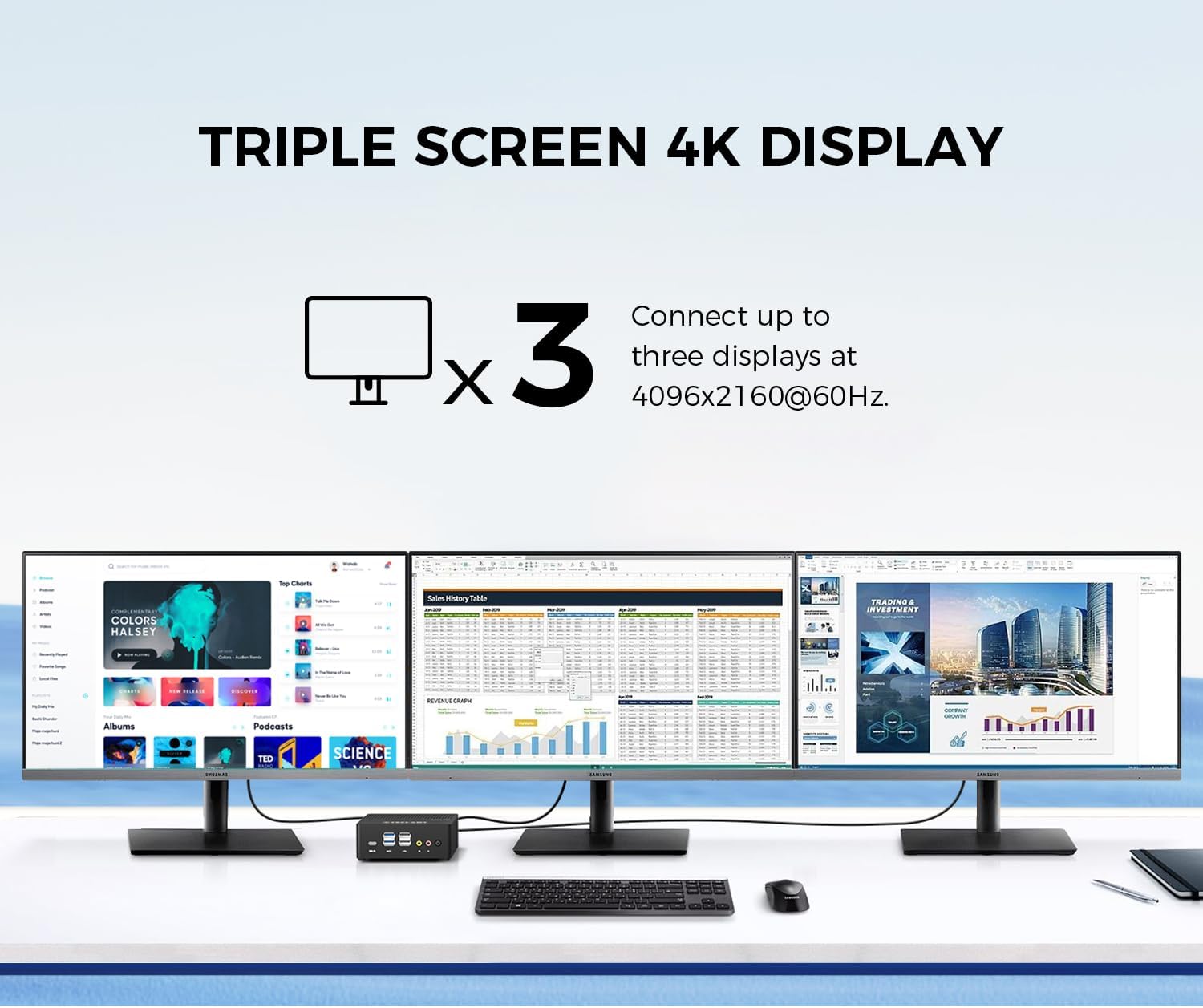
Image: Triple screen 4K display setup with the Mini PC.
- Collega il tuo monitor principale tramite HDMI.
- Connect a second monitor via DisplayPort.
- Connect a third monitor via the Full-Function Type-C port (requires a compatible Type-C to DisplayPort/HDMI adapter or monitor).
- In Windows, right-click on the desktop and select "Display settings" to configure your multiple displays (extend, duplicate, or show only on one).
5.3. Connettività wireless
The Mini PC supports 2.4G+5G ac Wi-Fi and Bluetooth 4.2 for wireless connections.
- Wifi: Access Wi-Fi settings in Windows to connect to your preferred wireless network.
- Bluetooth: Pair Bluetooth devices like keyboards, mice, or headphones through Windows Bluetooth settings.
6. Manutenzione
Una manutenzione regolare contribuisce a garantire la longevità e le prestazioni ottimali del tuo Mini PC.
- Pulizia: Utilizzare un panno morbido e asciutto per pulire l'esterno. Per rimuovere la polvere accumulata nelle prese d'aria, utilizzare aria compressa. Assicurarsi che il dispositivo sia spento e scollegato prima di pulirlo.
- Aggiornamenti software: Controllare e installare regolarmente gli aggiornamenti di Windows e dei driver per mantenere la sicurezza e le prestazioni del sistema.
- Gestione della memoria: Pulire periodicamente ciò che non è necessario filee applicazioni per liberare spazio di archiviazione e migliorare la reattività del sistema.
- Ventilazione: Assicurarsi che il Mini PC sia posizionato in un'area ben ventilata e che le prese d'aria non siano ostruite per evitare il surriscaldamento.
7. Risoluzione Dei Problemi
If you encounter issues with your TECLAST N15 Mini PC, refer to the following common troubleshooting steps:
| Problema | Possibile soluzione |
|---|---|
| Nessuna visualizzazione sul monitor | Check all cable connections (HDMI, DisplayPort, Type-C). Ensure the monitor is powered on and set to the correct input source. Try a different cable or monitor if possible. |
| Il mini PC non si accende | Verify the power adapter is securely connected to both the Mini PC and a working power outlet. Try a different power outlet. |
| Nessuna connessione internet (Wi-Fi) | Controlla che il Wi-Fi sia abilitato nelle impostazioni di Windows. Assicurati di essere connesso alla rete corretta e di aver inserito la password corretta. Riavvia il router/modem. |
| No internet connection (Wired) | Ensure the Ethernet cable is securely connected to both the Mini PC and your router/modem. Check the network status in Windows. Restart your router/modem. |
| Prestazioni lente | Close unnecessary applications. Check for background processes consuming resources. Ensure sufficient free storage space. Run a system scan for malware. |
| Peripheral devices not recognized | Try connecting the device to a different USB port. Ensure device drivers are installed. Restart the Mini PC. |
Se il problema persiste dopo aver provato questi passaggi, contattare l'assistenza clienti TECLAST per ulteriore assistenza.
8. Specifiche
Detailed technical specifications for the TECLAST N15 Mini PC:
| Caratteristica | Specificazione |
|---|---|
| Marca | TECLAST |
| Numero di modello | N15 |
| Modello CPU | Processore Intel Celeron N5095 |
| Velocità della CPU | Up to 2.9 GHz (Turbo Frequency) |
| Numero di processori | 4 |
| Memoria RAM installata | 16 GB DDR4 |
| Dimensione massima della memoria RAM | 16 GB |
| Capacità di archiviazione della memoria | 512 GB PCI-e 3.0 SSD |
| Coprocessore grafico | Grafica Intel UHD |
| Risoluzione massima dello schermo | 3840 x 2160 pixel (4K) |
| Interfacce di uscita video | HDMI, DisplayPort, Type-C |
| Tecnologia di connettività | Ethernet (Dual RJ45 2.5GbE), HDMI, LAN, Wi-Fi (802.11ac), Bluetooth 4.2 |
| Porte USB totali | 6 (2x USB 3.2, 4x USB 2.0) |
| Peso dell'articolo | 400 grammi |
| Consumo energetico | 15 Watt |
| Metodo di raffreddamento | Air (with Turbo Fan and Nickel-Plated Heat Pipe) |
| Colore | Nero |
9. Garanzia e supporto
TECLAST products are designed for quality and reliability. For any product-related inquiries, technical support, or warranty claims, please contact TECLAST customer service. Most questions are answered within 24 hours.
For further assistance, please visit the official TECLAST websito o contattare direttamente i loro canali di supporto.
10. Video del prodotto
Guarda questo video ufficiale del prodotto per una panoramica visivaview of the TECLAST N15 Mini PC's features and connectivity.
Video: Oltreview of the TECLAST N15 Mini PC, showcasing its design, ports, and internal components.