
symcode 1D Laser Blue white
Symcode 1D Barcode Scanner User Manual
Model: 1D Laser Blue white
1. Introduzione
Thank you for choosing the Symcode USB 1D Barcode Scanner. This handheld wired CCD laser barcode reader is designed for efficient and accurate scanning of 1D barcodes from both printed materials and digital screens. It is an ideal solution for various applications including warehouses, libraries, supermarkets, and point-of-sale (POS) systems.
This manual provides comprehensive instructions on setting up, operating, and maintaining your scanner to ensure optimal performance and longevity.

Complessivamente view of the Symcode 1D Barcode Scanner with its USB cable.
2. Caratteristiche principali
- 1D CCD Image Scanning Technology: Equipped with an advanced CCD sensor for quick and accurate capture of 1D codes from paper and screens, including deformed, smudged, damaged, fuzzy, or reflective barcodes.
- Modalità di scansione versatili: Features Key Trigger mode, Auto-induction mode, and Continuous Mode for flexible operation.
- Costruzione durevole: Ergonomic design with high-quality ABS material ensures resistance to drops from 2m high, providing long service life.
- Extensive 1D Barcode Support: Compatible with UPC/EAN, UCC/EAN 128, Code 39, Code 93, Code 128, Codabar, Interleaved 2 of 5, Discrete 2 of 5, MSI, Code 11, RSS variants, Chinese 2 of 5, and more.
- Output personalizzabile: Offers 180 configurable options for prefix, suffix, and termination strings.
- Ampia gamma di applicazioni: Suitable for use in supermarkets, convenience stores, warehouses, libraries, bookstores, drugstores, and retail shops for various management tasks.
3. Contenuto della confezione
Si prega di verificare che tutti gli articoli siano presenti nel pacco:
- 1 x Symcode CCD Barcode Scanner
- 1 x Manuale utente (questo documento)
- 1 cavo USB
4. Impostazione
4.1 Collegamento dello scanner
The Symcode 1D Barcode Scanner is a plug-and-play device. No drivers are typically required for most operating systems.
- Locate an available USB port on your computer (Desktop, Laptop) or compatible device.
- Inserire il connettore USB del cavo dello scanner nella porta USB.
- The scanner will typically emit a short beep and/or a light indicator will turn on, signifying successful connection and readiness for use.

The scanner connects to a laptop via its 1.6m (5.2ft) USB cable, compatible with Linux, Windows, iOS, and Android operating systems.
5. Funzionamento dello scanner
5.1 Scansione di base
To scan a barcode, point the scanner's laser beam at the barcode you wish to read and press the trigger button (if in Key Trigger mode). The scanner will emit a successful scan beep and the data will be transmitted to your connected device as if typed by a keyboard.

The scanner can read 1D barcodes from both printed labels and digital screens, such as a smartphone display.
5.2 Modalità di scansione
Lo scanner supporta tre modalità di scansione principali:
- Modalità di attivazione chiave: Press the trigger to activate the scan. Release to stop.
- Modalità di autoinduzione: Lo scanner rileva automaticamente un codice a barre nel suo campo di view e lo scansiona senza dover premere il grilletto.
- Modalità continua: The scanner continuously emits the laser beam, scanning any barcode that passes through its field.
Refer to the included configuration guide (often a set of barcodes) to switch between these modes. If auto-sensing is inactive, scan the appropriate configuration barcode to enable it.
5.3 Impostazioni audio
The scanner provides audible feedback for successful scans. You can turn this sound on or off according to your preference by scanning specific configuration barcodes.
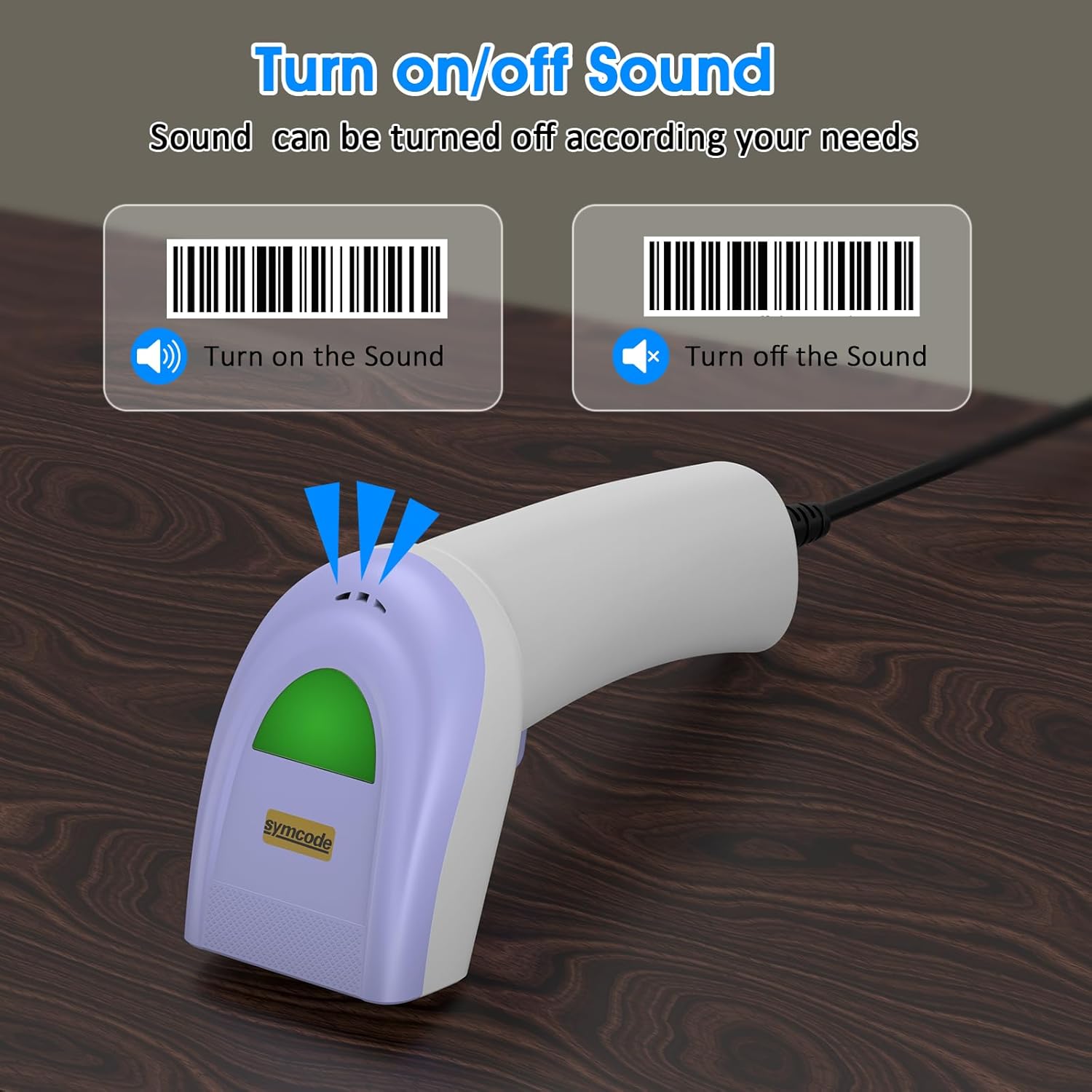
Scan specific barcodes to enable or disable the scanner's sound feedback.
5.4 Customizing Data Output (Prefix/Suffix)
The scanner allows you to add custom prefixes or suffixes to the scanned barcode data. This feature is useful for integrating scanned data into specific software or databases that require additional identifiers.

The scanner can customize scanned data by adding prefixes or suffixes. Examples: RL123456789 (with prefix), 12345RL6789 (with middle text), 123456789RL (with suffix).
5.5 Tipi di codici a barre supportati
The Symcode 1D Barcode Scanner has excellent decoding ability for a wide range of common 1D barcodes.

The scanner supports various 1D barcode types, including CODE 128 (1234567890), UPC A (123456789012), Frauded Barcode (1234567890135), Profiled Barcode (4603146002134), Industrial 2 of 5 (987612), ITF, Folded Barcode, and Color Barcode.
6. Manutenzione
Per garantire la longevità e le prestazioni ottimali del tuo scanner di codici a barre, segui queste semplici linee guida per la manutenzione:
- Pulizia: Utilizzare un panno morbido e asciutto per pulire l'esterno dello scanner. Per la finestra di scansione, utilizzare un panno per la pulizia delle lenti o un panno morbido leggermente imbevuto di acqua.ampcon un detergente delicato e non abrasivo. Evitare prodotti chimici aggressivi o materiali abrasivi.
- Magazzinaggio: Conservare lo scanner in un luogo fresco e asciutto, lontano dalla luce solare diretta e da temperature estreme.
- Gestione: While the scanner is designed to be durable, avoid unnecessary drops or impacts. Do not pull the cable excessively or bend it sharply.
7. Risoluzione Dei Problemi
If you encounter issues with your Symcode barcode scanner, please refer to the following common problems and solutions:
| Problema | Possibile causa | Soluzione |
|---|---|---|
| Lo scanner non si accende o non risponde. | Cavo USB non collegato correttamente o porta USB difettosa. | Assicurati che il cavo USB sia collegato saldamente sia allo scanner che al computer. Prova una porta USB diversa. |
| Lo scanner emette un segnale acustico ma non vengono trasmessi dati. | Incorrect output mode or software not ready to receive input. | Ensure your cursor is in a text field or application ready to receive input. Check scanner configuration for output mode (e.g., HID Keyboard Emulation). |
| Lo scanner non legge alcuni codici a barre. | Barcode type not enabled, damaged barcode, or insufficient lighting. | Refer to the configuration guide to enable all necessary barcode types. Ensure the barcode is clear and well-lit. Try scanning from a different angle or distance. |
| Lo scanner legge lentamente o a intermittenza. | Dirty scanning window or interference. | Clean the scanning window as described in the Maintenance section. Ensure no obstructions are blocking the laser. |
If the problem persists after trying these solutions, please contact Symcode customer support for further assistance.
8. Specifiche
| Caratteristica | Specificazione |
|---|---|
| Dimensioni | 165 x 63 x 87 mm (6.5 x 2.48 x 3.43 pollici) |
| Peso | 156 g (5.5 once) |
| Sorgente luminosa | 650nm~670nm visible laser |
| Velocità di scansione | 100 scansioni/sec |
| Read Preciseness | 0.1 mm (4 mil) |
| Contrasto di stampa | 30% minimo |
| Profondità di campo | 0~600mm (0.33mm, PCS 90%) |
| Ambito di scansione | 10mm~250mm |
| Distanza di lettura | 2.5~600mm (100% UPC/EAN) |
| Capacità di decodifica | EAN-8/13, UPC-A/E, Code 39/93/128, EAN-128, Codabar, Industrial 2 of 5, Interleave 2 of 5, Matrix 2 of 5, MSI etc. |
| Tasso di errore di bit | 1 / 5 milioni |
| Consumo attuale | 85mA (working), 36mA (storage) |
| Interfaccia | USB |
| Temperatura di esercizio | 0℃~45℃ (32°F~113°F) |
| Temperatura di conservazione | -20℃~60℃ (-4°F~140°F) |
| Umidità | 5%~95% senza condensa |
| Materiale | ABS+PC |
| Dispositivi compatibili | Desktop, portatile |
| Fonte di alimentazione | Elettrico con cavo |

The scanner is compact, with dimensions of 1.97in/5cm width, 2.76in/7cm depth, and 5.5in/14cm height, and weighs only 181g (excluding cable).

The compact and streamlined design of the Symcode scanner (left) offers a more comfortable and practical user experience compared to larger, heavier alternatives (right).
9. Garanzia e supporto
Symcode products are manufactured to high-quality standards. This product comes with a standard manufacturer's warranty against defects in materials and workmanship. Please refer to the warranty card included in your package or visit the official Symcode websito per termini e condizioni di garanzia dettagliati.
For technical support, troubleshooting assistance, or any inquiries regarding your Symcode 1D Barcode Scanner, please contact Symcode customer service through the contact information provided on the product packaging or the official Symcode websito. Quando contatti l'assistenza, tieni a portata di mano il modello del tuo prodotto e i dettagli di acquisto.
Ask a question about this manual
Ask about setup, troubleshooting, compatibility, parts, safety, or missing instructions. Manuals+ will review the question and use this page’s manual context to help answer it.