
1. Introduzione
Thank you for choosing TTQ Open Ear Headphones, Model CT26. These true wireless sports earbuds are designed to provide a comfortable listening experience while allowing you to remain aware of your surroundings. Featuring Bluetooth 5.3 connectivity, IPX7 waterproofing, and crystal-clear call quality, they are ideal for various activities including running, cycling, workouts, and driving. This manual will guide you through the setup, operation, and maintenance of your new headphones.
2. Contenuto della confezione
Si prega di verificare che tutti gli articoli siano presenti nel pacco:
- TTQ Open Ear Headphones (Left and Right Earbuds)
- Custodia di ricarica
- Cavo di ricarica USB-C
- Manuale d'uso

Immagine: The TTQ Open Ear Headphones, Model CT26, displayed within their open charging case. The case features an LED digital power display indicating the battery level of both the case and the individual earbuds.
3. Prodotto finitoview
The TTQ CT26 headphones feature an innovative open-ear design with flexible earhooks, ensuring comfort and stability during extended use. This design allows ambient sounds to be heard, enhancing safety in outdoor environments.

Immagine: A person wearing the TTQ Open Ear Earbuds, demonstrating how the open-ear design sits comfortably outside the ear canal, allowing for situational awareness.

Immagine: Two individuals cycling outdoors, both wearing TTQ Open Ear Headphones. This illustrates the product's suitability for sports and activities where awareness of surroundings is crucial for safety.
4. Impostazione
4.1 Ricarica delle cuffie e della custodia
Before first use, fully charge the headphones and the charging case. Connect the provided USB-C charging cable to the charging port on the case and a power source. The LED display on the charging case will show the battery percentage, and individual earbud charge indicators will light up during charging.
- A full charge provides up to 8 hours of music playtime or 9 hours of call time for the earbuds.
- La custodia di ricarica estende la durata totale di riproduzione fino a 36 ore.

Immagine: The TTQ charging case with its lid open, showcasing the digital LED display that indicates the battery percentage of the case and the charging status of the earbuds. A USB-C charging port is visible at the front.
4.2 Associazione con il dispositivo
- Assicurati che le cuffie siano cariche.
- Open the charging case. The earbuds will automatically enter pairing mode, indicated by a flashing light (if applicable, refer to product specific light indicators).
- Sul tuo dispositivo (smartphone, tablet, computer), vai alle impostazioni Bluetooth e attiva il Bluetooth.
- Cercare available devices and select "CT26" from the list.
- Una volta connessi, gli auricolari indicheranno l'avvenuta associazione (ad esempio, tramite un messaggio vocale o una luce fissa).
Se il Bluetooth è abilitato sul dispositivo, le cuffie si riconnetteranno automaticamente all'ultimo dispositivo associato quando vengono estratte dalla custodia.

Immagine: A visual representation of Bluetooth 5.3 technology, showing a smartphone's Bluetooth settings screen with 'CT26' listed as a connected device, illustrating the stable and fast connection capability.
5. Istruzioni per l'uso
The TTQ CT26 headphones feature a physical button for easy control of various functions.
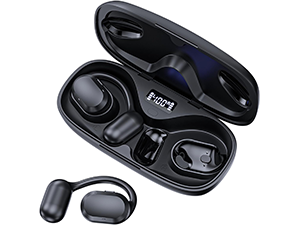
Immagine: A diagram illustrating the single button controls on the earbud, detailing actions for pause/play, answer/hang up, rejection, volume adjustment, switching songs, and activating Siri.
5.1 Riproduzione di musica
- Riproduci/Pausa: Press the button once (x1).
- Prossima canzone: Press the button twice (x2).
- Canzone precedente: Press the button three times (x3).
- Volume su/giù: Press and hold the button for 2 seconds (Hold 2s).
5.2 Gestione delle chiamate
- Rispondi/Termina chiamata: Press the button once (x1).
- Rifiuta chiamata: Press and hold the button for 2 seconds (Hold 2s).
The headphones feature dual-mic noise-cancelling technology for clearer calls by reducing environmental noise.

Immagine: A man wearing TTQ Open Ear Headphones while holding a smartphone, illustrating the intelligent noise cancellation feature that boosts human voice and reduces environmental noise for clearer calls.
5.3 Assistente vocale
- Attiva l'Assistente vocale (Siri, Google Assistant, ecc.): Press the button three times (x3).
6. Manutenzione
To ensure the longevity and optimal performance of your TTQ Open Ear Headphones, follow these maintenance guidelines:
- Pulizia: Pulisci regolarmente gli auricolari e la custodia di ricarica con un panno morbido, asciutto e privo di lanugine. Evita di utilizzare materiali abrasivi o sostanze chimiche aggressive.
- Resistenza all'acqua: The headphones are IPX7 waterproof, meaning they can withstand submersion in up to 1 meter of water for 30 minutes. They are resistant to sweat and rain, making them suitable for workouts. However, they are not designed for swimming or prolonged submersion. Ensure the charging port is dry before charging.
- Magazzinaggio: Quando non vengono utilizzate, conservare le cuffie nella custodia di ricarica per proteggerle da polvere e danni. Conservare in un luogo fresco e asciutto, al riparo da temperature estreme.

Immagine: TTQ Open Ear Headphones and their charging case on a wet surface with water splashes, demonstrating their IPX7 waterproof rating, indicating resistance to rain and sweat.
7. Risoluzione Dei Problemi
If you encounter issues with your TTQ Open Ear Headphones, please refer to the following common solutions:
- Nessun suono/Volume basso:
- Assicurati che le cuffie siano correttamente associate e collegate al tuo dispositivo.
- Controlla il livello del volume sia delle cuffie che del dispositivo collegato.
- Assicurati che gli auricolari siano carichi.
- Problemi di accoppiamento:
- Assicurati che il Bluetooth sia abilitato sul tuo dispositivo.
- Ensure the headphones are in pairing mode (flashing indicator).
- Disattiva il Bluetooth sugli altri dispositivi nelle vicinanze che potrebbero tentare di connettersi.
- Forget/remove "CT26" from your device's Bluetooth list and try pairing again.
- Restart both your device and the headphones (by placing them back in the case and taking them out).
- Problemi di ricarica:
- Assicurarsi che il cavo di ricarica sia collegato saldamente sia alla custodia sia alla fonte di alimentazione.
- Prova un cavo USB-C e un adattatore di alimentazione diversi.
- Assicurarsi che i contatti di ricarica sugli auricolari e nella custodia siano puliti e privi di detriti.
- Connessione intermittente:
- Ensure your device is within the Bluetooth range (up to 10 meters/33 feet).
- Evitare ostacoli fisici tra le cuffie e il dispositivo.
- Ridurre al minimo le interferenze provenienti da altri dispositivi wireless.
Se il problema persiste dopo aver provato questi passaggi, contatta l'assistenza clienti.
8. Specifiche
| Caratteristica | Specificazione |
|---|---|
| Nome del modello | CT26 |
| Tecnologia di connettività | Wireless (Bluetooth) |
| Tecnologia di comunicazione wireless | Bluetooth 5.3 |
| Portata Bluetooth | 10 metri (33 piedi) |
| Livello di resistenza all'acqua | IPX7 impermeabile |
| Posizionamento dell'orecchio | Orecchio aperto |
| Fattore di forma | Vero wireless |
| Durata della batteria (auricolari) | 8 Hours (Music) / 9 Hours (Calls) |
| Tempo di riproduzione totale con custodia di ricarica | Fino a 36 ore |
| Tipo di driver audio | Driver dinamico |
| Dimensioni del driver audio | 16.2 millimetri |
| Gamma di frequenza | 20 Hz - 20,000 Hz |
| Controllo del rumore | Cancellazione attiva del rumore (per le chiamate) |
| Metodo di controllo | Pulsante fisico |
| Porta di ricarica | USB-C |
| Peso dell'articolo | 7.8 once (0.22 chilogrammi) |
| Materiale | Plastica |
| Codice UPC | 717977781312 |
9. Assistenza clienti
For any questions, concerns, or if you receive a defective product, please do not hesitate to contact TTQ customer support. We are committed to providing solutions within 24 hours.
Please visit the official TTQ store on Amazon for more information and support resources: TTQ Store