
Restmo O-HTB-1A
Manuale utente del timer per irrigazione RESTMO
Model: O-HTB-1A
Brand: Restmo
Introduzione
The RESTMO Sprinkler Timer is an advanced ball valve water timer designed for efficient and automatic watering of gardens, lawns, and various irrigation systems. It is particularly effective with zero or low water pressure setups, including rain barrels. This multi-functional timer offers automatic, manual, and rain delay modes, providing flexible control over your watering schedule.

Figure 1: RESTMO Sprinkler Timer, showing the main unit with LCD display and control dial.
Caratteristiche
- Zero and Low Pressure Watering: Optimized to work efficiently with low-pressure drip irrigation systems and zero-pressure setups, such as rain barrels, due to its ball valve mechanism.
- Multi-Functional Watering Modes: Includes Auto, Manual, and Rain Delay modes for versatile watering control.
- Easy Setup and Operation: Features an oversized dial and a large, easy-to-read LCD screen for intuitive programming of watering duration, frequency, and start times.
- Costruzione durevole: Built with a robust ball valve and rated IP54 for water and leak resistance.
- Ampia applicazione: Suitable for garden hoses, outdoor faucets, lawn sprinkler controllers, greenhouse mist systems, pool filling, birdbath drippers, and pet drinking systems.

Figure 2: Key features highlighting zero water pressure compatibility, ball valve, ease of use, and various watering modes.
Contenuto della confezione
- 1 x RESTMO Sprinkler Timer (Model O-HTB-1A)
- 1 x Manuale utente
- Note: 2 x AA Alkaline Batteries are not included.
Specifiche
| Specificazione | Valore |
|---|---|
| Frequenza di irrigazione | 1-23 ore o 1-7 giorni |
| Durata dell'irrigazione | Da 1 minuti a 4 ore e 59 minuti |
| Opzioni di ritardo per pioggia | 12 / 24 / 48 / 72 ore |
| Pressione di lavoro | 0 - 120 PSI (0 - 8 bar) |
| Portata massima | 10 GPM (35 LPM) |
| Temperatura di lavoro | 38 - 120 °F (3 - 50 °C) |
| Tipo di batteria | 2 batterie alcaline AA (non incluse) |
| Durata approssimativa della batteria | 1 anno |
| Dimensioni (L x P x A) | 4.7 x 4.3 x 2.2 pollici (12 x 11 x 5.5 cm) |
| Peso | 9 once (254 g) |
| Grado di impermeabilità | Grado di protezione IP54 |
| Compatibilità del rubinetto | Standard 3/4" Garden Hose & Faucet |

Figura 3: Esploso view of the timer showing components like filter washer, LCD screen, ball valve, and control buttons, along with key specifications.
Impostare
- Installa le batterie: Open the battery compartment. Insert 2 x AA alkaline batteries (not included), ensuring correct polarity. Close the compartment securely. Important: Do not moisten the battery or battery compartment. Keep your hands dry during installation.
- Collega al rubinetto: Connect the timer to your standard 3/4" garden faucet. Ensure the connection is tight to prevent leaks. The timer is designed to work with 0-120 PSI water pressure.
- Collegare il tubo: Connect your garden hose or irrigation system to the bottom outlet of the timer.
- Turn on Faucet: Fully open your faucet to allow water pressure to the timer. The timer's ball valve will control the water flow according to your programmed schedule.
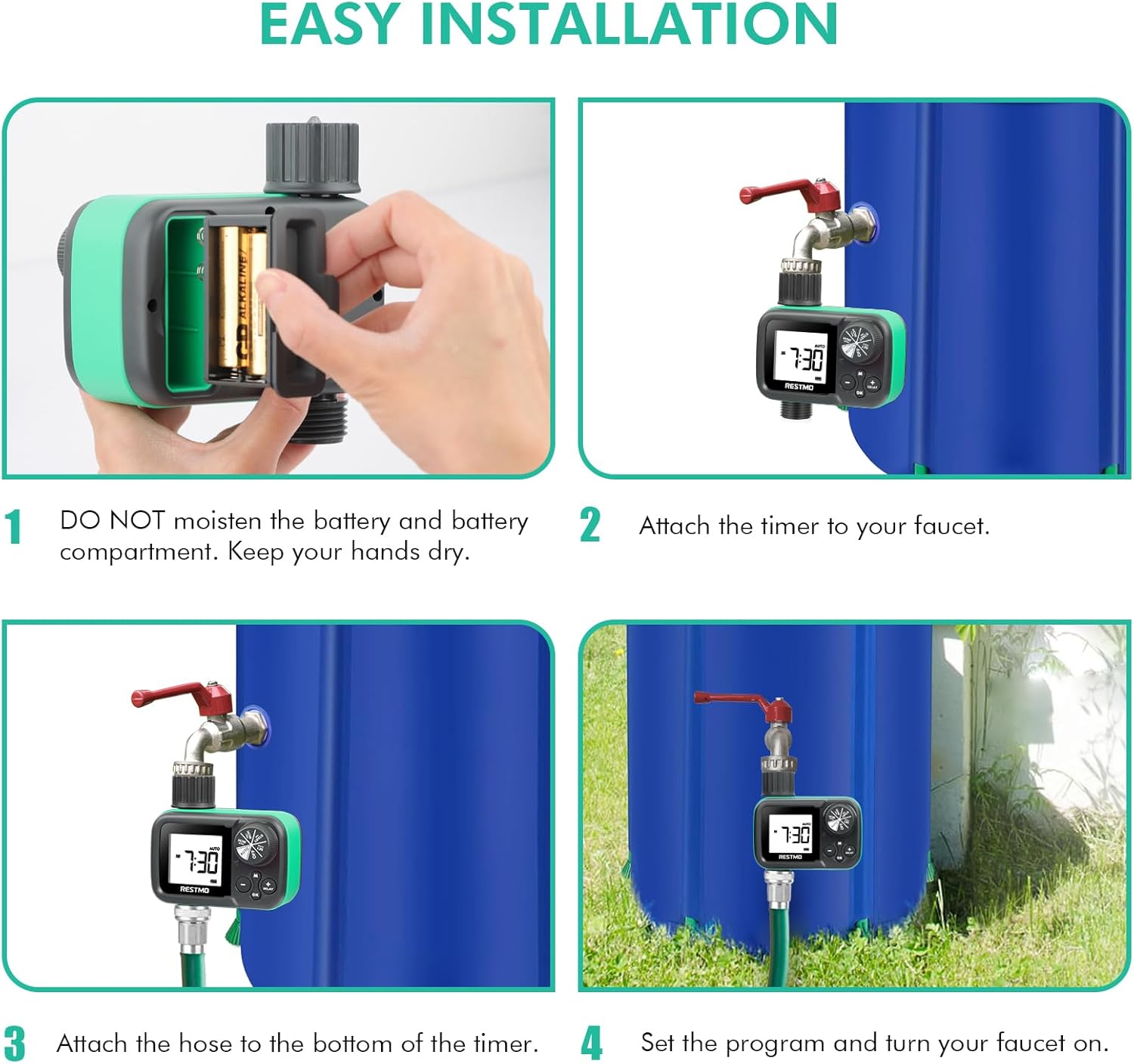
Figure 4: Visual guide for installing the timer, including battery insertion, attaching to faucet, connecting the hose, and turning on the faucet.
Operazione
The RESTMO Sprinkler Timer features a large dial for selecting different settings and buttons for adjustment. Rotate the dial to navigate through the programming options.
Posizioni del quadrante:
- IMPOSTA L'OROLOGIO: Imposta l'ora corrente.
- START TIME: Impostare l'orario di inizio desiderato per l'irrigazione.
- PER QUANTO: Set the duration of each watering cycle (1 minute to 4 hours 59 minutes).
- QUANTO SPESSO: Set the frequency of watering (every 1-23 hours or every 1-7 days).
- AUTO: Activates the automatic watering schedule based on your settings.
- OFF: Turns off all watering functions.
Passaggi di programmazione:
- Imposta l'orologio: Rotate the dial to "SET CLOCK". Use the + E - buttons to adjust the current time. Press OK per confermare.
- Imposta ora di inizio: Rotate the dial to "START TIME". Use the + E - buttons to set the desired time for watering to begin. Press OK per confermare.
- Imposta la durata dell'irrigazione (PER QUANTO TEMPO): Rotate the dial to "HOW LONG". Use the + E - buttons to set how many minutes or hours the timer should water. Press OK per confermare.
- Imposta la frequenza di irrigazione (QUANTO FREQUENTE): Rotate the dial to "HOW OFTEN". Use the + E - buttons to set how often the watering cycle should repeat (e.g., every 12 hours, every 2 days). Press OK per confermare.
- Attiva la modalità automatica: Once all settings are confirmed, rotate the dial to "AUTO". The timer will now operate according to your programmed schedule.
Irrigazione manuale:
Per avviare l'irrigazione manuale al di fuori della programmazione:
- Ensure the dial is set to "AUTO" and the timer is not in "DELAY" mode.
- Premere il tasto M (Manual) button.
- Utilizzare il + E - buttons to set the desired manual watering duration (1 minute to 299 minutes).
- Premere OK to start manual watering. The timer will water for the set duration and then return to its automatic schedule.
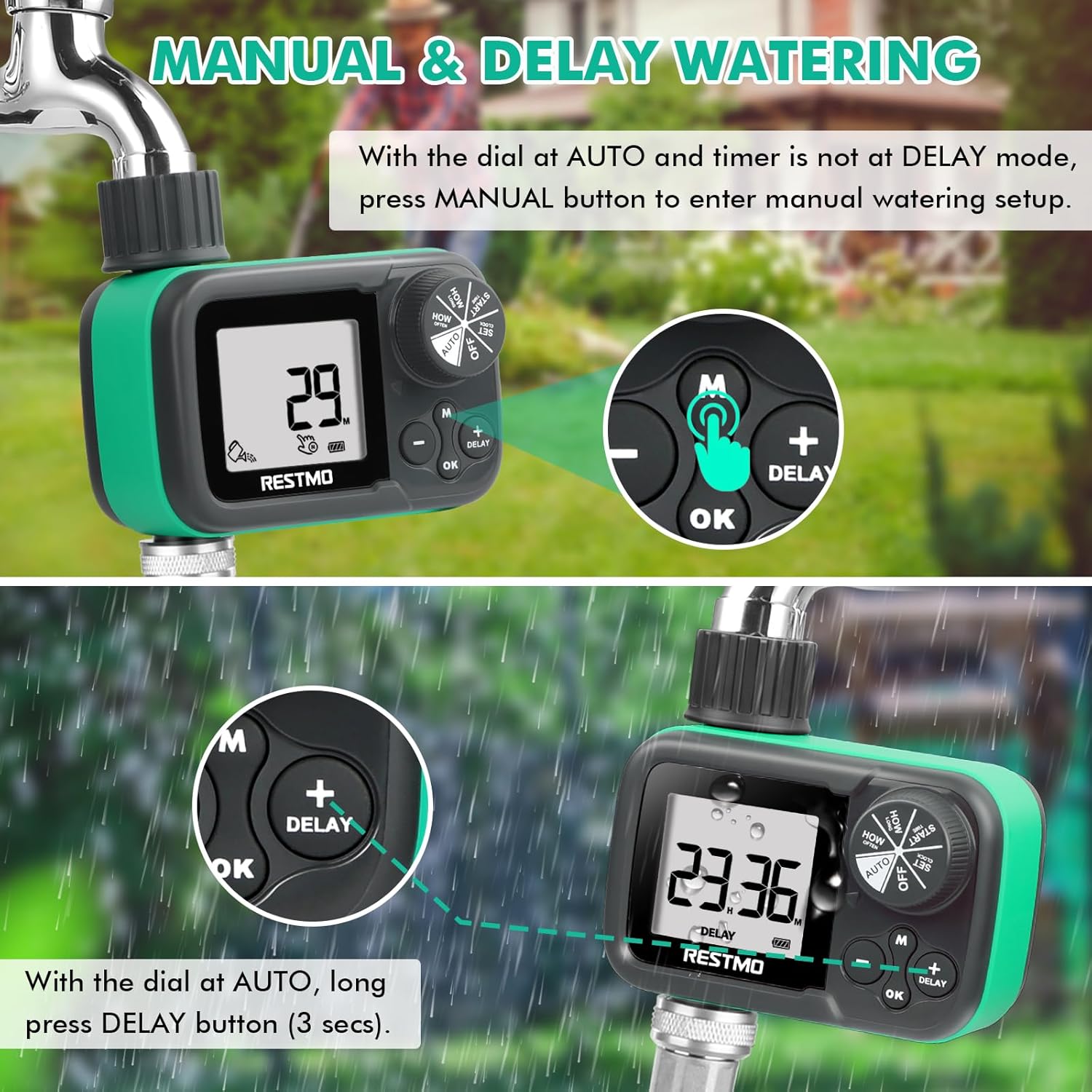
Figure 5: Visual guide for activating manual watering and rain delay functions.
Funzione di ritardo pioggia:
To temporarily pause your watering schedule due to rain or other reasons:
- Ensure the dial is set to "AUTO".
- Premere a lungo il tasto RITARDO button (for 3 seconds).
- Utilizzare il + E - buttons to select the desired delay period (12, 24, 48, or 72 hours).
- Il timer si fermerà per la durata selezionata e poi riprenderà automaticamente la programmazione.
Manutenzione
- Rimessaggio invernale: To prevent freezing damage, remove the timer from the faucet before the first frost. Dry the timer thoroughly and store it indoors in a dry, protected area during winter months.
- Sostituzione della batteria: Sostituire le batterie una volta all'anno o quando sullo schermo LCD compare l'indicatore di batteria scarica per garantire un funzionamento continuo.
- Lavatrice filtro: Periodically check the filter washer at the inlet connection for debris. Clean if necessary to maintain optimal water flow and prevent blockages.
- Pulizia: Pulisci l'esterno del timer con un panno morbido eamp panno. Non utilizzare detergenti abrasivi né immergere l'unità in acqua.

Figure 6: Important warning regarding winter storage to prevent freezing damage.
Risoluzione dei problemi
| Problema | Possibile causa | Soluzione |
|---|---|---|
| Timer not turning on / LCD blank | Batterie scariche o installate in modo errato. | Replace with fresh AA alkaline batteries, ensuring correct polarity. |
| No water flow / Low water flow | Faucet not fully open; clogged filter washer; low water pressure (if not using rain barrel); incorrect program setting. | Ensure faucet is fully open. Check and clean the filter washer. Verify water pressure is within 0-120 PSI. Confirm program settings are correct and timer is in "AUTO" mode. |
| Perdita d'acqua dai collegamenti | Loose connections; missing or damaged washer. | Tighten all connections. Ensure rubber washers are properly seated and not damaged. Replace if necessary. |
| Il timer non irriga all'ora programmata | Incorrect clock or start time setting; timer in "OFF" or "DELAY" mode; low battery. | Verify clock and start time. Ensure dial is set to "AUTO". Check battery level. |
Garanzia e supporto
RESTMO is committed to customer satisfaction and product quality.
- Garanzia: The product comes with a 100% satisfaction guarantee, a 45-day money-back guarantee, and an 18-month worry-free replacement service.
- Assistenza clienti: For any questions, issues, or support needs, please reach out to our 24/7 local customer service team.
Informazioni sui contatti:
- E-mail: support@restmo-link.com
- Phone (Toll-Free): +1 866-876-6888
- Telefono: +1 929-329-4398

Figure 7: Product packaging displaying contact details for customer support and key specifications.
Ask a question about this manual
Ask about setup, troubleshooting, compatibility, parts, safety, or missing instructions. Manuals+ will review the question and use this page’s manual context to help answer it.