
IXITAB FS8233Pro
FS8233Pro Touch Smart Digital Multimeter User Manual
Model: FS8233Pro | Brand: IXITAB
1. Introduzione
The IXITAB FS8233Pro is an advanced, automatic smart digital multimeter designed for professional electricians and DIY enthusiasts. Featuring an intelligent sensing touch screen, this device offers convenient operation and clear display for various electrical measurements. Its rechargeable lithium battery ensures long-lasting performance without the need for frequent battery replacements. The FS8233Pro is equipped with intelligent anti-burning fuse protection and a durable silicone protective case, enhancing both safety and hardware longevity. This manual provides comprehensive instructions for safe and effective use of your multimeter.
2. Informazioni sulla sicurezza
Always adhere to safety precautions when operating electrical testing equipment. Failure to do so may result in injury or damage to the device.
- Non superare i valori massimi di input specificati per ciascun intervallo di misurazione.
- Prima di effettuare le misurazioni, assicurarsi che i cavi di prova siano in buone condizioni e correttamente collegati.
- Avoid using the multimeter in wet environments or with wet hands.
- Non tentare di misurare il voltage or current on circuits exceeding the device's rated capacity.
- Scollegare sempre l'alimentazione dal circuito prima di misurare la resistenza, la capacità o la continuità.
- Prestare attenzione quando si lavora su circuiti sotto tensione.
- Fare riferimento alle normative elettriche e agli standard di sicurezza locali.
3. Contenuto della confezione
Verifica che tutti gli articoli siano presenti nel tuo pacco:
- 1 x FS8233Pro Digital Multimeter
- 1 x Manuale di istruzioni
- 1 cavo di ricarica (USB)
- 1 x coppia di cavi di prova

Image: The FS8233Pro multimeter shown with its standard accessories, including the red and black test leads and a USB charging cable.
4. Prodotto finitoview
The FS8233Pro features a large, clear LCD display and intuitive touch controls for ease of use.

Immagine: un primo piano view of the FS8233Pro's front panel, highlighting its large digital display and touch-sensitive buttons for various functions like HOLD, AUTO, NCV, Live, and input jacks.
4.1 caratteristiche principali:
- Intelligent Sensing Touch Screen: For convenient operation and clear display.
- Batteria al litio ricaricabile: Long life, USB charging.
- Rilevamento automatico: Eliminates the need for manual gear shifting.
- Intelligent Anti-Burning Fuse: Enhanced safety protection.
- Custodia protettiva in silicone: Prevents shock and protects hardware.
- Retroilluminazione: Allows clear viewin condizioni di oscurità.
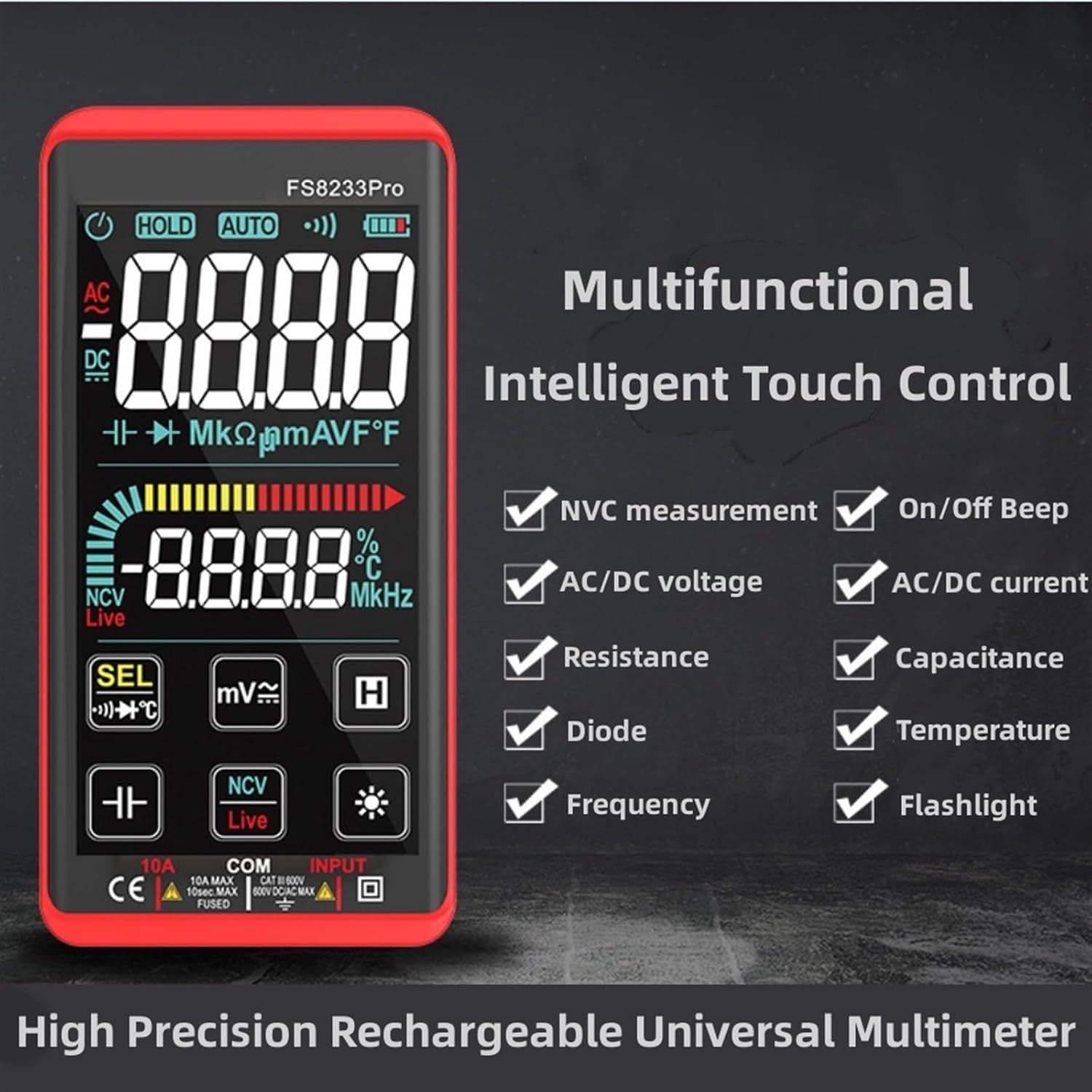
Immagine: Un'immagine promozionale mostraasing the multifunctional intelligent touch control features of the FS8233Pro, including NVC measurement, AC/DC voltage, resistance, diode, frequency, on/off beep, AC/DC current, capacitance, temperature, and flashlight.
5. Impostazione
5.1 Carica iniziale
Before first use, fully charge the multimeter's internal lithium battery. Connect the provided USB charging cable to the multimeter's charging port and to a standard USB power adapter (not included) or a computer USB port. The battery indicator on the display will show charging status.
5.2 Collegamento dei puntali di prova
Insert the red test lead into the "INPUT" jack and the black test lead into the "COM" (common) jack. Ensure they are securely inserted.
6. Istruzioni per l'uso
The FS8233Pro features automatic detection, simplifying measurement selection. Simply turn on the device and it will automatically identify the measurement type for most common functions.

Image: A hand interacting with the touch-sensitive display of the FS8233Pro multimeter, demonstrating its "Intelligent Movement Touch Sensing" for sensitive and fast measurements.
6.1 Accensione/spegnimento
Press the power button (usually indicated by a power symbol) to turn the multimeter on or off. The device will automatically shut down after approximately 15 minutes of inactivity to conserve battery life.
6.2 Volume ACtage (ACV) Misurazione
- Collegare i puntali di prova in parallelo alla tensione CAtage fonte.
- The multimeter will automatically detect AC voltage.
- Range: 0.5V-750V (Accuracy: 1%+5)
6.3 Volume CCtage (DCV) Misurazione
- Collegare i puntali di prova in parallelo alla tensione CCtage sorgente, osservando la polarità.
- The multimeter will automatically detect DC voltage.
- Range: 0.5V-1000V (Accuracy: 0.5%+3)
6.4 Misurazione della resistenza
- Prima di misurare la resistenza, assicurarsi che il circuito sia disattivato.
- Collegare i puntali di prova al componente da misurare.
- Range: 0.1Ω-99.999MΩ (Accuracy: 1%+3)
6.5 Misurazione della frequenza
- Collegare i puntali di prova alla sorgente del segnale.
- Range: 40Hz-10000Hz (Accuracy: 0.5%+3)
6.6 Misurazione della capacità
- Prima di effettuare la misurazione, assicurarsi che il condensatore sia scarico.
- Collegare i puntali di prova ai terminali del condensatore.
- Range: 10nF-60000μF (Accuracy: 4.5%+5)
6.7 Misurazione della temperatura
- Use the appropriate temperature probe (if included, or purchased separately) and connect it to the multimeter.
- Range: -40°C to 1000°C (Accuracy: 2%+5)
6.8 On & Off Beep (Continuity)
- Collegare i puntali di prova al circuito o al componente.
- If the resistance of the tested circuit is less than 50Ω, the auxiliary buzzer will sound, indicating continuity.
6.9 Test diodi
- Collegare i puntali di prova al diodo.
- The display will show the approximate diode forward voltage valore.
6.10 NCV (Volume senza contattotage) Rilevamento
- Selezionare la funzione NCV.
- Avvicinare la parte superiore del multimetro alla tensione CAtage fonte.
- There are three alarm modes (visual and audible) according to the detected voltage forza.
6.11 Live Line Identification
- Select the Live function.
- Insert the red test lead into the suspected live line.
- If it is a live line, "Live" will appear on the screen, and an alarm sound will be emitted.
7. Manutenzione
7.1 Pulizia
Pulisci il multimetro casing con annuncioamp cloth. Do not use abrasive cleaners or solvents. Ensure the device is off and disconnected from any power source before cleaning.
7.2 Conservazione
Store the multimeter in a cool, dry place, away from direct sunlight and extreme temperatures. If storing for extended periods, ensure the battery is partially charged (around 50%) to prolong its lifespan.
7.3 Cura della batteria
The built-in lithium battery is designed for long life. Avoid fully discharging the battery frequently. Recharge as needed. If the device will not be used for a long time, charge it every 3 months to maintain battery health.
8. Risoluzione Dei Problemi
| Problema | Possibile causa | Soluzione |
|---|---|---|
| Il multimetro non si accende. | La batteria è scarica. | Caricare il multimetro utilizzando il cavo USB in dotazione. |
| Letture imprecise. | Incorrect measurement mode; Damaged test leads; Environmental interference. | Ensure correct mode is selected (though often automatic); Check test leads for damage; Move away from strong electromagnetic fields. |
| Nessun segnale acustico di continuità. | Resistance is too high; Test leads not making good contact. | Ensure resistance is below 50Ω; Re-seat test leads firmly. |
| Lo spegnimento automatico avviene troppo rapidamente. | Inactivity timer. | The device is designed to shut down after approximately 15 minutes of inactivity. This is normal operation. |
9. Specifiche
| Parametro | Intervallo/Valore | Precisione |
|---|---|---|
| Volume ACtage(ACV) | 0.5V-750V | (1% + 5) |
| Volume DCtage(DCV) | 0.5V-1000V | (0.5% + 3) |
| Resistenza | 0.1Ω-99.999MΩ | (1% + 3) |
| Frequenza | Frequenza | (0.5% + 3) |
| Capacità | 10nF-60000μF | (4.5% + 5) |
| Temperatura | -40°C a 1000°C | (2% + 5) |
| Continuity Beep Threshold | < 50Ω | N / A |
| Spegnimento automatico | ca. 15 minuti di inattività | N / A |
| Fonte di alimentazione | Batteria al litio ricaricabile | N / A |
| Produttore | IXITAB | N / A |
| Modello | FS8233Pro | N / A |
10. Garanzia e supporto
For warranty information and technical support, please refer to the contact details provided by your retailer or visit the official IXITAB websito. Conservare la ricevuta d'acquisto come prova d'acquisto per eventuali reclami in garanzia.
For additional assistance, you may contact the seller directly through the platform where the product was purchased.
Ask a question about this manual
Ask about setup, troubleshooting, compatibility, parts, safety, or missing instructions. Manuals+ will review the question and use this page’s manual context to help answer it.