
Introduzione
Thank you for choosing the TECKNET Wireless Rechargeable Silent Mouse. This manual provides detailed instructions to help you get the most out of your new device. Please read it carefully before use and keep it for future reference.
Contenuto della confezione
- TECKNET Wireless Rechargeable Silent Mouse
- Ricevitore USB
- Cavo di ricarica USB-C
- Manuale dell'utente (questo documento)
Prodotto finitoview
Familiarizzare con i componenti del mouse:
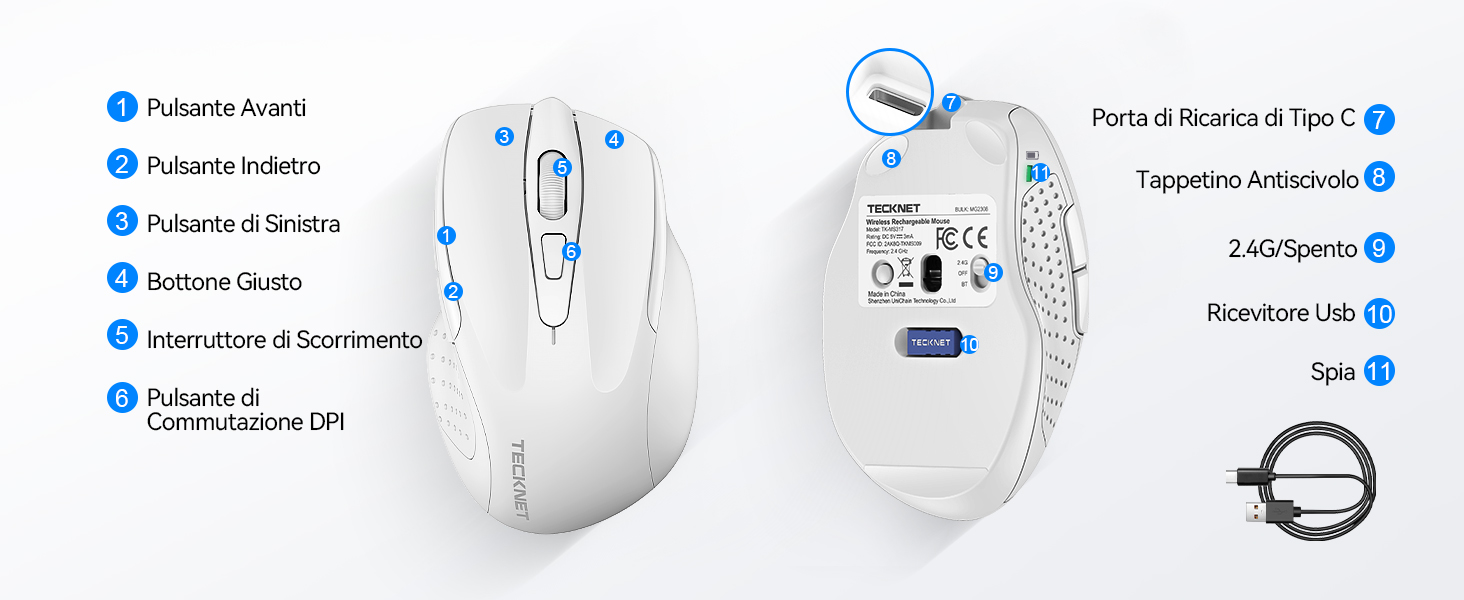
Figura 1: Diagramma dei componenti del mouse
- Pulsante Avanti
- Pulsante Indietro
- Pulsante sinistro
- Pulsante destro
- Rotella di scorrimento
- Pulsante interruttore DPI
- Porta di ricarica di tipo C
- Pad antiscivolo
- 2.4G/Off Switch
- Ricevitore USB di archiviazione
- Spia luminosa
Istruzioni di installazione
1. Ricarica del mouse
Prima del primo utilizzo, si consiglia di caricare completamente il mouse. Collegare il cavo di ricarica USB-C in dotazione alla porta di ricarica Type-C del mouse e l'altra estremità a una fonte di alimentazione USB (ad esempio, una porta USB del computer, un adattatore da parete USB).

The mouse features a 700mAh built-in battery, providing extended usage on a single charge. The indicator light will show charging status.
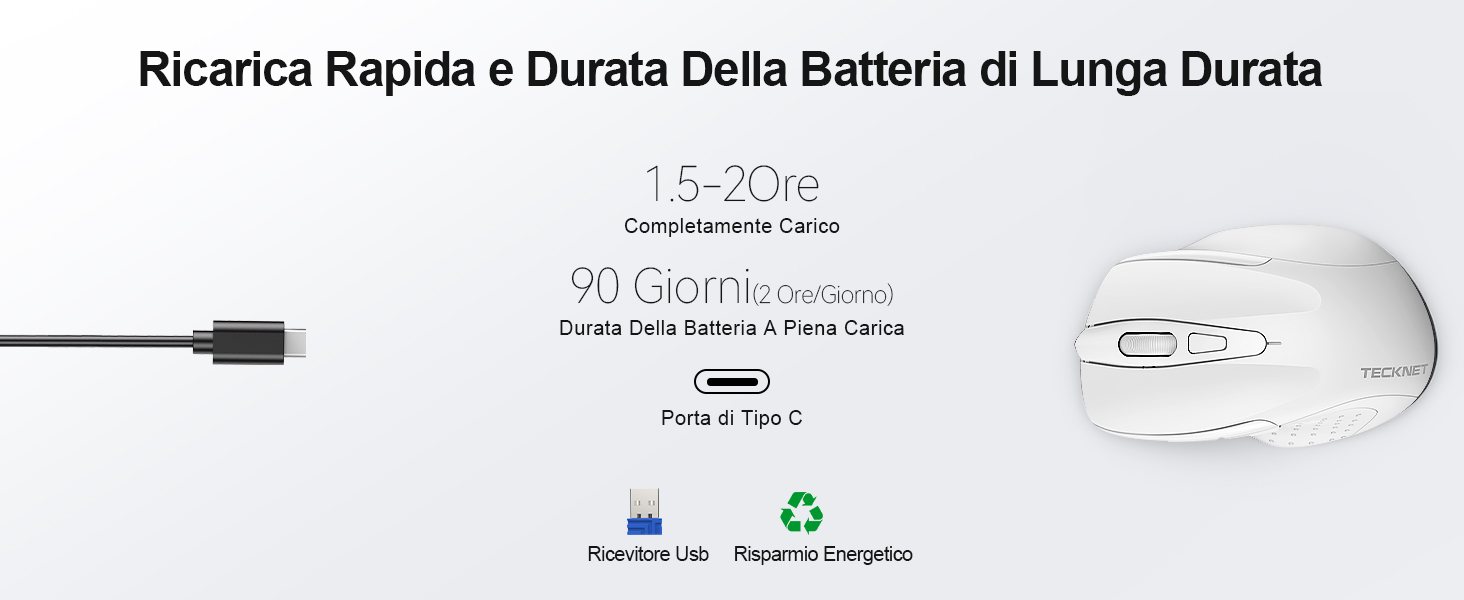
A full charge takes approximately 1.5-2 hours and can last up to 90 days (based on 2 hours/day usage).
2. Collegamento del ricevitore USB
The mouse uses a 2.4GHz wireless connection for reliable data transmission.
- Individuare il ricevitore USB riposto nello scomparto sul lato inferiore del mouse.
- Plug the USB receiver into an available USB port on your computer (PC, laptop, Chromebook, etc.).
- Turn on the mouse using the 2.4G/Off switch located on the underside.
- Your computer should automatically detect and install the necessary drivers. The mouse is plug-and-play, requiring no additional software.

The effective working distance is up to 15 meters.

Ensure the mouse is switched on after plugging in the receiver.
Istruzioni per l'uso
Regolazione DPI
The mouse features 6 adjustable DPI levels (800/1200/1600/2400/3200/4800) to suit various tasks, from precise targeting to fast gaming movements. Press the DPI switch button (Component 6 in Figure 1) to cycle through the DPI settings.

Regola i DPI per ottenere la velocità e la precisione ottimali del cursore.
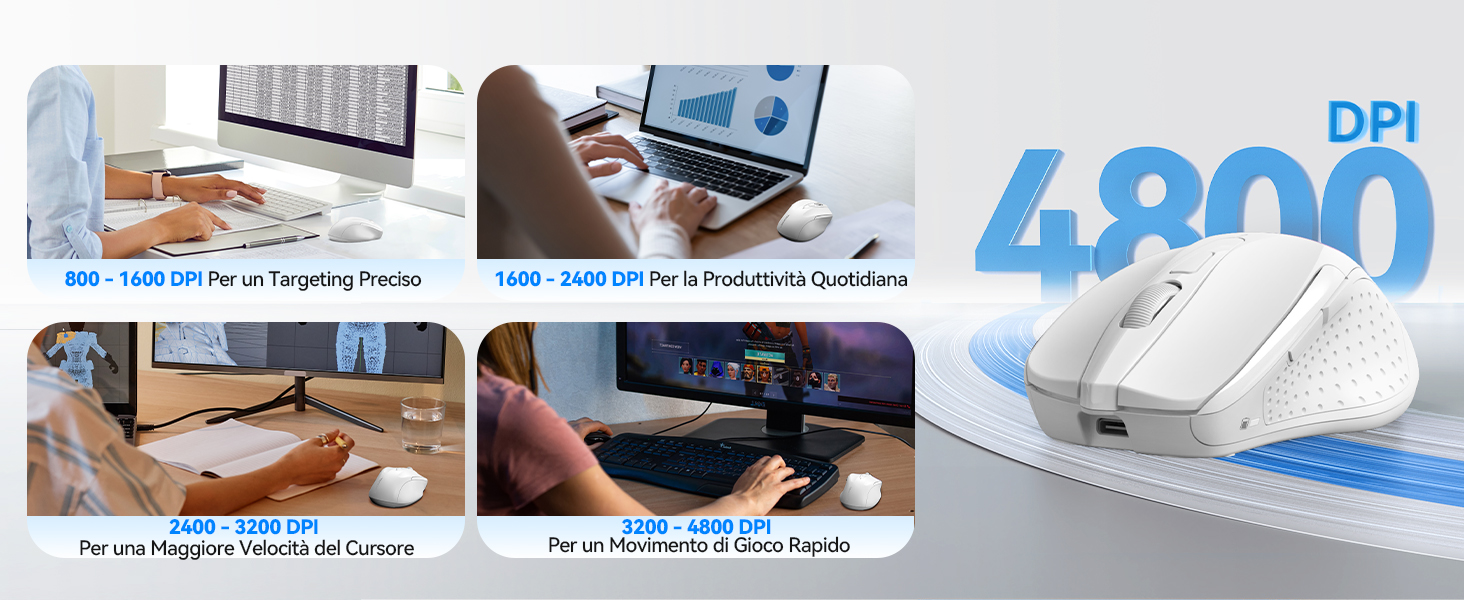
DPI settings for different usage scenarios.
Funzione di clic silenzioso
The mouse is designed for silent operation, reducing click noise by up to 90%. This allows for a quiet working environment without disturbing others.

Enjoy a quiet working experience.
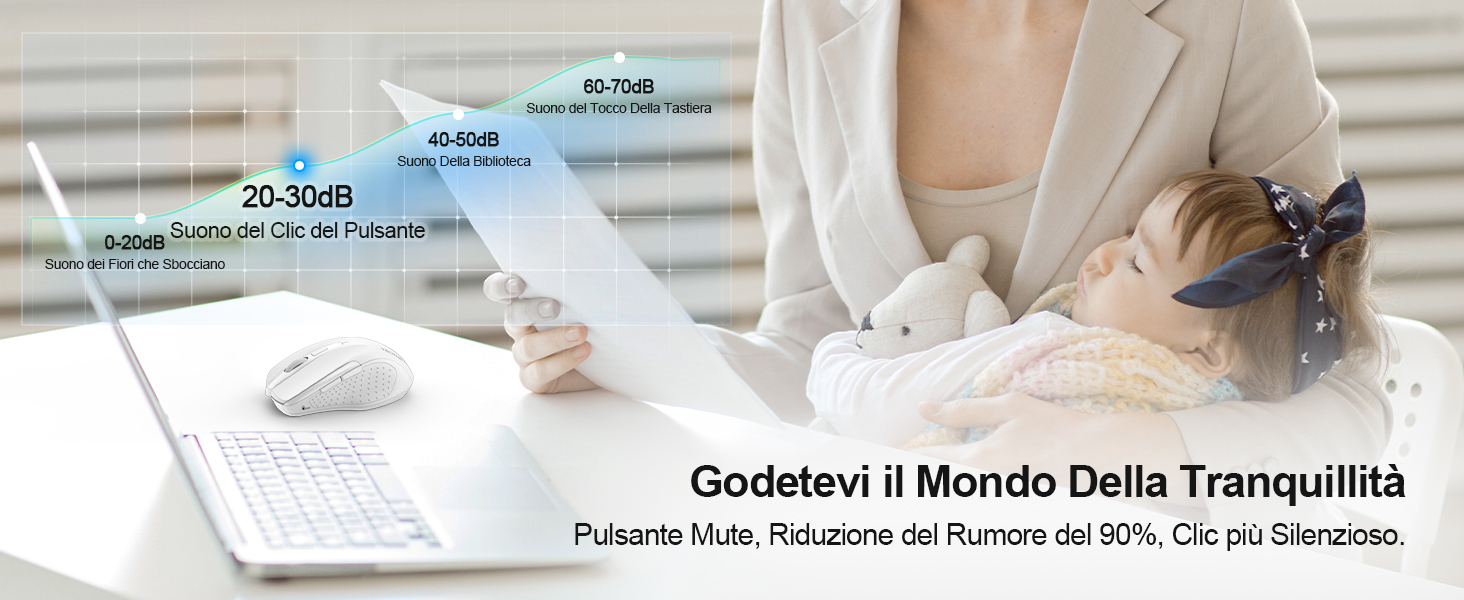
Sound level comparison demonstrating reduced click noise.
Design ergonomico
The mouse is ergonomically designed to fit the natural curvature of your hand, reducing muscle pressure by up to 30% and ensuring comfortable use for extended periods. Soft natural rubber grips on the sides provide a secure and comfortable hold.

Ergonomic shape for comfortable use.
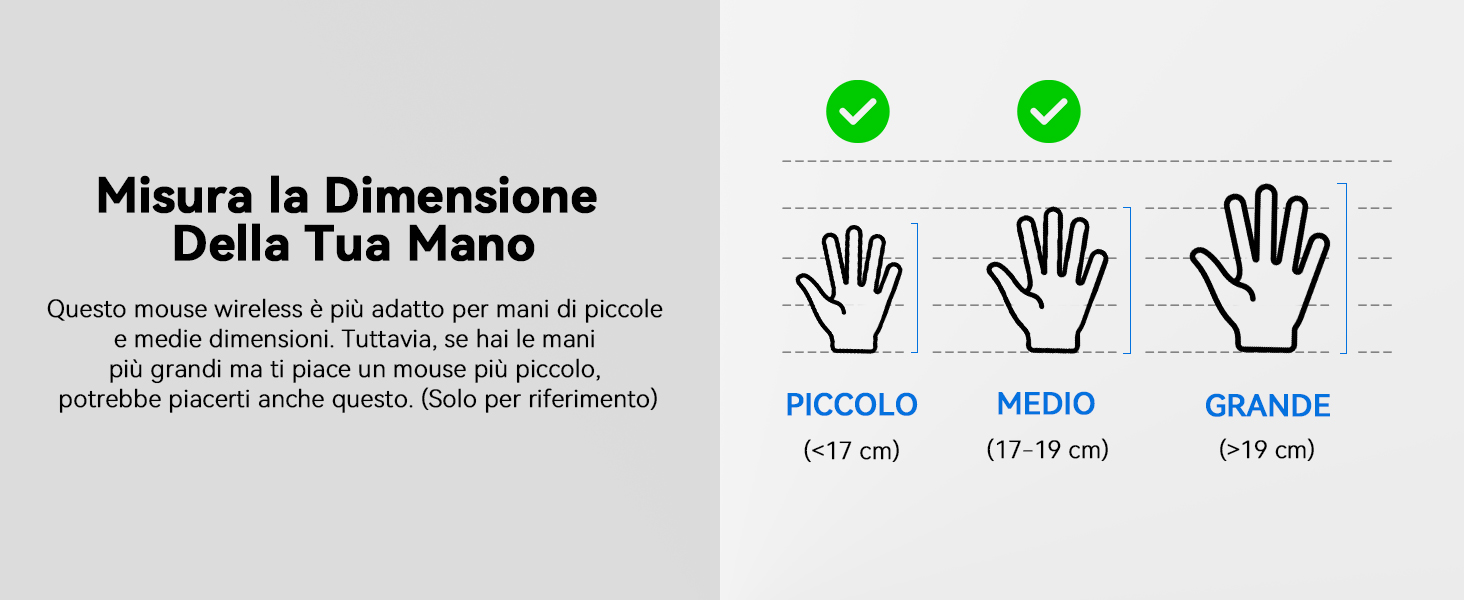
This mouse is suitable for small to medium hand sizes. Refer to the guide for reference.
Funzionalità di risparmio energetico
The mouse includes intelligent power-saving features:
- Modalità sospensione automatica: If inactive for 10 seconds, the mouse enters standby mode. After 10 minutes of inactivity, it enters deep sleep mode to conserve battery.
- Funzione di riattivazione: Premi un pulsante qualsiasi per riattivare il mouse dalla modalità di sospensione.
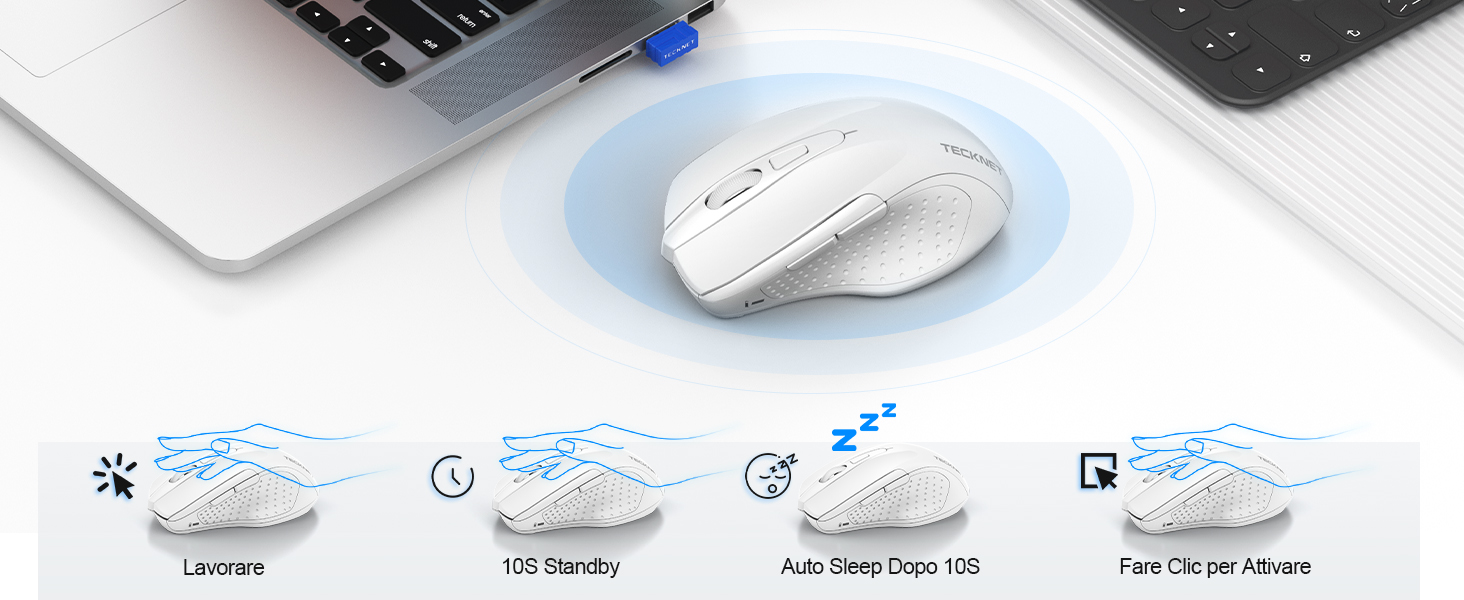
Power saving modes for extended battery life.
Manutenzione
- Pulizia: Utilizzare un panno morbido e asciutto per pulire il mouse. Per lo sporco ostinato, un panno leggermenteamp è possibile utilizzare un panno, assicurandosi che non penetri umidità nel dispositivo.
- Ricarica: Recharge the mouse when the indicator light signals low battery. Avoid completely draining the battery frequently to prolong its lifespan.
- Magazzinaggio: When not in use for extended periods, turn off the mouse and store the USB receiver in its designated compartment.
Risoluzione dei problemi
| Problema | Possibile causa | Soluzione |
|---|---|---|
| Il mouse non risponde | Low battery; USB receiver not connected; Mouse switched off; Driver issue. | Charge the mouse; Ensure USB receiver is securely plugged in; Turn on the mouse; Try a different USB port; Restart computer. |
| Connessione intermittente o ritardo | Interference from other wireless devices; Distance from receiver; Obstructions. | Move closer to the receiver; Remove obstructions; Avoid using near other 2.4GHz devices; Try a different USB port. |
| Il movimento del cursore è irregolare o impreciso | Sensore ottico sporco; Superficie non adatta; Impostazione DPI errata. | Clean the optical sensor; Use a mouse pad or a smooth, non-reflective surface; Adjust DPI settings. |
| Mouse does not charge | Faulty charging cable; Faulty USB port; Mouse issue. | Try a different USB-C cable; Try a different USB power source; Contact customer support if the issue persists. |
Specifiche
| Marca | TECKNET |
| Numero di modello | TK-MS009 |
| Colore | Bianco |
| Tecnologia di connettività | Wireless a 2.4 GHz (ricevitore USB) |
| Caratteristiche speciali | Rechargeable, Long Battery Life, Silent Click, Ergonomic Design |
| Tecnologia di rilevamento del movimento | Ottico |
| Numero di pulsanti | 6 |
| Orientamento della mano | Destro |
| Dispositivi compatibili | Laptop, PC, Chromebook, Computer |
| Sistemi operativi | Windows 11/10/8.1/8/7/Vista/XP, Linux, Mac OS (side buttons not available on Mac OS) |
| Durata media della batteria | 1050 Hours (approx. 1-2 months on 2-hour charge) |
| Sensibilità massima | 4800 DPI |
| wireless Range | 15 metri |
| Dimensioni (L x L) | 10.6L x 6.8W cm |
| Materiale | Plastica |
Garanzia e supporto
TECKNET offre un Garanzia di 36 mesi for registered users. If you encounter any issues during the use of your mouse, please contact our professional customer service team as soon as possible. We are committed to assisting you in resolving any problems.
Per supporto, visita il sito ufficiale TECKNET websito o fare riferimento alle informazioni di contatto fornite sulla confezione del prodotto.
Risorse online:


