
1. Introduzione
This manual provides detailed instructions for the JISOWA Universal Voice Magic Remote Control, designed as a replacement for various LG Smart TV Magic Remote models. It offers voice control, magic pointer functionality, and dedicated shortcut buttons for popular streaming services. Please read this manual thoroughly before use to ensure proper operation and to maximize your viewesperienza di acquisizione.
2. Informazioni sulla sicurezza
- Sicurezza della batteria: Use only 2 x 1.5V AAA batteries. Do not mix old and new batteries, or different types of batteries. Ensure correct polarity (+/-). Remove batteries if the remote will not be used for an extended period.
- Disposizione: Smaltire le batterie usate e il telecomando secondo le normative locali. Non smaltire le batterie nel fuoco.
- Gestione: Avoid dropping the remote control or exposing it to moisture or extreme temperatures.
3. Contenuto della confezione
- 1x JISOWA Universal Voice Magic Remote Control
- Note: 2 x 1.5V AAA Batteries are NOT included.
4. Prodotto finitoview e Caratteristiche
The JISOWA Universal Voice Magic Remote Control is designed for intuitive control of your LG Smart TV. It features an ergonomic design, voice command capabilities, and a magic pointer function.

Immagine 4.1: Davanti, di lato e dietro views of the remote control, illustrating its dimensions (approximately 7.59 inches long, 1.65 inches wide, and 1.18 inches thick). It also highlights long-distance control capability, with a transmission signal range exceeding 40 ft.

Immagine 4.2: This image illustrates the product's key features: Voice and Magic function for easier and faster TV control, special soft plastic buttons for a comfortable feel, a new upgraded smart chip for quick response and ease of use, new ABS material for environmental friendliness and durability, and an ergonomic design for comfortable holding and agile operation.

Immagine 4.3: This image highlights the remote's capabilities: Voice Control for issuing commands, Point & Scroll for navigating menus with a cursor, and an Easy Grip design for comfortable handling.
5. Impostazione
5.1 Installazione delle batterie
- Aprire il coperchio del vano batterie sul retro del telecomando.
- Inserire due (2) batterie AAA da 1.5 V, assicurandosi che i terminali positivo (+) e negativo (-) corrispondano agli indicatori all'interno del vano.
- Chiudere saldamente il coperchio del vano batterie.
5.2 Uso iniziale
This remote control is pre-programmed and requires no additional setup, programming, or pairing for most compatible LG Smart TVs. Simply insert the batteries, and it should be ready for use.
6. Istruzioni per l'uso
Familiarize yourself with the buttons and functions of your remote control for optimal use.
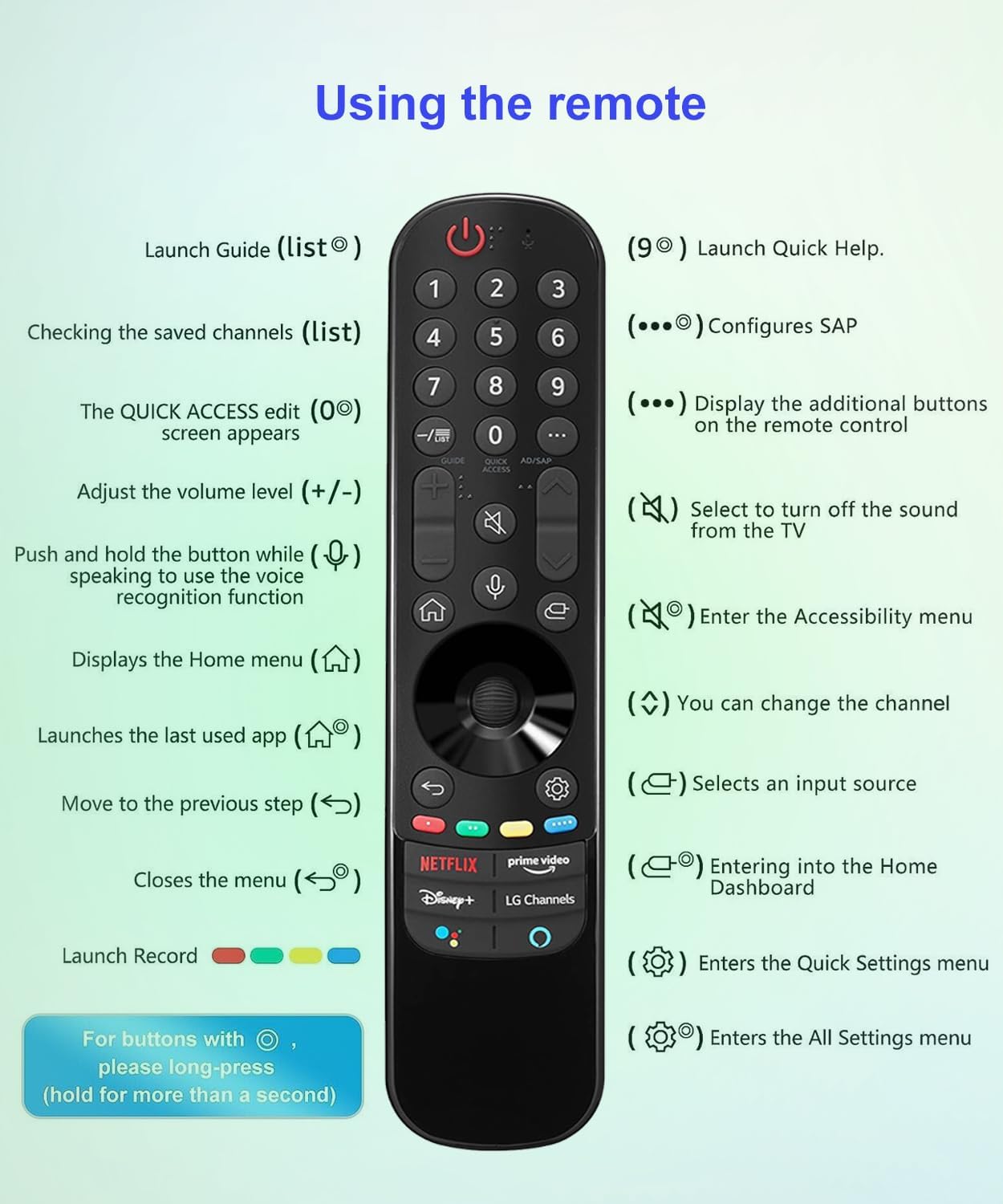
Immagine 6.1: A detailed diagram illustrating the functions of each button on the remote control.
6.1 Funzioni dei pulsanti
- Pulsante di accensione (cerchio rosso con linea): Accende o spegne la TV.
- Tasti numerici (0-9): Directly launch Guide (list button), check saved channels (list button), or configure SAP (9 button).
- Quick Access Edit (0 button): Edits quick access settings.
- AD/SAP Button: Displays additional buttons on the remote control.
- Volume su/giù (+/-): Regola il livello del volume.
- Pulsante di disattivazione audio (altoparlante con X): Selects to turn off the sound from the TV.
- Canale su/giù: Cambia il canale.
- Voice Recognition Button (Microphone): Push and hold while speaking to use the voice recognition function.
- Home Button (House): Visualizza il menu principale.
- Pulsante Indietro (freccia curva): Moves to the previous step.
- Input Source Button (Rectangle with Arrow): Seleziona una sorgente di ingresso.
- Pulsante Impostazioni (icona a forma di ingranaggio): Enters the Quick Settings menu. Long-press for All Settings menu.
- Rotella/Pulsanti di navigazione: Used for pointing, scrolling, and selecting items on screen.
- Netflix, Disney+, Prime Video, LG Channels Buttons: Direct access to these streaming services. Note: These buttons may not function correctly if your TV does not have the corresponding app or button on its original remote.
6.2 Comando vocale
To use the voice command feature, press and hold the Pulsante del microfono, then speak clearly into the remote. Release the button when finished speaking. This allows you to search for content, change settings, or control your TV using your voice.

Immagine 6.2: This image illustrates the voice command feature, showing the microphone icon and sound waves indicating voice input, which is then processed to control the TV or access streaming services like Netflix, Disney+, Prime Video, and LG Channels.
6.3 Magic Pointer Function
The remote's magic pointer allows you to navigate your TV screen by pointing the remote and moving a cursor, similar to a computer mouse. Use the navigation wheel to scroll through content.
7. Modelli compatibili
This replacement Voice Magic remote control is universal for a wide range of LG Smart TVs, including 4K OLED, 4K UHD, 8K UHD, 4K MiniLED, 8K MiniLED, and LED LCD Smart TV series models. It offers seamless compatibility with and replaces the following LG Magic Remote Control models:
- AN-MR21GA / MR21GA AKB76036202
- AN-MR20GA / MR20GA AKB75855501
- AN-MR22GA / MR22GA AKB76039901, AKB76039902, AKB76039904
- AN-MR22GN / MR22GN AKB76040002
- AN-MR23GA / MR23GA AKB76043102
- AN-MR23GN / MR23GN AKB76043202
Known compatible LG TV models include, but are not limited to: OLED77G1PUA, 55NANO90UPA, OLED77A1PUA, 65UP7560AUD, 75NANO75UPA, 50NANO75PUA, OLED83C1AUA, 75UP7770PUB, OLED55C3AUA, OLED83C3AUA, 65UP8000PUA, 65NANO99UPA, OLED65A1AUA, 86UP8770PUA, 50UP8000PUA, 43UP7560AUD, OLED55C1PUB, 43UP7700PUB, OLED65C1PUB, 55UP7700PUB, 43UP8000PUA, 43UP7100ZUF, OLED48C1PUB, 55UP7100ZUF, 70UP7070PUE, 65UP7700PUA, 55UP7560AUD, 75UP7070PUD, AKB76039904, 65UP7700PUB, 60UP7670PUB, 86QNED90UPA, 86NANO90UPA, OLED77B3AUA, 82UP8770PUA, 55UP7670PUC, 75QNED90UPA, 86NANO85APA, OLED65B3AUA, OLED55B3AUA.
8. Manutenzione
8.1 Pulizia del telecomando
Per pulire il telecomando, strofinarlo delicatamente con un panno morbido e asciutto. Non utilizzare detergenti liquidi, spray o materiali abrasivi, poiché potrebbero danneggiare la superficie o i componenti interni del telecomando.
8.2 Sostituzione della batteria
Replace the batteries when the remote's response becomes sluggish or if it stops functioning. Always replace both AAA batteries at the same time with new ones, ensuring correct polarity.
9. Risoluzione Dei Problemi
- Il telecomando non risponde:
- Assicurarsi che le batterie siano inserite correttamente, rispettando la polarità corretta.
- Sostituire le vecchie batterie con quelle nuove.
- Assicurarsi che non vi siano ostacoli tra il telecomando e il ricevitore IR del televisore.
- Confirm the remote is compatible with your specific LG Smart TV model.
- La funzione vocale non funziona:
- Assicurati di tenere premuto il pulsante del microfono mentre parli.
- Parlare in modo chiaro e a volume normale.
- Check your TV's settings to ensure voice recognition is enabled.
- Magic pointer not appearing or working:
- Assicurarsi che le batterie del telecomando siano nuove.
- Some older LG Smart TV models may not fully support the Magic Pointer function.
- Shortcut buttons (Netflix, Disney+, etc.) not working:
- These buttons may not function correctly if your TV does not have the corresponding app installed or if the original remote for your TV did not feature these specific buttons.
- Assicurati che la tua TV sia connessa a Internet.
10. Specifiche
| Dimensioni del prodotto | 7.59 x 1.65 x 1.18 pollici |
| Peso dell'articolo | 2.65 once |
| Batterie richieste | 2 batterie AAA (non incluse) |
| Tecnologia di connettività | Infrarossi |
| Caratteristiche speciali | Ergonomic, No Programming Required, Pre-Programmed, Universal, Voice Search |
| Numero massimo di dispositivi supportati | 1 (Televisione) |
11. Garanzia e supporto
For any defective product or issues with this remote control, please contact the seller through Amazon's after-sales service. The seller aims to provide a suitable solution within 1 business day.
For further assistance or inquiries, please refer to your Amazon order details to contact the seller directly.