
PELADN WI-6
PELADN Mini PC WI-6 User Manual
Model: N95/16GB+512GB
Marca: PELADN
1. Introduzione
Thank you for choosing the PELADN Mini PC WI-6. This compact and powerful desktop computer is designed for a wide range of applications, from office work and online education to home entertainment. Featuring the 12th Gen Intel Alder Lake-N95 processor, 16GB DDR4 RAM, and a 512GB SSD, it offers efficient performance in a small form factor. This manual provides essential information for setting up, operating, maintaining, and troubleshooting your new Mini PC.
2. Cosa c'è nella scatola
Si prega di controllare il contenuto del pacco per assicurarsi che siano presenti tutti gli articoli:
- 1 x PELADN WI-6 Mini PC (N95/16GB+512GB)
- 1 x Cavo HD
- 1 x supporto VESA con viti
- 1 x adattatore di alimentazione
- 1 x Manuale utente

Image: All items included in the PELADN Mini PC WI-6 package.
3. Prodotto finitoview
3.1 Porte anteriori e posteriori
Familiarize yourself with the various ports on your PELADN Mini PC:
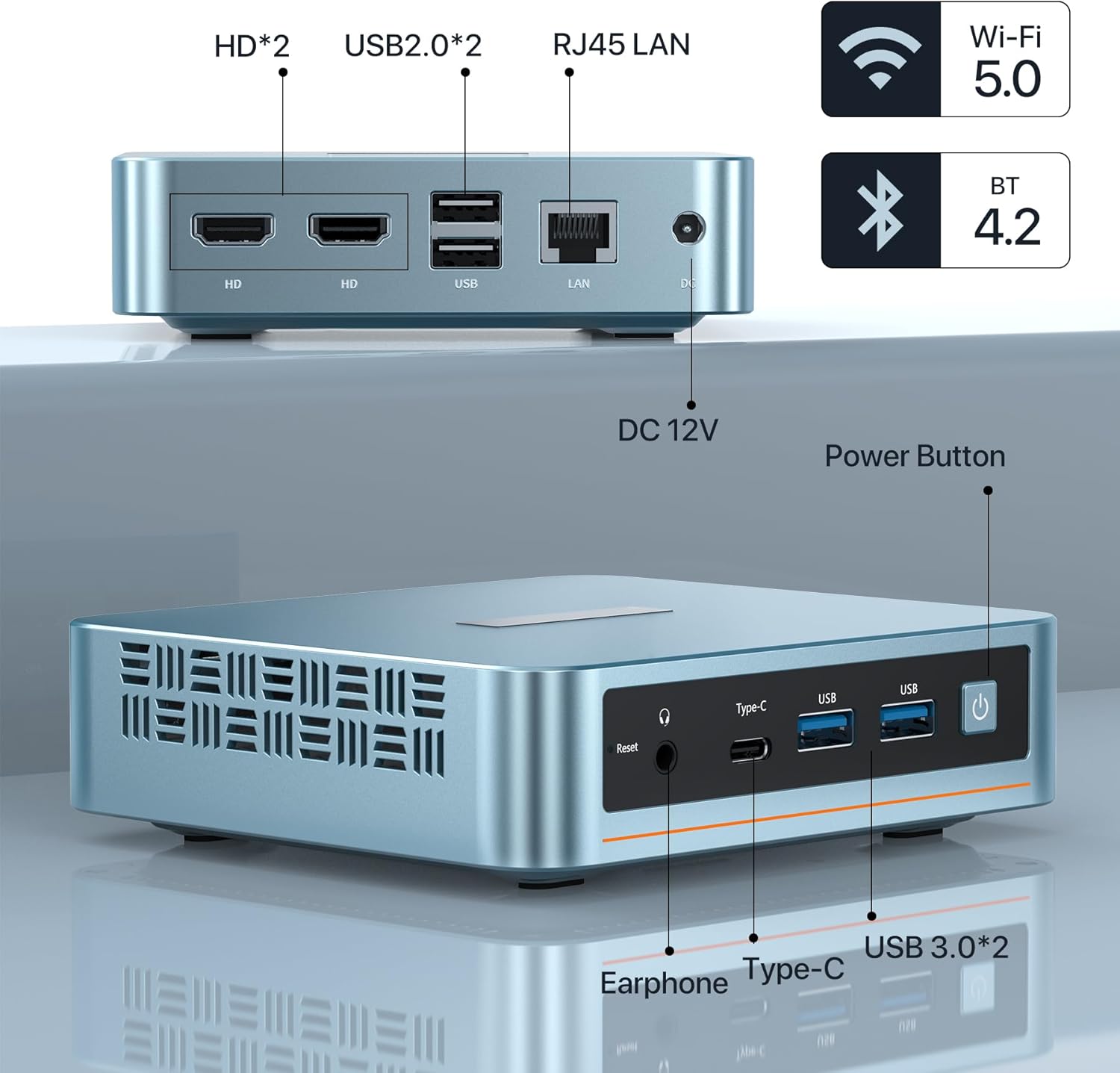
Immagine: anteriore e posteriore view of the PELADN Mini PC showing all available ports.
- Porte anteriori:
- Audio Jack (HP&MIC): For headphones and microphone.
- Type-C: Multi-functional port for data and video output.
- USB 3.0 (x2): High-speed data transfer ports.
- Power Button: To turn the device on/off.
- Reset Button: For system reset.
- Porte posteriori:
- HD (x2): For connecting displays via HDMI.
- USB 2.0 (x2): Standard USB ports for peripherals.
- RJ45 1000M LAN: For wired network connection.
- DC Jack: For power input (12V).
3.2 Caratteristiche principali

Immagine: Oltreview of the PELADN Mini PC's core specifications.
- Processore: 12th Gen Intel Alder Lake-N95 (4C/4T, up to 3.4GHz, 6W TDP).
- Grafica: Intel UHD Graphics, supporting 4K 60Hz.
- Memoria RAM: 16GB DDR4 (3200MHz).
- Magazzinaggio: 512GB M.2 2280 SSD (supports up to 2TB).
- Connettività: WiFi 5, Bluetooth 4.2, RJ45 1000M LAN.
- Raffreddamento: Efficient fan cooling system for silent operation and performance.
- Sistema operativo: Pre-installed OS, also supports Linux, Ubuntu.
3.3 Componenti interni

Immagine: Un esploso view illustrating the internal layout and components of the Mini PC.
The PELADN Mini PC features a well-designed internal structure, including the Alder Lake-N95 processor, a 512GB M.2 2280 SSD, 16GB DDR4 RAM, and an efficient cooling fan to maintain optimal operating temperatures.
4. Impostazione
4.1 Connessione iniziale
- Connetti alimentazione: Plug the power adapter into the DC Jack on the rear of the Mini PC, then plug the adapter into a power outlet.
- Connetti Display: Use the provided HD cable to connect your monitor to one of the HD ports on the Mini PC. For triple display, use both HD ports and the Type-C port with compatible adapters/cables.
- Connetti le periferiche: Collega la tastiera e il mouse USB alle porte USB disponibili.
- Connessione di rete: For a wired connection, plug an Ethernet cable into the RJ45 LAN port. For wireless, ensure Wi-Fi is enabled in the operating system settings after initial boot.
- Accensione: Premere il pulsante di accensione sulla parte anteriore del Mini PC.
4.2 Installazione con montaggio VESA
Il supporto VESA incluso consente di fissare il Mini PC sul retro di un monitor compatibile o a una parete, risparmiando spazio sulla scrivania.

Image: Step-by-step guide for attaching the VESA mount to the Mini PC and a display.
- Attach Bracket to Mini PC: Secure the VESA bracket to the back of the Mini PC using the provided screws.
- Attach to Display/Wall: Fix the bracket to the VESA mounting holes on the back of your display or to a wall using appropriate screws. Ensure it is securely fastened.

Image: Various placement options for the Mini PC, including VESA mount, desktop, and wall mount.
5. Istruzioni per l'uso
5.1 Accensione/spegnimento
- Per accendere: Premere il pulsante di accensione sulla parte anteriore del Mini PC. La spia di alimentazione si illuminerà.
- Per spegnere: For safe shutdown, use the operating system's shutdown function. Alternatively, press and hold the power button for 5-7 seconds to force a shutdown (use only when necessary to prevent data loss).
5.2 Collegamento delle periferiche
The Mini PC supports a variety of peripherals via its USB, Type-C, and audio ports. Simply plug in your devices such as external hard drives, USB flash drives, printers, or speakers.
5.3 Triple-Display Setup
The PELADN Mini PC supports up to three 4K displays simultaneously, enhancing your productivity and entertainment experience.

Image: A visual representation of the Mini PC driving three independent displays.
Connect your displays using the two HD ports and the Type-C port. Ensure your cables and monitors support 4K resolution for optimal performance. Once connected, configure display settings within your operating system.
5.4 Scenari di utilizzo
The PELADN Mini PC is versatile and suitable for various applications:

Lavoro d'ufficio

Online Education

Teatro domestico
6. Manutenzione
To ensure the longevity and optimal performance of your PELADN Mini PC, follow these maintenance guidelines:
- Pulizia: Regularly clean the exterior of the Mini PC with a soft, dry cloth. Use compressed air to gently clear dust from ventilation openings to prevent overheating. Do not use liquid cleaners directly on the device.
- Ventilazione: Ensure the Mini PC is placed in a well-ventilated area. Do not block the air vents. Avoid placing it on soft surfaces like carpets or blankets that can obstruct airflow.
- Aggiornamenti software: Mantieni il sistema operativo e i driver aggiornati alle versioni più recenti. Questo migliora sicurezza, prestazioni e compatibilità.
- Spegnimento sicuro: Per evitare il danneggiamento dei dati, spegnere sempre correttamente il Mini PC tramite il sistema operativo.
- Temperatura: Utilizzare il Mini PC entro gli intervalli di temperatura consigliati. Evitare ambienti eccessivamente caldi o freddi.
7. Risoluzione Dei Problemi
This section addresses common issues you might encounter with your PELADN Mini PC.
| Problema | Possibile causa | Soluzione |
|---|---|---|
| Il mini PC non si accende. | Nessuna alimentazione, adattatore di alimentazione difettoso, collegamento allentato. | Check power cable and adapter connection. Ensure power outlet is working. Try a different power outlet. |
| Nessuna visualizzazione sul monitor. | Incorrect cable connection, monitor input not selected, faulty cable/monitor. | Ensure HD/Type-C cable is securely connected. Select correct input source on monitor. Test with a different cable or monitor if possible. |
| Prestazioni lente. | Troppe applicazioni in esecuzione, poco spazio su disco, driver obsoleti, surriscaldamento. | Close unnecessary applications. Free up disk space. Update drivers and OS. Ensure proper ventilation. |
| Wi-Fi/Bluetooth non funzionanti. | Drivers not installed, disabled in OS, hardware issue. | Check device manager for driver status. Ensure Wi-Fi/Bluetooth is enabled in settings. Restart the Mini PC. |
| Dispositivi USB non riconosciuti. | Faulty USB port, driver issue, device incompatibility. | Prova una porta USB diversa. Aggiorna i driver USB. Testa il dispositivo su un altro computer. |
8. Specifiche
Detailed technical specifications for the PELADN Mini PC WI-6:
| Caratteristica | Specificazione |
|---|---|
| Processore | Intel Alder Lake-N95 (4 Cores, 4 Threads, up to 3.4GHz) |
| Grafica | Intel UHD Graphics (4K@60Hz Triple-Display Support) |
| Memoria RAM | 16 GB DDR4 (3200 MHz) |
| Magazzinaggio | SSD M.2 2280 da 512 GB (espandibile fino a 2 TB) |
| Sistema operativo | Pre-installed OS (Supports Windows 11, Linux, Ubuntu) |
| Connettività wireless | Wi-Fi 5, Bluetooth 4.2 |
| Connettività cablata | 1x RJ45 1000M LAN Port |
| Porte USB | 2x USB 3.0, 2x USB 2.0 |
| Uscita video | 2x HD 2.0, 1x Type-C |
| Porta audio | 1x Jack audio (HP e MIC) |
| Potenza in ingresso | CC 12V |
| Dimensioni (LxWxH) | 4.88 x 1.38 x 4.41 pollici (124 x 35 x 112 mm) |
| Peso | Circa. 2 libbre (0.9 kg) |
| Colore | Blu |
9. Garanzia e supporto
Your PELADN Mini PC comes with a Garanzia di 1 anno. For warranty service or technical support, please follow these steps:
- Login to your account on the platform where you purchased the product.
- Navigate to "My Orders".
- Find the order ID for your PELADN Mini PC.
- Click on "Contact Seller" to reach out to PELADN's support team.
PELADN aims to provide professional technical support and typically responds to inquiries within 24 hours. Additionally, the product may be eligible for a 30-day return and exchange policy, depending on the retailer's terms.
Ask a question about this manual
Ask about setup, troubleshooting, compatibility, parts, safety, or missing instructions. Manuals+ will review the question and use this page’s manual context to help answer it.