
1. Introduzione
Thank you for choosing the OSCAL PowerMax 3600 Portable Power Station and PM200 Solar Panel. This manual provides essential information for the safe and efficient operation, setup, and maintenance of your device. Please read this manual thoroughly before use and retain it for future reference.
Precauzioni di sicurezza
- Non smontare, riparare o modificare l'unità.
- Tenere l'unità lontana da fuoco, acqua e temperature estreme.
- Assicurare una ventilazione adeguata durante l'uso e la ricarica.
- Evitare di far cadere l'unità o di sottoporla a forti urti.
- Tenere fuori dalla portata dei bambini e degli animali domestici.
2. Prodotto finitoview
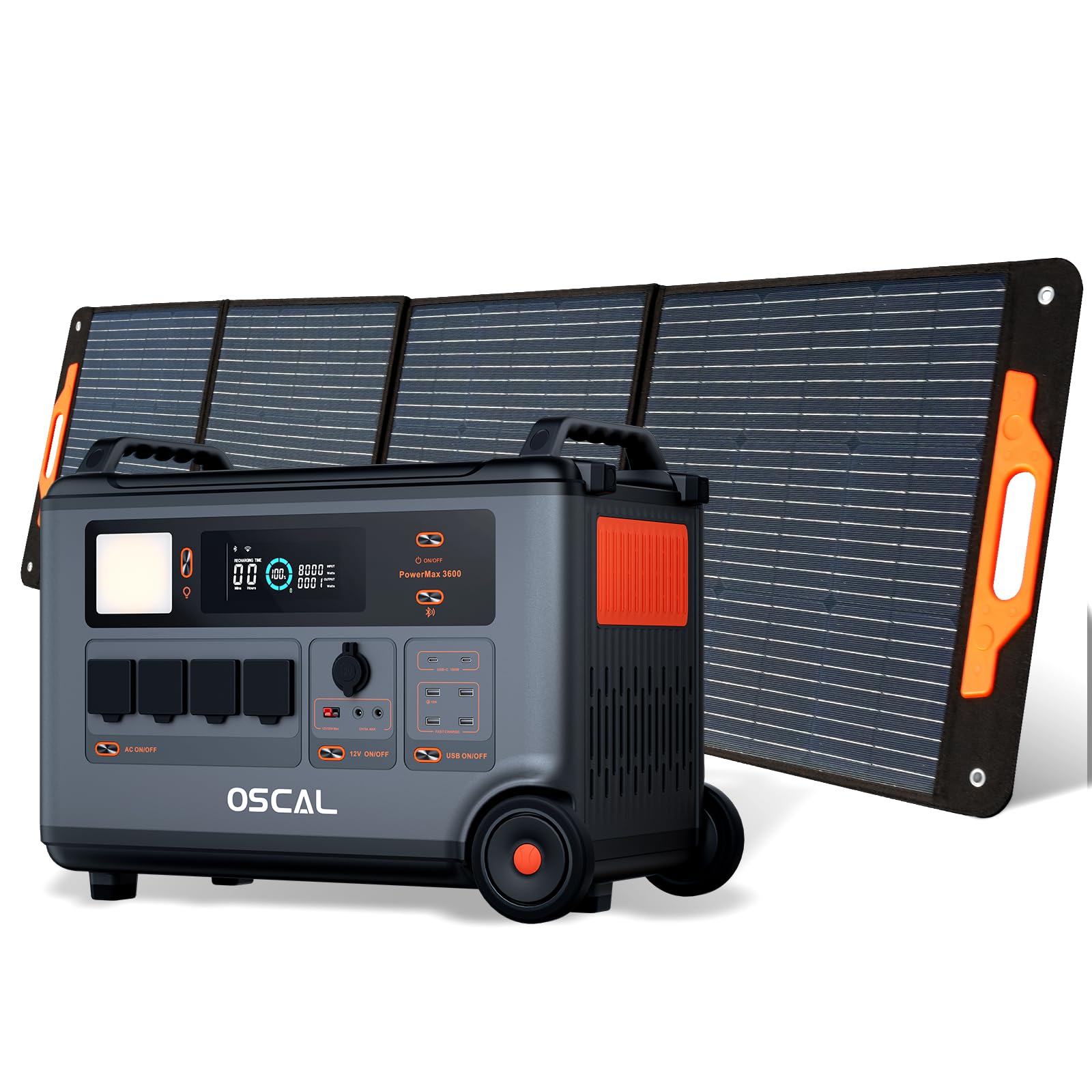
The OSCAL PowerMax 3600 is a high-capacity portable power station designed for various applications, from outdoor adventures to emergency home backup. It features a robust LiFePO4 battery and multiple output ports.
Caratteristiche principali:
- Alta capacità: 3600 Wh base capacity, expandable up to 57,600 Wh with additional batteries.
- Uscita potente: 6000 W peak output, capable of powering most household appliances.
- Batteria LiFePO4: Safe, stable, and durable with over 3500 charge cycles (to 80% capacity).
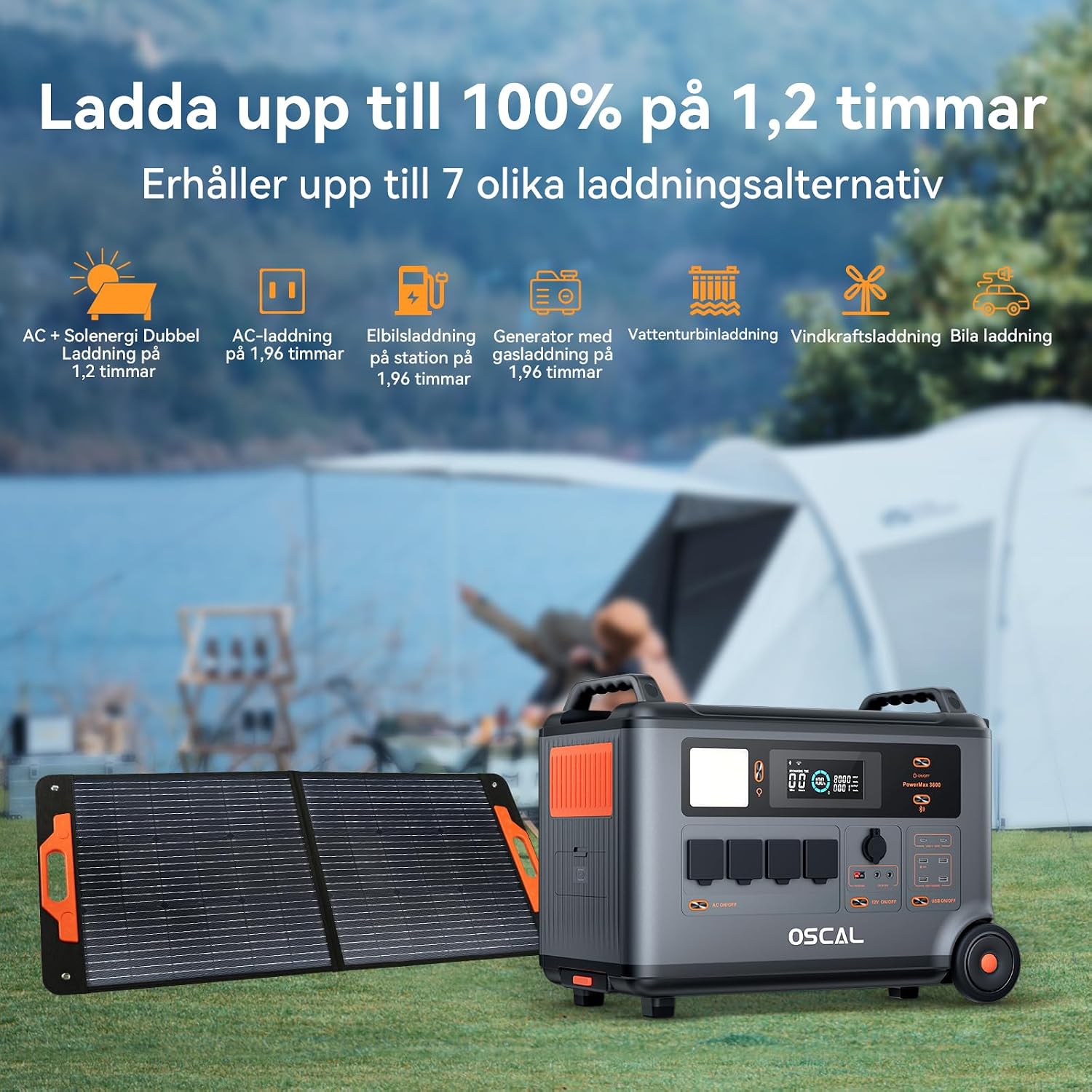
- Ricarica rapida: Fully charged in 1.2 hours with dual AC and solar input.
- Gruppo di continuità (UPS): Automatic switchover in 5-8 ms during power outages.
- Controllo intelligente: Monitor and control via the OSCAL smartphone application (Wi-Fi/Bluetooth).
- Design durevole: Splash-proof, dust-proof, 0.8M vertical drop protection, UV-resistant, and UL94V-0 fire rating.

3. Impostazione
3.1 Disimballaggio e ispezione iniziale
Carefully remove all components from the packaging. Verify that all items listed in the 'What you will get' section are present and undamaged. If any items are missing or damaged, contact customer support immediately.
3.2 Carica iniziale
Before first use, fully charge the PowerMax 3600. Connect the AC charging cable to the unit's AC input port and then to a standard wall outlet. The display will indicate the charging status. A full charge typically takes 1.2 hours with combined AC and solar input, or 1.96 hours with AC only.
3.3 Connecting the PM200 Solar Panel
To charge using solar power, unfold the PM200 solar panel and position it in direct sunlight. Connect the MC4 to Anderson cable (or other compatible cable) from the solar panel to the PowerMax 3600's solar input port. The unit will automatically detect the solar input and begin charging.

4. Istruzioni per l'uso
4.1 Accensione/Spegnimento
Tenere premuto il pulsante di accensione principale per alcuni secondi per accendere o spegnere l'unità. Il display si illuminerà all'attivazione.
4.2 Utilizzo delle uscite CA
Press the AC power button to activate the AC outlets. Plug your devices into the available AC ports. The PowerMax 3600 provides a pure sine wave output, suitable for sensitive electronics. The unit has 4 AC outlets.
4.3 Using DC Outputs (USB-A, USB-C, 12V)
Press the DC power button to activate the DC outputs. Connect your USB-powered devices to the 4 USB-A ports or 2 USB-C ports (100W each). The 12V car port and other DC outputs are also available for compatible devices.

4.4 Comprensione del display
The integrated display shows real-time information including battery level, input/output wattage, remaining run time, and active ports. Refer to the on-screen icons for specific indicators.
4.5 Funzione di alimentazione ininterrotta (UPS)
When connected to an AC wall outlet and powering devices, the PowerMax 3600 acts as a UPS. In the event of a power outage, it automatically switches to battery power within 5 to 8 milliseconds, ensuring continuous operation for connected devices like computers or medical equipment (e.g., CPAP machines).

4.6 Smart Remote Control (OSCAL App)
Download the OSCAL application from your smartphone's app store. Pair the PowerMax 3600 via Wi-Fi or Bluetooth to monitor battery status, control outputs, and perform firmware updates remotely.

5. Metodi di ricarica
The PowerMax 3600 supports multiple charging methods to ensure you always have power.
- Presa a muro CA: Collegare il cavo di ricarica CA in dotazione a una presa a muro standard.
- Ricarica solare: Use the PM200 solar panel or other compatible solar panels via the MC4 input.
- Ricarica auto: Charge from your vehicle's 12V cigarette lighter port using the included car charging cable.
- Stazione di ricarica per veicoli elettrici: The unit can be charged at an electric vehicle charging station (up to 2200W input).
- Generatore: Connect to a gasoline generator for charging (up to 2200W input).
- Batteria al piombo: Supports charging from lead-acid batteries for emergency situations.


6. Manutenzione
6.1 Cura della batteria
The PowerMax 3600 uses LiFePO4 batteries, known for their longevity. To maximize battery lifespan:
- Evitare di scaricare completamente la batteria frequentemente.
- Se non utilizzata per periodi prolungati, conservare l'unità con un livello di carica compreso tra il 50% e l'80%.
- Durante lo stoccaggio, ricaricare l'unità ogni 3-6 mesi per evitare che si scarichi completamente.

6.2 Pulizia
Use a dry, soft cloth to clean the exterior of the unit. Do not use abrasive cleaners or solvents. Ensure all ports are free from dust and debris.
6.3 Conservazione
Store the PowerMax 3600 in a cool, dry place, away from direct sunlight and extreme temperatures. Ensure the unit is turned off during storage.
7. Risoluzione Dei Problemi
Se riscontri problemi con il tuo PowerMax 3600, fai riferimento ai seguenti problemi comuni e alle relative soluzioni:
| Problema | Possibile causa | Soluzione |
|---|---|---|
| L'unità non si accende | La batteria è completamente scarica; il pulsante di accensione non è stato premuto abbastanza a lungo. | Caricare l'unità tramite alimentazione CA; tenere premuto il pulsante di accensione per 3-5 secondi. |
| Nessuna uscita dalle porte AC/DC | AC/DC output not activated; Device draws too much power; Overload protection triggered. | Press the respective AC/DC button; Check device wattage; Restart the unit and reduce load. |
| La ricarica solare non funziona | Insufficient sunlight; Incorrect panel connection; Damaged solar panel/cable. | Ensure direct sunlight; Verify cable connections; Test with another solar panel/cable if possible. |
| Problemi di connessione dell'app | Bluetooth/Wi-Fi disattivati; Unità troppo lontana dal telefono; App non aggiornata. | Ensure Bluetooth/Wi-Fi is on; Move phone closer to unit; Update the OSCAL app. |
Se il problema persiste, contattare l'assistenza clienti OSCAL.
8. Specifiche
| Caratteristica | Dettaglio |
|---|---|
| Marca | OSCALE |
| Numero di modello | BP3600-PM3600 (PowerMax 3600) |
| Tipo di batteria | LiFePO4 |
| Capacità | 3600 Wh (expandable up to 57,600 Wh) |
| Potenza di uscita CA | 3600 W (nominale), 6000 W (picco) |
| Prese CA totali | 4 |
| Uscite USB-A | 4 |
| Uscite USB-C | 2 (100 W each) |
| Ingresso volumetage | 12 Volts (DC input for car/solar) |
| Frequenza | Frequenza 60 Hz |
| Tempo di ricarica (CA + solare) | 1.2 ore (al 100%) |
| Charging Time (AC only) | 1.96 ore (al 100%) |
| Orario di commutazione dell'UPS | 5-8 millisecondi |
| Durata | 3500+ cycles (to 80% capacity) |
| Dimensioni (L x P x A) | Dimensioni: 48 cm x 44 cm x 35 cm |
| Peso | 44.45 chilogrammi |
| Materiale | addominali |
| Caratteristiche speciali | Extra-long battery life, Energy efficient, BMS protection (over-voltage, sotto-volumetage, over-current, over-charge, low/high temperature, short-circuit) |
9. Garanzia e supporto
9.1 Informazioni sulla garanzia
L'OSCAL PowerMax 3600 è dotato di un Garanzia del produttore di 5 anniLa presente garanzia copre i difetti di materiali e fabbricazione in condizioni di normale utilizzo. Si prega di conservare la prova d'acquisto per eventuali reclami in garanzia.
9.2 Componenti inclusi
Il pacchetto include:
- PowerMax 3600 Portable Charging Station
- PM200 Portable Solar Panel
- Cavo di ricarica CA.
- Cavo di ricarica per auto
- Solar Charging Cable (MC4 to Anderson, MC4 to 7909, 6530, XT60, 5521)
- Manuale d'uso
- Scheda di garanzia
9.3 Assistenza clienti
For technical assistance, warranty claims, or any questions regarding your OSCAL PowerMax 3600, please refer to the contact information provided on your warranty card or visit the official OSCAL website. 24-hour after-sales support is available.