
1. Introduzione
This manual provides detailed instructions for the installation, operation, and maintenance of the IXITAB KWS-AC301 and KWS-AC300 series Digital AC Power Energy Meters. These devices are designed to measure and display various electrical parameters including voltage, current, power, energy consumption (Kwh), timing, temperature, frequency, and power factor (for KWS-AC301 models). Please read this manual thoroughly before use to ensure proper and safe operation.
2. Informazioni sulla sicurezza
- Prima dell'installazione o del cablaggio, assicurarsi che tutta l'alimentazione sia scollegata per evitare scosse elettriche.
- L'installazione deve essere eseguita solo da personale qualificato.
- Non utilizzare il dispositivo in ambienti bagnati o damp condizioni.
- Non superare il volume specificatotage and current ratings of the meter.
- Verificare che tutti i collegamenti siano sicuri prima di collegare l'alimentazione.
3. Caratteristiche del prodotto
The IXITAB KWS-AC300 and KWS-AC301 series meters offer comprehensive monitoring of AC electrical parameters:
- Real-time display of AC Voltage (V), Current (A), and Active Power (W).
- Measurement of cumulative Electrical Energy (Kwh) and Timing (H).
- Misura della temperatura.
- Frequency measurement (Hz).
- Power Factor measurement (PF) (KWS-AC301 models only).
- Electrical energy and timing reset function.
- Power-down memory function for electrical energy and timing.
- Optional 485 communication interface for data transmission (KWS-AC301L models).
4. Specifiche
KWS-AC300 Series
| Parametro | AC300-20A | AC300-100A |
|---|---|---|
| Voltage | CA 50-300 V | CA 50-300 V |
| Attuale | 0-20A | 0-100A |
| Energia | 0-3000 W | 0-30 kW |
| Capacity (Kwh) | 0.01-19999 kWh | 0.01-19999 kWh |
| Tempistica | 0-200H | 0-200H |
| Temperatura | -10°C a 99°C | -10°C a 99°C |
| Frequenza | Frequenza | Frequenza |
KWS-AC301 Series
| Parametro | AC301-20A / AC301L-20A | AC301-100A / AC301L-100A |
|---|---|---|
| Voltage | CA 50-300 V | CA 50-300 V |
| Attuale | 0-20A | 0-100A |
| Shunt Way | Incorporato | Incorporato |
| 485 Comunicazione | AC301-20A: No, AC301L-20A: Yes | AC301-100A: No, AC301L-100A: Yes |
| Energia | 0-4400 W | 0-22 kW |
| Capacity (Kwh) | 0.01-99999 kWh | 0.01-99999 kWh |
| Tempistica | 0-999H | 0-999H |
| Temperatura | -10°C a 150°C | -20°C a 150°C |
| Frequenza | Frequenza | Frequenza |
| Fattore di potenza | 0.01-1PF | 0.01-1PF |
Note: Dimensions for KWS-AC300 are approximately 79mm x 37.5mm x 20.7mm. Dimensions for KWS-AC301 are approximately 73mm x 44mm x 24mm. Both models use a CT coil with a diameter of 15mm.

Figure 4.1: Physical dimensions of KWS-AC300 and KWS-AC301 models, including CT coil measurements.
5. Contenuto della confezione
- 1 x Digital AC Power Energy Meter (KWS-AC300 or KWS-AC301 model)
- 1 x Manuale utente
- For 100A models: 1 x 100A Shunt / CT Coil
- For 20A models: No external shunt/CT Coil (built-in)
6. Configurazione e installazione
Per una corretta installazione, seguire attentamente questi passaggi:
6.1 Wiring Diagram (KWS-AC301L-100A Example)
The following diagram illustrates the wiring for the KWS-AC301L-100A model with a closed sensor (CT coil). Ensure all connections are made correctly before applying power.

Figure 6.1: Wiring connections for the KWS-AC301L-100A model, showing input voltage (IN-AC), load connection, and CT coil placement around the live wire.
- Potenza in ingresso: Connect the AC 50-300V power supply to terminals L and N (typically labeled 3 and 4 on the meter).
- Connessione di carico: Connect the load in series with the live wire (L). The CT coil should be placed around the live wire that feeds the load.
- CT Coil: Connect the CT coil wires to the designated CT terminals on the meter (typically labeled 1 and 2). Ensure the direction of the CT coil is correct as indicated by any arrows on the coil or meter.
- 20A Models: For 20A models without an external CT coil, the current measurement is internal. Connect the AC 50-300V power supply to the meter's input terminals, and the load directly through the meter's designated load terminals.
6.2 485 Communication and Temperature Sensor (KWS-AC301L Models)
For KWS-AC301L models, additional interfaces are available for 485 communication and an external temperature sensor.

Figure 6.2: KWS-AC301L model showing the dedicated interfaces for the temperature sensor and 485 communication (RS485 A+ and B- terminals).
- Sensore di temperatura: Connect the external temperature sensor to the dedicated interface.
- 485 Interfaccia: Connect the RS485 A+ and B- terminals to your 485 communication network for data acquisition. PC software may be available for data logging and analysis (refer to product documentation or manufacturer's website for download links).
7. Funzionamento
The meter features a clear digital display and intuitive buttons for navigation and settings.
7.1 Fine displayview
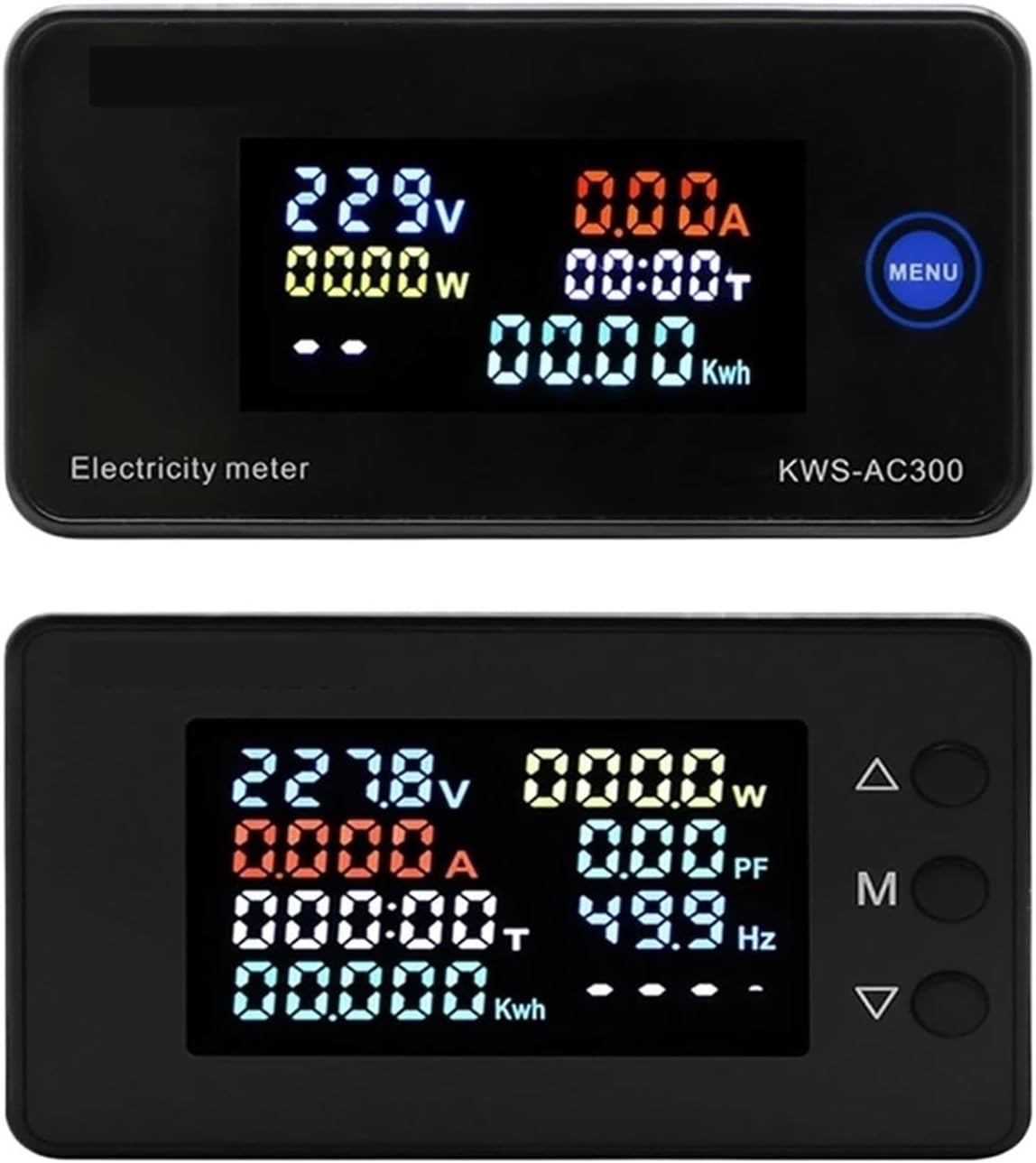
Figure 7.1: Top display shows KWS-AC300 with Voltage, Current, Power, Timing, and Kwh. Bottom display shows KWS-AC301 with Voltage, Current, Power, Timing, Kwh, Power Factor, and Frequency.
The display shows various parameters simultaneously. The KWS-AC300 typically displays Voltage, Current, Power, Timing, and Kwh. The KWS-AC301 models additionally display Frequency and Power Factor.
7.2 Funzioni dei pulsanti
The meters typically feature one or more buttons for interaction:
- KWS-AC300: Features a "MENU" button. Pressing this button allows cycling through display modes or accessing settings.
- KWS-AC301: Features three buttons: Up (Δ), Middle (M), and Down (∇).

Figure 7.2: KWS-AC301 button interaction. Pressing the 'M' button for 3 seconds allows entry into setting or alarm value adjustment modes.
- "M" Button (KWS-AC301):
- Pressione breve: Cycles through different display parameters (e.g., Voltage, Current, Power, Kwh, Timing, Temperature).
- Pressione lunga (3 secondi): Enters the setting mode or alarm value adjustment mode. Use the Up (Δ) and Down (∇) buttons to navigate and adjust values.
- Up (Δ) and Down (∇) Buttons (KWS-AC301): Used to navigate menus, increase or decrease values in setting modes.
7.3 Resetting Electrical Energy and Timing
To reset the cumulative electrical energy (Kwh) and timing (H) values, typically a long press on a specific button (often the "M" or "MENU" button) while in the Kwh or Timing display mode will initiate the reset process. Confirm the reset if prompted by the display.
8. Manutenzione
- Mantenere il misuratore pulito e privo di polvere. Per la pulizia, utilizzare un panno morbido e asciutto.
- Evitare di esporre il dispositivo a temperature estreme, alla luce solare diretta o ad ambienti corrosivi.
- Non tentare di aprire o riparare il contatore da soli, poiché ciò potrebbe invalidare la garanzia e rappresentare un rischio per la sicurezza.
- Ensure all wiring connections remain secure over time.
9. Risoluzione Dei Problemi
- Nessuna visualizzazione:
- Check if the power supply (AC 50-300V) is connected correctly and active.
- Assicurare il volume di inputtage rientra nell'intervallo specificato.
- Incorrect Current/Power Reading:
- For 100A models, verify the CT coil is correctly installed around the live wire and connected to the meter.
- Ensure the CT coil direction is correct.
- Controllare che il carico sia collegato correttamente.
- Parameters Not Resetting:
- Refer to Section 7.3 for the correct procedure to reset Kwh and Timing. Ensure the button is pressed for the required duration.
- 485 Communication Issues (KWS-AC301L):
- Verify the A+ and B- connections are correct.
- Check communication settings (baud rate, parity, stop bits) on both the meter and the connected device.
10. Garanzia e supporto
Per informazioni sulla garanzia, supporto tecnico o richieste di assistenza, contattare il produttore o il rivenditore autorizzato. Conservare la ricevuta d'acquisto come prova d'acquisto.
Manufacturer: IXITAB