
Introduzione
This manual provides detailed instructions for the installation, operation, maintenance, and troubleshooting of your RONGJI 9-inch IPS Touch Screen Car Stereo. Please read this manual thoroughly before installation and use to ensure proper function and to maximize your user experience. Keep this manual for future reference.
Caratteristiche del prodotto
- Sistema operativo: Android 13.0 con CPU a 4 core, 2 GB di RAM e 32 GB di ROM per prestazioni fluide.
- Display: 9-inch IPS Capacitive Touch Screen with 1280*720 resolution for clear visuals.
- Integrazione smartphone: Built-in Wireless Car-Play and Android Auto for seamless phone connectivity. Supports both wireless and wired connections.
- Bluetooth: Integrated Bluetooth for hands-free calling, phonebook access, and audio streaming from your mobile device.
- Radio: FM&RDS tuner with stable radio frequency for listening to broadcasts.
- Connettività: Built-in 5G WiFi receiver for internet access and app downloads.
- Navigazione: Integrated GPS module with external GPS antenna for online and offline map navigation.
- Controllo del volante (SWC): Supports original vehicle steering wheel controls for convenient operation.
- Posteriore View Supporto per fotocamera: Compatible with aftermarket rear view cameras (camera not included).
- Multi-tasking: Split Screen Function allows simultaneous display of two applications.
Configurazione e installazione
The RONGJI Car Stereo is designed for plug-and-play installation in compatible Mitsubishi ASX models from 2016 to 2022. While designed for ease of installation, professional installation is recommended if you are unfamiliar with car audio systems or vehicle wiring.
Verifica compatibilità veicolo
Before installation, verify compatibility by comparing your vehicle's center console and the back of your factory radio socket with the product images. Ensure the unit matches your vehicle's dashboard configuration.
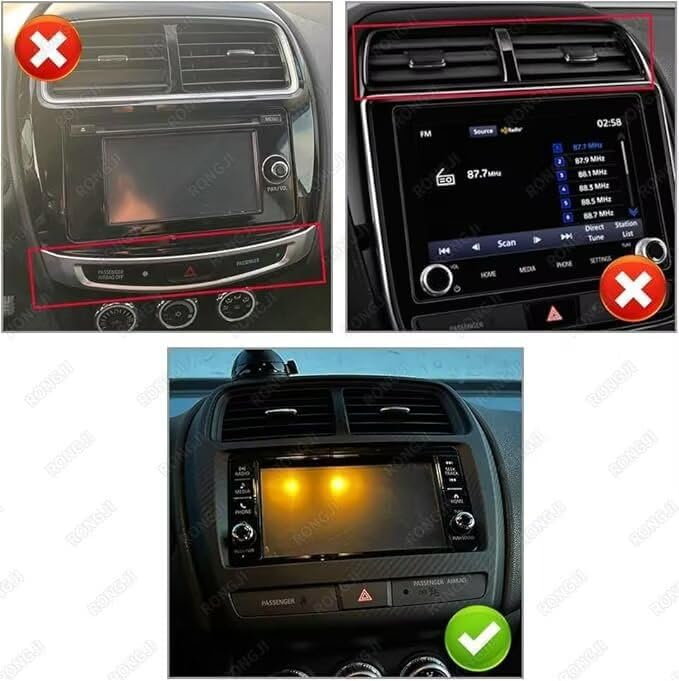
This image illustrates the correct and incorrect center console configurations for installing the RONGJI car stereo. The top two panels show incompatible setups, while the bottom panel displays a compatible dashboard with the green checkmark.
Fasi di installazione (linee guida generali)
- Preparazione: Scollegare la batteria del veicolo per evitare cortocircuiti.
- Rimuovere l'unità di fabbrica: Carefully remove the existing factory radio and trim panels using appropriate tools.
- Collegare il cablaggio: Connect the provided wiring harness from the RONGJI stereo to the vehicle's factory wiring. Ensure all connections are secure. Connect the external GPS antenna and any other accessories (e.g., rear view camera, external microphone).
- Funzionalità di prova: Before fully reassembling, reconnect the battery and power on the unit to test basic functions like power, audio, touch screen, and steering wheel controls.
- Unità sicura: Mount the RONGJI stereo securely into the dashboard opening.
- Rimontare: Reinstall all trim panels and ensure a snug fit.
Istruzioni per l'uso
Interfaccia Touch Screen
The unit features a responsive IPS capacitive touch screen. Navigate through menus, select applications, and control functions by tapping, swiping, and pinching gestures similar to a smartphone.
Car-Play and Android Auto
The stereo includes built-in Car-Play and Android Auto for integrating your smartphone. Connect wirelessly via Bluetooth or use your original phone cable for a wired connection. This allows access to navigation, music, calls, and other compatible apps directly from the head unit's screen.

This image displays the user interfaces for Car-Play (left) and Android Auto (right), illustrating how smartphones connect wirelessly or wired to the head unit.
Navigazione GPS
Utilize the built-in GPS module and external antenna for precise navigation. The unit supports both online and offline maps. Download free maps for your region via WiFi for offline use. The system provides real-time traffic conditions and accurate positioning.

This image illustrates the GPS navigation interface with accurate positioning and the WiFi connectivity feature, allowing for online content and map downloads.
Connettività WiFi
Connect to a WiFi network or mobile hotspot to access online features, download applications, stream music, and browse the internet directly from the head unit.
Funzione schermo diviso
To use the split screen feature, open an application, then drag another compatible application from the app drawer to the side of the screen. This allows you to view and interact with two applications simultaneously, such as navigation and music.
Controllo del volante (SWC)
After proper installation and configuration, your vehicle's steering wheel controls can be used to manage audio playback, answer calls, and navigate menus, enhancing driving safety and convenience.

This image demonstrates the split screen feature, showing music and map applications simultaneously, and highlights the integration with steering wheel controls for safe operation.
FM RDS Radio and Bluetooth
Access the FM radio tuner to scan for stations automatically or manually. The RDS function provides station information. Use the built-in Bluetooth for hands-free calls and to stream audio from your paired smartphone. The unit supports phonebook synchronization and call records.

This image illustrates the FM RDS Radio interface with station tuning options and the Bluetooth function for hands-free calling and music streaming.
Manutenzione
To ensure the longevity and optimal performance of your RONGJI Car Stereo, follow these maintenance guidelines:
- Pulizia dello schermo: Utilizzare un panno morbido e privo di lanugine per pulire delicatamente il touch screen. Per le macchie ostinate, pulire leggermenteampPulisci il panno con acqua o un detergente per schermi. Evita prodotti chimici aggressivi o materiali abrasivi.
- Controllo della temperatura: Evitare di esporre l'unità a temperature estreme, sia calde che fredde, per periodi prolungati.
- Polvere e detriti: Periodically clean around the unit to prevent dust and debris from accumulating in vents or ports.
- Aggiornamenti software: Controlla periodicamente la disponibilità di aggiornamenti software per garantire prestazioni ottimali e l'accesso a nuove funzionalità.
Risoluzione dei problemi
If you encounter issues with your RONGJI Car Stereo, refer to the following common problems and solutions:
- Nessun potere:
- Controllare tutti i collegamenti elettrici per accertarsi che siano saldamente inseriti.
- Verificare che il fusibile dello stereo del veicolo sia intatto.
- Assicurarsi che la batteria del veicolo sia correttamente collegata e carica.
- Touchscreen che non risponde:
- Riavviare l'unità spegnendo e riavviando il veicolo.
- Assicurarsi che lo schermo sia pulito e privo di detriti o umidità.
- Nessun segnale GPS:
- Ensure the external GPS antenna is properly connected and positioned with a clear view del cielo.
- Verify GPS settings within the unit's menu.
- Problemi di connessione Bluetooth:
- Assicurati che il Bluetooth sia abilitato sia sullo stereo che sul tuo dispositivo mobile.
- Eliminare gli abbinamenti precedenti e provare ad associare nuovamente i dispositivi.
- Avvicina il tuo dispositivo mobile allo stereo.
- Comandi al volante non funzionanti:
- Verify that the SWC wiring is correctly connected during installation.
- Access the unit's settings to configure or recalibrate the steering wheel controls.
Se questi passaggi non risolvono il problema, contattare l'assistenza clienti per ulteriore assistenza.
Specifiche
| Marca | RONGJI |
| Nome del modello | For Mitsubishi ASX 2016-2022 |
| Sistema operativo | Androide 13.0 |
| processore | 4-Nucleo |
| Memoria RAM | 2 GB |
| Capacità di archiviazione della memoria | 32 GB |
| Dimensioni dello schermo | 9 pollici |
| Tipo di visualizzazione | Schermo LCD IPS |
| Risoluzione | 1280x720 |
| Tipo di schermo tattile | Capacitivo |
| Tecnologia di connettività | Bluetooth, Wi-Fi |
| Supported Navigation System | GPS |
| Caratteristiche speciali | BT, Touchscreen, Wireless Android Auto, Wireless Car-play |
| Componenti inclusi | Plug-and-Play Kit |
Informazioni sulla garanzia
This RONGJI Car Stereo comes with a Garanzia di 1 anno dalla data di acquisto. La presente garanzia copre difetti di fabbricazione e malfunzionamenti in condizioni di normale utilizzo. Si prega di conservare la prova d'acquisto per eventuali reclami in garanzia. La garanzia non copre danni causati da installazione impropria, uso improprio, incidenti o modifiche non autorizzate.
Supporto e contatti
For technical assistance, troubleshooting not covered in this manual, or warranty inquiries, please contact RONGJI customer support.

Our customer service team is ready to assist you.
E-mail: Rongji08@outlook.com
You can also visit the official RONGJI Store on Amazon for more product information and support resources.
RONGJI Store: Visita il negozio