
NGS Roller Furia 2
NGS Roller Furia 2 Portable Bluetooth Speaker User Manual
Model: Roller Furia 2 | Brand: NGS
1. Introduzione
Thank you for choosing the NGS Roller Furia 2 Portable Bluetooth Speaker. This manual provides essential information for the safe and efficient use of your device. Please read it carefully before use and retain it for future reference.
2. Informazioni sulla sicurezza
- Non esporre l'altoparlante a temperature estreme o alla luce solare diretta.
- Evitare di far cadere o di sottoporre l'altoparlante a forti urti.
- Tenere l'altoparlante lontano da dispositivi medici.
- Non tentare di smontare o riparare l'altoparlante da soli. Contattare personale di assistenza qualificato.
- Ensure the charging port cover is securely closed when near water to maintain IPX7 waterproofing.
3. Contenuto della confezione
Il pacchetto include i seguenti articoli:
- NGS Roller Furia 2 Portable Bluetooth Speaker
- Cavo di ricarica USB di tipo C.
- Manuale dell'utente (questo documento)
4. Caratteristiche del prodotto
- Connettività Bluetooth 5.3: Advanced and stable wireless connection for music streaming.
- Suono potente: 30W output for high-quality audio.
- IPX7 impermeabile: Can be submerged up to 1 meter for 30 minutes.
- Stereo senza fili (TWS): Pair two Roller Furia 2 speakers for enhanced sound.
- Molteplici opzioni di riproduzione: Bluetooth, USB port, TF card slot, and 3.5mm AUX input.
- Batteria a lunga durata: Up to 9 hours of playback at 50% volume.
- Controlli integrati: Easy music control directly from the speaker.
- Luci LED: Party mode with dynamic LED lighting.
5. Controlli e collegamenti
Familiarize yourself with the speaker's controls and connection ports.

Image: Top controls and side connection panel of the NGS Roller Furia 2 speaker.
5.1. Controlli superiori
- Pulsante di accensione: Tieni premuto per accendere/spegnere. Premi brevemente per riprodurre/mettere in pausa.
- Volume su (+): Aumentare il volume.
- Volume basso (-): Diminuire il volume.
- Pulsante Modalità: Switch between Bluetooth, AUX, USB, and TF card modes.
- Pulsante luce LED: Change LED light modes or turn off lights.
5.2. Porte di connessione

Immagine: dettagliata view of the connection ports on the NGS Roller Furia 2 speaker, including AUX, USB, and Micro SD slots.
- Ingresso AUX (jack da 3.5 mm): Collegare dispositivi audio esterni tramite un cavo audio da 3.5 mm.
- Ingresso USB: Connect a USB flash drive for MP3 playback (up to 32GB).
- Slot per scheda TF (Micro SD): Insert a TF/Micro SD card for MP3 playback (up to 32GB).
- Porta di ricarica USB di tipo C: Collegare il cavo USB-C in dotazione per la ricarica.
6. Impostazione
6.1. Carica iniziale
Before first use, fully charge the speaker. Connect the USB Type-C cable to the speaker's charging port and the other end to a USB power adapter (not included) or a computer's USB port. The LED indicator will show charging status.
6.2. Accensione/spegnimento
Tieni premuto il pulsante di accensione (ⓘ) for approximately 3 seconds to turn the speaker on or off.
7. Istruzioni per l'uso
7.1. Accoppiamento Bluetooth
- Accendi l'altoparlante. Entrerà automaticamente in modalità di associazione Bluetooth, indicata da un LED lampeggiante.
- Abilita il Bluetooth sul tuo smartphone, tablet o altro dispositivo.
- Cercare "NGS Roller Furia 2" in the list of available Bluetooth devices.
- Select it to connect. Once connected, you will hear a confirmation sound, and the LED will stop flashing.
- The speaker will automatically reconnect to the last paired device when turned on, if available.
7.2. Funzione True Wireless Stereo (TWS)
To pair two NGS Roller Furia 2 speakers for a stereo sound experience:
- Assicurarsi che entrambi gli altoparlanti siano accesi e non connessi ad alcun dispositivo Bluetooth.
- On one speaker (this will be the primary speaker), press and hold the TWS button (often indicated by a Wi-Fi-like symbol or two interlocking circles) for 2-3 seconds.
- L'altoparlante principale cercherà l'altoparlante secondario. Una volta connesso, sentirai un suono di conferma.
- Now, connect your Bluetooth device to the primary speaker as described in section 7.1. Both speakers will play audio in stereo.
7.3. Playing Music from USB/TF Card
- Insert a USB flash drive or TF/Micro SD card (with MP3 files) nella porta corrispondente.
- The speaker will automatically switch to USB/TF card mode and begin playing music. If not, press the Mode button to select the correct input.
7.4. Ingresso AUX
- Collegare un'estremità di un cavo audio da 3.5 mm (non incluso) alla porta di ingresso AUX dell'altoparlante.
- Collegare l'altra estremità all'uscita audio del dispositivo esterno (ad esempio, lettore MP3, computer).
- The speaker will automatically switch to AUX mode. If not, press the Mode button to select AUX input.
7.5. Modalità di luce LED
Press the LED Light button to cycle through different light modes or turn the lights off. The speaker features dynamic LED lighting for a party atmosphere.
Video: Demonstrates the NGS Roller Furia series features, including LED lights, TWS pairing, robust design, waterproofing, various connection options, and battery life.
8. Ricarica
When the battery is low, the speaker will indicate this with an audible alert or LED behavior. Connect the USB Type-C cable to the speaker and a power source to recharge. A full charge takes approximately 3-4 hours. The speaker can be used while charging.
9. Manutenzione
- Pulire l'altoparlante con un panno morbido e asciutto. Non utilizzare detergenti abrasivi o solventi.
- Quando non si utilizza l'altoparlante per lunghi periodi, conservarlo in un luogo fresco e asciutto.
- Ensure the charging port cover is sealed when not charging, especially in wet environments.
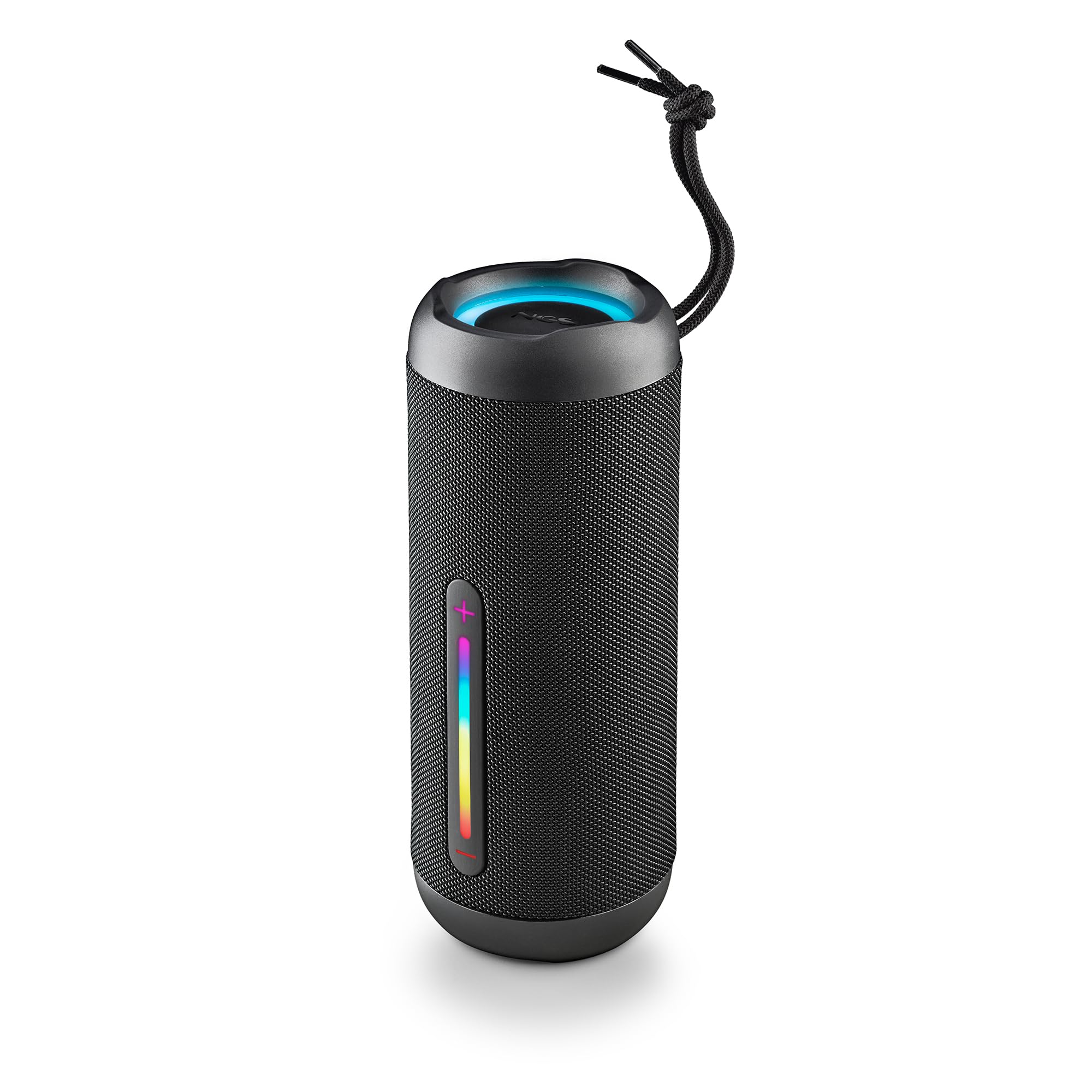
Image: The NGS Roller Furia 2 speaker demonstrating its IPX7 water resistance by being partially submerged in water.
10. Risoluzione Dei Problemi
| Problema | Possibile soluzione |
|---|---|
| L'altoparlante non si accende. | Assicurarsi che la batteria sia carica. Collegare a una fonte di alimentazione e riprovare. |
| Impossibile effettuare l'associazione tramite Bluetooth. | Assicurati che l'altoparlante sia in modalità di associazione. Disattiva e riattiva il Bluetooth sul tuo dispositivo. Assicurati che nessun altro dispositivo sia connesso all'altoparlante. Avvicinati all'altoparlante. |
| Nessun suono. | Controlla i livelli del volume sia sull'altoparlante che sul dispositivo collegato. Assicurati che sia selezionata la modalità di ingresso corretta (Bluetooth, AUX, USB, TF). |
| L'associazione TWS non riesce. | Prima di avviare l'associazione TWS, assicurati che entrambi gli altoparlanti non siano connessi ad altri dispositivi Bluetooth. Prova a resettare entrambi gli altoparlanti. |
11. Specifiche
| Caratteristica | Dettaglio |
|---|---|
| Nome del modello | Roller Furia 2 Black |
| Numero di modello | ELEC-SPK-0871 |
| Marca | NGS |
| Tecnologia di connettività | Bluetooth 5.3, AUX, USB, scheda TF |
| Potenza di uscita dell'altoparlante | 30 W (RMS) |
| Livello di resistenza all'acqua | IPX7 (impermeabile) |
| Tipo di batteria | 2 agli ioni di litio (inclusa) |
| Capacità della batteria | 7.4 V/2500 mAh |
| Tempo di riproduzione | Fino a 9 ore (al 50% del volume) |
| Portata Bluetooth | Fino a 10 metri |
| Dimensioni (L x P x A) | Dimensioni: 7.4 x 7.4 x 19.4 cm |
| Peso | 712 grammi |
| Dispositivi compatibili | MP3 Player, Laptop, Projector, Smartphone, Tablet, TV |
12. Garanzia e supporto
Questo prodotto viene fornito con un Garanzia limitata di 2 anno dalla data di acquisto. Conservare la prova d'acquisto per eventuali reclami in garanzia.
For technical support or warranty inquiries, please visit the official NGS websito o contattare il rivenditore locale.
Documenti correlati - Roller Furia 2
 |
NGS Roller Nitro 3: Manuale utente dell'altoparlante portatile wireless per esterni Scopri le caratteristiche e il funzionamento dell'NGS Roller Nitro 3, un altoparlante portatile wireless per esterni. Questo manuale illustra le modalità Bluetooth, TWS, Radio, USB/TF e AUX, oltre alle istruzioni di ricarica e alle specifiche tecniche. |
 |
Manuale utente dell'altoparlante Bluetooth NGS Roller Furia Manuale utente per l'altoparlante Bluetooth portatile NGS Roller Furia, con dettagli sui pulsanti di controllo, le modalità, la ricarica, l'associazione TWS e le specifiche tecniche. Include informazioni sulla sicurezza e dettagli sulla conformità. |
 |
NGS WILD DUB ZERO & WILD DUB 1 Trolley Speakers User Manual User manual for the NGS WILD DUB ZERO and WILD DUB 1 trolley speakers, detailing features, controls, connectivity, and technical specifications. |
 |
Altoparlante portatile wireless impermeabile NGS Roller Furia 2 Scopri NGS Roller Furia 2, uno speaker portatile Bluetooth 5.3 impermeabile da 30 W con tecnologia True Wireless. Dotato di certificazione IPX7, ingressi USB/TF/AUX e fino a 9 ore di riproduzione. |
 |
Guida rapida di HiFuture Ripple - Manuale utente Inizia a utilizzare il tuo altoparlante wireless portatile HiFuture Ripple. Questa guida rapida fornisce informazioni essenziali su configurazione, funzionalità e specifiche. |
Ask a question about this manual
Ask about setup, troubleshooting, compatibility, parts, safety, or missing instructions. Manuals+ will review the question and use this page’s manual context to help answer it.