
PQWT M200
PQWT M200 Water Detector Instruction Manual
Modello: M200
1. Introduzione
The PQWT M200 Water Detector is a geophysical instrument designed for underground water detection. It utilizes the natural electric field frequency selection system to analyze changes in the earth's electromagnetic field, providing millivolt data (Self-potential) to identify potential water sources.
2. Contenuto della confezione
Verificare che tutti i componenti siano presenti nella confezione:
- Host Machine (PQWT M200 Detector)
- Electrode Bars
- Copper Electrodes
- Cavo
- Cintura
- Caricabatterie
- Custodia per il trasporto
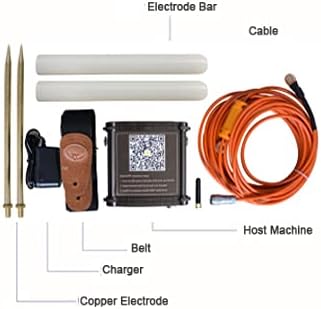
Figure 2.1: Included components of the PQWT M200 Water Detector kit.

Figure 2.2: The PQWT M200 Water Detector and its accessories stored in the carrying case.
3. Specifiche tecniche
| Parametro | Valore |
|---|---|
| Modello del prodotto | PQWT-M100/200/400 (M200 variant) |
| Misurazione della profondità | 100/200/400 meters (M200: 200 meters) |
| Measurement Data Unit | Electric field component of different frequencies of the earth electromagnetic field ΔVs (mV) |
| Campo di misura | 0mV-1000mV, automatic range conversion |
| Precisione della misurazione | 0.001mV |
| Measuring Channel | 4/6/8 canali |
| Guadagno del canale | 1-200,000 volte |
| Frequenza di misurazione | 30/36/48 frequency |
| Peso (ospite) | 0.55 kg |
| Energia | 18650*2 3000mAh rechargeable lithium battery |
| Display | Indicatore LED |
| A D Conversion / | 8-bit 1Msps |
| Impedenza di ingresso | ≥10 MΩ |
| Umidità relativa | ≤85% |
| Consumo energetico | Circa 1 W |
| Temperatura dell'ambiente di lavoro | Temperatura di esercizio -20°C ~ +50°C |
| Dimensioni del prodotto | 16.4 cm L x 6.1 cm P x 13.2 cm A |
| Metodo di controllo | Applicazione, remoto |
| Tecnologia | Electric Field Sensor |
| Dispositivi compatibili | Dispositivi Android |

Figure 3.1: Detailed technical specifications for the PQWT M-series water detectors.
4. Configurazione e installazione
4.1. Installazione dell'app mobile
The PQWT M200 operates with a dedicated mobile application on Android devices. Follow these steps to install the app:
- Locate the QR code on the side of the host machine.
- Scansiona il codice QR utilizzando il tuo dispositivo mobile.
- Open the download link provided by the QR code in your browser.
- Install the application named "PQWT water finder" or "PQWT_MobileAPP_PRO.APK".
Alternatively, you can download the app directly from: http://www.pqwtcs.com/download/PQWT_MobileAPP_PRO.APK

Figura 4.1: Fronte view of the PQWT M200 device with the mobile app QR code visible.

Figura 4.2: Parte superiore e laterale views of the PQWT M200 device, highlighting the QR code for app download.

Figura 4.3: dettagliata view of the QR code and instructions for mobile app installation.
4.2. Connessione hardware
- Connect the cable to the host machine.
- Connect the electrode bars and copper electrodes to the cable.
- Secure the host machine to your person using the provided belt for ease of use during surveys.
- Ensure the device is charged using the provided charger before use.
5. Istruzioni per l'uso
5.1. Accensione e collegamento
- Press and hold the white button on the host machine to turn it on.
- Open the "PQWT water finder" app on your Android device.
- The app should automatically connect to the device. Verify the connection status within the app.

Figure 5.1: Visual guide for initial setup and software interface navigation.
5.2. Conducting a Survey
The PQWT M200 offers high-speed and efficient detection of underground water sources. It is suitable for various geological structures including plains, hills, mountains, highlands, and basins.
- Selezionare la modalità di misurazione: In the software operation interface, choose your desired measurement mode (e.g., "Three frequency" for rough tests or "Profile survey").
- Imposta parametri: Adjust parameters such as "Lines", "Sites", and "Gain" as needed. Click "OK" to confirm.
- Inizia la misurazione: Click "Record" to begin measuring the first point.
- Continue Measurement: After the data for the first point is measured and the app indicates "record completed", move to the next measurement point and click "Record" again. Repeat this process for all desired points.
- Analisi dei dati: The instrument automatically generates geological section drawings without the need for a computer (Android system only). Analyze the generated curves and maps to identify potential water locations.
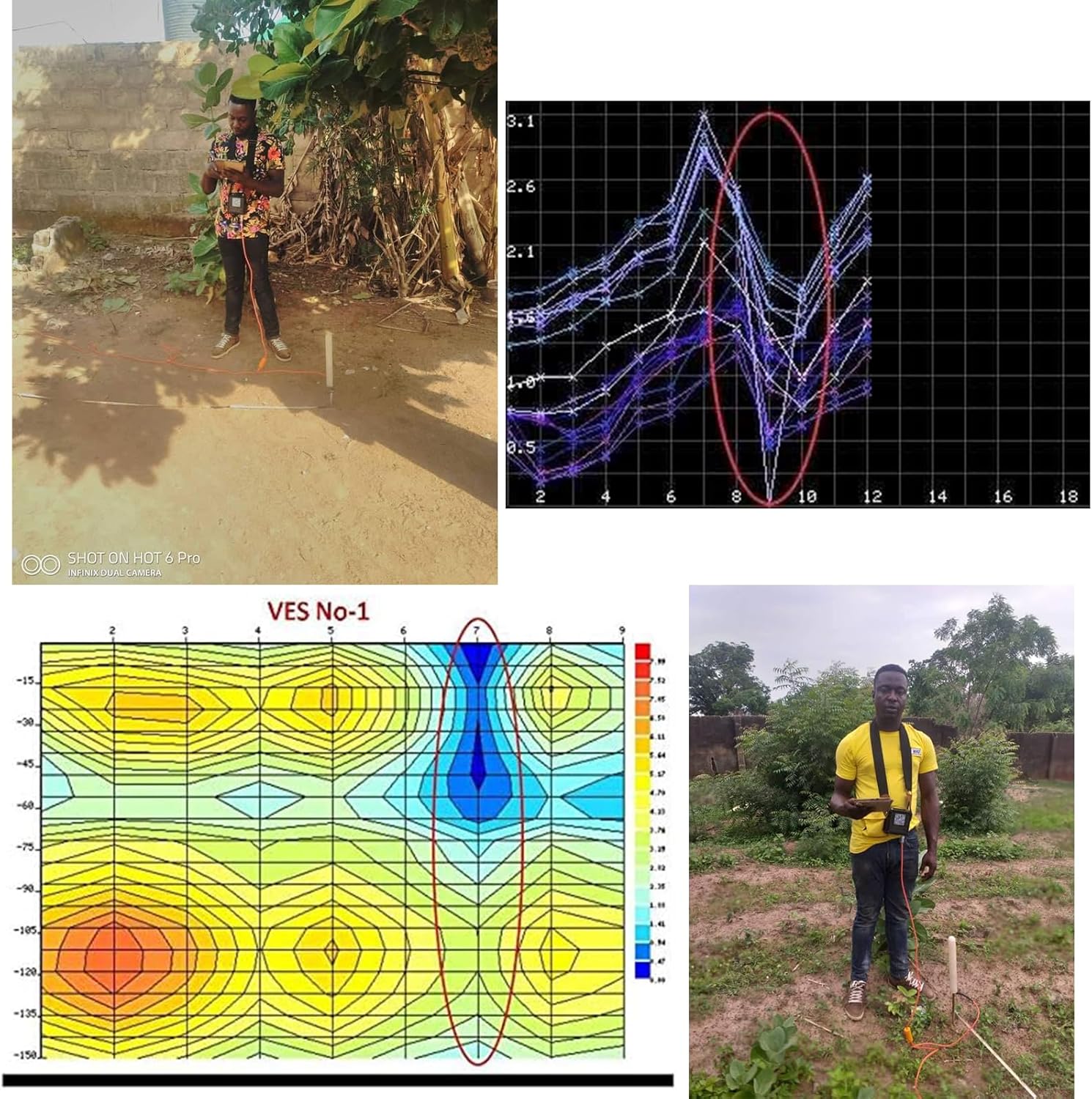
Figure 5.2: User conducting a water survey in the field with the PQWT M200.
Video 5.1: A demonstration of the PQWT M100 (similar model) in a real-world water survey application in Zambia, showing the process from survey to drilling.
6. Manutenzione
- Mantenere il dispositivo pulito, privo di polvere e umidità.
- Store the device and accessories in the provided carrying case when not in use to prevent damage.
- Charge the battery regularly, even during periods of inactivity, to maintain battery health.
- Evitare di esporre il dispositivo a temperature estreme o alla luce solare diretta per periodi prolungati.
- Inspect cables and electrodes for wear or damage before each use. Replace damaged components as necessary.
7. Risoluzione Dei Problemi
| Problema | Possibile causa | Soluzione |
|---|---|---|
| Il dispositivo non si accende. | Batteria scarica o pulsante di accensione non premuto correttamente. | Charge the device. Press and hold the power button firmly for a few seconds. |
| App fails to connect to the device. | Bluetooth/wireless issue, app not installed correctly, or device not powered on. | Ensure the device is on. Restart the app and device. Check your Android device's wireless settings. Reinstall the app if necessary. |
| Letture imprecise o incoerenti. | Poor electrode contact, environmental interference, or incorrect survey procedure. | Ensure electrodes are firmly inserted into the ground. Avoid areas with significant electromagnetic interference. Review operating instructions for correct survey methods. |
| L'app si blocca o si arresta in modo anomalo. | Software bug or insufficient device resources. | Restart the app. Ensure your Android device meets the minimum system requirements. Check for app updates. |
Per ulteriore assistenza, consultare la sezione supporto o contattare il servizio clienti.
8. Garanzia e supporto
The PQWT M200 Water Detector comes with a two-year instrument warranty and free maintenance. For any inquiries, concerns, or expert remote assistance regarding well position fixing, please contact our dedicated after-sales support group.
Informazioni sui contatti: Refer to the product packaging or the official PQWT websito per i dettagli di contatto dell'assistenza più aggiornati.
Ask a question about this manual
Ask about setup, troubleshooting, compatibility, parts, safety, or missing instructions. Manuals+ will review the question and use this page’s manual context to help answer it.