
1. Introduzione
This manual provides essential information for the safe and efficient operation of your SYLVOX 15.6" Under Cabinet Smart TV. Please read these instructions thoroughly before installation and use, and retain them for future reference. This television is designed for space-saving installation under cabinets, offering smart TV functionalities with Google TV.
2. Informazioni sulla sicurezza
- Sicurezza elettrica: Ensure the power supply matches the TV's requirements (AC 100-240V, DC12V, 9-32V). Do not expose the TV to rain or moisture. Disconnect power during lightning storms or when unused for long periods.
- Montaggio: The TV must be securely mounted to a sturdy surface capable of supporting its weight. Follow all installation instructions carefully to prevent injury or damage.
- Ventilazione: Ensure adequate ventilation around the TV. Do not block ventilation openings. Overheating can lead to malfunction.
- Pulizia: Always unplug the TV before cleaning. Use a soft, dry cloth. Avoid liquid cleaners or aerosols.
- Bambini: Per evitare rischi di soffocamento, tenere le parti di piccole dimensioni e i materiali di imballaggio lontano dalla portata dei bambini.
3. Contenuto della confezione
Verifica che tutti gli articoli elencati di seguito siano inclusi nel tuo pacchetto:
- SYLVOX 15.6" Under Cabinet Smart TV
- Telecomando
- Manuale di istruzioni (questo documento)
- Power Adapter (AC 100-240V to DC12V)
- Base telecomando
- Staffa di fissaggio
- Viti (KA4.0x8MM)
- Batterie AAA (2, per il telecomando)
- Scheda di garanzia

Immagine 3.1: Accessori e componenti inclusi.
4. Prodotto finitoview
The SYLVOX 15.6" Under Cabinet Smart TV is designed for versatile viewing and space efficiency. It features a 15.6-inch Full HD (1080p) LED display with a 16:9 aspect ratio and a 60Hz refresh rate, offering a 178° horizontal and 178° vertical ultra-wide viewangolo di ing.
4.1 Caratteristiche principali
- Flip-Down Screen: The screen can be vertically flipped down 0-90 degrees for optimal viewing and folded up for storage.
- Rotazione 360°: The entire unit can rotate 360 degrees horizontally for flexible positioning.
- Smart Google TV: Integrated Google TV system with 1.5G RAM and 8G storage, supporting various streaming applications.
- Connettività: Built-in Wi-Fi (5G support) and Wireless Connection (Bluetooth 5.0).
- Interfaccia utente: Touch buttons on the unit and a full-function remote control.
- Funzioni aggiuntive: LED clock display and timer alarm clock functionality.

Immagine 4.1: anteriore view of the SYLVOX Under Cabinet Smart TV.
4.2 Porte e connessioni
The TV includes the following ports for various connections:
- DC 12V Input di alimentazione
- RJ45 (Ethernet)
- USCITA SPDIF
- Line (L/R) Out
- HDMI (2 ports, with CEC & ARC support)
- RF (Antenna Input)
- USB (2 porte)
- Ingresso AV mini
- Uscita auricolare

Image 4.2: Rear panel with connection ports.
4.3 Screen Movement
The TV offers flexible screen positioning:
- Ribaltabile: The screen can be pulled down up to 90 degrees from its stored position.
- Rotazione: The entire TV unit can rotate 360 degrees horizontally when extended.

Image 4.3: Screen rotation and flip-down capabilities.
5. Configurazione e installazione
Careful installation is crucial for the stability and functionality of your TV.
5.1 Considerazioni sulla posizione di montaggio
- Choose a sturdy under-cabinet location that can safely support the TV's weight (approximately 7.7 lbs).
- Ensure there is sufficient clearance for the TV to rotate and flip down. The center point of the TV bracket should be at least 10.4 inches from any wall or obstruction to allow full rotation.
- Evitare luoghi vicini a fonti di calore o alla luce solare diretta.

Image 5.1: Mounting clearance and VESA dimensions.
5.2 Fasi di montaggio
- Preparare la superficie: If your cabinet has a recessed bottom, you may need to add a piece of wood (e.g., MDF) to create a flush mounting surface. Ensure this piece is securely attached to the cabinet.
- Fissare la staffa di montaggio: Position the mounting bracket (VESA 40x40mm) on the chosen under-cabinet location. Mark the screw holes.
- Praticare i fori pilota: Drill pilot holes into the cabinet surface at the marked locations.
- Staffa di sicurezza: Use the provided screws (KA4.0x8MM) to firmly attach the mounting bracket to the cabinet.
- Fissare la TV alla staffa: Carefully align the TV with the mounted bracket and secure it according to the instructions provided with the bracket. Ensure the single screw for rotation is properly engaged but allows movement.
5.3 Collegamento di alimentazione
Connect the power adapter to the DC 12V input port on the TV, then plug the adapter into a standard electrical outlet. The TV supports 9-32V wide voltage protection, making it suitable for various power sources, including RVs (12V car power cable not included).
5.4 Configurazione iniziale
- Accensione: Premere il pulsante di accensione sul televisore o sul telecomando.
- Selezione della lingua: Segui le istruzioni sullo schermo per selezionare la lingua preferita.
- Connessione di rete: Connect the TV to your Wi-Fi network or via an Ethernet cable (RJ45). Enter your Wi-Fi password if prompted.
- Account Google: Accedi con il tuo account Google per usufruire delle funzionalità di Google TV, scaricare app e personalizzare la tua esperienza.
- Channel Scan (Optional): If connecting an antenna, follow the on-screen instructions to scan for available channels.
6. Istruzioni per l'uso
This section details how to use your SYLVOX Smart TV.
6.1 Remote Control and Touch Buttons
The TV can be operated using the included remote control or the touch-sensitive buttons located on the front panel of the unit.
- Energia: Accende o spegne la TV.
- Fonte: Selects input sources (HDMI, AV, ATV/DTV).
- Menu: Accede alle impostazioni e alle opzioni della TV.
- CH+/CH-: Cambia canale o naviga nei menu.
- VOL+/VOL-: Regola il volume.
- SET/ENTER: Conferma le selezioni.
- TIME MINUS/TIME PLUS: Regola le impostazioni del timer.
6.2 Interfaccia di Google TV
After initial setup, the Google TV home screen will display. This interface provides access to streaming apps, live TV, and personalized recommendations.

Image 6.1: Google TV home screen.
6.3 Utilizzo dell'App
You can download and use various applications from the Google Play Store. Pre-certified apps include Netflix, YouTube, Twitter, Facebook, AccuWeather, Mirracast, Vudu, Pandora, and HTML5.
- Navigate to the 'Apps' section on the home screen.
- Select the Google Play Store icon to browse and download new applications.
- Select an installed app to launch it.
Image 6.2: Accessing the Google Play Store.
6.4 Wireless Connectivity and Screen Casting
- Wifi: Connect to your home Wi-Fi network via the settings menu for internet access.
- Wireless Connection (Bluetooth 5.0): Pair Bluetooth devices like headphones or speakers through the TV's settings.
- Trasmissione dello schermo: The TV supports screencasting from compatible phones and devices, allowing you to display content from your mobile device directly on the TV screen.
6.5 Funzione timer
The TV includes a timing function (15-60 minutes optional) which can be used as a cooking timer or for other purposes. Use the 'TIME MINUS' and 'TIME PLUS' buttons on the control panel or remote to set the desired duration.
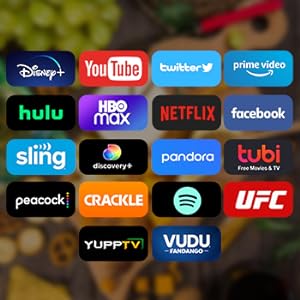
Image 6.3: Using the timing function.
7. Manutenzione
Una corretta manutenzione garantisce la longevità e le prestazioni del televisore.
- Pulizia dello schermo: Pulire delicatamente lo schermo con un panno morbido e privo di lanugine. Per macchie ostinate, strofinare leggermenteampPulire il panno con acqua o con una soluzione detergente specifica per schermi (non spruzzare direttamente sullo schermo).
- Pulizia dell'esterno: Utilizzare un panno morbido e asciutto per pulire la superficie del televisore.asing. Evitare detergenti abrasivi o solventi.
- Ventilazione: Controllare periodicamente che le aperture di ventilazione siano libere da polvere e detriti.
- Magazzinaggio: When not in use, fold the TV screen up into its storage position to protect it from dust and potential damage.

Image 7.1: TV folded for storage, freeing up space.
8. Risoluzione Dei Problemi
Se riscontri problemi con il tuo televisore, fai riferimento ai seguenti problemi comuni e alle relative soluzioni:
| Problema | Possibile causa | Soluzione |
|---|---|---|
| Nessun potere | Power cable disconnected; outlet malfunction; remote batteries dead. | Check power cable connection; test outlet with another device; replace remote batteries. |
| Nessuna immagine, ma l'audio è presente | È stata selezionata una sorgente di input errata; problema con il dispositivo esterno. | Press 'Source' button to cycle through inputs; check external device connections. |
| Nessun suono, ma l'immagine è presente | Volume disattivato o troppo basso; problema con il sistema audio esterno. | Unmute or increase volume; check audio connections to external devices. |
| Problemi di connessione Wi-Fi | Password errata; problema con il router; TV troppo lontana dal router. | Re-enter Wi-Fi password; restart router; move TV closer to router or use Ethernet. |
| Il telecomando non funziona | Batterie scariche; ostruzione tra telecomando e TV. | Replace batteries; remove obstructions; ensure remote is pointed at the TV's sensor. |
| Prestazioni lente / arresti anomali delle app | Too many apps running; low memory. | Close unused apps; restart the TV; clear cache for problematic apps in settings. |
Se il problema persiste dopo aver provato queste soluzioni, contattare l'assistenza clienti SYLVOX.
9. Specifiche
| Caratteristica | Dettaglio |
|---|---|
| Numero di modello | KT16A0KHGA |
| Dimensioni dello schermo | 15.6 pollici |
| Tecnologia di visualizzazione | GUIDATO |
| Risoluzione | 1080p (Full HD) |
| Frequenza di aggiornamento | 60 Hz |
| Proporzioni | 16:9 |
| ViewAngolo di inclinazione (H/V) | 178° / 178° |
| Sistema operativo | TV di Google |
| Memoria (RAM + Archiviazione) | 1.5G + 8G |
| Connettività wireless | Wi-Fi (supporto 5G), Bluetooth 5.0 |
| Ingressi video | ATV/DTV, Mini AV, HDMI (x2) |
| Ingresso di rete | RJ45 |
| Altre porte | SPDIF OUT, Line (L/R) Out, RF, Earphone, USB (x2) |
| Potenza in ingresso | AC 100-240V, DC12V, 9-32V |
| Dimensioni del prodotto (senza supporto) | 373.35 x 226.85 x 9.5 mm (0.4"P x 14.7"L x 8.9"A) |
| Peso dell'articolo | 7.7 libbre (3.5 kg) |
| Temperatura di esercizio | -20°C a 45°C (-4°F a 113°F) |
10. Garanzia e supporto
SYLVOX is committed to providing quality products and customer satisfaction.
- Garanzia: Your SYLVOX TV comes with a 12-month free defect protection.
- Resi: Free returns are offered for quality issues. A 30-day hassle-free return policy is available, requiring original packaging.
- Assistenza clienti: For technical assistance, warranty claims, or any other inquiries, please refer to the contact information provided on your warranty card or visit the official SYLVOX websito.