
Introduzione
This manual provides essential information for the proper setup, operation, and maintenance of your Rubble & Crew: Construction Crew to the Rescue! DVD. Please read these instructions carefully to ensure optimal viewing experience and to prolong the life of your DVD.
Prodotto finitoview
The Rubble & Crew: Construction Crew to the Rescue! DVD features animated adventures from Builder Cove. This DVD is designed for playback on standard DVD players and compatible devices.
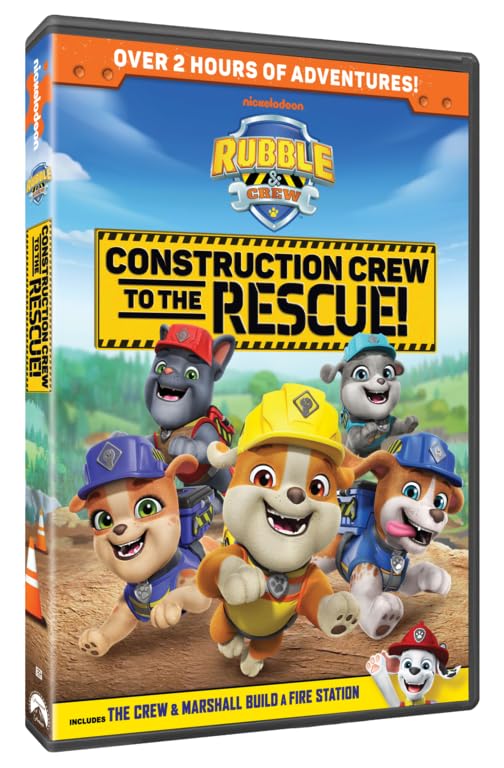
This image displays the front cover artwork for the Rubble & Crew: Construction Crew to the Rescue! DVD, featuring Rubble and his construction pup crew.
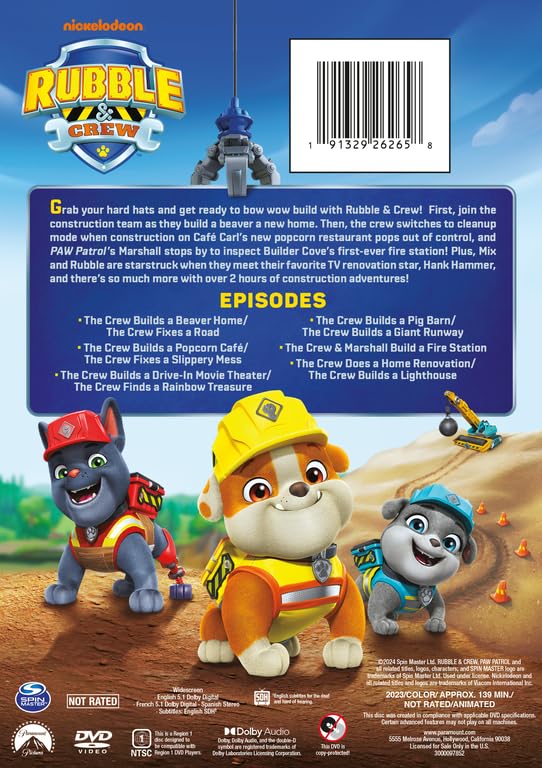
The back cover of the DVD case, showing a list of episodes included, copyright information, and the product barcode.
Impostare
- Disimballare il DVD: Carefully remove the DVD from its packaging. Avoid touching the disc's playback surface.
- Prepara il tuo lettore DVD: Assicurati che il lettore DVD sia collegato al televisore o al dispositivo di visualizzazione e che sia acceso. Consulta il manuale del lettore DVD per istruzioni specifiche sul collegamento.
- Inserire il DVD: Open the disc tray of your DVD player. Hold the DVD by its edges and gently place it onto the tray with the label side facing up. Close the disc tray.
- Seleziona ingresso: On your television, select the correct input source (e.g., HDMI 1, AV) that corresponds to your DVD player connection.
Istruzioni per l'uso
- Riproduzione automatica: Many DVD players will automatically begin playing the disc or display the main menu upon insertion.
- Navigazione nel menu principale: Use your DVD player's remote control to navigate the on-screen menu. Typically, arrow keys are used to move selections, and the "Enter" or "OK" button is used to confirm.
- Selezione degli episodi: From the main menu, select "Episodes" or "Play All" to start viewing. Individual episodes can usually be selected from a dedicated episode menu.
- Selezione della lingua: This DVD supports English, French, and Spanish audio. To change the audio language, look for a "Language" or "Audio" option in the main menu or during playback via your remote's audio button.
- Controlli di riproduzione:
- Riproduci/Pausa: Press the Play/Pause button on your remote to start or temporarily stop playback.
- Stop: Press the Stop button to end playback and return to the main menu or stop the disc.
- Saltare: Use the Skip Forward/Backward buttons to jump to the next or previous chapter/episode.
- Avanti veloce/Riavvolgimento: Use the Fast Forward/Rewind buttons to quickly scan through the content.

A still image from the Rubble & Crew series, depicting the characters engaged in a construction activity.
Manutenzione
- Gestione: Always hold the DVD by its outer edges or by the center hole. Avoid touching the shiny playback surface to prevent fingerprints and scratches.
- Pulizia: If the disc becomes dirty, gently wipe it with a soft, lint-free cloth. Wipe from the center of the disc outwards in a straight line, not in a circular motion. Do not use abrasive cleaners or solvents.
- Magazzinaggio: Store the DVD in its original case in a cool, dry place away from direct sunlight and extreme temperatures. Do not expose the disc to excessive heat or humidity.
- Evitare di piegarsi: Non piegare o flettere il disco, poiché ciò potrebbe causare danni irreparabili.
Risoluzione dei problemi
- Disco non in riproduzione:
- Assicurarsi che il disco sia inserito correttamente con l'etichetta rivolta verso l'alto.
- Check if the disc is clean and free of scratches. Clean if necessary.
- Verify your DVD player is functioning correctly and is set to the correct input on your TV.
- Try playing another DVD to confirm the player is working.
- Nessun audio o video:
- Controlla tutti i collegamenti via cavo tra il lettore DVD e la TV.
- Assicurarsi che la sorgente di ingresso del televisore sia selezionata correttamente.
- Adjust the volume on your TV and DVD player.
- Confirm the audio language setting on the DVD menu.
- Saltare o congelare:
- Pulire accuratamente il disco come descritto nella sezione Manutenzione.
- Minor scratches can sometimes cause skipping. If cleaning does not resolve the issue, the disc may be damaged.
Specifiche
- Titolo: Rubble & Crew: Construction Crew to the Rescue!
- Marca: FONDAMENTALE
- Modello (ASIN): B0CTHX4QSR
- Valutazione MPAA: NR (non classificato)
- Dimensioni del prodotto: 1 x 1 x 1 pollici; 2.4 once
- Formato multimediale: DVD, NTSC
- Data di rilascio: 14 maggio 2024
- Attori: Alessandro Pugiotto, Luxton Handspiker
- Lingue doppiate: Inglese, Francese, Spagnolo
- Numero di dischi: 1
- Genere: Animation, Children
- Primary Language: Inglese
Informazioni sulla garanzia
No specific warranty information is provided with this product. Please refer to the retailer's return policy or contact the manufacturer directly for any warranty-related inquiries.
Supporto
For technical support or further inquiries regarding the Rubble & Crew: Construction Crew to the Rescue! DVD, please refer to the contact information provided by the DVD manufacturer (PARAMOUNT) or your point of purchase.