
VirtuFit VF11007
Manuale di istruzioni per la pedana vibrante VirtuFit VF11007
Modello: VF11007
1. Introduzione
Thank you for choosing the VirtuFit VF11007 Vibration Plate Fitness machine. This manual provides essential information for the safe and effective use of your new fitness equipment. Please read it thoroughly before operation and retain it for future reference.

Figura 1: The VirtuFit VF11007 Vibration Plate, including the remote control and resistance bands.
2. Informazioni sulla sicurezza
Before using the vibration plate, please observe the following safety precautions:
- Consultare un medico prima di iniziare un nuovo programma di esercizi, soprattutto se si hanno patologie preesistenti.
- Assicurarsi che la piastra vibrante sia posizionata su una superficie stabile e piana.
- Non utilizzare la macchina in caso di gravidanza, se si è portatori di pacemaker o se si soffre di osteoporosi grave, epilessia o trombosi acuta.
- Tenere i bambini e gli animali domestici lontani dalla macchina durante il funzionamento.
- Indossare sempre calzature sportive adatte.
- Interrompere immediatamente l'esercizio se si avvertono vertigini, nausea o dolore.
- Scollegare la macchina quando non è in uso e prima di pulirla.
3. Impostazione
The VirtuFit VF11007 Vibration Plate requires minimal setup. Follow these steps:
- Disimballaggio: Carefully remove all components from the packaging. Verify that all parts are present: the vibration plate, remote control, power cable, and resistance bands.
- Posizionamento: Position the vibration plate on a flat, stable, and non-slip surface. Ensure there is enough clear space around the unit for safe operation.
- Collegamento elettrico: Plug the power cable into the vibration plate's power input, then into a suitable electrical outlet.
- Fasce di resistenza (facoltative): Se lo si desidera, fissare le fasce di resistenza ai punti di attacco designati sui lati della pedana vibrante.
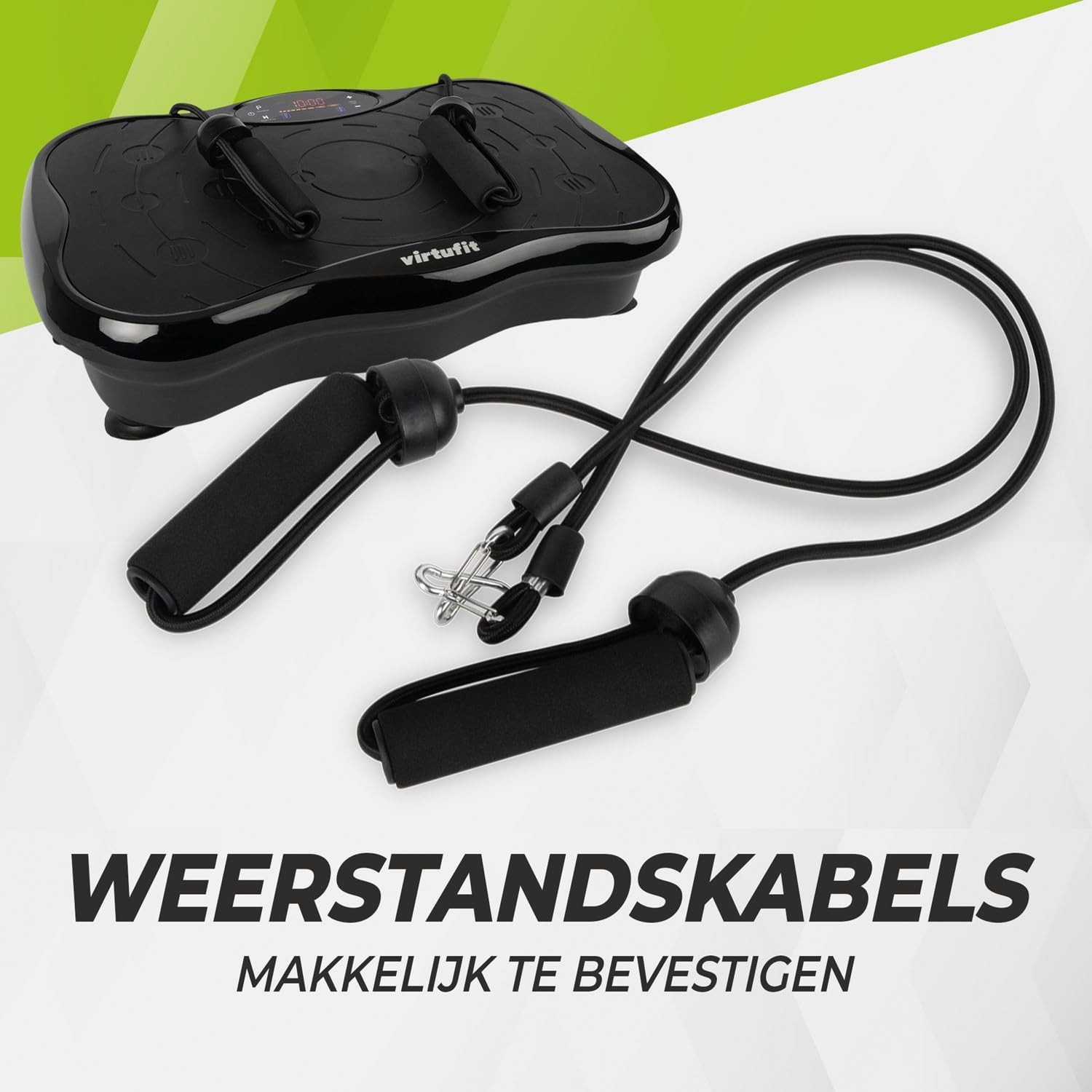
Figura 2: Resistance bands ready for attachment to the vibration plate.
4. Istruzioni per l'uso
The VirtuFit VF11007 features an intuitive display and a convenient remote control for easy operation.
4.1. Pannello di controllo e display
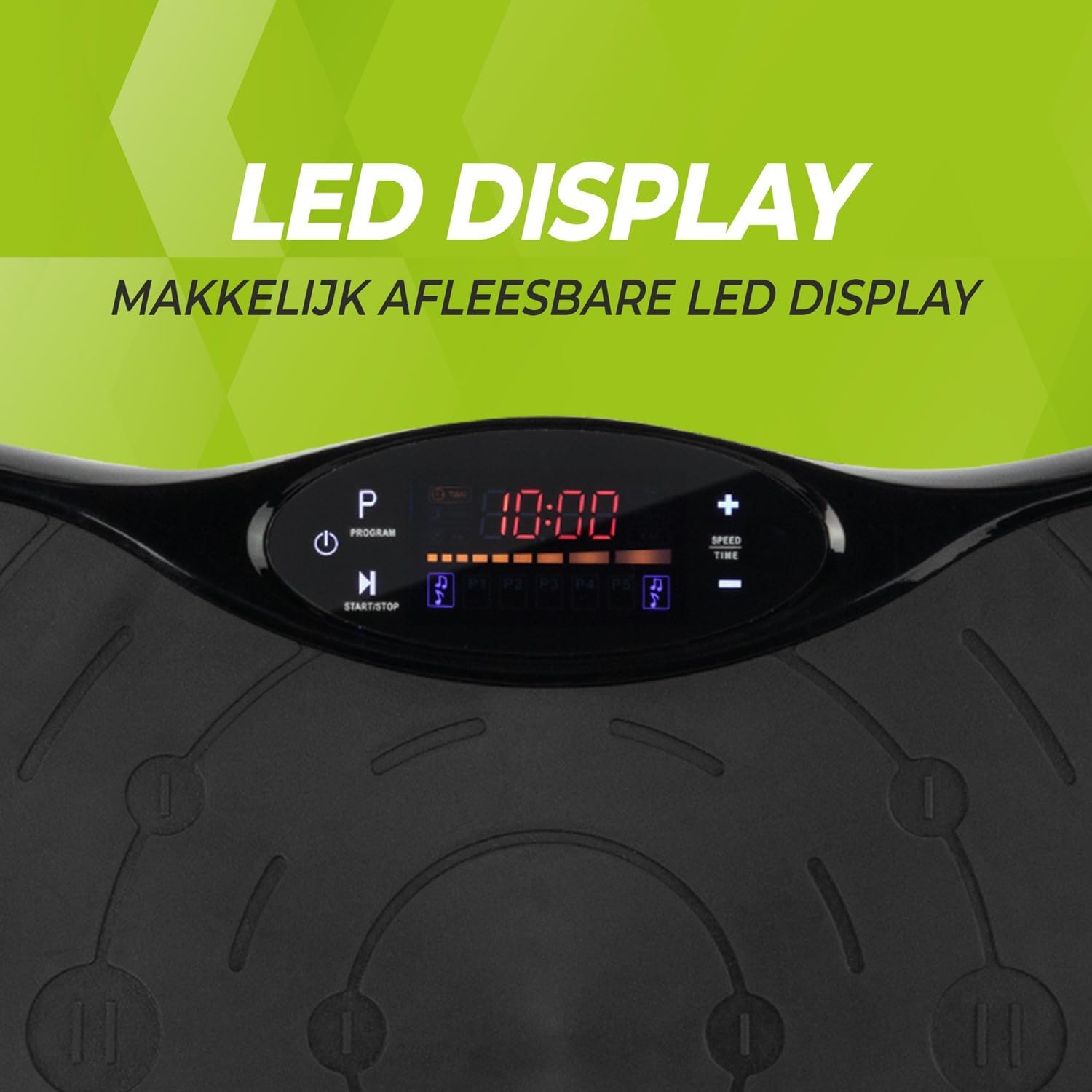
Figura 3: Dettagliato view of the LED display, showing time, program, and speed settings.
The integrated computer features an LED display showing time, speed, and program information. Buttons on the panel allow for basic control.
- Pulsante di accensione: Accende/spegne l'unità.
- Pulsante di avvio/arresto: Initiates or pauses manual operation.
- Pulsante Programma (P): Cycles through the pre-set programs.
- Pulsanti +/- velocità: Adjusts the vibration speed in manual mode.
- Pulsanti tempo +/-: Adjusts the exercise duration in manual mode.
4.2. Controllo remoto
The remote control provides full functionality, allowing you to adjust settings without interrupting your workout.

Figura 4: The remote control for convenient adjustment of settings.
- Pulsante di accensione: Accende/spegne l'unità.
- Pulsante di avvio/arresto: Initiates or pauses manual operation.
- Pulsante Programma (P): Selects one of the 5 automatic programs or the manual program.
- Pulsanti +/- velocità: Increases or decreases the vibration speed (99 levels).
- Pulsanti tempo +/-: Regola la durata dell'esercizio.
- Controlli musicali: Play/Pause, Next/Previous track, Volume +/- for Bluetooth audio.
4.3. Exercise Programs
The vibration plate offers 10 training programs, including 5 automatic programs (P1-P5) and a manual program.
- Programmi automatici (P1-P5): These programs automatically vary the speed over a 10-minute duration. Select the desired program using the 'P' button on the control panel or remote.
- Programma manuale: Allows you to set your preferred speed (1-99) and duration. Use the Speed +/- and Time +/- buttons to customize your workout.
Program Speed Examples (for a 10-minute duration):
| Programma | Speed Progression (Example) |
|---|---|
| P1 | 10 - 30 - 40 - 50 |
| P2 | 15 - 25 - 20 - 30 |
| P3 | 20 - 40 - 60 - 80 |
| P4 | 25 - 45 - 50 - 85 |
| P5 | 30 - 50 - 70 - 90 |
Note: These are example speed progressions. Actual speeds may vary slightly.
4.4. Bluetooth Speaker and USB Port
The vibration plate includes an integrated Bluetooth speaker and a USB charging port.

Figura 5: Location of the integrated Bluetooth speaker.
- Connessione Bluetooth: Turn on the vibration plate. Activate Bluetooth on your smartphone or tablet and search for "VirtuFit" or a similar device name. Pair your device.
- Riproduzione musicale: Once connected, you can play music through the integrated speakers. Use your device or the remote control to manage playback and volume.
- Ricarica USB: Connect your phone or tablet to the USB port to charge it during your workout.
5. Manutenzione
Regular maintenance ensures the longevity and optimal performance of your VirtuFit Vibration Plate.
- Pulizia: Pulire la superficie della piastra vibrante con un panno morbido eamp panno dopo ogni utilizzo. Non utilizzare detergenti abrasivi o solventi.
- Magazzinaggio: Conservare la macchina in un luogo fresco e asciutto, lontano dalla luce solare diretta e dall'umidità.
- Ispezione: Controllare periodicamente il cavo di alimentazione per verificare che non sia danneggiato. Assicurarsi che tutti i collegamenti siano saldi.
- Superficie antiscivolo: The anti-slip rubber surface is designed for durability. Keep it clean to maintain its grip.

Figura 6: The durable anti-slip rubber surface for secure footing.
6. Risoluzione Dei Problemi
If you encounter any issues with your VirtuFit Vibration Plate, refer to the following common problems and solutions:
| Problema | Possibile causa | Soluzione |
|---|---|---|
| La macchina non si accende. | Cavo di alimentazione non collegato correttamente; presa di corrente non funzionante. | Ensure the power cord is securely plugged into both the machine and the wall outlet. Test the outlet with another device. |
| Nessuna vibrazione. | Machine is paused; Speed setting is too low; Program not started. | Press the Start button. Increase the speed setting. Ensure a program is selected and running. |
| Telecomando non funzionante. | Batteries are dead or incorrectly inserted; Obstruction between remote and sensor. | Replace batteries with new ones, ensuring correct polarity. Remove any obstructions. Point the remote directly at the display sensor. |
| Il Bluetooth non si connette. | Bluetooth on device is off; Incorrect pairing. | Ensure Bluetooth is enabled on your device. Forget the device on your phone/tablet and re-pair. Ensure the vibration plate is powered on. |
Se il problema persiste, contattare l'assistenza clienti.
7. Specifiche
Key technical specifications for the VirtuFit VF11007 Vibration Plate:
- Numero modello: VF11007
- Marca: Virtu Fit
- Dimensioni (L x P x A): Dimensioni: 54 x 12.5 x 32 cm
- Peso: 7.5 kg
- Materiale: ABS rubber
- Tipo di controllo: Telecomando
- Tipo di visualizzazione: Graphic display (LED)
- Maximum Speed Levels: 99
- Numero di programmi: 10
- Modalità operativa: Automatico / Manuale
- Fonte di energia: Cavo elettrico
- Funzionalità integrate: Bluetooth speaker, USB charging port
8. Informazioni sulla garanzia
VirtuFit products are manufactured to high-quality standards. This product is covered by the standard legal warranty applicable in your region. Please retain your proof of purchase for any warranty claims.
For specific warranty terms and conditions, please refer to the VirtuFit official websito o contattare il rivenditore.
9. Assistenza clienti
Should you require assistance, have questions, or need to report an issue, please contact VirtuFit customer support or your authorized retailer.
For more information, visit the official VirtuFit websito: VirtuFit Brand Store
Ask a question about this manual
Ask about setup, troubleshooting, compatibility, parts, safety, or missing instructions. Manuals+ will review the question and use this page’s manual context to help answer it.