
SHARP XL-B530(BK)
Sistema a microcomponenti SHARP XL-B530
Manuale di istruzioni per l'utente
Introduzione
Grazie per l'acquistoasing the SHARP XL-B530 Micro Component System. This system is designed to provide high-quality audio playback from various sources, including Bluetooth wireless streaming, CD, USB, AM/FM radio, and auxiliary input. This manual provides detailed instructions for setting up, operating, and maintaining your new audio system to ensure optimal performance and longevity.
Informazioni importanti sulla sicurezza
- Leggere attentamente tutte le istruzioni prima dell'uso.
- Conservare questo manuale per riferimento futuro.
- Non esporre l'unità alla pioggia o all'umidità.
- Assicurare una ventilazione adeguata attorno all'unità. Non ostruire le aperture di ventilazione.
- Non posizionare l'unità vicino a fonti di calore quali radiatori, bocchette di riscaldamento, stufe o altri apparecchi (inclusi amplificatori) che producono calore.
- Proteggere il cavo di alimentazione per evitare che venga calpestato o schiacciato.
- Utilizzare solo accessori/componenti specificati dal produttore.
- Scollegare l'apparecchio durante i temporali o quando non viene utilizzato per lunghi periodi di tempo.
- Affidare tutti gli interventi di assistenza a personale qualificato.
Contenuto della confezione
Si prega di verificare che tutti i seguenti articoli siano inclusi nel pacchetto:
- Main Unit (Micro Component System)
- Unità altoparlanti (x2)
- Telecomando
- Cavo di alimentazione
- Antenna FM
- Antenna ad anello AM
- Manuale dell'utente (questo documento)
Prodotto finitoview
Familiarize yourself with the components and controls of your SHARP XL-B530 system.
Main Unit and Speakers

Complessivamente view of the SHARP XL-B530 Micro Component System, including the main unit, two speakers, and the remote control.
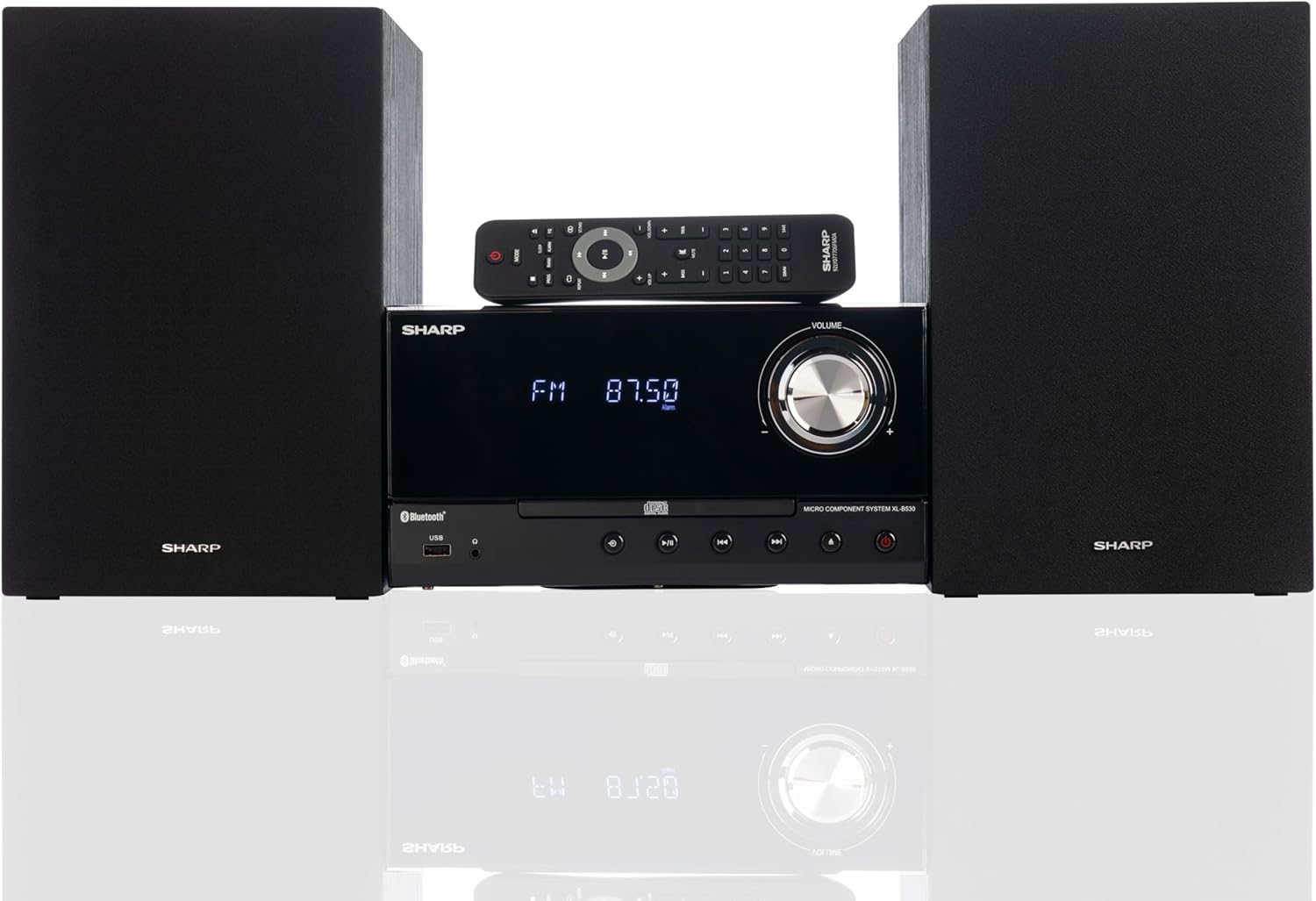
Front panel of the main unit, showing the LCD display, volume knob, CD tray, and control buttons.
Collegamenti del pannello posteriore

The rear panel of the main unit, featuring speaker terminals, FM antenna input, AM antenna input, and auxiliary input ports.
Telecomando
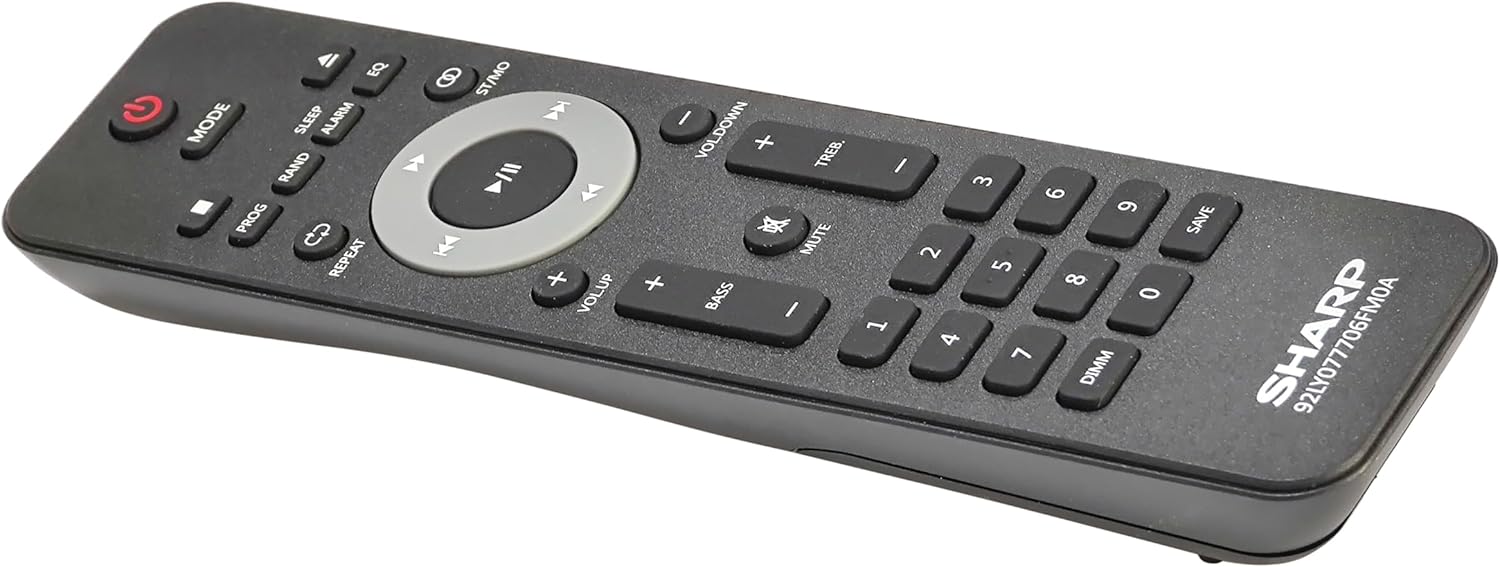
Dettagliato view of the remote control, showing various function buttons for power, mode, playback, volume, and sound adjustments.
Impostare
Follow these steps to set up your micro component system.
1. Collegamento degli altoparlanti
- Identify the left and right speaker cables.
- Connect the red (+) wire from each speaker to the red (+) terminal on the main unit's rear panel.
- Connect the black (-) wire from each speaker to the black (-) terminal on the main unit's rear panel.
- Assicurare una connessione sicura per entrambi gli altoparlanti.
2. Collegamento dell'antenna
- Antenna FM: Connect the supplied FM wire antenna to the FM antenna jack on the rear panel. Extend the wire fully for best reception.
- Antenna AM: Assemble the AM loop antenna and connect its wires to the AM antenna terminals on the rear panel. Rotate the antenna for optimal AM reception.
3. Collegamento elettrico
- Ensure all other connections are made.
- Collegare il cavo di alimentazione alla presa AC IN sul retro dell'unità principale.
- Insert the other end of the power cord into a wall outlet.
Istruzioni per l'uso
This section details how to use the various functions of your SHARP XL-B530 system.
Accensione/spegnimento
- Premere il tasto ENERGIA pulsante sull'unità principale o sul telecomando per accendere o spegnere il sistema.
Selezione della fonte
- Premere il tasto MODALITÀ button on the main unit or remote control repeatedly to cycle through available sources: CD, Bluetooth, USB, FM, AM, AUX.
Riproduzione CD
- Premere il tasto MODALITÀ pulsante per selezionare la modalità 'CD'.
- Premere il tasto APRI/CHIUDI pulsante per aprire il vassoio del CD.
- Place a CD (CD/MP3/WMA/CD-R/CD-RW) with the label side up into the tray.
- Premere il tasto APRI/CHIUDI nuovamente il pulsante per chiudere il vassoio. La riproduzione inizierà automaticamente.
- Utilizzo RIPRODUCI/PAUSA, FERMARE, SALTARE (forward/backward), and RICERCA pulsanti per il controllo.
Accoppiamento Bluetooth
- Premere il tasto MODALITÀ button to select 'Bluetooth' mode. The display will show 'BT' and flash, indicating it's ready for pairing.
- Sul tuo dispositivo Bluetooth (smartphone, tablet, ecc.), attiva il Bluetooth e cerca i dispositivi disponibili.
- Select 'SHARP XL-B530' from the list.
- Once paired, the display will stop flashing and show 'BT CONNECTED'. You can now stream audio from your device.
Riproduzione USB
- Inserire una chiavetta USB nella porta USB sul pannello frontale.
- Premere il tasto MODALITÀ pulsante per selezionare la modalità 'USB'.
- The system will automatically detect and begin playing compatible audio file(MP3/WMA).
- Use playback controls similar to CD mode.
Radio AM/FM

The SHARP XL-B530 system displaying an FM radio frequency, highlighting its digital tuner capabilities.
- Premere il tasto MODALITÀ button to select 'FM' or 'AM' mode.
- Scansione automatica: Premere e tenere premuto il tasto RIPRODUCI/PAUSA pulsante per eseguire la scansione automatica e salvare le stazioni disponibili.
- Sintonizzazione manuale: Utilizzare il SALTARE pulsanti per sintonizzarsi manualmente sulle frequenze desiderate.
- Stazioni preimpostate: Use the number buttons on the remote to directly select saved preset stations.
Regolazione del volume e del suono

A close-up of one of the SHARP XL-B530 speakers, illustrating the adjustable bass and treble sound output.
- Volume: Ruotare il VOLUME manopola sull'unità principale o utilizzare il VOL + / VOL- pulsanti sul telecomando.
- Bassi/Alti: Utilizzare il BASSI+ / BASSI- E TREB+ / TREB- buttons on the remote control to adjust sound characteristics.
- Loudness: Premere il tasto RUMOROSITÀ button on the remote to enhance bass and treble at low volumes.
- EQ: Premere il tasto EQ button on the remote to cycle through preset equalizer modes.
Manutenzione
Proper care will ensure the longevity of your system.
- Pulizia: Use a soft, dry cloth to clean the exterior of the unit. For stubborn stains, dampen the cloth lightly with water. Do not use abrasive cleaners or solvents.
- Cura del CD: Maneggiare i CD tenendoli per i bordi. Pulire i CD sporchi con un panno morbido e privo di lanugine, procedendo dal centro verso l'esterno.
- Ventilazione: Assicurarsi che le aperture di ventilazione non siano ostruite da polvere o detriti.
- Magazzinaggio: Se si conserva l'unità per un periodo prolungato, scollegarla dalla presa di corrente e conservarla in un luogo fresco e asciutto.
Risoluzione dei problemi
Se riscontri problemi con il tuo sistema, fai riferimento ai seguenti problemi comuni e alle relative soluzioni.
| Problema | Possibile causa | Soluzione |
|---|---|---|
| Nessun potere | Cavo di alimentazione non collegato; presa di corrente non attiva | Assicurarsi che il cavo di alimentazione sia collegato saldamente; provare una presa diversa |
| Nessun suono | Volume too low; Speakers not connected; Incorrect source selected | Increase volume; Check speaker connections; Select correct input source |
| Il CD non viene riprodotto | CD inserted incorrectly; CD is dirty or scratched; Incorrect mode | Insert CD correctly (label side up); Clean or replace CD; Select CD mode |
| Bluetooth non associato | Bluetooth mode not selected; Device too far; Device already paired to another unit | Select Bluetooth mode; Move device closer; Disconnect from other devices and try again |
| Scarsa ricezione radio | Antenna not connected or positioned poorly; Interference | Connect and adjust antenna position; Move unit away from other electronic devices |
| Il telecomando non funziona | Le batterie sono scariche o inserite in modo errato; Ostruzione tra il telecomando e l'unità | Replace batteries, check polarity; Remove any obstructions; Ensure remote is pointed at the unit's sensor |
Specifiche
| Caratteristica | Specificazione |
|---|---|
| Numero di modello | XL-B530(BK) |
| Potenza di uscita | 200 W massimo (100 W efficace) |
| Connettività | Bluetooth, USB, ingresso Aux |
| Compatibilità del disco | CD, CD-R/RW, MP3, WMA |
| Sintonizzatore | AM/FM Stereo Digital Tuner (50 station presets) |
| Tipo di altoparlante | Stereo |
| Dimensioni del prodotto (L x P x A) | 25 x 11 x 9.6 pollici |
| Peso dell'articolo | 18 libbre |
| Colore | Quercia nera |
Garanzia e supporto
For warranty information and technical support, please refer to the warranty card included with your product or visit the official SHARP websito. Conservare la ricevuta d'acquisto come prova d'acquisto per eventuali reclami in garanzia.
For further assistance, you may contact SHARP customer service through their official channels.
Ask a question about this manual
Ask about setup, troubleshooting, compatibility, parts, safety, or missing instructions. Manuals+ will review the question and use this page’s manual context to help answer it.