
Introduzione
Grazie per l'acquistoasing the Muse M-780 BTB Bluetooth Speaker. This portable speaker features 20W output, colored lights, IPX5 splash resistance, hands-free calling, and stereo pairing capabilities. It supports Bluetooth, Auxiliary input, and USB MP3 playback. Please read this manual carefully before use to ensure proper operation and to maximize your listening experience.
Informazioni sulla sicurezza
- Non esporre il dispositivo a temperature estreme, alla luce solare diretta o a elevata umidità.
- Evitare di far cadere o di sottoporre l'altoparlante a forti urti.
- The speaker is IPX5 splash-resistant. Do not immerse it in water or expose it to strong jets of water.
- Non tentare di smontare o modificare l'altoparlante. Ciò invaliderà la garanzia.
- Utilizzare solo il cavo di ricarica fornito o approvato.
- Tenere fuori dalla portata dei bambini.
Contenuto della confezione
Si prega di verificare che tutti gli elementi siano presenti:
- Muse M-780 BTB Bluetooth Speaker
- Cavo di ricarica USB-C
- Cavo di ingresso ausiliario
- Manuale di istruzioni (questo documento)
Prodotto finitoview
Familiarizzare con i comandi e le porte dell'altoparlante.
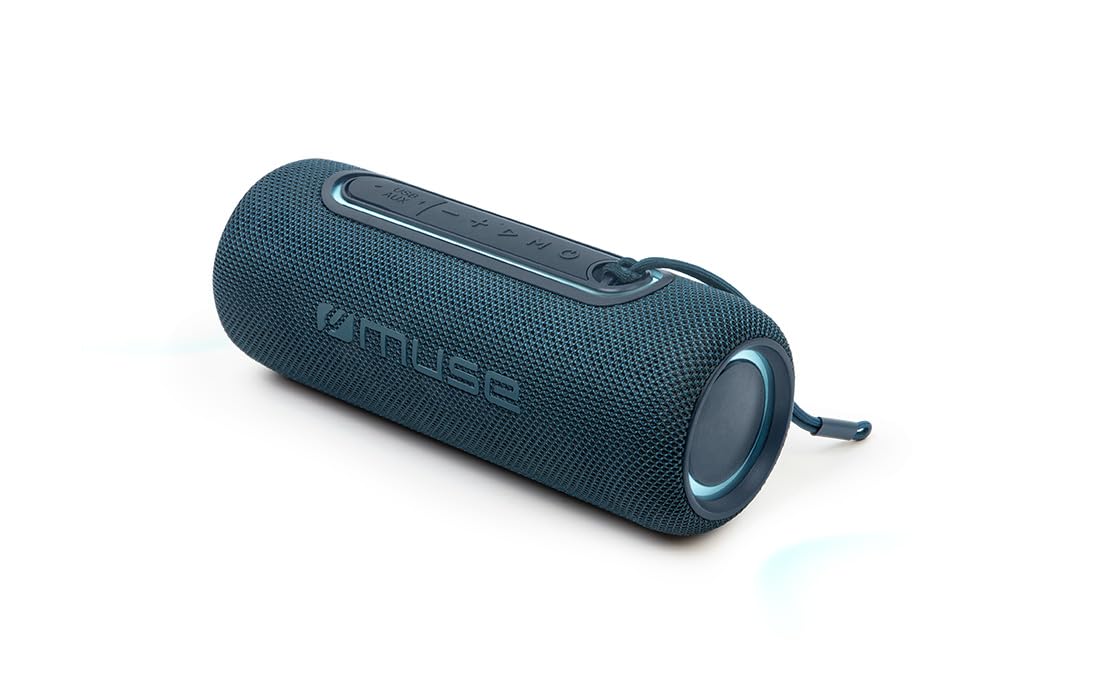
Figura 1: Davanti view of the Muse M-780 BTB Bluetooth Speaker, showing the speaker grille and control buttons on top.
Comandi e indicatori:
- Pulsante di accensione: Tenere premuto per accendere/spegnere.
- Pulsante Play/Pausa: Premere per riprodurre o mettere in pausa la musica. Rispondere/terminare le chiamate.
- Volume su (+): Premere per aumentare il volume. Tenere premuto per passare alla traccia successiva.
- Volume basso (-): Premere per diminuire il volume. Tenere premuto per tornare alla traccia precedente.
- Pulsante Modalità (M): Press to switch between Bluetooth, Aux-in, and USB modes.
- Pulsante modalità luce: Press to cycle through different colored light effects.
- Bluetooth Pairing LED Indicator: Mostra lo stato della connessione Bluetooth.
- Indicatore LED di ricarica: Mostra lo stato di carica della batteria.
Porte:
- Porta di ricarica USB-C: Per caricare la batteria interna.
- Porta AUX-IN: Per collegare dispositivi audio esterni tramite cavo da 3.5 mm.
- Porta USB: For MP3 playback from a USB flash drive.
Impostare
1. Ricarica iniziale
Before first use, fully charge the speaker. Connect the supplied USB-C cable to the speaker's USB-C charging port and the other end to a USB power adapter (not included) or a computer's USB port. The Charging LED indicator will illuminate during charging and turn off when fully charged. A full charge provides up to 10 hours of music playback.
2. Accensione/Spegnimento
Premere e tenere premuto il tasto Pulsante di accensione for approximately 3 seconds to turn the speaker ON or OFF.
Istruzioni per l'uso
Accoppiamento Bluetooth
- Turn on the speaker. It will automatically enter Bluetooth pairing mode, and the Bluetooth Pairing LED indicator will flash.
- Enable Bluetooth on your smartphone, tablet, or other Bluetooth-compatible device.
- Cercare "M-780 BTB" in the list of available devices and select it to connect.
- Once successfully paired, the Bluetooth Pairing LED indicator will stop flashing and remain solid. You can now stream music wirelessly from your device within a range of up to 10 meters.
Auxiliary Input (AUX-IN)
- Connect one end of the supplied 3.5mm auxiliary cable to the AUX-IN port on the speaker.
- Collegare l'altra estremità al jack delle cuffie o all'uscita audio del dispositivo audio esterno.
- Premere il tasto Pulsante modalità (M) to switch to AUX-IN mode.
- Controlla la riproduzione e il volume dal tuo dispositivo esterno.
Riproduzione MP3 USB
- Inserire una chiavetta USB contenente audio MP3 filenella porta USB dell'altoparlante.
- Premere il tasto Pulsante modalità (M) per passare alla modalità USB.
- The speaker will automatically begin playing MP3 files dall'unità USB.
- Utilizzare i pulsanti Riproduci/Pausa, Volume su (+) e Volume giù (-) per controllare la riproduzione.
Chiamata a mani libere
Quando connesso tramite Bluetooth allo smartphone:
- Rispondi/Termina chiamata: Premere il tasto Pulsante di riproduzione/pausa una volta.
- Rifiuta chiamata: Premere e tenere premuto il tasto Pulsante di riproduzione/pausa per 2 secondi.
Accoppiamento stereo (TWS - True Wireless Stereo)
You can pair two M-780 BTB speakers together for a true wireless stereo sound experience.
- Ensure both M-780 BTB speakers are turned on and not connected to any Bluetooth device.
- Su un altoparlante (che sarà l'altoparlante principale), tieni premuto il tasto Pulsante modalità (M) for 2-3 seconds until you hear a confirmation tone. The speakers will attempt to pair with each other.
- Once successfully paired, you will hear another confirmation tone. The Bluetooth LED on the primary speaker will flash, and the LED on the secondary speaker will be solid.
- Now, connect your Bluetooth device to the primary speaker as described in the "Bluetooth Pairing" section. Both speakers will play audio in stereo.
Luci colorate
Premere il tasto Pulsante modalità luce to cycle through various colored light effects. Press again to change the effect or turn the lights off.
Caricamento dell'altoparlante
When the battery is low, the speaker may emit an audible alert. Connect the USB-C charging cable to the speaker and a power source. The Charging LED indicator will show the charging status. Disconnect the cable once fully charged to preserve battery life.
Manutenzione
- Pulizia: Utilizzare un panno morbido e asciutto per pulire la superficie dell'altoparlante. Non utilizzare detergenti abrasivi o solventi.
- Resistenza all'acqua: The M-780 BTB has an IPX5 splash-resistant rating, meaning it can withstand splashes of water. Do not submerge the speaker in water or expose it to running water. Ensure the port cover is securely closed to maintain water resistance.
- Magazzinaggio: Quando non si utilizza l'altoparlante per lunghi periodi, conservarlo in un luogo fresco e asciutto.
Risoluzione dei problemi
| Problema | Possibile causa | Soluzione |
|---|---|---|
| L'altoparlante non si accende. | La batteria è scarica. | Caricare l'altoparlante tramite il cavo USB-C. |
| Nessun suono. | Il volume è troppo basso o disattivato. Modalità di input errata. | Increase volume on both the speaker and the connected device. Press the Mode button to select the correct input (Bluetooth, AUX, USB). |
| Impossibile effettuare l'associazione tramite Bluetooth. | L'altoparlante non è in modalità di associazione. Il dispositivo è troppo lontano. Interferenza. | Ensure speaker is in pairing mode (flashing LED). Move device closer to speaker (within 10m). Turn off other Bluetooth devices. |
| L'associazione stereo non funziona. | Speakers not correctly paired. | Ensure both speakers are disconnected from other devices. Follow the stereo pairing instructions carefully. |
Specifiche
| Nome modello: | M-780TBB |
| Marca: | Musa |
| Potenza di uscita: | 20 Watt |
| Connettività: | Bluetooth, USB, AUX-IN |
| Gamma Bluetooth: | Fino a 10 metri (33 piedi) |
| Resistenza all'acqua: | IPX5 resistente agli schizzi |
| Tempo di riproduzione: | Fino a 10 ore (a volume moderato) |
| Porta di ricarica: | USB-C |
| Dimensioni (L x P x A): | 24.2 x 9.2 x 9.2 cm (9.5 x 3.6 x 3.6 pollici) |
| Peso: | 1 kg (2.2 libbre) |
| Dispositivi compatibili: | Smartphone, tablet, laptop |
| Caratteristiche speciali: | Colored Lights, Hands-Free Calling, Stereo Pairing (TWS) |
Garanzia e supporto
This product is covered by a standard manufacturer's warranty. For detailed warranty terms and conditions, please refer to the warranty card included with your purchase or contact your retailer. For technical support or service inquiries, please contact Muse customer service through their official websito o le informazioni di contatto fornite con il prodotto.