
1. Introduzione
Thank you for choosing the PNI Voyager S2600 WiFi 4K Ultra HD Car DVR Camera. This device is designed to record high-quality video footage of your journeys, providing security and evidence in case of incidents. It features 4K Ultra HD recording, Wi-Fi connectivity for smartphone control, parking monitoring, and a G-sensor for automatic incident detection.

Image 1.1: PNI Voyager S2600 Dash Cam installed in a vehicle, showcasing its key features: 4K Ultra HD recording, Wi-Fi connectivity, and Parking Monitoring.
2. Informazioni sulla sicurezza
Si prega di leggere e seguire queste linee guida di sicurezza per garantire il corretto funzionamento ed evitare danni al dispositivo o lesioni.
- Non esporre il dispositivo a temperature estreme, alla luce solare diretta per periodi prolungati o a elevata umidità.
- Assicurarsi che il dispositivo sia montato saldamente e non ostruisca la visuale del conducente view o interferire con i comandi del veicolo.
- Utilizzare solo il cavo di alimentazione e gli accessori forniti. L'utilizzo di accessori non autorizzati può danneggiare il dispositivo e invalidare la garanzia.
- Non tentare di smontare o riparare il dispositivo autonomamente. Contattare il personale di assistenza autorizzato per assistenza.
- Mantenere l'obiettivo pulito per garantire una registrazione video nitida.
- Always format the microSD card regularly to maintain optimal recording performance.
3. Contenuto della confezione
Verificare che tutti gli articoli siano presenti nel pacco:
- PNI Voyager S2600 Car DVR Camera
- Power cord with cigarette lighter plug (12V/24V compatible)
- Supporto per parabrezza
- Manuale d'uso

Image 3.1: The PNI Voyager S2600 dash cam, its magnetic mount, and the power cable with a cigarette lighter adapter.
4. Prodotto finitoview
Familiarize yourself with the components of your PNI Voyager S2600 dash cam.
4.1. Disposizione del dispositivo
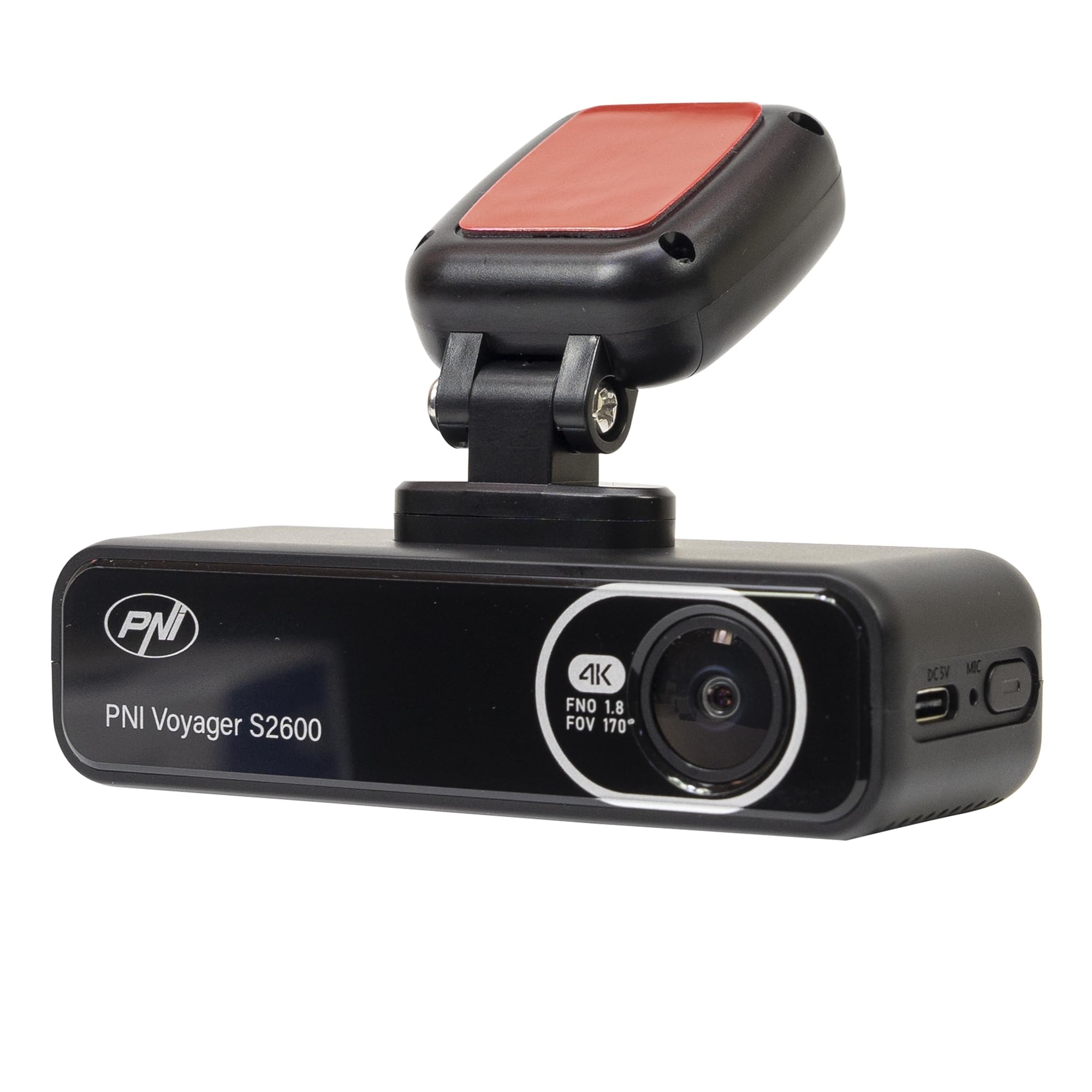
Immagine 4.1: anteriore view of the PNI Voyager S2600, displaying the camera lens with 4K FNO 1.8 FOV 170° markings, the PNI brand logo, and the model name.

Immagine 4.2: Dettagliata view of the side of the dash cam, highlighting the USB-C power input (DC 5V) and the microphone opening.
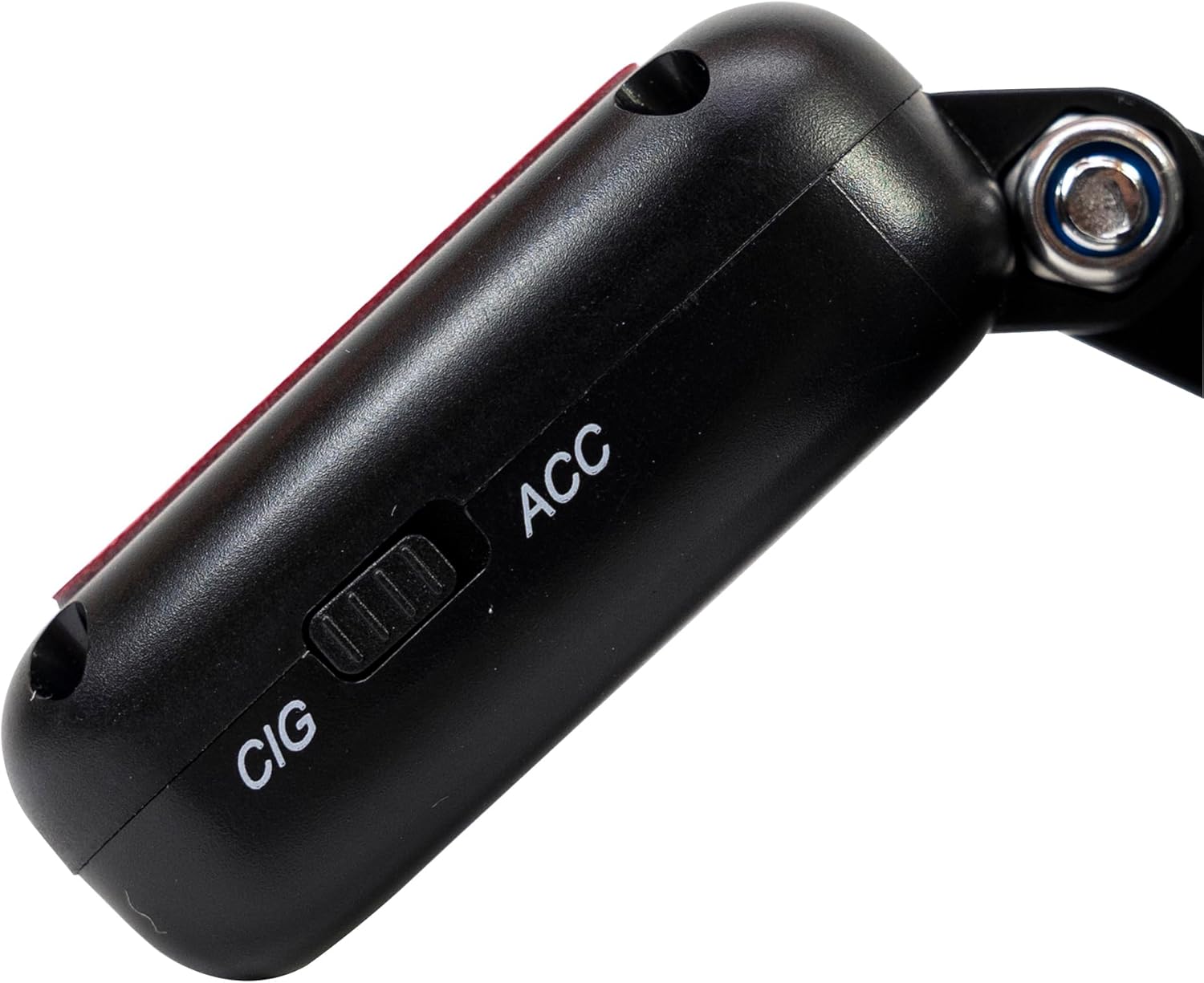
Immagine 4.3: Lato view of the magnetic mount, featuring a switch to select between 'CIG' (cigarette lighter power) and 'ACC' (accessory power) modes.
4.2. Caratteristiche principali
- Registrazione video 4K Ultra HD: Captures video at 3840x2160 resolution at 30FPS, or 2560x1440 at 30FPS, and 1920x1080 at 60FPS/30FPS.
- Connettività Wi-Fi: Connects to your smartphone via the Viidure-Dashcam Viewer app for live view, download di video e regolazione delle impostazioni.
- Monitoraggio del parcheggio: Activates the camera to record when vibration or movement is detected while the vehicle is parked.
- Sensore G: Blocca automaticamente il video corrente file in case of a collision to prevent overwriting.
- Obiettivo grandangolare: 170 gradi viewangolo di ripresa per catturare un'ampia prospettiva della strada.
- Registrazione in loop: Sovrascrive il foo più vecchiotage quando la scheda di memoria è piena, garantendo una registrazione continua.
- GPS integrato: Records speed and coordinates, which can be displayed on recorded videos.
5. Impostazione
5.1. Inserimento della scheda MicroSD
- Assicurarsi che la dash cam sia spenta.
- Individua lo slot della scheda microSD sul dispositivo.
- Insert a high-speed (Class 10 or higher) microSD card (up to 512GB) into the slot until it clicks into place.
- To remove, gently push the card in until it clicks, then release. The card will eject.
Importante: Format the microSD card within the app or on a computer before first use and periodically thereafter to ensure stable recording.
5.2. Installazione e collegamento elettrico
- Pulisci l'area del parabrezza in cui intendi montare la dash cam. Assicurati che non ostruisca il tuo view.
- Attach the windshield mount to the dash cam. The mount is magnetic for easy attachment.
- Peel off the protective film from the adhesive pad on the mount and firmly press it onto the chosen spot on your windshield for at least 30 seconds.
- Connect the power cable to the USB-C port on the mount.
- Route the power cable neatly along the windshield and dashboard to the vehicle's cigarette lighter socket.
- Plug the cigarette lighter adapter into the vehicle's 12V/24V power outlet.
- Select the appropriate power mode on the mount's switch: 'CIG' for continuous power from the cigarette lighter, or 'ACC' for power only when the vehicle's ignition is on.

Image 5.1: The PNI Voyager S2600 dash cam detached from its magnetic mount, illustrating the contact points for secure attachment.
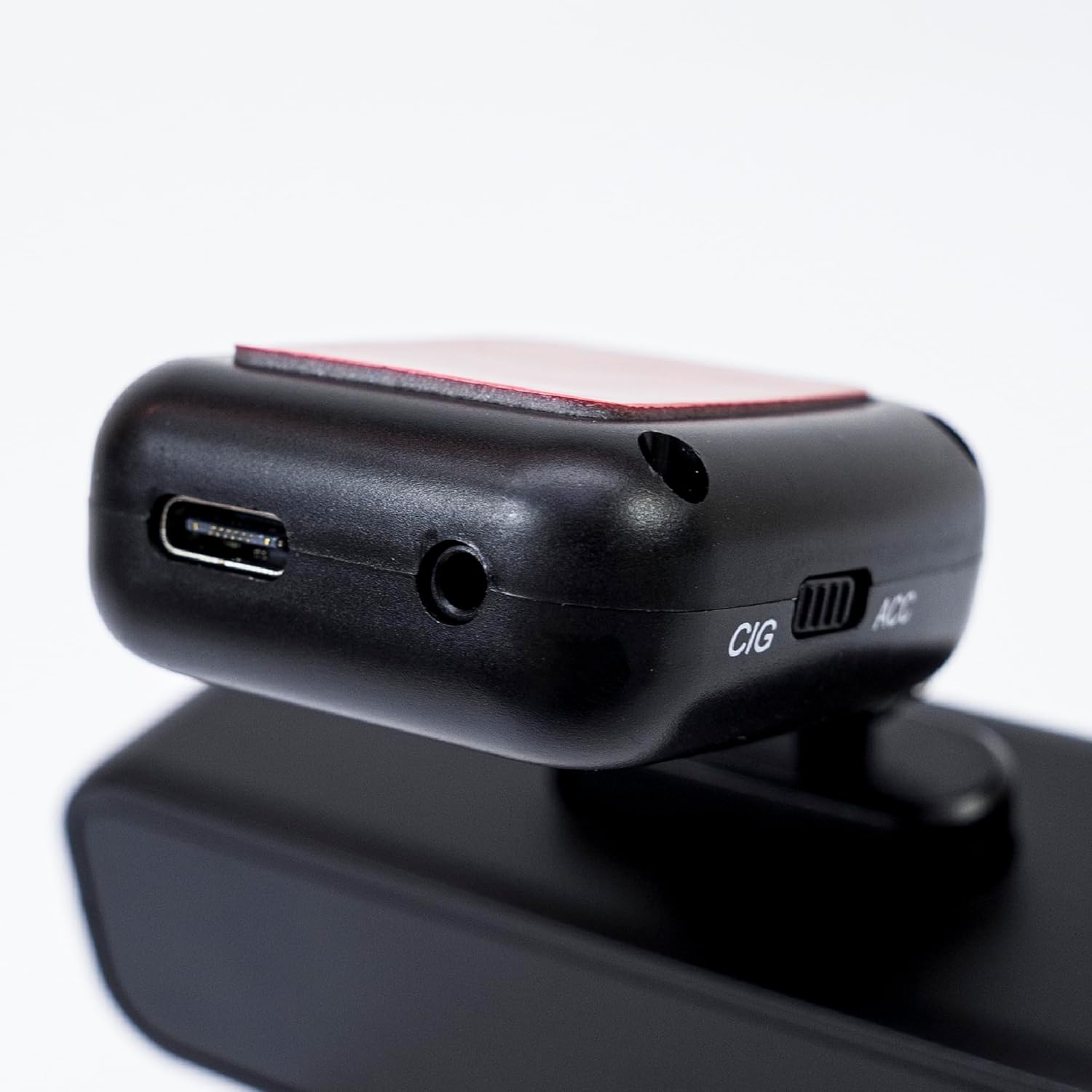
Image 5.2: The top of the dash cam mount, featuring the USB-C port for power input and the CIG/ACC switch for power mode selection.
5.3. Installazione dell'app e connessione Wi-Fi
- Scarica il Viidure-Dashcam Viewer app dall'App Store (iOS) o dal Google Play Store (Android).
- Accendere la dash cam.
- On your smartphone, go to Wi-Fi settings and connect to the dash cam's Wi-Fi network. The network name (SSID) and password can usually be found in the dash cam's settings (if it has a screen) or in the manual.
- Open the Viidure-Dashcam Viewer app. The app should automatically detect and connect to the dash cam.
- Attraverso l'app puoi view cibo vivotage, adjust settings, download recorded videos, and format the microSD card.

Image 5.3: A smartphone showing the Viidure-Dashcam Viewer application, demonstrating the wireless connection and control over the PNI Voyager S2600 dash cam.
6. Istruzioni per l'uso
6.1. Registrazione automatica
Once powered on and with a valid microSD card inserted, the PNI Voyager S2600 will automatically begin loop recording. Video files are saved in segments (e.g., 1, 3, or 5 minutes) to the microSD card.
6.2. G-Sensor (registrazione di emergenza)
Il sensore G integrato rileva impatti improvvisi o rapide accelerazioni/decelerazioni. Quando attivato, blocca automaticamente il segmento video corrente, impedendo che venga sovrascritto dalla registrazione in loop. Queste emergenze files are stored in a separate folder on the microSD card.
6.3. Monitoraggio del parcheggio
When the vehicle is parked and the dash cam is powered (either continuously via CIG mode or with a hardwire kit), the parking monitor function activates. If the G-sensor detects a collision or motion detection is enabled and detects movement, the dash cam will automatically power on and record a short video segment. This feature helps protect your vehicle when unattended.

Image 6.1: Visual representation of the Parking Monitor feature, showing the dash cam detecting an impact while the car is parked.
6.4. Utilizzo del Wi-Fi e delle app
The Viidure-Dashcam Viewer app allows you to:
- Vivere View: See what the camera is recording in real-time on your smartphone.
- Riproduzione video: Review recorded videos directly from the microSD card.
- Scarica video: Transfer important video files from the dash cam to your smartphone.
- Regolazione delle impostazioni: Configure various dash cam settings, such as video resolution, G-sensor sensitivity, loop recording duration, and parking monitor options.
- Formatta scheda SD: Erase all data on the microSD card.
6.5. Funzionalità GPS
The integrated GPS receiver records your vehicle's speed and location data. This information can be overlaid on the video footage during playback via the app or compatible desktop software, providing additional context for your recordings.
7. Manutenzione
7.1. Pulizia del dispositivo
Use a soft, dry cloth to clean the dash cam body. For the lens, use a specialized lens cleaning cloth to avoid scratches. Do not use chemical cleaners or abrasive materials.
7.2. MicroSD Card Formatting
It is recommended to format the microSD card every 2-4 weeks to prevent data corruption and ensure optimal recording performance. This can be done through the Viidure-Dashcam Viewehm app.
7.3. Aggiornamenti del firmware
Periodically check the PNI website or the Viidure-Dashcam Viewer app for available firmware updates. Firmware updates can improve performance, add new features, or fix bugs. Follow the instructions provided with the update carefully.
8. Risoluzione Dei Problemi
If you encounter issues with your PNI Voyager S2600, refer to the following common problems and solutions:
| Problema | Possibile causa | Soluzione |
|---|---|---|
| La dash cam non si accende. | No power supply; faulty cable; incorrect power mode. | Check power cable connection; ensure cigarette lighter socket is active; verify CIG/ACC switch setting. |
| La registrazione si interrompe o si blocca. | MicroSD card error; card full; low-speed card. | Format microSD card; replace with a high-speed (Class 10 U3) card; ensure sufficient storage. |
| Wi-Fi connection unstable or fails. | Interference; incorrect password; app issue. | Ensure dash cam Wi-Fi is enabled; re-enter password; restart app and dash cam; try connecting in a different location. |
| Scarsa qualità video. | Dirty lens; incorrect resolution setting. | Clean the camera lens; check video resolution settings in the app. |
| Il monitor del parcheggio non funziona. | Incorrect power mode; feature disabled. | Ensure dash cam is receiving continuous power (CIG mode or hardwire kit); enable parking monitor in app settings. |
If the problem persists, please contact PNI customer support.
9. Specifiche
Detailed technical specifications for the PNI Voyager S2600 Car DVR Camera:
| Caratteristica | Descrizione |
|---|---|
| Numero di modello | PNI-S2600 |
| Risoluzione video | 4K (3840x2160@30FPS), 2K (2560x1440@30FPS), FHD (1920x1080@60FPS/30FPS) |
| Sensore di immagine | SONY335 (5MP, 2592x1944px) |
| Viewangolo di ing | 170 gradi |
| Formato video | MP4, H.264 |
| Formato foto | Formato JPEG |
| Risoluzione massima foto | 8 MP (3264x2448) |
| Magazzinaggio | MicroSD card slot, up to 512GB (Class 10 or higher recommended) |
| Connettività | Wi-Fi, GPS (integrated) |
| Caratteristiche speciali | G-Sensor, Parking Monitoring, Motion Detection, Loop Recording |
| Alimentazione elettrica | 5V/2A (via 12V/24V car adapter) |
| Batteria | Super capacitor 1.5 UF |
| Temperatura di esercizio | Temperatura di esercizio -26°C ~ +80°C |
| Dimensioni (L x P x A) | Dimensioni: 105 mm x 35 mm x 27 mm |
| Peso | 88 grammi |
| Tipo USB | Tipo C |
10. Garanzia e supporto
10.1. Informazioni sulla garanzia
The PNI Voyager S2600 Car DVR Camera comes with a Garanzia di 24 mesi from the date of purchase. This warranty covers manufacturing defects under normal use. It does not cover damage caused by misuse, accidents, unauthorized modifications, or improper installation. Please retain your proof of purchase for warranty claims.
10.2. Assistenza clienti
For technical assistance, troubleshooting, or warranty inquiries, please contact PNI customer support. You can find more information and support resources on the official PNI websito:
Produttore: ONLINESHOP SRL
Indirizzo: Olteniei 26A, Piatra Neamt, Neamt, 610206, Romania