
1. Introduzione
This manual provides essential information for the safe and efficient operation of your Sharp GX-BT190 Portable Bluetooth Speaker. Please read it thoroughly before using the device and retain it for future reference.
2. Informazioni sulla sicurezza
- Non esporre l'altoparlante a temperature estreme, alla luce solare diretta o a elevata umidità.
- Non smontare, riparare o modificare l'altoparlante. Ciò potrebbe invalidare la garanzia e comportare rischi per la sicurezza.
- Ensure the charging port cover is securely closed when using the speaker near water to maintain its IP67 rating.
- Utilizzare solo il cavo di ricarica fornito o un equivalente certificato.
- Tenere l'altoparlante lontano da bambini e animali domestici.
- Evitare l'ascolto a livelli di volume elevati per periodi prolungati per evitare danni all'udito.
3. Contenuto della confezione
- Sharp GX-BT190 Portable Bluetooth Speaker
- Cavo di ricarica USB
- cordino
- Manuale di istruzioni
4. Prodotto finitoview

Davanti view of the Sharp GX-BT190 speaker, showing the central speaker grille with the Sharp logo and the LED light ring.

Lato view of the Sharp GX-BT190 speaker, highlighting the textured speaker grille and the integrated lanyard.
Posteriore view of the Sharp GX-BT190 speaker, showing the control buttons and the sealed charging port cover.
Comandi e indicatori:
- Pulsante di accensione: Tenere premuto per accendere/spegnere.
- Pulsante Volume su / Traccia successiva (+): Pressione breve per aumentare il volume, pressione prolungata per passare alla traccia successiva.
- Pulsante Volume giù / Traccia precedente (-): Pressione breve per abbassare il volume, pressione prolungata per passare alla traccia precedente.
- Pulsante Riproduci/Pausa/Chiama (►||): Short press to play/pause, answer/end calls. Long press to reject calls.
- Mode / Light Button (M): Short press to cycle through LED light modes. Long press to turn off LED lights.
- Porta di ricarica USB-C: For charging the speaker. Ensure the rubber cover is sealed when not charging.
- Indicatore LED: Visualizza lo stato di carica e lo stato di associazione Bluetooth.
5. Impostazione
5.1 Ricarica dell'altoparlante
- Open the rubber cover on the back of the speaker to access the USB-C charging port.
- Connect the provided USB charging cable to the speaker's USB-C port.
- Collegare l'altra estremità del cavo USB a un adattatore di alimentazione USB (non incluso) o alla porta USB di un computer.
- L'indicatore LED si illuminerà durante la ricarica e si spegnerà una volta completata la ricarica.
- Close the rubber cover securely after charging to maintain the speaker's waterproof rating.
5.2 Accensione/Spegnimento
- Per accendere: Tieni premuto il pulsante di accensione per circa 3 secondi. Verrà emesso un segnale acustico e l'indicatore LED lampeggerà.
- Per spegnere: Tieni premuto il pulsante di accensione per circa 3 secondi. Verrà emesso un segnale acustico e l'indicatore LED si spegnerà.
5.3 Associazione Bluetooth
- Ensure the speaker is powered on and the LED indicator is flashing, indicating it is in pairing mode.
- Sul tuo dispositivo mobile, attiva il Bluetooth e cerca i dispositivi disponibili.
- Select "GX-BT190" from the list of devices.
- Once paired, the LED indicator will stop flashing and remain solid, and you will hear a confirmation tone.
- L'altoparlante si riconnetterà automaticamente all'ultimo dispositivo associato quando viene acceso, se il dispositivo si trova nel raggio d'azione e il Bluetooth è abilitato.
5.4 Accoppiamento True Wireless Stereo (TWS)
TWS allows you to pair two GX-BT190 speakers together for a stereo audio experience.

Two Sharp GX-BT190 speakers, one red and one blue, positioned together, illustrating the True Wireless Stereo (TWS) pairing feature.
- Ensure both GX-BT190 speakers are powered on and not connected to any Bluetooth device.
- Su uno degli altoparlanti (che sarà quello principale), premere due volte il pulsante di accensione. L'altoparlante entrerà in modalità di associazione TWS.
- I due altoparlanti si cercheranno e si connetteranno automaticamente. Una volta completata l'associazione TWS, sentirai un tono di conferma.
- Una volta associato il TWS, collega il tuo dispositivo mobile all'altoparlante principale tramite Bluetooth come descritto nella sezione 5.3.
- Per disconnettere TWS, premere due volte il pulsante di accensione su uno dei due altoparlanti.
6. Operativo
6.1 Riproduzione dell'audio
- Riproduci/Pausa: Premi brevemente il pulsante Riproduci/Pausa.
- Aumenta volume: Premere brevemente il pulsante '+'.
- Volume basso: Premere brevemente il pulsante '-'.
- Traccia successiva: Premere a lungo il pulsante '+'.
- Traccia precedente: Premere a lungo il pulsante '-'.
6.2 Chiamate in vivavoce
- Rispondi alla chiamata: Premere brevemente il pulsante Riproduci/Pausa quando squilla una chiamata in arrivo.
- Termina chiamata: Premere brevemente il pulsante Riproduci/Pausa durante una chiamata.
- Rifiuta chiamata: Premere a lungo il pulsante Riproduci/Pausa quando squilla una chiamata in arrivo.
6.3 LED Mood Lights
- Short press the 'M' (Mode/Light) button to cycle through the 6 available LED mood light modes.
- Long press the 'M' button to turn off the LED lights.
6.4 Utilizzo impermeabile e antipolvere (IP67)

The Sharp GX-BT190 speaker partially submerged in water, demonstrating its IP67 waterproof and dustproof capabilities.
The GX-BT190 speaker is rated IP67, meaning it is protected from dust ingress and can withstand immersion in water up to 1 meter for 30 minutes. To ensure this protection:
- Always ensure the rubber cover for the charging port is fully and securely sealed before exposing the speaker to water or dust.
- Non immergere intenzionalmente l'altoparlante per periodi prolungati o oltre la profondità specificata.
- Dopo l'esposizione all'acqua, asciugare l'altoparlante con un panno morbido prima di caricarlo.
7. Manutenzione
7.1 Pulizia
- Pulisci l'altoparlante con un morbido, damp stoffa.
- Non utilizzare detergenti abrasivi, alcol o solventi chimici.
- Ensure the speaker is dry before charging or storing.
7.2 Conservazione
- Conservare l'altoparlante in un luogo fresco e asciutto, lontano dalla luce solare diretta e da temperature estreme.
- Se si prevede di non utilizzarla per un periodo prolungato, caricare periodicamente la batteria (ad esempio ogni 3 mesi) per mantenerla in buone condizioni.
8. Risoluzione Dei Problemi
| Problema | Soluzione |
|---|---|
| L'altoparlante non si accende. | Assicurarsi che la batteria sia carica. Collegare l'altoparlante a una fonte di alimentazione tramite il cavo USB. |
| Impossibile effettuare l'associazione tramite Bluetooth. | Ensure the speaker is in pairing mode (LED flashing). Turn off and on Bluetooth on your device. Move the speaker closer to your device. Clear previous Bluetooth connections on your device. |
| Nessun suono o volume basso. | Aumenta il volume sia sull'altoparlante che sul dispositivo connesso. Assicurati che l'altoparlante sia correttamente associato. |
| Qualità del suono scadente. | Move the speaker closer to your device. Ensure there are no obstructions between the speaker and your device. Try playing a different audio source. |
| L'associazione TWS non riesce. | Ensure both speakers are GX-BT190 models and are not connected to any other Bluetooth device. Try powering both speakers off and on, then re-attempt TWS pairing. |
9. Specifiche

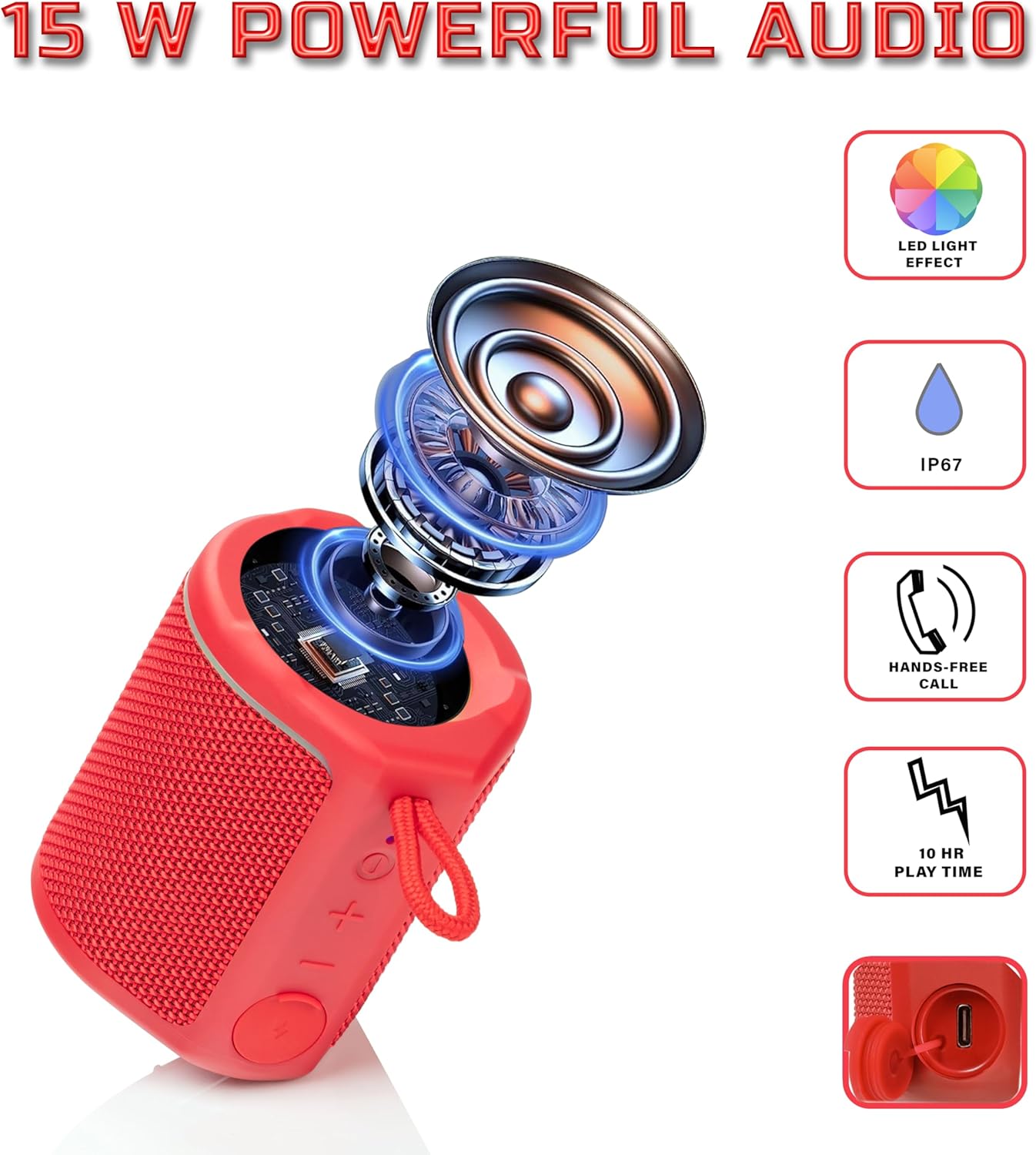
Diagram illustrating the internal components of the Sharp GX-BT190 speaker, including the speaker driver, and highlighting features like LED light effect, IP67 rating, hands-free call function, and battery life.
| Caratteristica | Dettaglio |
|---|---|
| Numero di modello | GX-BT190 |
| Tecnologia di connettività | Bluetooth |
| Potenza massima in uscita dell'altoparlante | 10 Watt |
| Grado di impermeabilità | Grado di protezione IP67 |
| Durata della batteria | Fino a 15 ore |
| Tipo di batteria | 1 ione di litio (incluso) |
| Capacità della batteria | 1200 mAh |
| Dimensioni del prodotto (P x L x A) | 7.5 x 7.5 x 7.5 cm (circa) |
| Peso dell'articolo | 226.8 g (8 once) |
| wireless Range | Fino a 33 piedi |
| Caratteristiche aggiuntive | LED Light, True Wireless Stereo (TWS), Hands-Free Calling |
10. Garanzia
The Sharp GX-BT190 Portable Bluetooth Speaker comes with a 1-Year Limited Warranty from the date of purchase. This warranty covers manufacturing defects under normal use. It does not cover damage caused by misuse, accidents, unauthorized modifications, or normal wear and tear. Please retain your proof of purchase for warranty claims.
11. Supporto
For technical assistance, warranty inquiries, or further information regarding your Sharp GX-BT190 speaker, please contact Sharp Inc. customer support:
- Contatto del produttore: Sharp Inc
- Telefono: 1-800-BE-SHARP