
H9
Manuale d'uso
Kalobee H9 Smart Watch
Modello: H9
Introduzione
Welcome to the user manual for your new Kalobee H9 Smart Watch. This guide provides essential information on setting up, operating, maintaining, and troubleshooting your device. Please read this manual thoroughly to ensure optimal performance and longevity of your smartwatch.
Cosa c'è nella scatola
- Smart Watch (Kalobee H9)
- 2X Straps (Orange Strap, Free Size)
- Cavo di ricarica
- Manuale d'uso
Prodotto finitoview
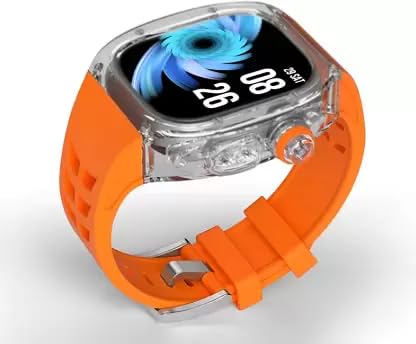
Figura 1: Fronte view of the Kalobee H9 Smart Watch featuring a large display and an orange silicone strap with a clear polycarbonate case.
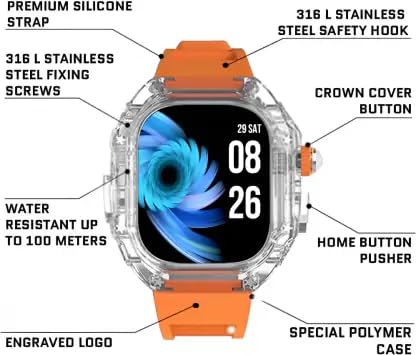
Figure 2: Detailed diagram of the Kalobee H9 Smart Watch highlighting key components such as the premium silicone strap, 316L stainless steel fixing screws, water resistance up to 100 meters, engraved logo, special polymer case, home button pusher, crown cover button, and 316L stainless steel safety hook.
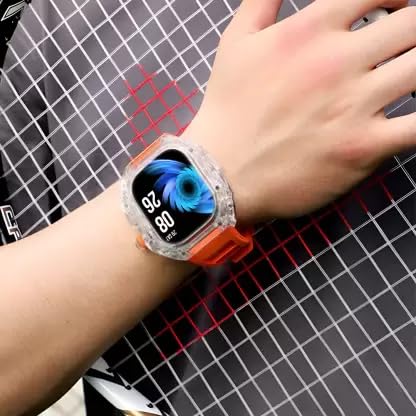
Figure 3: The Kalobee H9 Smart Watch worn on a wrist, demonstrating its fit and appearance during use.
Impostare
1. Ricarica iniziale
Before first use, fully charge your Kalobee H9 Smart Watch. Place the watch on the provided wireless charging pad. The display will indicate charging status. A full charge typically takes approximately 2-3 hours.
2. Accensione/Spegnimento
- Per accendere: Press and hold the Crown Cover Button (refer to Figure 2) for a few seconds until the display lights up.
- Per spegnere: Press and hold the Crown Cover Button, then select "Power Off" on the screen.
3. Associazione con lo smartphone
- Assicurati che il Bluetooth sia abilitato sul tuo smartphone.
- Download the companion application for the Kalobee H9 Smart Watch from your smartphone's app store (check the packaging or quick start guide for app name).
- Open the application and follow the on-screen instructions to search for and connect to your H9 Smart Watch.
- Conferma la richiesta di associazione sia sullo smartphone che sullo smartwatch.
Istruzioni per l'uso
Navigazione
- Schermo tattile: Scorri verso sinistra, destra, in alto o in basso per navigare tra i menu e le notifiche. Tocca per selezionare gli elementi.
- Crown Cover Button: Press to return to the home screen or wake the display. Rotate to scroll through lists or adjust settings (functionality may vary by software version).
- Home Button Pusher: Press to access specific functions or return to a previous screen (refer to Figure 2 for location).
Chiamata Bluetooth
Once paired with your smartphone, the H9 Smart Watch allows you to make and receive calls directly from your wrist. Ensure your watch is within Bluetooth range of your phone for this feature to work.
Gioco d'azzardo
The H9 Smart Watch includes built-in gaming capabilities. Access games through the main menu. Controls are typically touch-based or utilize the physical buttons.
Manutenzione
Pulizia del tuo smartwatch
- Wipe the display and case with a soft, lint-free cloth.
- Per lo sporco ostinato dampen the cloth slightly with water. Avoid using harsh chemicals or abrasive cleaners.
- Clean the charging contacts periodically with a dry cloth to ensure proper charging.
Resistenza all'acqua
The Kalobee H9 Smart Watch is water resistant up to 100 meters. This makes it suitable for swimming and showering. However, it is not recommended for deep diving or high-pressure water activities. Avoid exposing the watch to hot water or steam, as this can compromise the seals.
Cura del cinturino
The silicone strap is durable and water-resistant. Clean it regularly with mild soap and water to prevent skin irritation and maintain its appearance. Ensure the strap is dry before reattaching it to your wrist.
Risoluzione dei problemi
| Problema | Possibile causa | Soluzione |
|---|---|---|
| L'orologio non si accende. | Batteria scarica. | Charge the watch fully using the provided wireless charger. |
| Impossibile effettuare l'associazione con lo smartphone. | Bluetooth off; App not running; Watch not in pairing mode. | Ensure Bluetooth is on. Restart the companion app. Restart the watch. Try re-initiating pairing from the app. |
| Il display non risponde. | Problema software; batteria scarica. | Recharge the watch. Perform a force restart (refer to specific instructions in the app or online support if available). |
| Inaccurate readings (e.g., steps). | Improper fit; Software calibration needed. | Ensure the watch is worn snugly. Check the companion app for calibration options or firmware updates. |
Specifiche
| Caratteristica | Dettaglio |
|---|---|
| Marca | Generico |
| Modello | H9 |
| Dimensioni dello schermo | 49 millimetri |
| Risoluzione | 240x240 |
| Sistema operativo | Sistema operativo per smartwatch |
| Connettività | Bluetooth |
| Caratteristiche speciali | Wireless Charging, Bluetooth Calling, Gaming |
| Resistenza all'acqua | Fino a 100 metri |
| Peso dell'articolo | 245 grammi |
Garanzia e supporto
Informazioni sulla garanzia
The Kalobee H9 Smart Watch comes with a Garanzia di 3 mesi dalla data di acquisto. La presente garanzia copre i difetti di fabbricazione. Si prega di conservare la prova d'acquisto per eventuali reclami in garanzia.
Assistenza clienti
For further assistance, technical support, or warranty claims, please refer to the contact information provided with your purchase or visit the official website of the manufacturer, Smart 360.
Ask a question about this manual
Ask about setup, troubleshooting, compatibility, parts, safety, or missing instructions. Manuals+ will review the question and use this page’s manual context to help answer it.