1. Prodotto finitoview
The Generic Wireless Bluetooth Headphones AH-806 are designed to provide a high-fidelity audio experience with the convenience of wireless connectivity. Featuring a foldable design for portability and a built-in microphone for calls, these headphones are suitable for various uses including gaming, music, and sports.
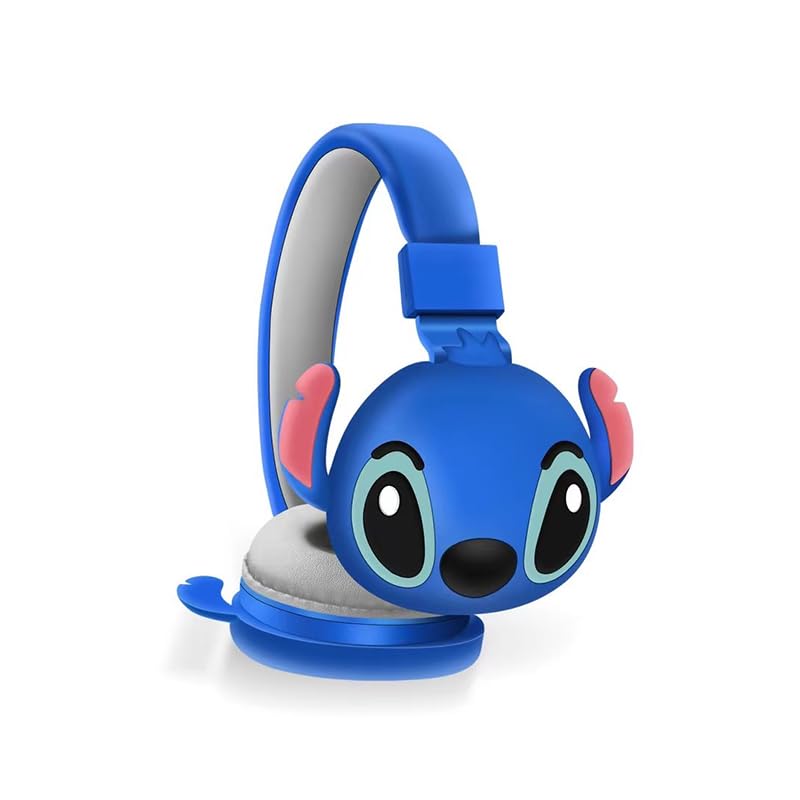
Immagine 1.1: anteriore view of the AH-806 Wireless Bluetooth Headphones, featuring a blue color and a Stitch character design on the earcups.
Caratteristiche principali:
- Design pieghevole: Conveniently folds for easy portability and storage in bags or suitcases, making it an ideal companion for travel.
- Suono stereo HIFI: Equipped with a 13mm driver diameter for high-fidelity stereo sound, suitable for various audio content.
- Microfono incorporato: Enables hands-free calling and communication.
- Cancellazione passiva del rumore: Oversize earcups provide passive noise reduction for an immersive listening experience.
- Utilizzo versatile: Designed for video games, general audio listening, HiFi audio, and sports activities.
2. Contenuto della confezione
Si prega di selezionare la casella per i seguenti elementi:
- 1 x Wireless Bluetooth Headphones AH-806
- 1 x Manuale utente (questo documento)
- 1 x Charging Cover
- 1 x Adattatore USB Tipo-C

Image 2.1: Packaging of the AH-806 Headphones, illustrating the product and its accessories.
3. Guida all'installazione
3.1. Carica delle cuffie
- Locate the USB Type-C charging port on the headphones.
- Connect the provided USB Type-C adapter to the charging port.
- Collegare l'altra estremità del cavo USB a una fonte di alimentazione USB compatibile (ad esempio, una porta USB del computer, un adattatore da parete).
- L'indicatore LED sulle cuffie si illuminerà per mostrare lo stato di carica. Solitamente si spegnerà o cambierà colore una volta completata la carica.
Note: For optimal battery life, fully charge the headphones before first use.
3.2. Accoppiamento Bluetooth
- Assicurarsi che le cuffie siano completamente cariche.
- Accensione: Tenere premuto il pulsante di accensione sulle cuffie finché l'indicatore LED non lampeggia, indicando la modalità di associazione.
- Attiva Bluetooth: Sul tuo dispositivo (smartphone, tablet, laptop), vai alle impostazioni Bluetooth e assicurati che il Bluetooth sia attivato.
- Cercare Dispositivi: Your device will scan for available Bluetooth devices. Look for "AH-806" or a similar name in the list.
- Collegare: Select "AH-806" from the list to initiate the connection. Once connected, the LED indicator on the headphones may change to a solid light or flash slowly.
- You are now ready to use your headphones.
Se viene richiesta una password, immettere "0000" (quattro zeri).
4. Istruzioni per l'uso
4.1. Accensione/spegnimento
- Accensione: Tenere premuto il pulsante di accensione per circa 3 secondi finché l'indicatore LED non si accende.
- Spegni: Tenere premuto il pulsante di accensione per circa 5 secondi finché l'indicatore LED non si spegne.
4.2. Riproduzione di musica
- Riproduci/Pausa: Premere una volta il pulsante multifunzione (spesso il pulsante di accensione o un pulsante dedicato Play/Pausa).
- Traccia successiva: Tieni premuto il pulsante Volume su o il pulsante dedicato alla traccia successiva.
- Traccia precedente: Tieni premuto il pulsante Volume giù o un pulsante dedicato alla traccia precedente.
- Aumenta volume: Premere brevemente il pulsante Volume su.
- Volume basso: Premere brevemente il pulsante Volume giù.
4.3. Gestione delle chiamate
- Rispondi/Termina chiamata: Press the Multi-function button once during an incoming call to answer, and once again to end the call.
- Rifiuta chiamata: Press and hold the Multi-function button for approximately 2 seconds during an incoming call to reject it.
- Ricomponi l'ultimo numero: Premi due volte il pulsante Multifunzione.
4.4. Folding Design
The headphones feature a foldable design for enhanced portability. Gently fold the earcups inwards towards the headband until they are compact. This reduces the overall size of the headphones, making them easier to store and carry.
5. Manutenzione e cura
- Pulizia: Use a soft, dry, lint-free cloth to clean the headphones. Do not use abrasive cleaners, alcohol, or chemical solvents, as these may damage the surface.
- Magazzinaggio: When not in use, store the headphones in a cool, dry place, away from direct sunlight and extreme temperatures. Utilize the folding feature to save space.
- Evitare l'acqua: Queste cuffie non sono impermeabili. Evitare l'esposizione ad acqua, umidità o umidità eccessiva.
- Maneggiare con cura: Non far cadere, smontare o tentare di riparare le cuffie autonomamente. Ciò potrebbe invalidare la garanzia e causare danni.
6. Risoluzione Dei Problemi
| Problema | Possibile soluzione |
|---|---|
| Le cuffie non si accendono. | Ensure the headphones are fully charged. Connect them to a power source using the provided USB Type-C adapter. |
| Impossibile accoppiarsi con il dispositivo Bluetooth. |
|
| Nessun suono o volume basso. |
|
| Il suono è distorto o intermittente. |
|
7. Specifiche
| Caratteristica | Dettaglio |
|---|---|
| Nome del modello | AH-806 |
| Tecnologia di connettività | Senza fili |
| Tecnologia di comunicazione wireless | Bluetooth |
| Materiale | Plastica, Tessuto |
| Usi specifici per il prodotto | Gaming, Music, Sport |
| Dispositivi compatibili | Smartphone, tablet, laptop, desktop, console di gioco |
| Caratteristica del cavo | Senza cavo |
| Metodo di controllo | Remoto |
| Numero di articoli | 1 |
| Tipo di driver audio | Driver dinamico (13 mm) |
| Forma dell'auricolare | Sopra l'orecchio |
| Produttore | MOPIKI |
| Caratteristiche speciali | Noise Cancellation (Passive) |
| Colore | r.blue |
| Posizionamento dell'orecchio | Sopra l'orecchio |
| Fattore di forma | Sopra l'orecchio |
8. Garanzia e supporto
This product is manufactured by MOPIKI. For specific warranty information, please refer to the documentation provided at the time of purchase or contact your retailer.
For technical support or inquiries, please contact the retailer or manufacturer directly. Keep your purchase receipt as proof of purchase.
Note: As per the provided product information, specific warranty details are not available in this manual.


