
Introduzione
Welcome to the user manual for your new Aheaplus Bar Cabinet. This versatile cabinet is designed to enhance your home bar or living space with its integrated power outlets, vibrant LED lighting, and intelligent storage solutions. Please read this manual thoroughly before assembly and use to ensure safe operation and optimal performance.
Informazioni sulla sicurezza
IMPORTANTI ISTRUZIONI DI SICUREZZA
- Always unplug the cabinet when not in use.
- Do not overload the shelves or place heavy objects on the top of the cabinet.
- Keep the cabinet away from heat sources and flammable materials.
- Do not attempt to repair or modify the electrical components yourself.
- Seguire sempre attentamente le istruzioni di montaggio per evitare lesioni.
- Use caution when adjusting the shelves to prevent pinch points.
Caratteristiche del prodotto
The Aheaplus Bar Cabinet is engineered with several key features to provide convenience and style:
- Prese di corrente integrate: Equipped with 3 AC outlets and 2 USB ports (5V/2A) for convenient charging of devices and powering appliances. The power cord is 6.56 feet long.
- Dynamic LED RGB Lighting: Features LED lights with over 60,000 color options and multiple flashing modes. Includes a music sync function to change light colors with sound and music rhythm, perfect for creating ambiance.
- Ample and Adjustable Storage: Offers a top open shelf for display, a double-layer storage cabinet with two doors, and adjustable shelves with 3 height options. Includes wine racks for up to 10 bottles and glass racks for 8 upside-down glasses.
- Design versatile: Can function as a coffee bar, wine cabinet, or sideboard buffet cabinet, suitable for kitchens, dining rooms, and living rooms.
- Costruzione durevole: Made with high-quality wooden materials and X-support for stability and durability.

Figura 1: Oltreview of the Aheaplus Bar Cabinet, showcasinil suo design e le sue varie caratteristiche.
Specifiche
| Attributo | Dettaglio |
|---|---|
| Marca | Aheaplus |
| Modello | B0CVVS665C |
| Colore | Marrone rustico |
| Dimensioni del prodotto | 13.8"P x 47.2"L x 39.3"A |
| Peso dell'articolo | 58 libbre |
| Materiale | Legna |
| Tipo di montaggio | Libera installazione |
| Prese di corrente | 3 AC Outlets, 2 USB Ports (5V/2A) |
| Lunghezza del cavo di alimentazione | 6.56 piedi |
| Luci LED | RGB, 60,000+ colors, music sync |
| Capacità della bottiglia di vino | Fino a 10 bottiglie |
| Glass Holder Capacity | Up to 8 glasses |
| Assemblaggio richiesto | SÌ |
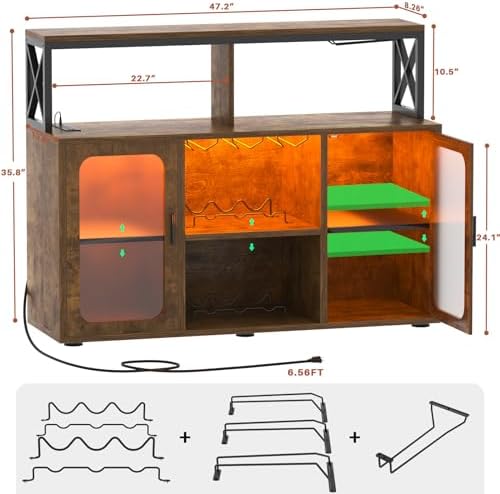
Figure 2: Detailed dimensions of the Aheaplus Bar Cabinet.
Contenuto della confezione
Please verify that all components are present before beginning assembly. Refer to the included assembly guide for a detailed list of parts and hardware.
- Pannelli per armadi (varie dimensioni)
- Pacchetto hardware (viti, tasselli, serrature a camma, ecc.)
- Wine Rack
- Portabicchieri
- Ripiani regolabili
- Striscia luminosa a LED con controller
- Unità di presa di corrente con porte USB
- Manuale di istruzioni per il montaggio
Installazione e assemblaggio
The Aheaplus Bar Cabinet is designed for straightforward assembly. All necessary hardware and tools are included, and parts are clearly labeled.
- Disimballare e identificare: Carefully unpack all components and lay them out on a clean, soft surface to prevent scratches. Identify each part using the labels and the provided assembly diagram.
- Montare il telaio: Follow the step-by-step instructions in the included manual to assemble the main frame of the cabinet. Ensure all connections are secure.
- Install Shelves and Racks: Insert the wine racks and glass holders into their designated slots. Install the adjustable shelves at your desired height.
- Porte di montaggio: Fissare le ante dell'armadio, assicurandosi che si aprano e si chiudano senza problemi.
- Installare componenti elettrici: Securely install the power outlet unit into its designated cutout. Attach the LED light strip according to the instructions, ensuring proper connection to the power source.
- Posizionamento finale: Once assembled, place the cabinet on a stable, level surface.
For detailed visual instructions, please refer to the separate assembly guide provided in your package.
Istruzioni per l'uso
Prese di corrente e porte USB
The integrated power strip allows you to conveniently power and charge your devices.
- Plug the cabinet's main power cord into a standard 120V AC wall outlet.
- Use the 3 AC outlets for small appliances like coffee makers, juicers, or decorative lights.
- Utilizza le 2 porte USB (5V/2A) per caricare telefoni cellulari, tablet o altri dispositivi alimentati tramite USB.
- Attenzione: Non superare la potenza massima nominale delle prese.

Figura 3: primo piano view of the integrated power outlets and USB ports.
Sistema di illuminazione a LED RGB
The LED lighting system offers a customizable ambiance for your bar cabinet.
- Accensione/spegnimento: Use the remote control or the dedicated button on the light strip controller to turn the lights on or off.
- Selezione del colore: Choose from over 60,000 colors using the remote control or a compatible mobile application (if applicable, refer to LED light manual for app details).
- Selezione della modalità: Select various flashing modes or static color options to suit your mood or occasion.
- Funzione di sincronizzazione musicale: Activate the music sync feature to allow the lights to change color and intensity in rhythm with ambient sound or music.
- Regolazione della luminosità: Adjust the brightness level to create the desired lighting effect.
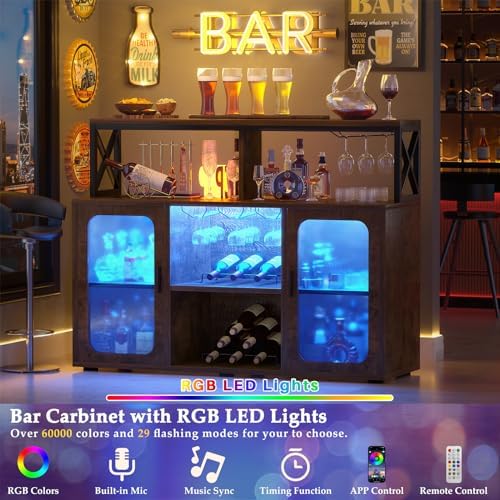
Figure 4: The bar cabinet illuminated by its versatile LED RGB lighting.
Manutenzione
Regular maintenance will help keep your Aheaplus Bar Cabinet in excellent condition.
- Pulizia: Pulire le superfici con un panno morbido, damp panno. Evitare prodotti chimici aggressivi o detergenti abrasivi che potrebbero danneggiare la finitura.
- Spolverare: Regularly dust the cabinet to prevent buildup, especially around electrical components.
- Fuoriuscite: Pulire immediatamente eventuali fuoriuscite per evitare macchie o danni al legno.
- Componenti elettrici: Ensure the power outlets and LED lights are free from dust and debris. Do not attempt to clean them with liquids while plugged in.
- Controllo hardware: Controllare periodicamente tutte le viti e gli elementi di fissaggio per assicurarsi che siano ben serrati. Serrare nuovamente se necessario.
Risoluzione dei problemi
| Problema | Possibile causa | Soluzione |
|---|---|---|
| Le luci LED non si accendono | Not plugged in; loose connection; remote battery dead | Ensure power cord is securely plugged in. Check all light strip connections. Replace remote battery. |
| Le prese di corrente non funzionano | Cabinet not plugged in; circuit breaker tripped; overloaded | Verify cabinet is plugged into a live outlet. Check household circuit breaker. Unplug some devices to reduce load. |
| Il mobile sembra traballante | Pavimento irregolare; elementi di fissaggio allentati | Adjust cabinet leveling feet (if present) or place shims under legs. Retighten all assembly screws. |
| Doors not aligning | Improper hinge adjustment | Adjust door hinges according to assembly manual instructions. |
Garanzia e supporto
Aheaplus provides lifetime customer support for this product. If you encounter any issues or have questions, please do not hesitate to contact our experienced customer service team.
Informazioni sui contatti: Please refer to the contact details provided in your product packaging or visit the official Aheaplus websito di supporto.
For information regarding protection plans, please refer to your purchase documentation.