
1. Introduzione
The Aubess Mini Smart Wi-Fi Switch 16A (Model WSM02) is designed to integrate seamlessly into your smart home ecosystem. This device enables remote control of connected appliances via your smartphone or tablet, offering convenience and enhanced energy management. It features an integrated energy monitor that provides real-time consumption data, helping you make informed decisions about your energy usage.
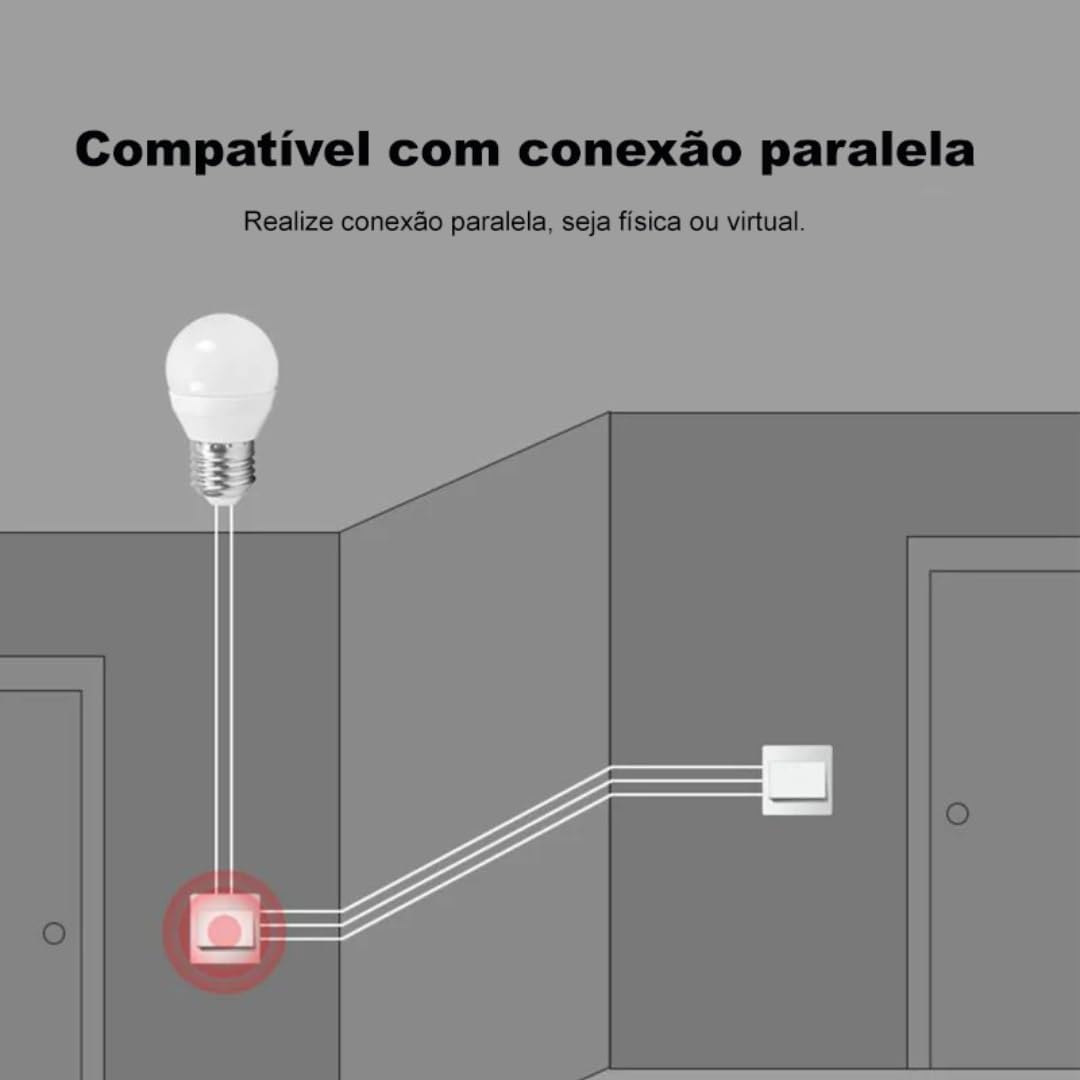
The switch is compatible with popular voice assistants such as Amazon Alexa and Google Home, and works with smart home platforms like Tuya Smart, Smart Life, and Home Assistant. Its compact design allows for simple and quick installation, including parallel installation with existing switches.
2. Informazioni sulla sicurezza
AVVERTIMENTO: Electrical installation should only be performed by a qualified electrician to ensure safety and compliance with local electrical codes. Incorrect installation can lead to electric shock, fire, or device damage.
- Prima di procedere all'installazione o alla manutenzione, scollegare sempre l'alimentazione elettrica dall'interruttore automatico.
- Assicurarsi che il dispositivo venga utilizzato entro il volume specificatotage valori nominali di corrente (110 V, 16 A, 1600 W).
- Non esporre il dispositivo a umidità o temperature estreme.
- Questo dispositivo è progettato esclusivamente per l'uso in ambienti interni.
3. Contenuto della confezione
- 1 x Aubess Mini Smart Wi-Fi Switch
- 1 x Manuale utente
4. Caratteristiche del prodotto
- Connettività Wi-Fi: Operates on 2.4GHz Wi-Fi networks for remote control.
- Monitoraggio energetico: Provides real-time and historical energy consumption data.
- Controllo vocale: Compatibile con Amazon Alexa e Google Home per il funzionamento a mani libere.
- Controllo app: Works with Tuya Smart and Smart Life applications for comprehensive management.
- Alta potenza nominale: Supporta fino a 16 Amperes and 1600 Watts.
- Installazione parallela: Designed to facilitate parallel wiring with existing traditional switches.
- Design compatto: Small form factor for easy integration into electrical boxes.


5. Specifiche
| Specificazione | Valore |
|---|---|
| Modalità di funzionamento | Acceso-Spento |
| Valutazione attuale | 16 Amperi |
| Volume di eserciziotage | 110 Volt |
| Tipo di contatto | Normalmente Chiuso |
| Tipo di connettore | Clamp |
| Tipo di interruttore | Diapositiva |
| terminale | Vite |
| Tipo di circuito | 1 vie |
| Tipo di montaggio | Montaggio a parete |
| Numero di posizioni | 2 |
| Valutazione massima della temperatura | 55 gradi Celsius |
| Tipo di controllo | Amazon Alexa, Push Button, Google Assistant |
| Metodo di controllo | Application, Remote, Touch, Voice |
| Tipo di connettività | Wi-Fi (2.4 GHz) |
| Energia | 1600 Watt |
| Colore | Bianco |
| Dimensioni dell'articolo | 41 x 20 x 41 millimetri |
| Conteggio unità | 1 unità |
| Quantità di articoli | 1 |
| Materiale | Plastica |
| Materiale di contatto | Metallo |
| Valutazione internazionale di protezione | Grado di protezione IP00 |
| Compliant Specification | CE, RoHS |
| Produttore | Aubess |
| Numero di parte | Modello WSM02 |
6. Configurazione e installazione
6.1 Istruzioni per il cablaggio
Importante: Ensure power is disconnected at the circuit breaker before proceeding with any wiring. Professional installation is highly recommended.
- Identificare i fili: Locate the Live (L), Neutral (N), and Load (L1, L2, etc.) wires in your electrical box. The Aubess switch requires a Neutral wire for operation.
- Collegare i fili: Connect the Live wire from your power source to the 'L' terminal on the switch. Connect the Neutral wire to the 'N' terminal. Connect the Load wire(s) (to your light fixture or appliance) to the 'L1' (and 'L2' if applicable) terminal(s).
- Connessioni sicure: Assicurarsi che tutti i collegamenti dei cavi siano sicuri e adeguatamente isolati.
- Interruttore di montaggio: Carefully place the switch into the electrical box and secure it.
- Ripristina alimentazione: Una volta completata e verificata l'installazione, ripristinare l'alimentazione all'interruttore automatico.
6.2 Associazione di app
To control your Aubess Mini Smart Wi-Fi Switch, you need to pair it with the Tuya Smart or Smart Life application.
- Scarica l'app: Scarica l'app 'Tuya Smart' o 'Smart Life' dall'app store del tuo smartphone (iOS o Android).
- Registrati/Accedi: Apri l'app e registrati per un nuovo account oppure accedi se ne hai già uno.
- Aggiungi dispositivo: Tocca l'icona '+' nell'angolo in alto a destra dell'app per aggiungere un nuovo dispositivo.
- Seleziona il tipo di dispositivo: Choose 'Electrical Switch' or 'Switch (Wi-Fi)'.
- Inserisci i dettagli Wi-Fi: Assicurati che il tuo telefono sia connesso a una rete Wi-Fi a 2.4 GHz. Inserisci la password Wi-Fi nell'app.
- Metti il dispositivo in modalità di associazione: Power on the switch. If the indicator light is not blinking rapidly, press and hold the reset button on the switch for 5-10 seconds until it blinks rapidly.
- Conferma lampeggiante: Nell'app, verifica che la spia lampeggi rapidamente.
- Collegare: The app will begin searching for the device. Once found, you can rename it and complete the setup.
7. Istruzioni per l'uso
7.1 Controllo dell'app
Once paired, you can control the switch from anywhere using the Tuya Smart or Smart Life app:
- Acceso/Spento: Tocca l'icona dell'interruttore nell'app per accendere o spegnere l'apparecchio connesso.
- Pianificazione: Impostare programmi o timer per il funzionamento automatico.
- Scene: Crea scene personalizzate per controllare più dispositivi contemporaneamente.
7.2 Controllo vocale (Alexa/Google Home)
To enable voice control, link your Tuya Smart/Smart Life account with Amazon Alexa or Google Home:
- Apri l'app Alexa o Google Home.
- Vai su "Abilità e giochi" (Alexa) o "Funziona con Google" (Google Home).
- Cercare 'Tuya Smart' o 'Smart Life'.
- Enable the skill/service and link your account using your app credentials.
- Discover devices. You can now control your switch using voice commands like: "Alexa, turn on the living room light" or "Hey Google, turn off the fan."
7.3 Monitoraggio energetico
The integrated energy monitor allows you to track power consumption:
- In the Tuya Smart/Smart Life app, select your Aubess switch.
- Look for the 'Energy Monitoring' or 'Power Statistics' section.
- View real-time power usage (Watts), current (Amperes), and voltage (Volt).
- Access historical data, including daily, weekly, or monthly consumption graphs.

8. Manutenzione
- Pulizia: Utilizzare un panno morbido e asciutto per pulire il dispositivo. Non utilizzare prodotti chimici aggressivi o detergenti abrasivi.
- Aggiornamenti del firmware: Controllare periodicamente l'app Tuya Smart/Smart Life per verificare la disponibilità di aggiornamenti del firmware, per garantire prestazioni e sicurezza ottimali.
- Condizioni ambientali: Ensure the device is kept within its operating temperature range (max 55°C) and away from excessive humidity.
9. Risoluzione Dei Problemi
- Il dispositivo non risponde:
- Controllare se il dispositivo è alimentato.
- Verify your Wi-Fi network is active and stable (2.4GHz).
- Assicurati che il tuo smartphone abbia una connessione Internet.
- Try restarting the switch by cycling its power at the circuit breaker.
- Impossibile associare:
- Make sure the switch's indicator light is blinking rapidly (pairing mode). If not, reset it by holding the button for 5-10 seconds.
- Verifica che la tua rete Wi-Fi sia a 2.4 GHz. Le reti a 5 GHz non sono supportate.
- Assicurati di aver inserito correttamente la password Wi-Fi.
- Durante l'associazione, avvicinare l'interruttore al router Wi-Fi.
- Controllo vocale non funzionante:
- Verify that the Tuya Smart/Smart Life skill/service is enabled and linked correctly in your Alexa/Google Home app.
- Ensure the device name in the smart home app matches the name you are using in voice commands.
- Try rediscovering devices in your Alexa/Google Home app.
10. Garanzia e supporto
For warranty information, technical support, or service inquiries, please contact Aubess customer support through their official website or the contact information provided at the point of purchase. Please have your product model (WSM02) and purchase details ready when contacting support.