
1. Introduzione
Thank you for choosing the MONODEAL DV68 Bone Conduction Headphones. These headphones are designed to provide a comfortable and safe listening experience, especially during sports and outdoor activities. Utilizing advanced bone conduction technology and Bluetooth 5.3, they deliver clear audio while keeping your ears open to ambient sounds. The integrated smart light enhances visibility and safety during nighttime use.
2. Contenuto della confezione
Si prega di controllare la confezione per verificare la presenza dei seguenti elementi:
- MONODEAL DV68 Bone Conduction Headphones
- Cavo di ricarica magnetico
- Manuale d'uso
- Tappi per le orecchie (facoltativi, per un migliore isolamento acustico)
3. Prodotto finitoview
Familiarize yourself with the components of your MONODEAL DV68 headphones.
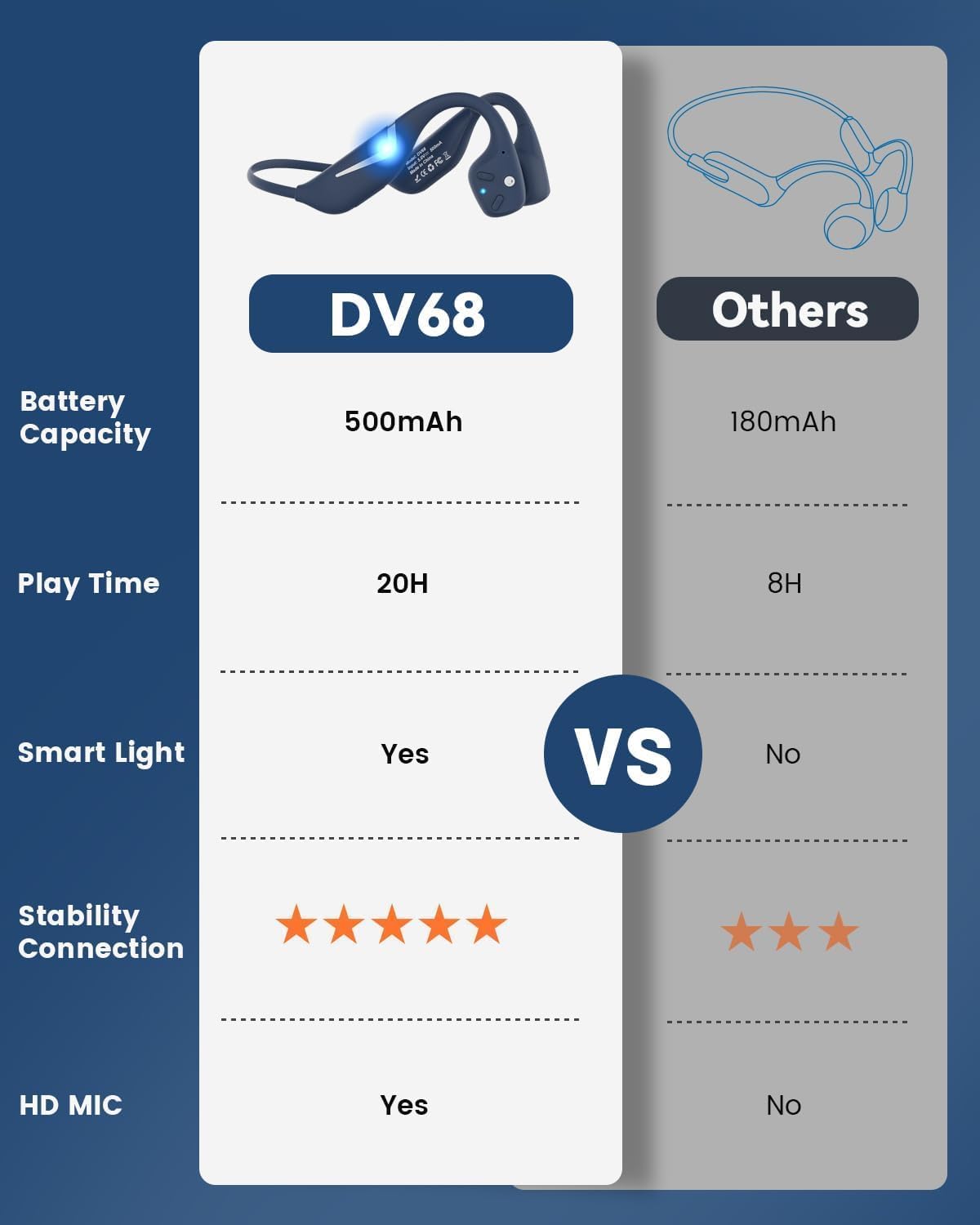
Figure 3.1: MONODEAL DV68 Bone Conduction Headphones, showing the overall design.

Figura 3.2: Esploso view illustrating the bone conduction transducer and built-in microphone.
3.1 Controlli e porte
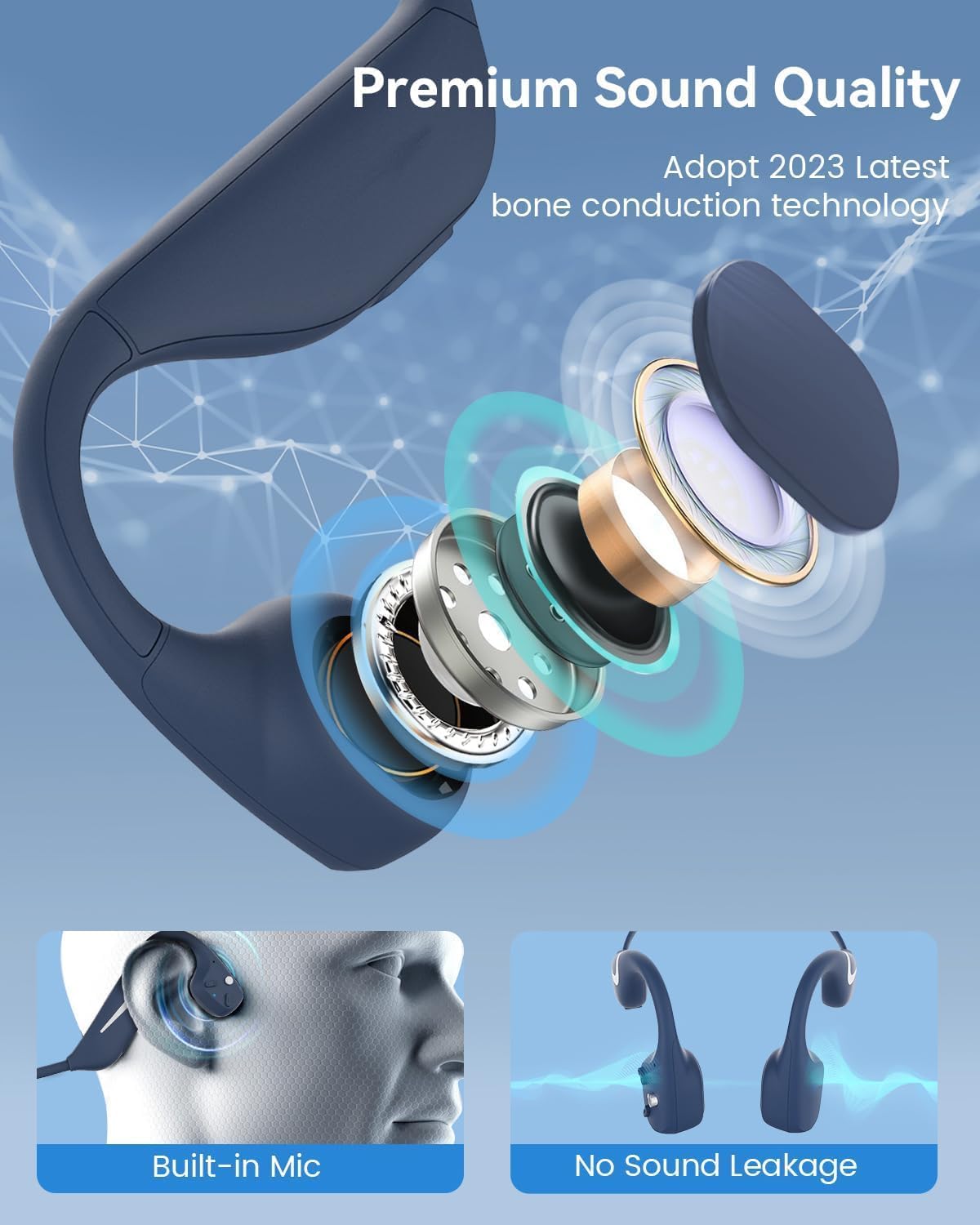
Figura 3.3: lato view of the headphones highlighting the control buttons.

Figura 3.4: primo piano view of the magnetic charging port.
The headphones feature physical buttons for power, volume, and playback control. The magnetic charging port is located on one of the ear pieces for convenient charging.
4. Specifiche
| Caratteristica | Specificazione |
|---|---|
| Numero di modello | DV68 |
| Versione Bluetooth | 5.3 |
| Capacità della batteria | 500 mAh |
| Tempo di gioco | Fino a 20 ore |
| Valutazione della resistenza all'acqua | IP67 (Sweat, rain, and splash resistant) |
| Peso | 34 grammi |
| Gamma di frequenza | 20 Hz - 20,000 Hz |
| Tecnologia di connettività | Wireless (Bluetooth) |
| Tipo di driver audio | Conduzione ossea |
| Caratteristiche speciali | Smart LED Light, Built-in Microphone, Multipoint Pairing |

Figura 4.1: Oltreview of key features including Open-Ear design, IP67 Waterproofing, 500mAh Battery, Bluetooth V5.3, Lightweight, HD Microphone, Multipoint Pairing, and RGB Light.
5. Impostazione
5.1 Ricarica delle cuffie
Prima del primo utilizzo, caricare completamente le cuffie.
- Collegare il cavo di ricarica magnetico alla porta di ricarica delle cuffie.
- Collegare l'altra estremità del cavo a un adattatore di alimentazione USB (non incluso) o alla porta USB di un computer.
- L'indicatore LED mostrerà lo stato di carica. Una ricarica completa richiede in genere circa 2 ore.

Figure 5.1: Illustration of 20-hour battery life and quick charge feature (10 minutes charging for 2 hours playtime).
5.2 Associazione Bluetooth
Per collegare le cuffie a un dispositivo:
- Assicurati che le cuffie siano spente.
- Tenere premuto il pulsante di accensione finché l'indicatore LED non lampeggia in rosso e blu, indicando la modalità di associazione.
- Sul tuo dispositivo (smartphone, tablet, computer), attiva il Bluetooth e cerca i dispositivi disponibili.
- Select "MONODEAL DV68" from the list of found devices.
- Una volta connesso, l'indicatore LED diventerà blu fisso o lampeggerà lentamente in blu.
The headphones support multipoint pairing, allowing connection to two devices simultaneously. Refer to your device's Bluetooth settings for managing multiple connections.
6. Istruzioni per l'uso
6.1 Accensione/spegnimento
- Accensione: Tenere premuto il pulsante di accensione per 3 secondi.
- Spegni: Tenere premuto il pulsante di accensione per 5 secondi.
6.2 Riproduzione di musica
- Riproduci/Pausa: Premi una volta il pulsante Multifunzione.
- Traccia successiva: Tenere premuto il pulsante Volume + per 2 secondi.
- Traccia precedente: Tenere premuto il pulsante Volume - per 2 secondi.
- Aumenta volume: Premi il pulsante Volume +.
- Volume basso: Premere il pulsante Volume -.
6.3 Gestione delle chiamate
- Rispondi/Termina chiamata: Premi una volta il pulsante Multifunzione.
- Rifiuta chiamata: Tenere premuto il pulsante multifunzione per 2 secondi.
- Assistente vocale: Premi due volte il pulsante Multifunzione.
6.4 Smart LED Light
The headphones feature a smart LED light for enhanced visibility during nighttime activities.
- Accendere/Spegnere la luce: Refer to the specific button combination in your quick start guide (usually a dedicated light button or a long press of a volume button).
- The light can cycle through different colors (e.g., blue, green, red) to increase your safety and visibility.

Figure 6.1: A runner demonstrating the smart LED light feature for night safety.
7. Manutenzione
7.1 Pulizia
To maintain hygiene and product longevity:
- After sweating or intense workouts, gently wipe the headphones with a damp panno o salvietta bagnata.
- Evitare l'uso di prodotti chimici aggressivi o detergenti abrasivi.
7.2 Conservazione
- Conservare le cuffie in un luogo fresco e asciutto, lontano dalla luce solare diretta e da temperature estreme.
- When not in use, it is recommended to store them in their original packaging or a protective case.
7.3 Resistenza all'acqua
The MONODEAL DV68 headphones are IP67 rated, meaning they are resistant to sweat, rain, and splashes. However, they are not suitable for swimming or submersion in water.

Figure 7.1: A person exercising with the headphones, demonstrating their IP67 water resistance against sweat and rain. Note: Not for swimming.
8. Risoluzione Dei Problemi
Se riscontri problemi con le cuffie, fai riferimento alle seguenti soluzioni comuni:
- Nessun potere:
Assicurati che le cuffie siano completamente cariche. Collegale al cavo di ricarica e a una fonte di alimentazione. - Impossibile associare:
Make sure the headphones are in pairing mode (LED flashing red and blue). Turn off Bluetooth on other nearby devices that may have previously connected. Try restarting both the headphones and your device. - Nessun suono/Volume basso:
Check the volume levels on both the headphones and your connected device. Ensure the headphones are properly positioned on your cheekbones. If using earplugs, ensure they are correctly inserted. - Connessione intermittente:
Ensure your device is within the Bluetooth range (up to 15 meters) and there are no significant obstacles between the headphones and your device. Avoid strong electromagnetic interference. - Scarsa qualità della chiamata:
Ensure the microphone is not obstructed. Move to an area with better network reception for your phone.
9. Garanzia e supporto
9.1 Informazioni sulla garanzia
MONODEAL provides a Garanzia di 2 anno for the DV68 Bone Conduction Headphones from the date of purchase. This warranty covers manufacturing defects and ensures the product meets its specified performance. Please retain your proof of purchase for warranty claims.
9.2 Assistenza clienti
For further assistance, technical support, or warranty inquiries, please contact MONODEAL customer service through the retailer where you purchased the product or visit the official MONODEAL websito per le informazioni di contatto.