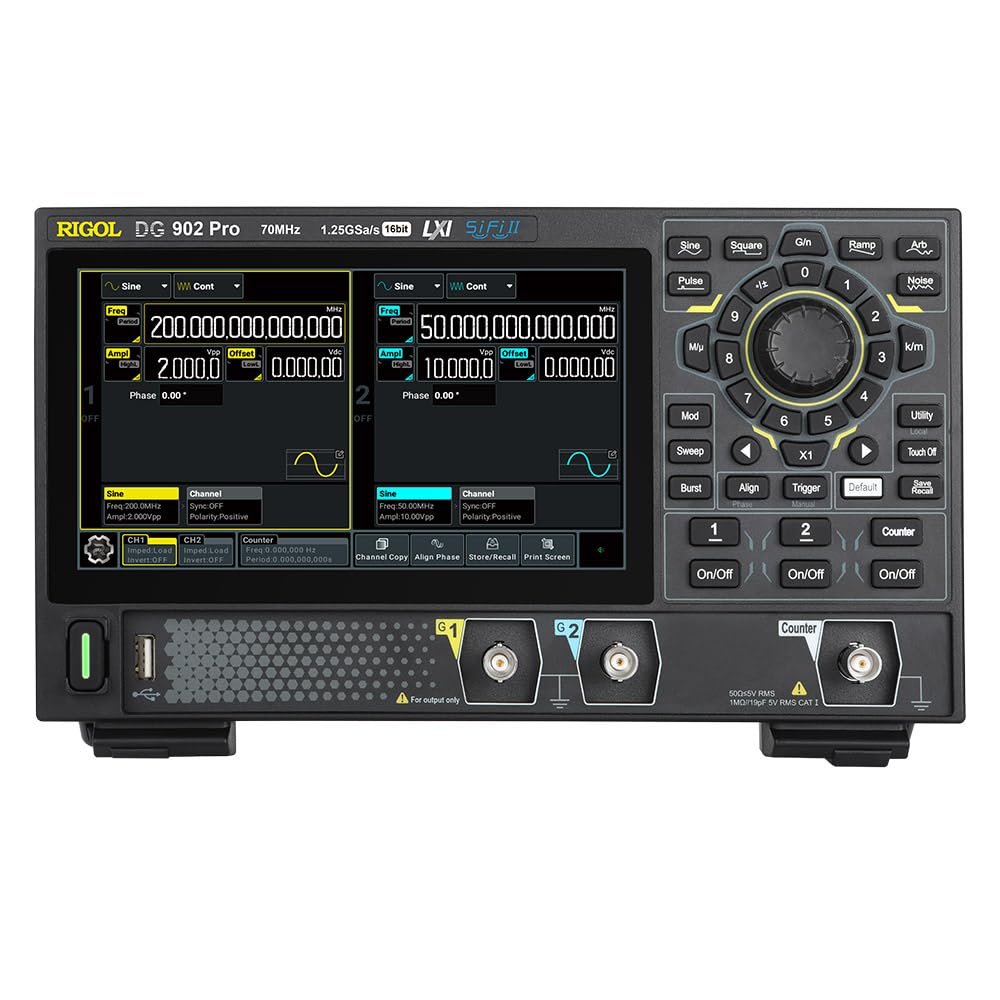
The RIGOL DG902 Pro is a high-performance waveform generator designed for a wide range of applications requiring precise signal generation. It features a 16-bit vertical resolution, a maximum sample rate of 1.25 GSa/s, and a 70 MHz output frequency. This device is capable of generating various waveforms and offers advanced modulation capabilities.
Le caratteristiche principali includono:
1.25 GSa/s Max. sampla tariffa
Arb Length of 16 Mpts/CH (32 Mpts/CH optional)
Rise Time as Low as 3 ns
Waveform Jitter as Low as 200 ps
A 7 Digits/s Counter with 1 GHz Bandwidth
Figura 1.1: Fronte view of the RIGOL DG902 Pro Waveform Generator, showing the display, control panel, and output channels.
2. Configurazione e connessioni
2.1 Disimballaggio e ispezione
Carefully unpack the DG902 Pro waveform generator and all accessories from the shipping carton. Inspect the instrument for any signs of damage that may have occurred during transit. If any damage is found, contact your supplier immediately.
2.2 Collegamento di alimentazione
Connect the provided power adapter to the DC input port on the rear panel of the instrument. Plug the power adapter into a suitable AC power outlet. The DG902 Pro can also be operated via a USB-C power bank for portable use.
Figure 2.1: The DG902 Pro connected to an external USB-C power bank, demonstrating its portable power capability.
2.3 Connessioni di ingresso/uscita
The rear panel of the DG902 Pro provides various input and output ports for signal generation and external synchronization.
Figura 2.2: Posteriore view of the DG902 Pro, highlighting the 10MHz REF IN/OUT, AUX IN/OUT, LAN, USB DEVICE, and USB-C ports.
Channel Outputs (CH1, CH2): Located on the front panel, these BNC connectors provide the main waveform outputs.
10MHz REF IN/OUT: Used for external reference clock synchronization.
INGRESSO/USCITA AUX: Auxiliary input/output ports for additional signal routing.
Porta LAN: Per la connettività di rete e il controllo remoto.
USB DEVICE Port: For connecting to a computer for data transfer and control.
3. Istruzioni per l'uso
3.1 Interfaccia utente e visualizzazione
The DG902 Pro features a 7.0-inch color display with a resolution of 1024x600 pixels, providing a clear and intuitive interface for operation. Navigation is primarily done through the rotary knob, directional buttons, and dedicated function keys.
Figura 3.1: Un primo piano view of the DG902 Pro's 7.0-inch display, highlighting its size and resolution.
Figure 3.2: The DG902 Pro display showing detailed settings for Channel 1 and Channel 2, including frequency, amplitude e offset.
3.2 Generazione di forme d'onda di base
Accensione: Per accendere lo strumento, premere il pulsante di accensione situato sul pannello frontale.
Seleziona canale: Utilizzare i pulsanti CH1 o CH2 per selezionare il canale di uscita desiderato.
Seleziona il tipo di forma d'onda: Premere il tasto Forma d'onda button (e.g., Sine, Square, Pulse, Ramp, Arb, Noise) to choose the desired waveform.
Imposta parametri: Use the rotary knob and numeric keypad to adjust parameters such as frequency, amplitude, and offset. The display will show the current settings.
Abilita output: Premere il tasto Acceso/Spento button for the selected channel to enable the waveform output.
3.3 Advanced Modulation Functions
The DG902 Pro supports various modulation types to meet complex signal generation requirements. These include Amplitude Modulation (AM), Frequency Modulation (FM), Phase Modulation (PM), Amplitude Shift Keying (ASK), Frequency Shift Keying (FSK), Pulse Width Modulation (PWM), and Sum modulation.
Figure 3.3: An illustration showing the DG902 Pro's support for various modulation types, including AM, FM, PM, ASK, FSK, PWM, and SUM.
To access modulation settings, press the Modo button and navigate through the options using the display and control knob.
4. Manutenzione
4.1 Pulizia dello strumento
To maintain the performance and appearance of your DG902 Pro, regularly clean its exterior. Use a soft, damp cloth with a mild detergent to wipe down the casing. Avoid using abrasive cleaners or solvents that could damage the plastic components or screen.
Scollegare sempre l'alimentazione prima della pulizia.
Do not allow any liquids to enter the instrument.
Clean the display screen gently with a soft, lint-free cloth.
4.2 Conservazione
When not in use for extended periods, store the DG902 Pro in a dry, dust-free environment, away from direct sunlight and extreme temperatures. It is recommended to store the instrument in its original packaging or a protective case to prevent damage.
5. Risoluzione Dei Problemi
This section provides solutions to common issues you might encounter with your DG902 Pro Waveform Generator. If the problem persists after trying these steps, please contact Rigol customer support.
Problema
Possibile causa
Soluzione
Lo strumento non si accende.
Power cable not connected properly; power outlet issue; power adapter fault.
Check power cable connection. Try a different power outlet. Ensure power adapter is functioning correctly.
Nessuna forma d'onda in uscita.
Output channel not enabled; amplitude set to zero; incorrect cable connection.
Premere il tasto Acceso/Spento button for the channel. Increase amplitude. Verify BNC cable connections.
Lo schermo è vuoto o bloccato.
Software error; temporary glitch.
Restart the instrument by powering it off and on again. If the issue persists, contact support.
6. Specifiche
The following table outlines the key technical specifications of the RIGOL DG902 Pro Waveform Generator.
Parametro
Valore
Numero di modello
DG902Pro
massimo Sampla tariffa
1.25 GSa/s
Frequenza di uscita
Fino a 70 MHz
Canali
2
Risoluzione verticale
16 pezzo
Arb Length
16 Mpts/CH (32 Mpts/CH optional)
Ora di alzarsi
As low as 3 ns
Waveform Jitter
As low as 200 ps
Counter Bandwidth
1 GHz
Dimensioni del prodotto
10.47 x 6.5 x 3.15 pollici
Peso
3.92 libbre
Produttore
RIGOL
7. Garanzia e supporto
7.1 Informazioni sulla garanzia
RIGOL provides a standard warranty for its products, covering defects in materials and workmanship under normal use. For specific warranty terms and duration, please refer to the warranty card included with your product or visit the official RIGOL websito. Conservare la ricevuta d'acquisto come prova d'acquisto per eventuali reclami in garanzia.
7.2 Assistenza clienti
For technical assistance, troubleshooting, or service requests, please contact RIGOL customer support. You can find contact information, including phone numbers and email addresses, on the official RIGOL webposto (www.rigol.com). When contacting support, please have your product model number (DG902 Pro) and serial number ready.
Ask a question about this manual
Ask about setup, troubleshooting, compatibility, parts, safety, or missing instructions. Manuals+ will review the question and use this page’s manual context to help answer it.