
Introduzione
Grazie per l'acquistoasing the XDOBO KING MAX 140W Portable Wireless Speaker. This manual provides essential information for setting up, operating, maintaining, and troubleshooting your speaker. Please read this manual thoroughly before use to ensure optimal performance and longevity of your device.
Informazioni sulla sicurezza
- Non esporre l'altoparlante a temperature estreme, alla luce solare diretta o a elevata umidità.
- Keep the speaker away from water and liquids, despite its IPX5 rating, to prevent damage.
- Non smontare, riparare o modificare il dispositivo autonomamente. Per qualsiasi intervento di assistenza, rivolgersi a personale qualificato.
- Use only the specified charging cable and power supply (Type C 5V3A) to avoid damage or fire.
- Evitare l'ascolto a livelli di volume elevati per periodi prolungati per evitare danni all'udito.
- Tenere fuori dalla portata dei bambini.
Contenuto della confezione
Si prega di controllare la confezione per verificare la presenza dei seguenti elementi:
- 1 x XDOBO KING MAX Speaker
- 1 x cavo di ricarica (tipo C)
- 1 x cavo audio
- 1 x Manuale di istruzioni
- 1 x Cinturino
- 2 x microfoni

Image: The XDOBO KING MAX speaker shown with its two accompanying wireless microphones, illustrating the complete product package.
Prodotto finitoview
Controlli e porte
Familiarize yourself with the various input and control options available on your speaker:
- Bluetooth (Bluetooth): Per lo streaming audio wireless.
- Slot per schede TF: For playing audio directly from a MicroSD card.
- USB Flash Disk Port: For playing audio directly from a USB drive.
- 3.5mm AUX Line Input: Per la connessione audio cablata da dispositivi esterni.
- 6.5mm Audio Cable Input: For connecting additional audio sources or instruments.
- Ingressi microfono: Dedicated ports for the wireless microphones.
- Pulsante di accensione: To turn the speaker on/off.
- Controlli del volume: To adjust the speaker's output volume.
- Pulsante Modalità: To switch between different playback modes.
- TWS Button (Key III): For connecting two speakers in True Wireless Stereo mode.
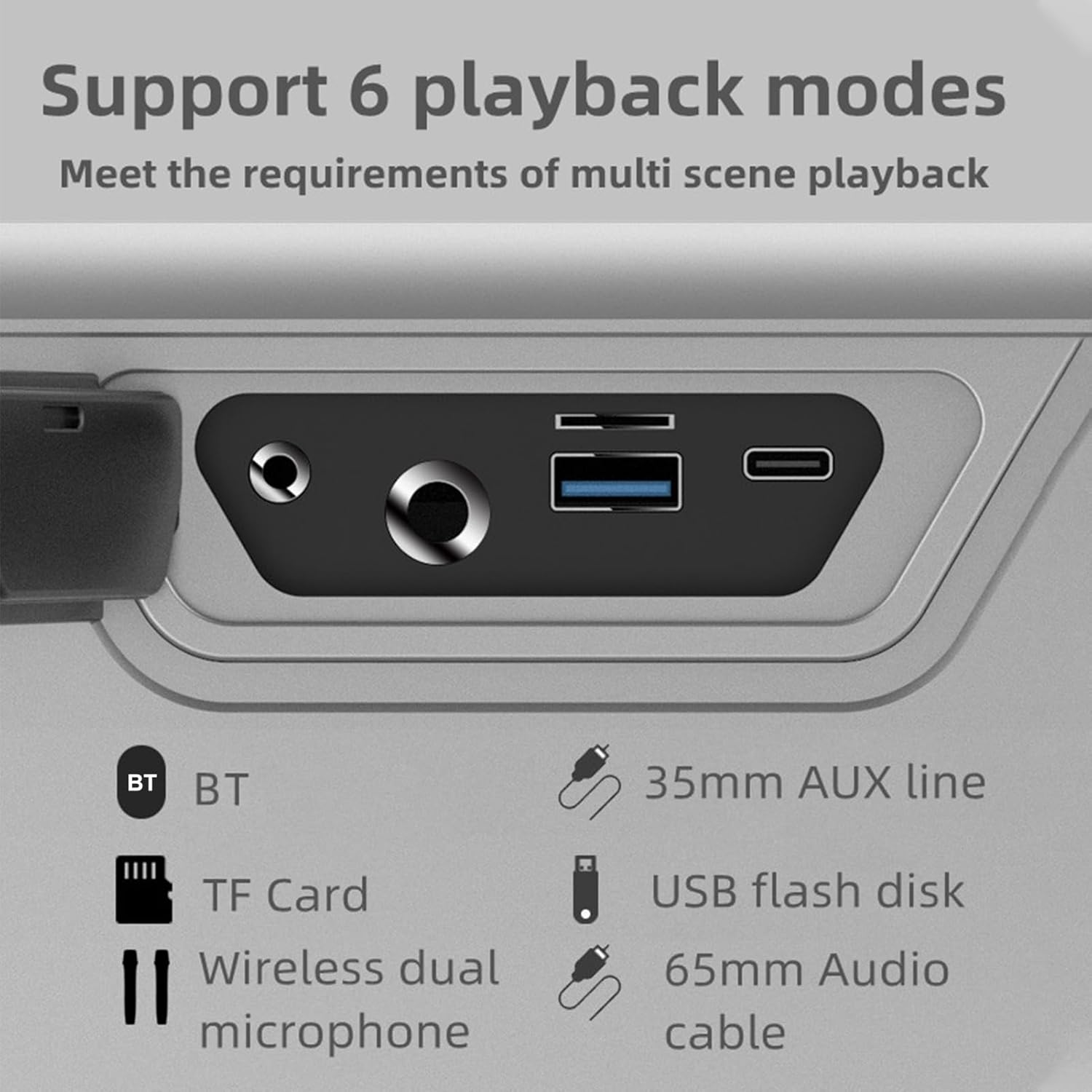
Immagine: un primo piano view of the speaker's rear panel, highlighting the BT, TF Card, Wireless Dual Microphone, 3.5mm AUX line, USB flash disk, and 6.5mm Audio cable input ports.
Impostare
1. Ricarica dell'altoparlante
Before first use, fully charge the speaker. Connect the provided Type-C charging cable to the speaker's charging port and the other end to a 5V/3A power adapter (not included). The charging time is approximately 9 hours for a full charge. The battery capacity is 36000mAh (7.4V).
2. Configurazione del microfono
The speaker comes with two UHF wireless karaoke microphones. To use them, ensure they are charged (if applicable) and powered on. They should automatically connect to the speaker when both devices are on and within range. Refer to the microphone's individual instructions for specific pairing details if needed.

Image: The XDOBO KING MAX speaker and its two wireless microphones are displayed on a wooden table, ready for use in a home setting.
Istruzioni per l'uso
1. Accensione/spegnimento
Tenere premuto il pulsante di accensione per accendere o spegnere l'altoparlante.
2. Bluetooth Pairing (BT Mode)
- Accendi l'altoparlante. Entrerà automaticamente in modalità di associazione Bluetooth.
- Abilita il Bluetooth sul tuo dispositivo (smartphone, tablet, ecc.).
- Cercare "XDOBO KING MAX" (or similar name) in your device's Bluetooth list and select it to connect.
- Once connected, the speaker will indicate successful pairing. The effective Bluetooth distance is up to 18 meters in open areas.
3. Modalità TWS (True Wireless Stereo)
If you have two XDOBO KING MAX speakers, you can connect them for a stereo sound experience. TWS mode is supported only in Bluetooth mode.
- Assicurarsi che entrambi gli altoparlanti siano accesi e non connessi ad altri dispositivi Bluetooth.
- On either speaker, click the TWS button (often labeled as 'III' or a dedicated TWS icon).
- Gli altoparlanti si cercheranno e si accoppieranno automaticamente tra loro. Una volta connessi, funzioneranno come una coppia stereo.
- Now, connect your device to one of the speakers via Bluetooth as described above. Audio will play through both speakers in stereo.

Image: A visual representation of two XDOBO KING MAX speakers wirelessly connected to create a stereo sound system, emphasizing the TWS (True Wireless Stereo) functionality.
4. Switching Playback Modes
Press the Mode button to cycle through the available playback modes:
- Bluetooth (BT)
- Carta TF
- Disco flash USB
- AUX Input (3.5mm or 6.5mm)
- Karaoke Mode (with microphones)
Supported audio formats include APE, FLAC, WAV, and MP3.
5. Uso del microfono (Karaoke)
Turn on the wireless microphones. They will automatically connect to the speaker. Adjust the microphone volume and echo effects (if available on the speaker or microphone) for your karaoke experience. The speaker supports full frequency, voice, and subwoofer sound effect modes, enhancing your audio and vocal performance.
6. Output Phone Charging
The speaker supports output phone charging. You can use the USB port to charge your mobile device while the speaker is on, utilizing its large battery capacity.
Manutenzione
- Pulizia: Utilizzare un panno morbido e asciutto per pulire la superficie dell'altoparlante. Non utilizzare detergenti abrasivi o solventi.
- Magazzinaggio: Conservare l'altoparlante in un luogo fresco e asciutto quando non lo si utilizza. Evitare temperature estreme.
- Cura della batteria: To prolong battery life, charge the speaker fully at least once every three months if not used regularly. Avoid completely draining the battery frequently.
- Resistenza all'acqua: The IPX5 rating means it can resist a sustained, low-pressure water jet spray. Do not submerge the speaker in water. Ensure all port covers are securely closed before exposure to water.
Risoluzione dei problemi
| Problema | Possibile causa | Soluzione |
|---|---|---|
| L'altoparlante non si accende | Batteria scarica; pulsante di accensione non premuto correttamente | Charge the speaker; Press and hold the Power button for a few seconds |
| Nessun suono | Volume troppo basso; Modalità errata; Dispositivo non connesso | Increase volume; Switch to correct playback mode (BT, AUX, TF, USB); Reconnect device |
| Connessione Bluetooth instabile | Too far from device; Obstacles; Interference | Move speaker closer to device (within 18M); Remove obstacles; Avoid strong electromagnetic interference |
| Il microfono non funziona | Microphone off; Low microphone battery; Not paired | Turn on microphone; Charge microphone; Re-pair microphone with speaker |
| Accoppiamento TWS non riuscito | Speakers already connected to other devices; Not in BT mode | Disconnect speakers from other devices; Ensure both are in BT mode before TWS pairing |
Specifiche

Image: A graphic detailing the technical specifications and parameters of the XDOBO KING MAX speaker, including BT version, power, waterproof rating, and battery life.
| Caratteristica | Specificazione |
|---|---|
| Versione BT | V5.2 |
| Potenza nominale | 140W |
| Grado di impermeabilità | Grado di protezione IPX5 |
| Signal-to-Noise Ratio | 75 dB |
| Gamma di risposta in frequenza | 20 Hz - 20 kHz |
| Distorsione | ≤1% |
| Effective Distance (BT) | 18 M (area aperta) |
| Alimentazione in ingresso | Type C 5V3A |
| Tempo di gioco | 4-12 ore (varia in base al volume e al contenuto) |
| Tempo di ricarica | Circa 9 ore |
| Capacità della batteria | 36000mAh 7.4V (Built-in lithium battery) |
| Connessione TWS | BT |
| Modalità effetti sonori | Full frequency, Voice, Subwoofer |
| Output Phone Charging | Supportato |
| Formati supportati | APE, FLAC, WAV, MP3 |
| Modalità di lavoro | BT, TF card, USB flash disk, AUX cable, Karaoke |
| Dimensioni del prodotto | 255 x 125 x 255 mm |
| Peso del prodotto | 4476g |
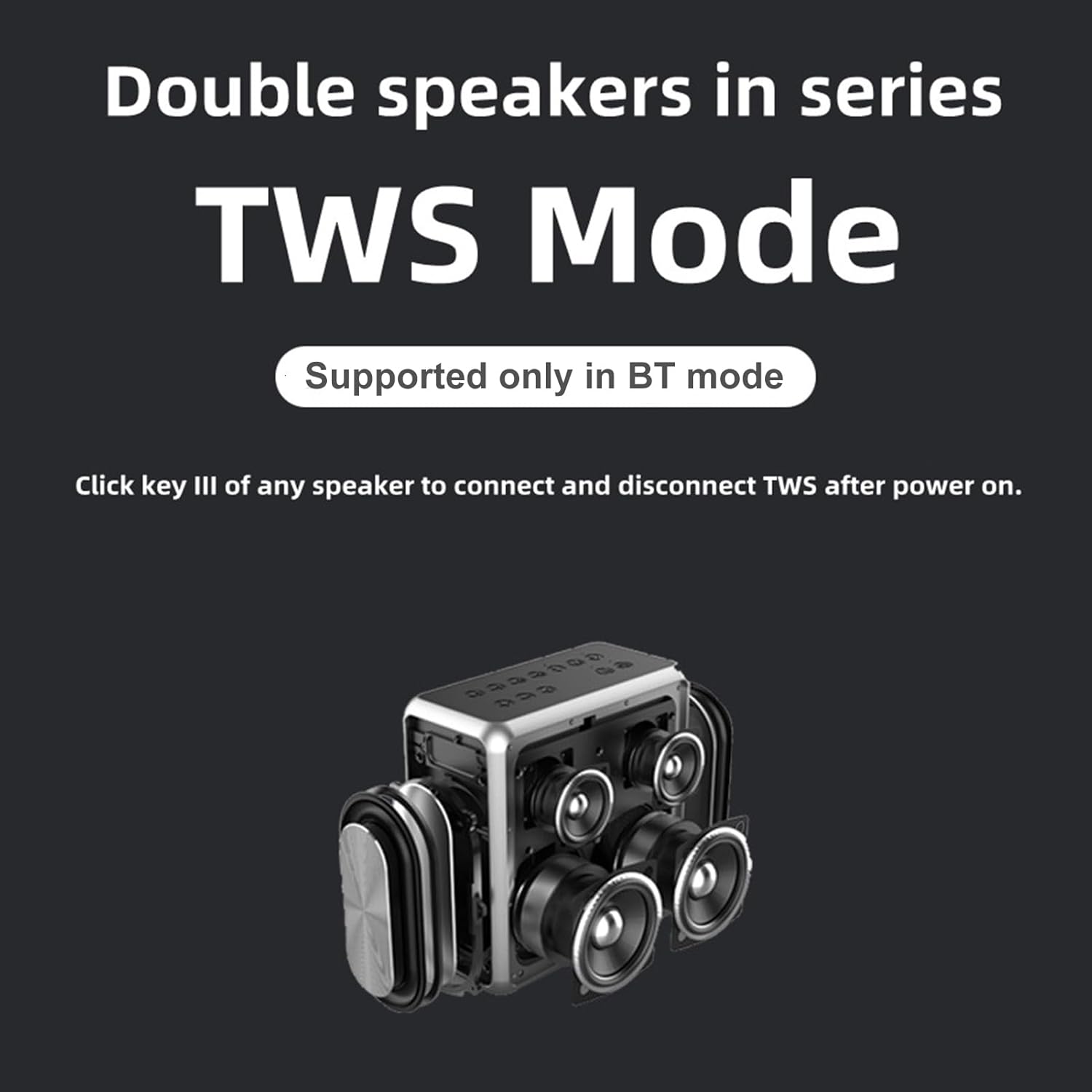
Image: A technical drawing illustrating the length, width, and height measurements of the XDOBO KING MAX speaker.
Garanzia e supporto
This product comes with a standard manufacturer's warranty. Please refer to the warranty card included in your package for specific terms and conditions. For technical support, troubleshooting assistance, or warranty claims, please contact the retailer or manufacturer's customer service. Keep your purchase receipt as proof of purchase.