
1. Introduzione
Thank you for choosing the FLEXISPOT E6 MAX Standing Desk. This electric height-adjustable desk is designed to enhance your workspace ergonomics and productivity, allowing seamless transitions between sitting and standing positions. This manual provides essential information for the proper setup, operation, and maintenance of your new desk.
Please read this manual thoroughly before assembly and use to ensure safe and efficient operation.
2. Caratteristiche principali
- Durable Bamboo Desktop: Crafted from bamboo, known for its remarkable strength and flexibility, capable of withstanding daily use with a tensile strength of 28,000 pounds per square inch. The surface features a natural grain and elegant finish.
- Motori doppi silenziosi: Equipped with dual motors for whisper-quiet height adjustments (less than 50dB). These powerful motors effortlessly lift up to 330 lbs (150KG), ensuring smooth transitions without disturbing your environment.
- Tre-Stage Leg System: Provides continuous height adjustment, accommodating users of various heights, from children to extra tall adults.
- Programmable Control Panel: Features intuitive up/down buttons, blue backlighting, and four height memory settings for quick and precise ergonomic adjustments.
- Funzione anticollisione: Includes a built-in system that automatically retracts the desk upon encountering an obstacle, preventing accidents and protecting furniture, children, and pets.
- Complimentary Accessories: Comes with Velcro straps for cable management, a set of wheels for easy mobility, and a cable manager to keep your workspace tidy.
3. Specifiche del prodotto
| Attributo | Dettaglio |
|---|---|
| Marca | FLESSIBILE |
| Numero di modello | E6 |
| Materiale del desktop | Bamboo (Whole-Piece Board) |
| Materiale del telaio | Metallo (cornice nera) |
| Dimensioni (Desktop) | 55"P x 28"L |
| Intervallo di altezza | 23.6" - 50" (Continuous Adjustment) |
| Capacità di carico | Up to 330 lbs (150KG) |
| Tipo di motore | Doppio motore |
| Livello di rumore | Meno di 50 dB |
| Pannello di controllo | Programmabile con 4 preimpostazioni di memoria |
| Assemblaggio richiesto | Sì (strumenti inclusi) |
| Codice UPC | 810072854988 |
4. Avvertenze importanti per la sicurezza
- Limite di peso: Do not exceed the maximum weight limit of 330 lbs (150KG). Exceeding this limit can cause damage to the desk and potentially lead to injury.
- Rumore del motore: The desk's quiet dual motors generate less than 50dB of sound. Users should be aware of this minimal motor noise during operation.
- Sistema anticollisione: While the desk has an anti-collision feature, always ensure the area around the desk is clear during height adjustments to prevent accidents.
- Fonte di energia: Utilizzare solo l'adattatore di alimentazione fornito e assicurarsi che sia collegato a una presa di corrente dotata di messa a terra.
- Bambini e animali domestici: Per evitare lesioni, tenere bambini e animali domestici lontani dalla scrivania durante il funzionamento.
5. Installazione e assemblaggio
Your FLEXISPOT E6 MAX Standing Desk arrives in two separate packages: one for the desktop and one for the frame components. All necessary assembly tools are included.
Fasi di assemblaggio:
- Disimballare tutti i componenti e verificarli con l'elenco delle parti riportato nel manuale incluso.
- Assemble the frame according to the detailed instructions provided in the assembly guide. This typically involves attaching the crossbar, side brackets, and feet to the lifting columns.
- Attach the desktop to the assembled frame using the provided screws. The bamboo desktop comes with pre-drilled holes for easy alignment.
- Connect the motor cables to the control box and then connect the control box to the power supply.
- Install the control panel to the underside of the desktop in the designated area.
- Optionally, attach the included casters to the feet for easy mobility, or use the standard leveling feet for a stationary setup.
- Organize cables using the provided Velcro straps and cable manager for a clean and safe workspace.

Image: The FLEXISPOT E6 MAX Standing Desk fully assembled in a home office environment.

Immagine: Dettaglio dei tretage leg, illustrating continuous height adjustment from 24.4" to 50".
6. Istruzioni per l'uso
Funzioni del pannello di controllo:
- Frecce su/giù: Press and hold the up or down arrow buttons to manually adjust the desk height. Release the button to stop.
- Preimpostazioni di memoria (1, 2, 3, 4): The control panel features four programmable memory buttons.
- Impostazione delle preimpostazioni di memoria:
- Regolare la scrivania all'altezza desiderata utilizzando le frecce su/giù.
- Press the 'M' button (Memory button). The display will show 'S-' or similar.
- Within 3 seconds, press the desired memory button (1, 2, 3, or 4) to save the current height. The display will confirm the setting.
- Richiamo delle preimpostazioni di memoria: Simply press the corresponding memory button (1, 2, 3, or 4), and the desk will automatically move to the saved height.
- Sistema anticollisione: The desk is equipped with an anti-collision sensor. If the desktop encounters an obstacle during movement, it will automatically stop and retract slightly to prevent damage.
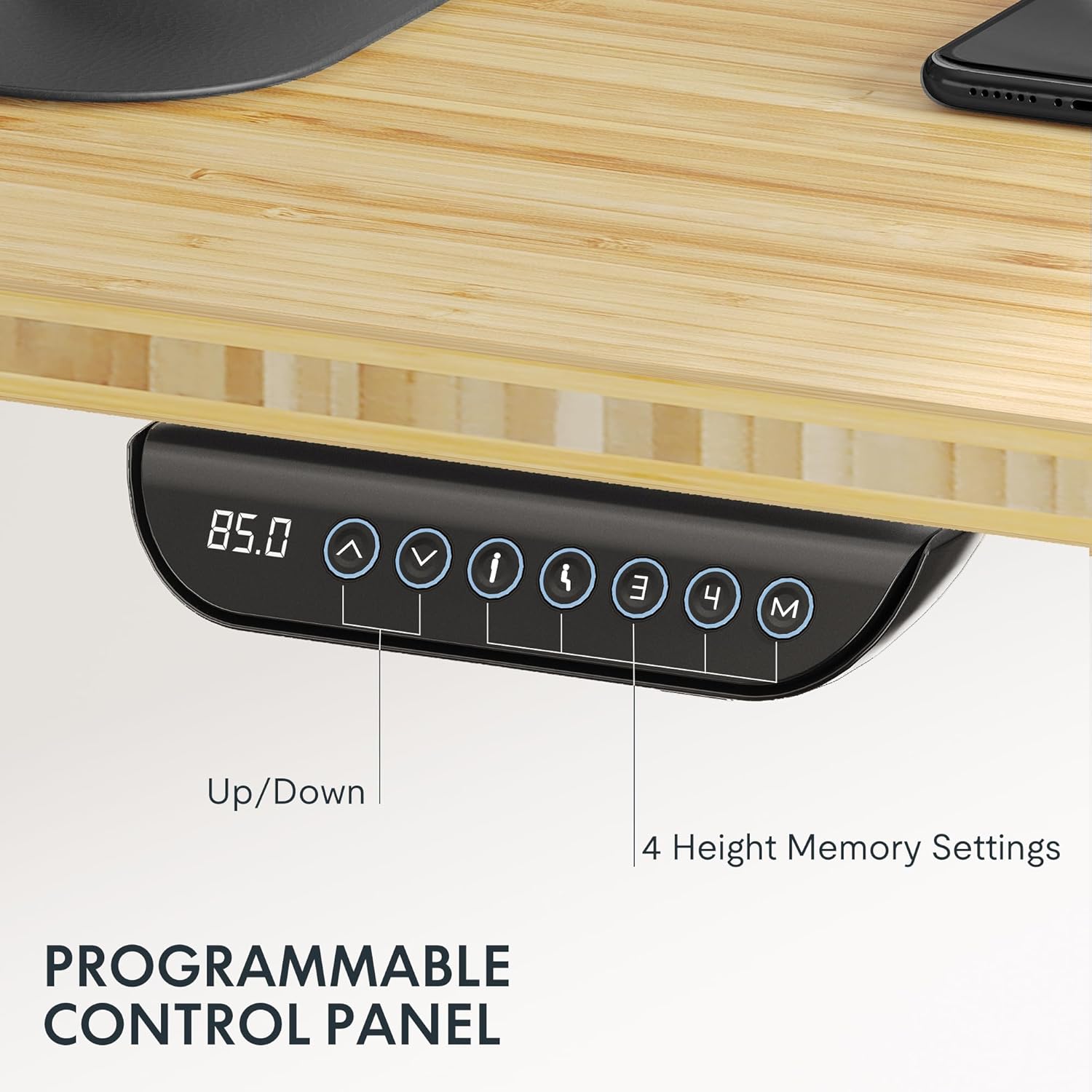
Image: The intuitive control panel allows for easy height adjustments and saving preferred positions.
Video: Official FLEXISPOT brand video showcasing general product features and operation. (Creator: FlexiSpot)
7. Manutenzione
- Pulizia: Pulisci il desktop e la cornice con un panno morbido eamp panno. Evitare prodotti chimici aggressivi o detergenti abrasivi che potrebbero danneggiare la finitura.
- Controlli regolari: Controllare periodicamente tutte le viti e i collegamenti per accertarsi che siano ben saldi. Serrare se necessario.
- Gestione dei cavi: Ensure cables remain tidy and are not pinched or tangled, especially during height adjustments.
8. Risoluzione Dei Problemi
Problemi comuni e soluzioni:
- La scrivania non si muove:
- Controllare che il cavo di alimentazione sia collegato saldamente sia alla scrivania sia alla presa a muro.
- Ensure the control box connections are firm.
- Altezza irregolare:
- Perform a reset procedure (refer to the detailed assembly manual for specific steps).
- Assicurarsi che la scrivania sia su una superficie piana.
- Motor Noise is Excessive:
- While the motors are quiet, unusual loud noises may indicate an issue. Check for any obstructions or loose components.
- Ensure the desk is not overloaded beyond its maximum capacity.
- Attivazione frequente dell'anticollisione:
- Ensure there are no objects in the desk's path during movement.
- Check if any cables are hanging loosely and interfering with the desk's movement.
9. Garanzia e supporto
FLEXISPOT stands behind the quality of its products. The E6 MAX Standing Desk comes with a comprehensive warranty:
- Garanzia di 10 anni: Copre il telaio della scrivania e il motore.
- Protezione di 2 anni: Copre il pannello di controllo e l'elettronica.
For any assistance, questions, or warranty claims, please contact FLEXISPOT Customer Support. Refer to your product packaging or the official FLEXISPOT websito per le informazioni di contatto più aggiornate.