
VTech Genius XL Interactive Video Binoculars (Model 618605)
Manuale di istruzioni del binocolo video interattivo VTech Genius XL
Modello: 618605
Introduzione
Welcome to the VTech Genius XL Interactive Video Binoculars. This device is designed for children aged 5 and above to explore the world around them through observation, interactive videos, images, and educational games. This manual provides essential information for setup, operation, and maintenance to ensure optimal use and longevity of your product.

Image: The VTech Genius XL Interactive Video Binoculars, showing the main unit with its flip-up color screen and binocular lenses.
Informazioni importanti sulla sicurezza
ATTENZIONE: Non adatto a bambini di età inferiore a 36 mesi a causa della presenza di piccole parti.
- Sorvegliare sempre i bambini durante l'uso.
- Do not look directly at the sun through the binoculars, as this can cause serious eye damage.
- Assicurarsi che le batterie siano inserite correttamente.
- Non mischiare batterie vecchie e nuove o tipi diversi di batterie.
- Rimuovere prontamente le batterie scariche.
- Smaltire le batterie in modo responsabile.
Cosa c'è nella scatola
- 1 Pair of VTech Genius XL Interactive Video Binoculars
- Batteries (4 x LR6-AA)
- Cinghia da collo
Impostare
1. Installazione della batteria
- Individuare il vano batteria sul dispositivo.
- Utilizzando un cacciavite, aprire il coperchio del vano batteria.
- Insert 4 new LR6-AA batteries, ensuring correct polarity (+/-).
- Riposizionare il coperchio e serrare la vite.
2. Fissaggio del cinturino al collo
Thread the provided neck strap through the designated loops on the binoculars. Adjust the strap length for comfortable and secure wearing.

Image: A child wearing the VTech Genius XL Interactive Video Binoculars with the neck strap, demonstrating how it can be worn for outdoor exploration.
Istruzioni per l'uso
1. Accensione/spegnimento
Press and hold the power button to turn the device on or off. The device features an automatic shut-off function to preserve battery life.
2. Viewin modalità
The binoculars offer two primary viewing methods:
- Through the Binoculars: Look directly through the eyepieces (binocular lenses) for traditional observation. The interpupillary distance is adjustable for optimal comfort.
- On the LCD Screen: Flip up the 2.4-inch color LCD screen to view observations digitally.

Image: A child looking through the VTech Genius XL Interactive Video Binoculars, demonstrating the traditional viewmetodo di ing.
3. Magnification and Focus
- The binoculars provide up to Ingrandimento 10x.
- Use the focus wheel to adjust the image clarity for both binocular and screen viewing.
4. Modalità visione notturna
Activate the integrated infrared system for night vision. This mode is exclusively available on the LCD screen, allowing observation in low-light or dark conditions.

Image: The VTech Genius XL Interactive Video Binoculars displaying a night vision image of a hedgehog on its screen, highlighting the night vision feature.
5. Acquisizione di foto e video
The integrated camera allows you to capture images of flora and fauna. The internal memory can store up to 50 photos. A micro-SD card slot (card not included) is available to expand storage capacity and save photos for printing.

Image: The VTech Genius XL Interactive Video Binoculars with multiple captured images of animals and nature displayed around it, illustrating the photo capture function.
6. Interactive Content (BBC Videos & Images)
Explore over 340 official videos and images from the BBC, providing more than 700 educational facts categorized into 9 groups:
- Amphibian
- Artropodi
- Terrestrial Birds
- Flying Birds
- Terrestrial Mammals
- Marine Mammals
- Rettili
- Piante da fiore
- Other Plants and Fungi

Image: The VTech Genius XL Interactive Video Binoculars displaying an image of a mushroom on its screen, with a speech bubble indicating educational information, showcasing the BBC content.
7. Games and Quizzes
- Adventure Game: Navigate through 5 natural environments, encountering over 100 animals and exploring 25 levels.
- Educational Quiz: Test scientific knowledge through a 3-stage quiz (Training, Time Challenge, Clue Game).
- Use the joystick and 12 buttons to navigate through games and features.
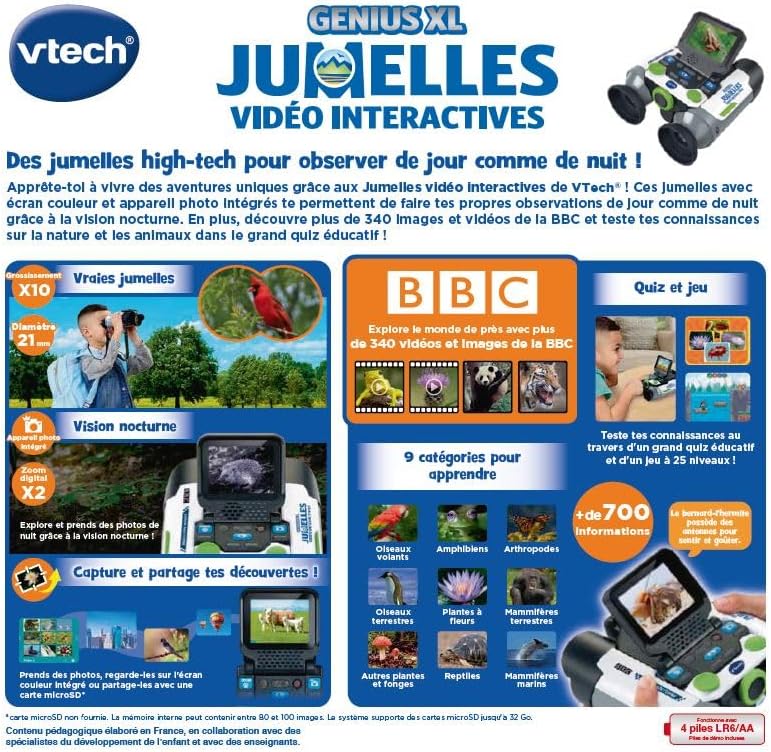
Image: A child holding the VTech Genius XL Interactive Video Binoculars, playing an adventure game on its screen, demonstrating the interactive game feature.
8. Controllo del volume
Adjust the sound volume using the dedicated controls on the device.
Integrazione dei media
Video ufficiali dei prodotti
The following video demonstrates the key features and interactive capabilities of the VTech Genius XL Interactive Video Binoculars.
Video: Un breve preview video mostraasing children using the VTech Genius XL Interactive Video Binoculars to observe nature, take photos, play games, and utilize the night vision mode. It highlights the educational BBC content and interactive features.
This video provides a broader overview of the Genius XL range, including the Interactive Video Binoculars and the Interactive Video Globe.
Video: A preview video demonstrating both the VTech Genius XL Interactive Video Binoculars and the Interactive Video Globe. It shows children engaging with both products, highlighting their educational and interactive aspects, including exploring animals and geography.
Manutenzione
Pulizia
Pulisci il dispositivo con un leggero damp panno. Non utilizzare prodotti chimici aggressivi o detergenti abrasivi. Assicurarsi che il dispositivo sia asciutto prima di riporlo.
Magazzinaggio
Store the binoculars in a cool, dry place away from direct sunlight. Remove batteries if the device will not be used for an extended period.
Risoluzione dei problemi
- Il dispositivo non si accende: Check battery installation and ensure batteries are not depleted. Replace with new batteries if necessary.
- Lo schermo è vuoto o bloccato: Try turning the device off and on again. If the issue persists, remove and reinsert the batteries.
- L'audio non funziona: Check the volume settings. If the issue persists after checking volume and restarting, contact customer support.
- Photos lost or unable to access gallery: Ensure a micro-SD card is properly inserted if you are relying on external storage. If using internal storage and experiencing issues, a factory reset might be necessary, but this will erase all stored photos. It is recommended to regularly transfer important photos to an external micro-SD card.
- Immagine sfocata: Regolare la rotella di messa a fuoco finché l'immagine non risulta nitida.
Specifiche
| Caratteristica | Dettaglio |
|---|---|
| Dimensioni del prodotto | Dimensioni: 12.1 x 6.9 x 16.2 cm |
| Peso | 170 grammi |
| Età consigliata | 5 anni e oltre |
| Valore educativo | Learning, Creativity, Animal Discoveries, Interaction |
| Lingua | French (Note: Product content is in French as per specifications) |
| Riferimento produttore | 618605 |
| Numero di pezzi | 1 |
| Batterie richieste | Sì (4 x LR6-AA) |
| Batterie incluse | SÌ |
| Materiale principale | Plastica |
| Colore | Grigio |
| Caratteristica speciale | Visione notturna |
| Diametro della lente dell'obiettivo | 21 millimetri |
| Ingrandimento massimo | 10x |
| Tipo di montaggio | Collar (Neck Strap) |
| Nome del modello | 21X |
| Binocular Prism Description | Prisma di Porro |
Garanzia e supporto
Per informazioni sulla garanzia e sull'assistenza clienti, fare riferimento alla documentazione inclusa con l'acquisto o visitare il sito ufficiale VTech websito. Conservare la prova d'acquisto per eventuali reclami in garanzia.
Product support and spare parts availability may vary by region. The manufacturer states that spare parts are unavailable for this product.
Ask a question about this manual
Ask about setup, troubleshooting, compatibility, parts, safety, or missing instructions. Manuals+ will review the question and use this page’s manual context to help answer it.