
Introduzione
Thank you for choosing the Thunderobot K87 Wired Mechanical Keyboard. This manual provides essential information for the proper setup, operation, maintenance, and troubleshooting of your new keyboard. Please read this manual thoroughly before using the product to ensure optimal performance and longevity.

Figura 1: Angolato view of the Thunderobot K87 Mechanical Keyboard.
Impostare
Contenuto della confezione
Prima di procedere, verifica che il pacco contenga i seguenti elementi:
- Thunderobot K87 Wired Mechanical Keyboard
- Cavo USB
- Manuale dell'utente (questo documento)
Collegamento della tastiera
- Unpack the Thunderobot K87 keyboard and the included USB cable.
- Connect the USB-C end of the cable to the port located on the keyboard.
- Collegare l'estremità USB-A del cavo a una porta USB disponibile sul computer.
- La tastiera verrà riconosciuta automaticamente dal sistema operativo. In genere non sono necessari driver aggiuntivi per le funzionalità di base.

Figura 2: In basso view of the keyboard, illustrating adjustable feet and cable management options.
Istruzioni per l'uso
Funzioni di base
The Thunderobot K87 is a standard 87-key (TKL) layout mechanical keyboard. Simply plug it into your computer, and it is ready for typing. The keyboard features Red mechanical switches, known for their linear feel and quiet operation, making them suitable for both typing and gaming.
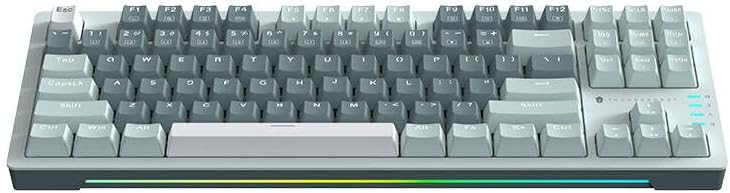
Figura 3: Dall'alto verso il basso view of the Thunderobot K87 keyboard layout.
Tasti multimediali e funzione
The keyboard includes a Function (Fn) key, typically located near the right Alt key. This key, when pressed in combination with the F1-F12 keys, activates various multimedia and system functions. Refer to the keycap legends for specific functions.
- Fn + F1-F12: Typically control media playback, volume, and other system shortcuts.
- Fn + tasto Windows: Blocca/sblocca il tasto Windows per evitare pressioni accidentali durante il gioco.
Controllo della retroilluminazione
The Thunderobot K87 keyboard features customizable RGB backlighting. Specific key combinations allow you to change lighting modes, brightness, and speed. Consult the keyboard's keycap legends or the manufacturer's website for detailed instructions on lighting customization.

Figura 4: Fronte view showing the RGB lighting strip.

Figura 5: Prospettiva lateralefile view demonstrating keycap height and keyboard angle.
Manutenzione
Pulizia della tastiera
Una pulizia regolare aiuta a preservare l'aspetto e la funzionalità della tastiera.
- Disconnetti: Scollegare sempre la tastiera dal computer prima di pulirla.
- Rimozione della polvere: Utilizzare una bomboletta di aria compressa per soffiare via polvere e detriti dagli spazi tra i tasti.
- Pulizia delle superfici: Pulisci delicatamente i tasti e la superficie della tastiera con un panno morbido e privo di lanugine, leggermente dampcon acqua o una soluzione detergente delicata e non abrasiva. Evitare l'eccessiva umidità.
- Evitare: Do not use harsh chemicals, solvents, or abrasive materials, as these can damage the keyboard's finish or keycap legends.
Magazzinaggio
When not in use for extended periods, store the keyboard in a dry, cool place away from direct sunlight and extreme temperatures. Consider covering it to prevent dust accumulation.
Risoluzione dei problemi
If you encounter issues with your Thunderobot K87 keyboard, please refer to the following common solutions:
| Problema | Possibile causa | Soluzione |
|---|---|---|
| La tastiera non risponde | Connessione USB allentata, porta USB difettosa, problema con il driver. | Ensure USB cable is securely connected. Try a different USB port on your computer. Restart your computer. |
| Tasti specifici non funzionanti | Detriti sotto il tasto, malfunzionamento dell'interruttore. | Use compressed air to clear debris. If the issue persists, contact customer support. |
| Retroilluminazione non funzionante o errata | Lighting mode disabled, software conflict. | Check keyboard's lighting control key combinations (Fn + specific keys). Ensure no conflicting software is running. |
| Ritardo di input della tastiera | USB port issues, system performance. | Try a different USB port. Close unnecessary background applications. |
If the problem persists after trying these solutions, please contact Thunderobot customer support for further assistance.
Specifiche
| Caratteristica | Dettaglio |
|---|---|
| Numero di modello | JM03NQ002 |
| Marca | Thunderobot |
| Connettività | Cablato (USB) |
| Tipo di interruttore | Interruttori meccanici rossi |
| Disposizione | 87 tasti (senza tastierino numerico) |
| Retroilluminazione | Colore RGB |
| Produttore | Thunderobot |
| ASIN | B0CWS77B83 |
| Garanzia | 2 anni di produzione |
Informazioni sulla garanzia
The Thunderobot K87 Wired Mechanical Keyboard (Model JM03NQ002) comes with a Garanzia del produttore di 2 anni from the date of purchase. This warranty covers defects in materials and workmanship under normal use. It does not cover damage caused by accident, misuse, abuse, neglect, unauthorized modification, or improper installation.
To claim warranty service, please retain your proof of purchase. For detailed warranty terms and conditions, or to initiate a warranty claim, please contact Thunderobot customer support.
Supporto
For technical assistance, product inquiries, or warranty claims, please visit the official Thunderobot website or contact their customer support team. Please have your product model number (JM03NQ002) and proof of purchase ready when seeking support.
Official Thunderobot Websito: www.thunderobot.com (Nota: questo è un segnaposto URL poiché nessun supporto specifico URL was provided in the product data. Refer to your product packaging or official Thunderobot documentation for the correct support contact information.)