
1. Introduzione
Thank you for choosing the RIGOL DS1102Z-E Digital Oscilloscope. This manual provides essential information for the safe and efficient use of your device. Please read it thoroughly before operation and keep it for future reference.
The DS1102Z-E is a high-performance digital oscilloscope designed for various applications including research and development, education, maintenance, and industrial testing. It features a 100 MHz bandwidth, 1 GSa/s sample rate, and a 24 Mpts memory depth, enabling precise analysis of complex waveforms.
2. Prodotto finitoview
The RIGOL DS1102Z-E is a versatile measurement instrument integrating a frequency counter and supporting protocol decoding for RS232/UART, I2C, and SPI. It also includes FFT analysis and automatic measurement functions to enhance testing efficiency.
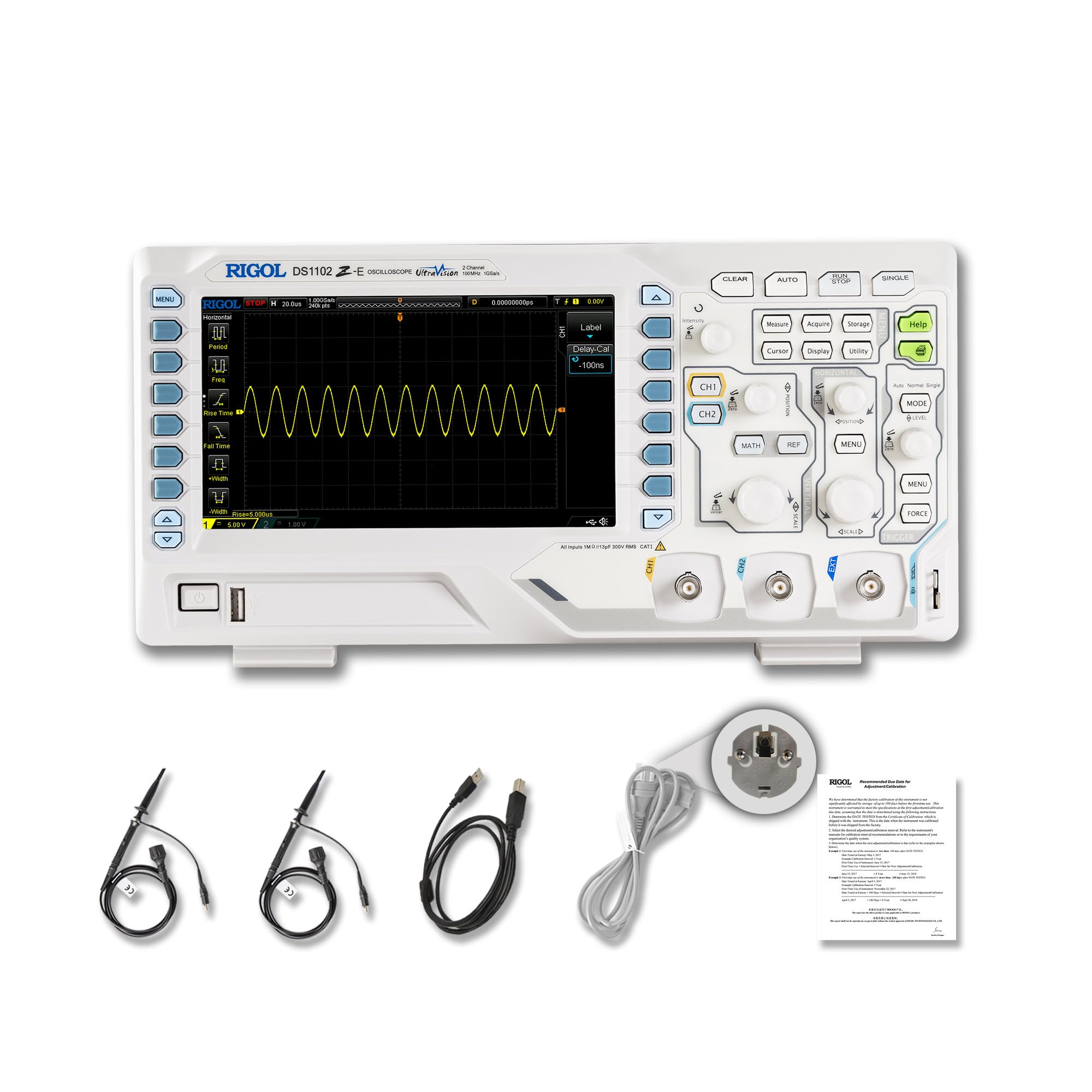
Figura 2.1: Fronte view of the RIGOL DS1102Z-E Digital Oscilloscope.
2.1 Caratteristiche principali
- 100 MHz Bandwidth, 1 GSa/s Sample Tariffa: Captures signals with high precision.
- 24 Mpts Memory Depth: Allows for extended signal capture and detailed waveform analysis.
- Multi-function Measurement Device: Includes frequency counter, protocol decoding (RS232/UART, I2C, SPI), FFT analysis, and automatic measurement functions.
- Waveform Recording and Playback: Records signal variations and replays them for fault identification.
- Display ad alta definizione: 7-inch TFT screen with 256-level grayscale, offering a phosphor-like display effect for clear waveform details.
- Remote Control & Secondary Development Support: Equipped with USB and LAN ports for PC remote control, compatible with SCPI commands, LabVIEW, Visual Basic, and Visual C++.
2.2 Cosa c'è nella scatola

Figure 2.2: Contents included with the DS1102Z-E Oscilloscope.
- 1x Main Unit (DS1102Z-E Digital Oscilloscope)
- 2x Passive Probes (150MHz)
- 1x Power Cable (EU plug)
- 1x USB A-B Cable
- 1x Scheda di garanzia
- 1x Certificato di calibrazione
- 1x Dichiarazione di conformità
3. Impostazione
Follow these steps to set up your RIGOL DS1102Z-E oscilloscope:
- Disimballaggio: Carefully remove all components from the packaging. Inspect the device for any signs of damage.
- Collegamento elettrico: Connect the provided power cable to the oscilloscope's power input and then to a suitable AC power outlet.
- Connessione sonda: Connect the passive probes to the BNC input connectors (CH1, CH2) on the front panel. Ensure a secure connection.
- Messa a terra: Always ensure the oscilloscope is properly grounded through the power cable.
- USB/LAN Connection (Optional): If you plan to use remote control or secondary development, connect the USB cable to a PC or the LAN cable to your network.

Figura 3.1: Oltreview of the oscilloscope's physical dimensions and ports.
4. Istruzioni per l'uso
This section covers the basic operation of your oscilloscope.
4.1 Accensione/Spegnimento
- Accensione: Press the power button located on the front panel. The device will perform a self-test and display the main interface.
- Spegni: Tieni premuto il pulsante di accensione finché il dispositivo non si spegne.
4.2 Visualizzazione della forma d'onda di base
After powering on, connect a signal to one of the input channels (e.g., CH1). Adjust the vertical scale (Volts/Div) and horizontal scale (Time/Div) knobs to display the waveform clearly. Use the AUTO button for automatic setup of the waveform display.

Figura 4.1: Esample of a waveform displayed on the oscilloscope screen.
4.3 Funzioni avanzate
- Funzioni di misurazione: Premere il tasto MISURA button to access automatic measurements like frequency, period, peak-to-peak voltage, ecc.
- Sistema di attivazione: Use the trigger controls to stabilize repetitive waveforms. Adjust the trigger level and mode (Edge, Pulse, Video, Slope, etc.) as needed.
- Registrazione della forma d'onda: The oscilloscope allows recording and replaying waveforms. Access this feature through the menu to capture transient events.
- Decodifica del protocollo: For serial bus analysis (RS232/UART, I2C, SPI), configure the decoding settings via the menu.
- Analisi FFT: Perform Fast Fourier Transform (FFT) to analyze the frequency components of your signal.

Figure 4.2: Complex waveform analysis with measurement data.

Figure 4.3: Multiple waveforms displayed simultaneously for comparison.
5. Manutenzione
Una corretta manutenzione garantisce la longevità e la precisione dell'oscilloscopio.
- Pulizia: Utilizzare un panno morbido e asciutto per pulire l'esterno dell'oscilloscopio. Per lo sporco ostinato, utilizzare un panno leggermenteamp È possibile utilizzare un panno con un detergente delicato. Evitare detergenti abrasivi o solventi.
- Cura dello schermo: Clean the display screen with a soft, lint-free cloth. Do not use excessive force or harsh chemicals.
- Magazzinaggio: When not in use, store the oscilloscope in a clean, dry environment, away from direct sunlight, extreme temperatures, and excessive dust.
- Cura della sonda: Handle probes carefully. Avoid bending or stressing the probe tips. Store them properly to prevent damage.
- Calibrazione: For optimal performance, periodic calibration by qualified personnel is recommended. Refer to the official RIGOL website for calibration services.
6. Risoluzione Dei Problemi
Questa sezione fornisce soluzioni ai problemi più comuni che potresti riscontrare.
| Problema | Possibile causa | Soluzione |
|---|---|---|
| No power when turned on. | Power cable not connected, power outlet faulty, or power button issue. | Check power cable connection. Test the power outlet. Ensure the power button is fully pressed. |
| Nessuna forma d'onda visualizzata. | No signal input, probe not connected correctly, vertical/horizontal scale incorrect, or trigger not set. | Verify signal source. Check probe connections. Adjust Volts/Div and Time/Div. Press AUTO or adjust trigger settings. |
| La forma d'onda è instabile. | Impostazioni di attivazione errate. | Adjust trigger level, mode, and source to stabilize the waveform. |
| Telecomando non funzionante. | USB/LAN cable issue, incorrect network settings, or software driver not installed. | Check cable connections. Verify network configuration. Install necessary drivers and software (e.g., UltraScope). |
If the problem persists, please contact RIGOL technical support.
7. Specifiche
Detailed technical specifications for the RIGOL DS1102Z-E Digital Oscilloscope.

Figure 7.1: Visual representation of key technical specifications.
| Caratteristica | Specificazione |
|---|---|
| Marca | Rigolo |
| Modello | DS1102Z-E |
| Larghezza di banda | 100 MHz |
| Canali | 2 Channels + EXT |
| Sampla tariffa | 1 GSa/s |
| Profondità della memoria | 24 Mpt |
| Velocità di acquisizione della forma d'onda | 30,000 WFM/s |
| Risoluzione verticale | 8 bit |
| Sensibilità minima | 1 mV/div |
| Minimum Time Base | 2 ns/div |
| Supporto alla decodifica | RS232/UART, I2C, SPI |
| Analisi FFT | Standard |
| Display | TFT da 7 pollici (800x480) |
| Connettività | USB Host, USB Device, LAN |
| Fonte di alimentazione | Adattatore CA |
| Colore | Grigio / Bianco |
| Peso dell'articolo | 2.9 chilogrammi |
| Dimensioni (L x P x A) | 31.31 x 16.08 x 12.24 centimetri |
| Standard conformi | CE, RoHS |
| Numero di parte del produttore | DS1102Z-E |
| Paese di origine | Cina |
8. Garanzia e supporto
RIGOL is committed to providing high-quality products and excellent customer service.
- Garanzia: The RIGOL DS1102Z-E Digital Oscilloscope comes with a Garanzia di 3 anno dalla data di acquisto. Questa garanzia copre difetti di materiali e lavorazione in condizioni di normale utilizzo.
- Supporto tecnico: RIGOL offers Supporto tecnico 24 ore su 7, XNUMX giorni su XNUMX to assist you with any questions or issues you may encounter. Please refer to the official RIGOL websito per informazioni di contatto e risorse di supporto.
- Risorse online: Visit the official RIGOL website for product documentation, software updates (e.g., UltraScope), and additional support materials.

Figure 8.1: RIGOL oscilloscopes support multiple languages for user convenience.