
Introduzione
This manual provides detailed instructions for setting up and operating your Majority Frameo Snap10 WiFi Digital Picture Frame. This 10.1-inch digital frame allows you to display photos and videos shared via the Frameo app, offering a convenient way to share memories with family and friends. It features a touchscreen, 32GB of internal storage, auto-rotate functionality, and a motion sensor for efficient use.

The Majority Frameo Snap10 Digital Picture Frame, showcasing a family photo on its 10.1-inch screen.
Cosa c'è nella scatola
Si prega di controllare il contenuto della confezione per assicurarsi che siano presenti tutti gli articoli:
- Majority Frameo Snap10 Digital Picture Frame
- Cavalletto
- Adattatore di alimentazione
- Telecomando
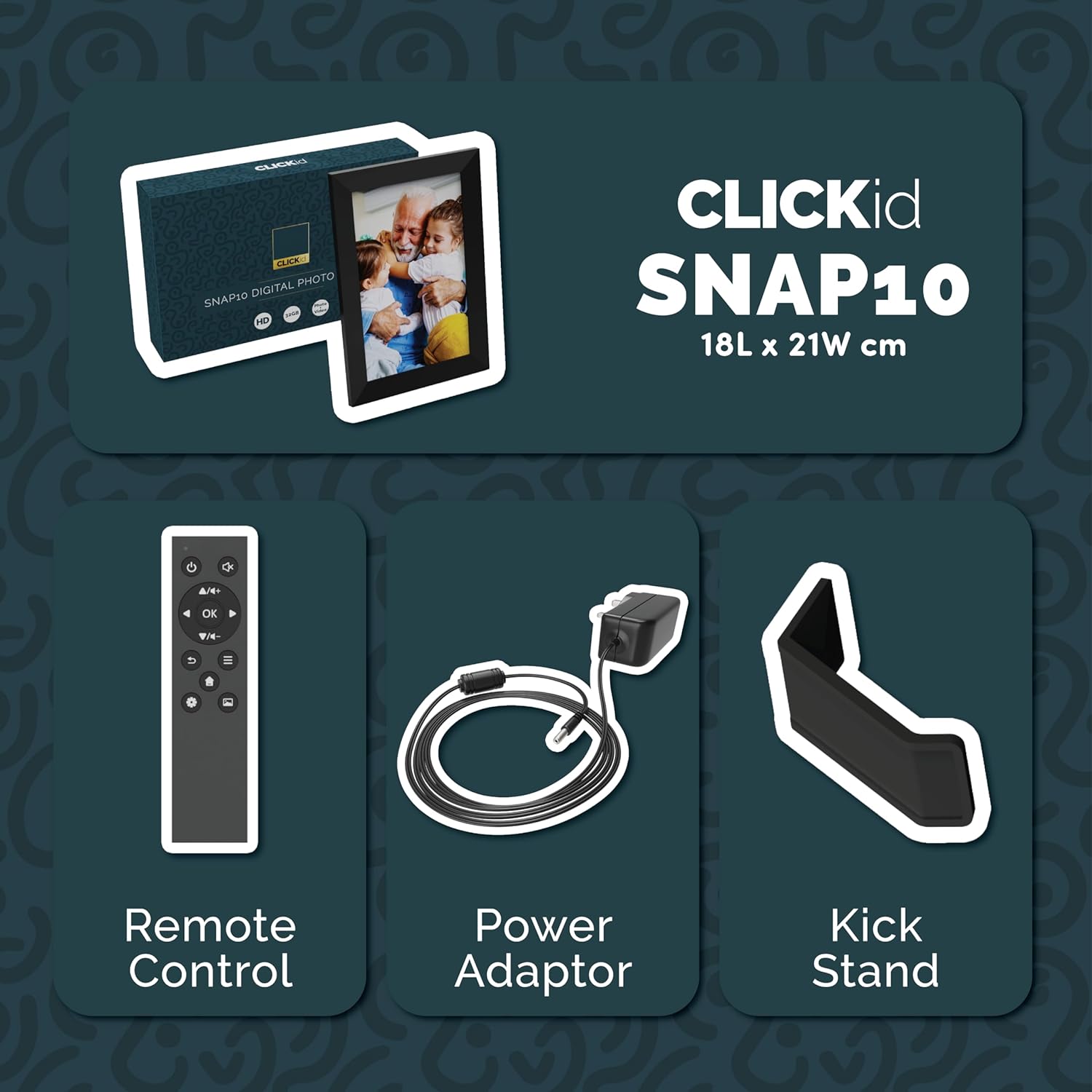
Included accessories: Remote Control, Power Adapter, and Kickstand.
Guida all'installazione
- Disimballare il telaio: Estrarre con cautela la cornice digitale e tutti gli accessori dalla confezione.
- Attach the Kickstand: Insert the kickstand into the designated slot on the back of the frame. The frame supports both horizontal and vertical orientations.
- Connetti alimentazione: Plug the power adapter into the DC port on the back of the frame, then connect it to a power outlet. The frame will automatically power on.
- Configurazione iniziale: Segui le istruzioni sullo schermo per selezionare la lingua, il fuso orario e connetterti a una rete Wi-Fi.
- Installa l'app Frameo: Scarica l'app "Frameo" dall'app store del tuo smartphone (disponibile per iOS e Android).
- Collega Frame all'app: Open the Frameo app and create an account. On your digital frame, tap "Add Friend" to get a unique code. Enter this code into the Frameo app on your smartphone to link the devices.

The back of the frame features essential ports for power, USB, and Micro SD card.
Istruzioni per l'uso
Invio di foto e video
Once your frame is connected to the Frameo app, you can easily send photos and short videos from your smartphone.
- Apri l'app Frameo sul tuo smartphone.
- Seleziona le foto o i video che desideri inviare.
- Choose the connected digital frame as the recipient.
- Add a caption if desired, then tap "Send."

The Frameo app simplifies photo and video uploads from your smartphone.
Utilizzo del touchscreen
The 10.1-inch LCD touchscreen allows for intuitive navigation. Swipe left or right to browse photos, tap to view options, and pinch to zoom.
Funzioni del telecomando
The included remote control provides convenient access to various frame functions from a distance.
- Navigazione: Use arrow keys to move through menus and photos.
- OK/Inserisci: Conferma le selezioni.
- Indietro: Torna alla schermata precedente.
- Riproduci/Pausa: Control slideshows or video playback.
- Volume: Regola l'audio per i video.

Il telecomando incluso consente un comodo utilizzo.
Sensore di movimento
The integrated motion sensor can be enabled to automatically turn the display on when movement is detected and off when the area is vacant, conserving energy. This setting can be adjusted in the frame's system settings.
Funzione di rotazione automatica
The frame automatically adjusts the photo orientation (portrait or landscape) based on how the frame is positioned. Ensure the auto-rotate feature is enabled in the settings for optimal display.

The auto-rotate feature adjusts display based on frame orientation.
Caratteristiche oltreview
- Touchscreen LCD da 10.1 pollici: Provides a clear display and interactive control.
- 32 GB di memoria interna: Ampspazio per archiviare migliaia di foto e video.
- Connettività Wi-Fi: Enables seamless photo and video sharing from anywhere via the Frameo app.
- Integrazione dell'app Frameo: Manage your frame, send media, and invite friends/family to share their moments.
- Sensore di movimento: Automatically turns the screen on/off to save energy.
- Rotazione automatica: Adjusts photo orientation automatically.
- Weather and Calendar Display: Integrated widgets provide current weather and calendar information.
- Slot per scheda di memoria: Supports Micro SD cards for additional storage or direct media import.
Manutenzione
- Pulizia: Utilizzare un panno morbido e asciutto per pulire lo schermo e la cornice. Evitare detergenti abrasivi o spray a diretto contatto con lo schermo.
- Aggiornamenti software: The frame may receive automatic software updates via Wi-Fi. Ensure your frame is connected to the internet to receive the latest features and improvements.
- Gestione della memoria: Periodicamente riview your stored photos and videos. You can delete unwanted media directly from the frame or through the Frameo app to free up space.
Risoluzione dei problemi
- Il telaio non si accende:
- Assicurarsi che l'adattatore di alimentazione sia collegato saldamente sia al telaio sia a una presa di corrente funzionante.
- Impossibile connettersi al Wi-Fi:
- Verify your Wi-Fi password. Ensure the frame is within range of your Wi-Fi router. Try restarting your router and the frame.
- Le foto non compaiono sulla cornice:
- Confirm that the frame is connected to Wi-Fi and linked to your Frameo app account. Check the Frameo app to ensure photos were successfully sent. Allow some time for photos to download, especially large batches.
- Frame is stuck on a white screen with a loading bar:
- This may indicate a software issue. Try performing a soft reset by disconnecting the power for 30 seconds and then reconnecting. If the issue persists, a factory reset might be necessary (refer to the frame's settings for this option, noting it will erase all data).
- Telecomando non funzionante:
- Check if the batteries in the remote control need replacement. Ensure there are no obstructions between the remote and the frame's IR receiver.
Specifiche
| Marca | Maggioranza |
| Numero di modello | Snap10 |
| Colore | Nero |
| Dimensioni dello schermo | 10.1 pollici |
| Risoluzione | 800*1280 |
| Proporzioni | 2.10:1 |
| Capacità di archiviazione della memoria | 32 GB |
| Tecnologia di connettività | Wifi |
| Metodo di controllo | App, Touchscreen, Remote |
| Fonte di alimentazione | Elettrico con cavo |
| Peso dell'articolo | 491 grammi |
| Dimensioni dell'articolo (L x P) | 7.08"L x 8.26"W |
Garanzia e supporto
The Majority Frameo Snap10 Digital Picture Frame comes with a Garanzia estesa di 2 anni. Registration is required to activate the extended warranty. Please refer to the product packaging or the manufacturer's websito per i dettagli su come registrare il tuo prodotto.
For technical support, troubleshooting assistance, or warranty claims, please contact Majority customer service through their official websito o le informazioni di contatto fornite nella documentazione del prodotto.
Video del prodotto
This video demonstrates the ease of sharing photos and videos with the Frameo app and viewing them on the digital picture frame, highlighting its use for connecting family members.