
1. Introduzione
This manual provides detailed instructions for the installation, operation, and maintenance of your RONGJI 9-inch Android Car Radio. This unit is specifically designed for Suzuki Vitara models manufactured between 2005 and 2015. Please read this manual thoroughly before installation and use to ensure proper functionality and safety.
2. Informazioni sulla sicurezza
- Installazione professionale consigliata: Data la complessità degli impianti elettrici dei veicoli, si consiglia vivamente l'installazione da parte di un professionista per evitare danni all'unità o al veicolo.
- Disconnessione dell'alimentazione: Prima di effettuare qualsiasi intervento elettrico, scollegare sempre la batteria del veicolo per evitare cortocircuiti o scosse elettriche.
- Cablaggio: Ensure all wiring connections are secure and properly insulated to prevent electrical hazards. Refer to the wiring diagram provided.
- Sicurezza di guida: Do not operate the unit's advanced features or watch videos while driving. Distracted driving can lead to accidents.
- Temperatura: Evitare di esporre l'unità a temperature estreme o alla luce solare diretta per periodi prolungati.
3. Contenuto della confezione
Verificare che tutti i componenti elencati di seguito siano inclusi nel pacchetto:

Image: Components included in the RONGJI 8 Core Car Radio package, showing RCA cables, reversing camera cable, USB cables, microphone, 4G antenna, and GPS antenna.
- Unità principale (autoradio Android da 9 pollici)
- Plastic Bezel (Dash Kit for Suzuki Vitara 2005-2015)
- Power Plug/Harness
- Set di cavi RCA
- Cavo di ingresso della telecamera di retromarcia
- Cavi USB (multipli)
- Microfono esterno
- Antenna GPS
- 4G Antenna (for 8 Core models)
4. Configurazione e installazione
Before proceeding with installation, ensure your vehicle is compatible. This unit is designed for Suzuki Vitara models from 2005 to 2015. It is recommended to consult a professional for installation.

Image: A visual comparison showing the original car radio dashboard and the dashboard after the RONGJI 9-inch Android Car Radio has been installed, demonstrating a seamless fit.
4.1 Controllo di compatibilità del veicolo
Carefully compare your vehicle's center console and the back of your factory radio socket with the product images and specifications. If unsure, contact customer support with photos of your vehicle's dashboard and original radio connections for verification.
4.2 Passaggi di installazione di base (guida generale)
- Scollegare la batteria: Spegnere il veicolo e scollegare il terminale negativo della batteria dell'auto.
- Rimuovere la radio di fabbrica: Rimuovere con cautela l'autoradio di serie e la modanatura del cruscotto. Consultare il manuale di manutenzione del veicolo per istruzioni specifiche.
- Collegare il cablaggio: Connect the provided power plug/harness to the vehicle's wiring. Ensure all connections match the vehicle's original wiring.
- Collegare le antenne: Connect the GPS antenna and 4G antenna (if applicable) to the corresponding ports on the new head unit. Position the antennas in a location with clear signal reception.
- Collegare i cavi USB e RCA: Connect any necessary USB cables for external devices and RCA cables for auxiliary inputs/outputs (e.g., reversing camera, external amplificatore).
- Unità di testa di montaggio: Securely mount the RONGJI head unit into the dashboard opening using the provided plastic bezel and mounting brackets.
- Ricollegare la batteria: Ricollegare la batteria del veicolo e testare la funzionalità dell'unità prima di rimontare completamente il cruscotto.
- Assemblaggio finale: Reinstallare tutti i pezzi di rivestimento del cruscotto.
5. Istruzioni per l'uso
5.1 Accensione/spegnimento e navigazione di base
- Accensione: L'unità si accenderà automaticamente quando si accende il motore del veicolo.
- Spegni: L'unità si spegnerà automaticamente quando il motore del veicolo verrà spento.
- Schermo tattile: È possibile navigare nell'interfaccia Android toccando, scorrendo e pizzicando sul touchscreen capacitivo da 9 pollici.
5.2 Car-Play e Android Auto
The unit supports both wireless and wired Car-Play and Android Auto for seamless smartphone integration.

Image: Displays the user interfaces for Car-Play and Android Auto, showing various app icons and media controls, indicating both wired and wireless connectivity options.
- Connessione wireless: Enable Bluetooth and Wi-Fi on your smartphone. Pair your phone with the car radio via Bluetooth. Follow the on-screen prompts to initiate wireless Car-Play or Android Auto.
- Connessione cablata: Connect your smartphone to the car radio using an original USB cable. The system will automatically detect and launch Car-Play or Android Auto.
5.3 funzioni Bluetooth
The built-in Bluetooth module supports hands-free calling and audio streaming.
- Abbinamento: Vai alle impostazioni Bluetooth dell'autoradio e attiva il Bluetooth. Cercare available devices on your smartphone and select the car radio's Bluetooth name to pair.
- Chiamate in vivavoce: Once paired, you can make and receive calls directly from the car radio's interface. The unit has a built-in microphone and supports an external microphone for clearer audio.
- Musica Bluetooth: Stream audio from your smartphone's music player to the car radio.
Radio FM/AM 5.4 con RDS
Access various radio stations with stable frequency reception.

Image: Shows the FM radio interface with station presets and frequency display, alongside the Digital Sound Processor (DSP) equalizer settings for audio customization.
- Ricerca automatica: Utilizzare la funzione di scansione automatica per trovare e salvare le stazioni radio disponibili.
- Sintonizzazione manuale: Sintonizzare manualmente le frequenze desiderate.
- RDS (sistema dati radio): Displays station information such as station name, program type, and traffic announcements where available.
5.5 Navigazione GPS
The unit features a built-in GPS module and supports online and offline navigation.

Image: Illustrates the GPS navigation interface with a map displaying routes and real-time traffic, and a diagram showing the car radio connected to WiFi for online services.
- Mappe online: Connect to Wi-Fi or a mobile hotspot to use online navigation applications.
- Mappe offline: Download maps for specific regions for navigation without an internet connection. Access this feature through the navigation app's menu.
5.6 Connettività Wi-Fi
Connect the car radio to a Wi-Fi network or mobile hotspot to access online features.
- Collegamento: Vai su Impostazioni > Rete e Internet > Wi-Fi. Seleziona la rete desiderata e inserisci la password.
- Applicazioni: Once connected, you can download apps, browse the internet, and stream media.
5.7 Controllo del volante (SWC)
The unit supports your vehicle's existing steering wheel controls for convenient operation.

Image: Demonstrates the split-screen feature displaying two applications simultaneously, and an illustration of how steering wheel controls can be used to manage the car radio.
- Impostare: Access the SWC settings in the unit's menu. Follow the on-screen instructions to map your vehicle's steering wheel buttons to the desired functions (e.g., volume up/down, track skip, mode change).
5.8 Funzione schermo diviso
Esegui più attività contemporaneamente visualizzando due applicazioni contemporaneamente sullo schermo.
- Attivazione: While an app is open, long-press the recent apps button or drag an app to one side of the screen to activate split-screen mode. Select another app to fill the remaining space.
6. Caratteristiche principali
The RONGJI Android Car Radio offers a range of advanced features for an enhanced driving experience:
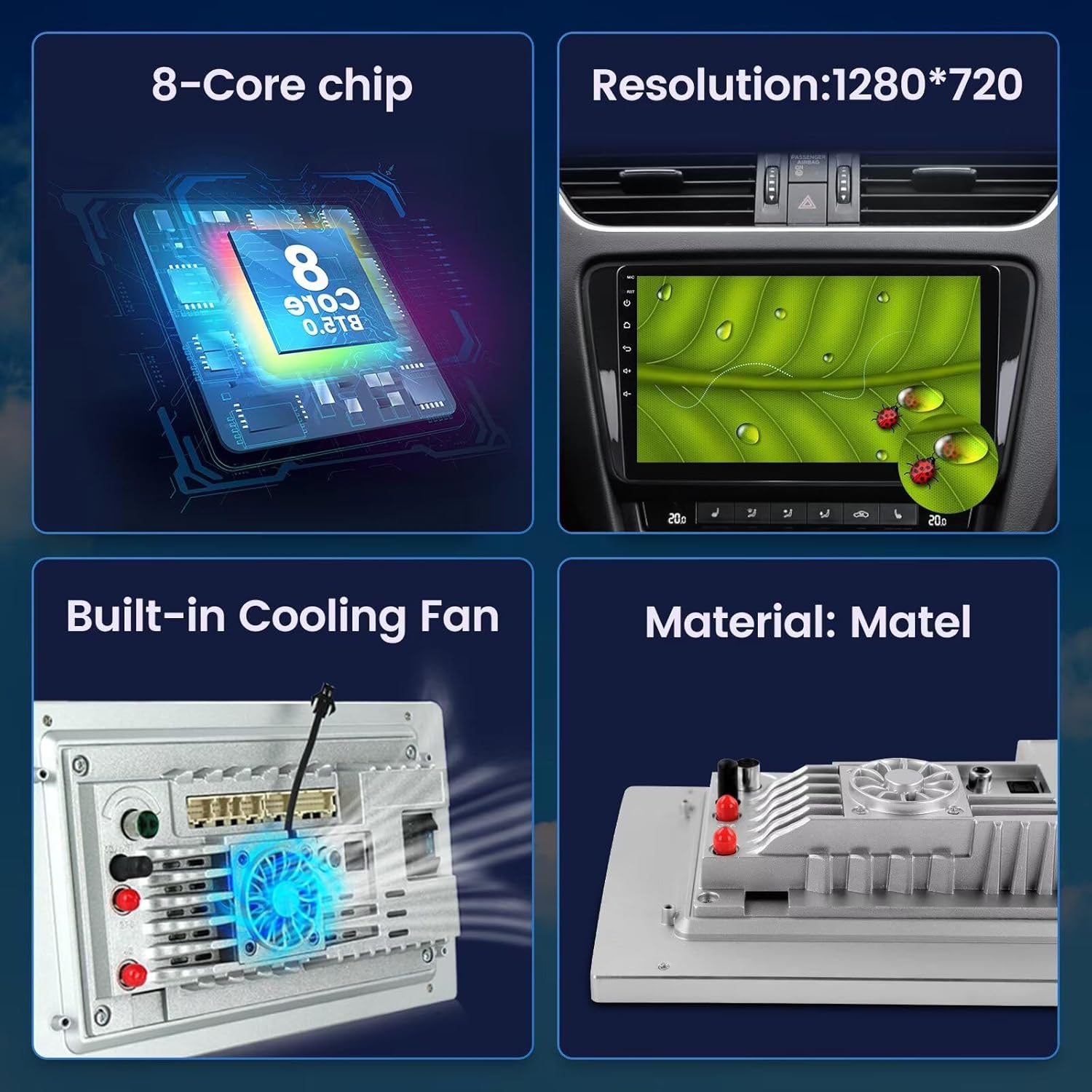
Image: Highlights key hardware components including the 8-Core chip, 1280*720 resolution display, built-in cooling fan, and the material construction of the unit.
- Sistema operativo: Android 13.0 OS for a modern and responsive user experience.
- Processore: Octa-Core CPU for fast performance and smooth multitasking.
- Memoria: 4 GB di RAM e 32 GB di ROM per ample storage and efficient operation.
- Display: 9-inch IPS Capacitive Touch Screen with 1280*720 resolution for clear visuals and responsive interaction.
- Integrazione smartphone: Built-in Wireless Car-Play and Android Auto for seamless connectivity with iOS and Android devices.
- Audio: Built-in DSP (Digital Sound Processor) with EQ settings for customizable and high-quality audio output.
- Connettività: Integrated Bluetooth for hands-free calling and music streaming, and built-in Wi-Fi for internet access.
- Navigazione: Built-in GPS module with an external GPS antenna for accurate online and offline navigation.
- Radio: FM/AM radio with RDS support for enhanced radio listening.
- Raffreddamento: Built-in cooling fan to maintain optimal operating temperature.
- Posteriore View Supporto per fotocamera: Compatible with aftermarket rear view cameras (camera not included) for safer parking and reversing.
7. Specifiche
Detailed technical specifications for the RONGJI 9-inch Android Car Radio (Model B0CX52D2FD):
| Caratteristica | Specificazione |
|---|---|
| Marca | RONGJI |
| Nome del modello | B0CX52D2FD (For Suzuki Vitara 2005-2015) |
| Sistema operativo | Androide 13 |
| processore | Octa-core |
| Memoria RAM | 4 GB |
| Capacità di archiviazione della memoria | 32 GB |
| Dimensioni dello schermo | 9 pollici |
| Tipo di visualizzazione | LCD |
| Tipo di schermo tattile | Capacitivo |
| Risoluzione | 1280*720 |
| Caratteristiche speciali | Bluetooth, Touchscreen, Wireless Android Auto, Wireless Car-play, Built-in DSP |
| Tecnologia di connettività | Wifi bluetooth |
| Navigazione GPS | Built-in GPS module, supports Worldwide maps |
| Radio | FM/AM con RDS |
| Metodo di controllo | Touch, Steering Wheel Control |
| Input dell'interfaccia umana | Microfono, Touchscreen |
| Produttore | Shenzhen Rongji Electronics Co., Ltd |
8. Risoluzione Dei Problemi
If you encounter issues with your RONGJI car radio, refer to the following common problems and solutions:
- Nessun potere:
- Controllare tutti i collegamenti elettrici e i fusibili.
- Assicurarsi che la batteria del veicolo sia correttamente collegata e carica.
- Nessun suono:
- Verificare i collegamenti degli altoparlanti.
- Controllare le impostazioni del volume e assicurarsi che l'unità non sia disattivata.
- Confirm audio output settings are correct.
- Perdita del segnale GPS:
- Assicurarsi che l'antenna GPS sia collegata correttamente e posizionata in modo chiaro view del cielo.
- Verificare la presenza di ostacoli che potrebbero bloccare il segnale.
- Problemi di connessione Bluetooth:
- Assicurati che il Bluetooth sia abilitato sia sull'autoradio che sullo smartphone.
- Eliminare gli abbinamenti precedenti e provare ad associare nuovamente i dispositivi.
- Riavvia entrambi i dispositivi.
- Touchscreen che non risponde:
- Riavvia l'unità.
- Assicurarsi che lo schermo sia pulito e privo di detriti.
- Car-Play/Android Auto Not Connecting:
- For wired connection, use an original, high-quality USB cable.
- For wireless, ensure Bluetooth and Wi-Fi are active and paired correctly.
- Check your phone's settings for Car-Play/Android Auto permissions.
Se questi passaggi non risolvono il problema, contattare l'assistenza clienti per ulteriore assistenza.
9. Manutenzione
- Pulizia dello schermo: Utilizzare un panno morbido e privo di lanugine per pulire delicatamente lo schermo. Per macchie ostinate, leggermente dampPulisci il panno con acqua o un detergente per schermi. Evita prodotti chimici aggressivi.
- Aggiornamenti software: Controllare periodicamente la presenza di aggiornamenti software tramite le impostazioni dell'unità o tramite il sito del produttore websito per garantire prestazioni ottimali e accesso a nuove funzionalità.
- Cura generale: Mantenere l'unità libera da polvere e detriti. Evitare di versare liquidi sull'unità.
10. Garanzia e supporto
Your RONGJI car radio is covered by a standard manufacturer's warranty. Please refer to the warranty card included with your product for specific terms and conditions, including warranty duration and coverage details. Keep your proof of purchase for warranty claims.

Immagine: un rappresentante del servizio clienti con le informazioni di contatto per l'assistenza.
Assistenza clienti
Per assistenza tecnica, risoluzione dei problemi o richieste di garanzia, contatta il nostro team di assistenza clienti:
E-mail: Rongji08@outlook.com
When contacting support, please provide your product model number (B0CX52D2FD) and a detailed description of the issue.