
1. Introduzione
The Amino H200 is a high-performance, ruggedized IPTV encoder and media player designed for diverse environments requiring 4K content delivery. Its robust design supports "out of sight" operation, making it suitable for applications ranging from in-room hospitality to public space signage and advertising. Key features include Power over Ethernet (PoE) for simplified installation and advanced AV1 and HEVC processing for efficient, high-quality video streaming.
2. Prodotto finitoview
The H200 unit is engineered for durability and discreet placement. Its compact form factor and VESA mounting capabilities allow for installation behind displays or in other concealed locations. The device integrates essential connectivity for both encoding and media playback functionalities.

Figura 1: Davanti view of the Amino H200 unit. This image shows the sleek, black casing of the device, designed for discreet installation.
2.1 Caratteristiche principali
- Supporto per la risoluzione 4K: Capable of handling and delivering high-definition 4K content.
- Alimentazione su Ethernet (PoE): Semplifica l'installazione consentendo la trasmissione di dati e alimentazione tramite un unico cavo Ethernet.
- Design robusto: Built for durability in various operational environments.
- AV1 and HEVC Capability: Efficient video compression for optimized bandwidth usage and high-quality image delivery.
- Graphics Acceleration: Ensures fast rendering of high-quality graphics.
- Out-of-Sight Operation: Features like serial display port, IR extender port, and VESA mounting facilitate discreet installation.
3. Configurazione e installazione
This section provides instructions for setting up your Amino H200 device. Ensure all accessories are present before beginning installation.
3.1 Disimballaggio e contenuto
Carefully unpack the Amino H200 unit and its accessories. The box should contain:
- Amino H200 Encoder/Media Player unit
- Adattatore di alimentazione (se non si utilizza PoE)
- IR Extender Cable (optional, for remote control)
- Mounting hardware (e.g., VESA mount screws)
- Guida rapida
3.2 Collegamento del dispositivo
Refer to the port diagram below for proper connection of cables.
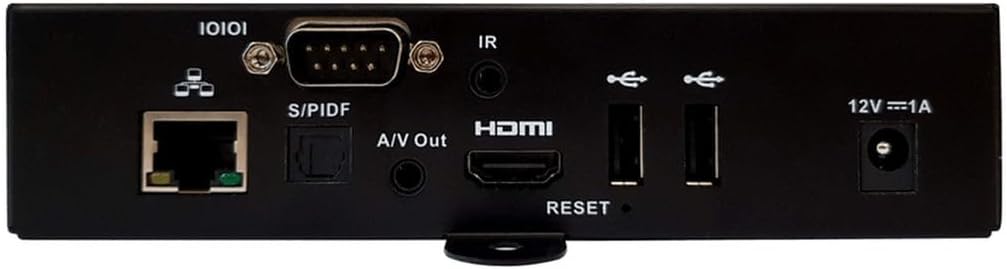
Figura 2: Rear panel connections of the Amino H200. This image details the various input and output ports available on the device, including Ethernet, S/PDIF, A/V Out, HDMI, USB, IR, and power input.
- Connessione di rete:
- Collegare un cavo Ethernet dal tuo switch o router di rete al Ethernet (10/100/1000) port on the H200.
- If your network switch supports Power over Ethernet (PoE), the device will receive power through this cable, eliminating the need for a separate power adapter.
- Uscita video:
- Collegare un cavo HDMI dal Porta HDMI on the H200 to the HDMI input of your display or TV.
- Uscita audio:
- For digital audio, connect an optical cable to the Porta S/PDIF.
- For analog audio, connect a 3.5mm audio cable to the A/V Out port.
- Estensione IR (opzionale):
- If the H200 is installed out of sight, connect the IR extender cable to the Porta IR. Position the IR receiver in a location where it can receive signals from your remote control.
- Dispositivi USB:
- Connect USB storage devices or peripherals to the available Porte USB.
- Collegamento di alimentazione (se non si utilizza PoE):
- If not using PoE, connect the provided power adapter to the 12V === 1A power input and then to a wall outlet.

Figura 3: Angolato view of the Amino H200, highlighting the rear panel and side mounting brackets. This perspective provides a clearer view of the device's compact size and the arrangement of its various ports and connectors, along with the VESA mounting points.
3.3 Montaggio VESA
The H200 features VESA mounting points for secure installation behind compatible displays or on walls. Use appropriate screws and mounting hardware (not always included) to attach the device securely. Ensure adequate ventilation around the unit.
4. Istruzioni per l'uso
Once the H200 is connected and powered on, it will boot up. The operating system and specific applications will determine the user interface and functionality. The device supports IPTV services and can function as both an encoder and a media player.
4.1 Funzionamento di base
- Accensione/spegnimento: The device powers on automatically when connected to a power source (PoE or power adapter). There is no physical power button. To power off, disconnect the power source.
- Telecomando: Use a compatible remote control (sold separately or provided by your service provider) to navigate the user interface. Ensure the IR extender is properly positioned if the unit is out of sight.
- Riproduzione dei contenuti: Access media content through the installed IPTV applications or from connected USB storage devices. The H200's AV1 and HEVC capabilities ensure smooth 4K video playback.
- Encoding Functionality: For encoding applications, refer to the specific software or platform documentation integrated with the H200.
4.2 Ripristino del sistema
A reset button is located on the rear panel (refer to Figure 2). This button is typically used for system reboots or factory resets, depending on the duration of the press. Consult your service provider or system administrator for specific reset procedures.
5. Manutenzione
The Amino H200 is designed for low maintenance. Follow these guidelines to ensure optimal performance:
- Pulizia: Utilizzare un panno morbido e asciutto per pulire l'esterno del dispositivo. Non utilizzare detergenti liquidi o materiali abrasivi.
- Ventilazione: Assicurarsi che le aperture di ventilazione non siano ostruite. Un flusso d'aria adeguato è fondamentale per evitare il surriscaldamento.
- Aggiornamenti del firmware: Periodically check with your service provider or Amino's official support channels for available firmware updates. Updates can improve performance, add features, and enhance security.
- Condizioni ambientali: Per evitare danni, utilizzare il dispositivo entro gli intervalli di temperatura e umidità specificati.
6. Risoluzione Dei Problemi
If you encounter issues with your Amino H200, try the following basic troubleshooting steps:
- Nessun potere:
- Verify that the Ethernet cable is securely connected and your PoE switch is active, or that the power adapter is correctly plugged into the device and a working power outlet.
- Check the power indicator light on the device (if present).
- Nessuna uscita video:
- Ensure the HDMI cable is securely connected to both the H200 and your display.
- Verificare che il display sia impostato sulla sorgente di ingresso HDMI corretta.
- Se possibile, prova un cavo HDMI o un display diverso.
- Nessuna connessione di rete:
- Controllare la connessione del cavo Ethernet a entrambe le estremità.
- Verificare che il router/switch di rete funzioni correttamente.
- Riavviare l'apparecchiatura di rete.
- Il telecomando non risponde:
- Ensure the IR extender is properly connected and positioned to receive signals.
- Controlla le batterie del telecomando.
- Sistema non reattivo:
- Perform a soft reboot by disconnecting and reconnecting the power.
- If necessary, use the reset button on the rear panel (consult your service provider for proper procedure).
If these steps do not resolve the issue, please contact Amino technical support or your service provider for further assistance.
7. Specifiche tecniche
| Caratteristica | Specificazione |
|---|---|
| Marca | Amino |
| Nome del modello | H200 |
| Numero modello articolo | H200 |
| Risoluzione | 4K |
| Tecnologia di connettività | Ethernet, HDMI, IR |
| Tipo di connettore | Etereo |
| Caratteristica speciale | Power over Ethernet (PoE) capability |
| Servizi Internet supportati | Televisore IPTV |
| Tipo di controllore | Telecomando |
| Fattore di forma | Scatola TV |
| Colore | Multicolor (Device is primarily black) |
| Peso dell'articolo | 2 libbre |
| Primo disponibile | 6 agosto 2024 |
8. Garanzia e supporto
For warranty information, please refer to the documentation provided with your purchase or contact your reseller/service provider. Amino products typically come with a standard manufacturer's warranty covering defects in materials and workmanship.
For technical support, product inquiries, or service requests, please contact your authorized Amino reseller or visit the official Amino websito per risorse di supporto e informazioni di contatto.
Produttore: Amino
Note: Warranty terms and support availability may vary by region and reseller.