
1. Introduzione
The Flysky Noble NB4+ 2.4GHz 8CH radio transmitter offers advanced flexibility and functionality for remote control applications. This updated model features enhancements in appearance, structure, hardware, and software compared to the previous Noble NB4. It is designed for precise control of RC cars and boats.
The NB4+ supports the entire series of FlySky i-BUS2 devices, as well as compatible devices from Hobbywing (XeRun Axe R2 Esc) and Power HD (GTS-3, GTS-5, GTS-6, GTS-7). Remote parameter adjustment is supported directly from the transmitter, allowing for multiple parameter adjustments to suit various usage demands. The 2CH (Ultra-fast) Mode provides ultra-low latency for critical control responses.
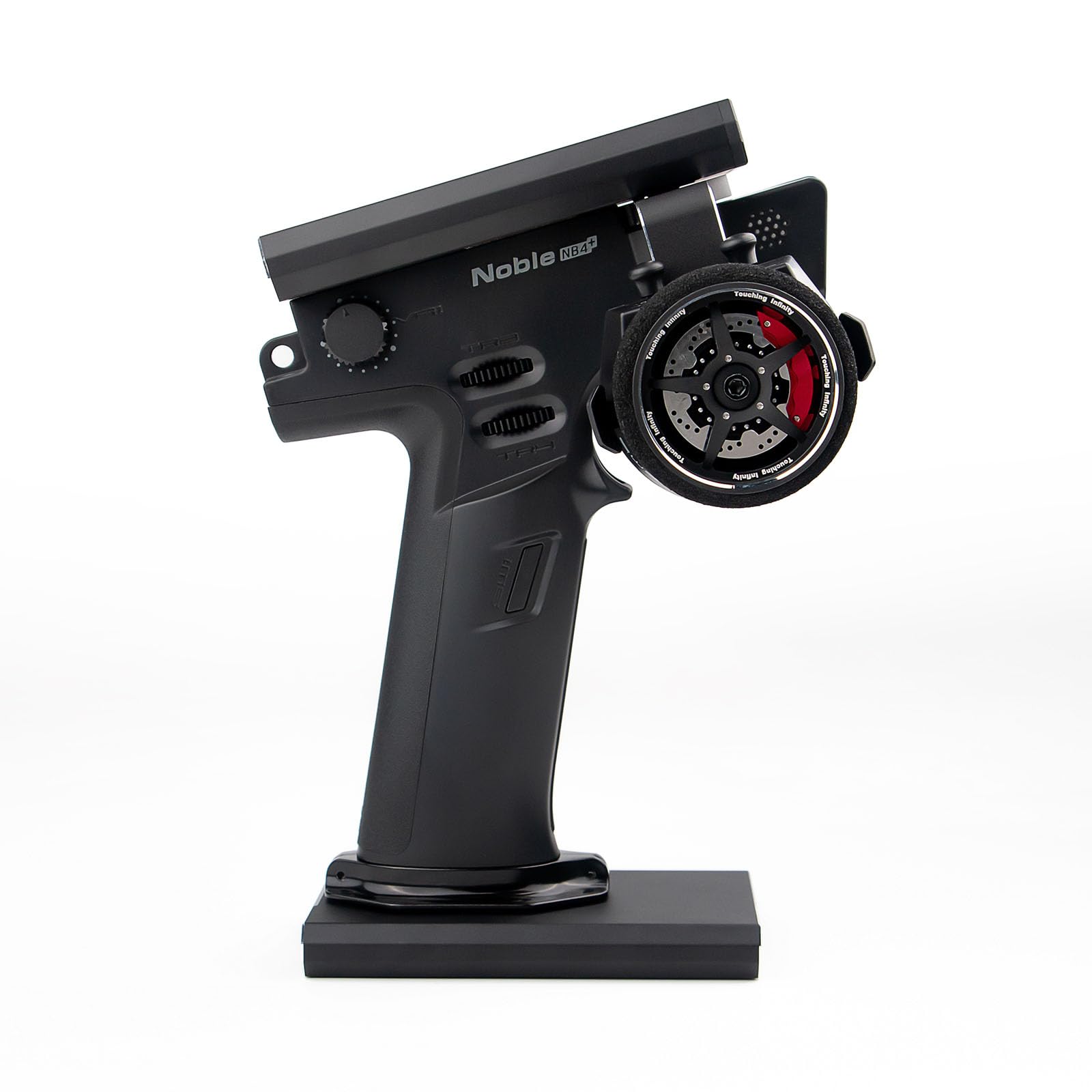
Figure 1: Flysky Noble NB4+ Remote Controller with charging base.
2. Cosa c'è nella scatola
Upon unboxing your Flysky Noble NB4+ Remote Controller, please verify that all the following components are included:
- 1x Flysky Noble NB4+ Remote Controller
- 1x Flysky FGr4S Receiver
- 1x cavo di ricarica (USB tipo C)
- 1x Spare Grip Cover
- 1x Manuale in inglese (questo documento)

Figure 2: All components included in the Flysky Noble NB4+ package.
3. Prodotto finitoview
3.1. Componenti del trasmettitore

Figura 3: Frontale e laterale view of the Noble NB4+ transmitter with labeled components including the screen, steering wheel, VR1, TR1, TR2, TR3, TR4, SW1, SW2, Transmitter LED, Transmitter Power Button, Speaker, and Battery compartment.

Figure 4: Rear and base view of the Noble NB4+ transmitter with labeled components including the Throttle Trigger Structure Travel Adjustment Hole, Steering Wheel Tension Adjustment Hole, Throttle Trigger Tension Adjustment Hole, Throttle Trigger Size Adjustment Hole, Handle, 18650 Battery Cover, Base Power Port (Type-C input, Firmware Update, Charging Jack, Simulator Port, Trainer Interface, Head Track Interface), Base Power Button, and USB 5V 2A Port.
3.2. FGr4S Receiver Components

Figure 5: Diagram of the FGr4S Receiver showing the Antenna LED, BIND button, I-BUS port, and CH1-CH4 ports. It also illustrates proper vertical antenna mounting for optimal signal strength.
3.3. Caratteristiche principali
- High-Brightness IPS Touch Screen: The 3.5-inch 320*480 resolution IPS display is designed for outdoor use, offering high brightness and clear visibility even under strong sunlight.
- Interfaccia utente personalizzabile: A new colorful UI design allows for customizable themes and wallpaper changes, enabling users to personalize their display.
- Customizable Channel Names: The function to customize channel names has been added, providing a more intuitive display and real-time understanding of each channel's function.
- Quick Release Battery Design: The controller features a “Quick Release” internal battery design, equipped with a standard large-capacity, high-quality 18650 battery. With a charging base, it can achieve over ten hours of endurance.
- Interfaccia USB di tipo C: The optimized USB Type-C interface offers stable connection and versatility. It supports coach mode for interactive teaching and head tracking functionality for immersive experiences.

Figure 6: The 3.5-inch IPS high-brightness outdoor display of the Noble NB4+ is visible even in strong sunlight.

Figure 7: The new colorful UI design allows for customizable themes and wallpapers.

Figure 8: The customizable channel names function on the Noble NB4+ display.

Figure 9: The Noble NB4+ features a quick-release internal battery design for extended use.

Figure 10: The USB Type-C interface on the Noble NB4+ supports trainer mode and head tracking functionality.
Video 1: Un overview of the Flysky Noble NB4+ 8CH Radio Transmitter, highlighting its features and design.
4. Impostazione
4.1. Installazione e ricarica della batteria
- Locate the 18650 Battery Cover on the handle of the transmitter (refer to Figure 4).
- Remove the cover and insert the provided 18650 Lithium-Ion Polymer battery, ensuring correct polarity.
- Riposizionare il coperchio della batteria.
- Connect the charging cable to the USB Type-C port on the base of the transmitter (refer to Figure 4) and to a suitable USB power source. The transmitter can achieve over ten hours of operation on a full charge.
4.2. Installazione del ricevitore
Mount the FGr4S receiver in your RC model. To ensure a strong signal, mount the receiver with its antenna vertical (refer to Figure 5).
4.3. Transmitter and Receiver Pairing (Binding)
The Noble NB4+ transmitter and FGr4S receiver are typically pre-bound. If re-binding is necessary, follow the instructions in the on-screen menu or consult the detailed pairing table below for compatibility with other receivers.

Figure 11: Compatibility table for AFHDS3 transmitters and receivers. A checkmark indicates compatibility. Products marked in red are no longer in production.
5. Istruzioni per l'uso
5.1. Accensione/spegnimento
Press and hold the Transmitter Power Button (refer to Figure 3) to power the unit on or off.
5.2. Using the Touch Screen Interface
The 3.5-inch IPS touch screen allows for intuitive navigation through menus and settings. Tap icons and options to select them. Swipe gestures may be used for navigation in certain menus.
5.3. Configurazione del canale
Access the channel settings through the UI to customize channel names and assign functions. The 2CH (Ultra-fast) Mode provides minimal latency for competitive use.
5.4. Trainer Mode and Head Tracking
Connect compatible devices via the USB Type-C port to utilize trainer mode for teaching or head tracking for an immersive control experience. Refer to the on-screen menus for specific setup procedures for these functions.
6. Manutenzione
- Pulizia: Utilizzare un panno morbido e asciutto per pulire il trasmettitore e il ricevitore. Evitare l'uso di prodotti chimici o solventi aggressivi.
- Cura della batteria: Store the battery in a cool, dry place when not in use. Do not expose to extreme temperatures. Charge the battery regularly to maintain its lifespan.
- Magazzinaggio: When storing the unit for extended periods, ensure the battery is partially charged (around 50%) and store in a safe, dry environment.
7. Risoluzione Dei Problemi
7.1. Loss of Control / Signal Interference
- Always keep your RC model in sight and within 300m of the transmitter.
- Ensure there are no other 2.4GHz radio signals or strong electromagnetic interference sources nearby, as these can block the RF signal and lead to loss of control.
- Never grip the transmitter antenna during operation, as this significantly degrades signal quality and strength.
- Verify the receiver antenna is mounted vertically and unobstructed (refer to Figure 5).
7.2. Problemi di visualizzazione
- Se lo schermo non risponde, provare a riavviare il trasmettitore.
- Ensure the battery is adequately charged if the screen is dim or not turning on.
7.3. Problemi di alimentazione
- If the transmitter does not power on, check the battery installation and ensure it is charged.
- If charging is not occurring, verify the USB Type-C cable and power source are functioning correctly.
8. Specifiche
| Attributo | Valore |
|---|---|
| Nome del marchio | Flysky |
| Nome del modello | Flysky Noble NB4+ |
| Nome del tipo di articolo | Flysky Noble NB4+ Remote Controller with FGr4S Receiver |
| Numero di parte del produttore | Nobile NB4+ |
| Numero di articoli | 1 |
| Fonte di alimentazione | Alimentato a batteria |
| Descrizione della batteria | Lithium-Ion Polymer (18650) |
| Modalità di funzionamento | Ultraveloce |
| Colore | Nero |
| Tipo di materiale | Metallo, Plastica |
| Dimensioni articolo (LxPxA) | 5.17 x 4.56 x 7.5 pollici |
| Descrizione della fascia d'età | Adulto |
9. Informazioni sulla sicurezza
- To avoid 2.4GHz radio signal interference, always keep your model in sight and within 300m. Ensure there are no other signals around that may block the RF signal and lead to loss of control.
- Never grip the transmitter antenna during operation. This significantly degrades signal quality and strength and may cause loss of control.
- Questo prodotto è destinato all'uso da parte di adulti.
10. Garanzia e supporto
For warranty information, technical support, or service inquiries, please contact Flysky customer support directly. Refer to the official Flysky website or the packaging for contact details.


