
DALY 16S 48V 300A
DALY Smart BMS 16S 48V 300A User Manual
Model: 16S 48V 300A
1. Introduzione
The DALY Smart BMS (Battery Management System) 16S 48V 300A is an advanced protection board designed for LiFePO4 lithium battery packs. It integrates essential safety features with smart monitoring capabilities, ensuring the longevity and optimal performance of your battery system. This manual provides detailed instructions for proper installation, operation, and maintenance.
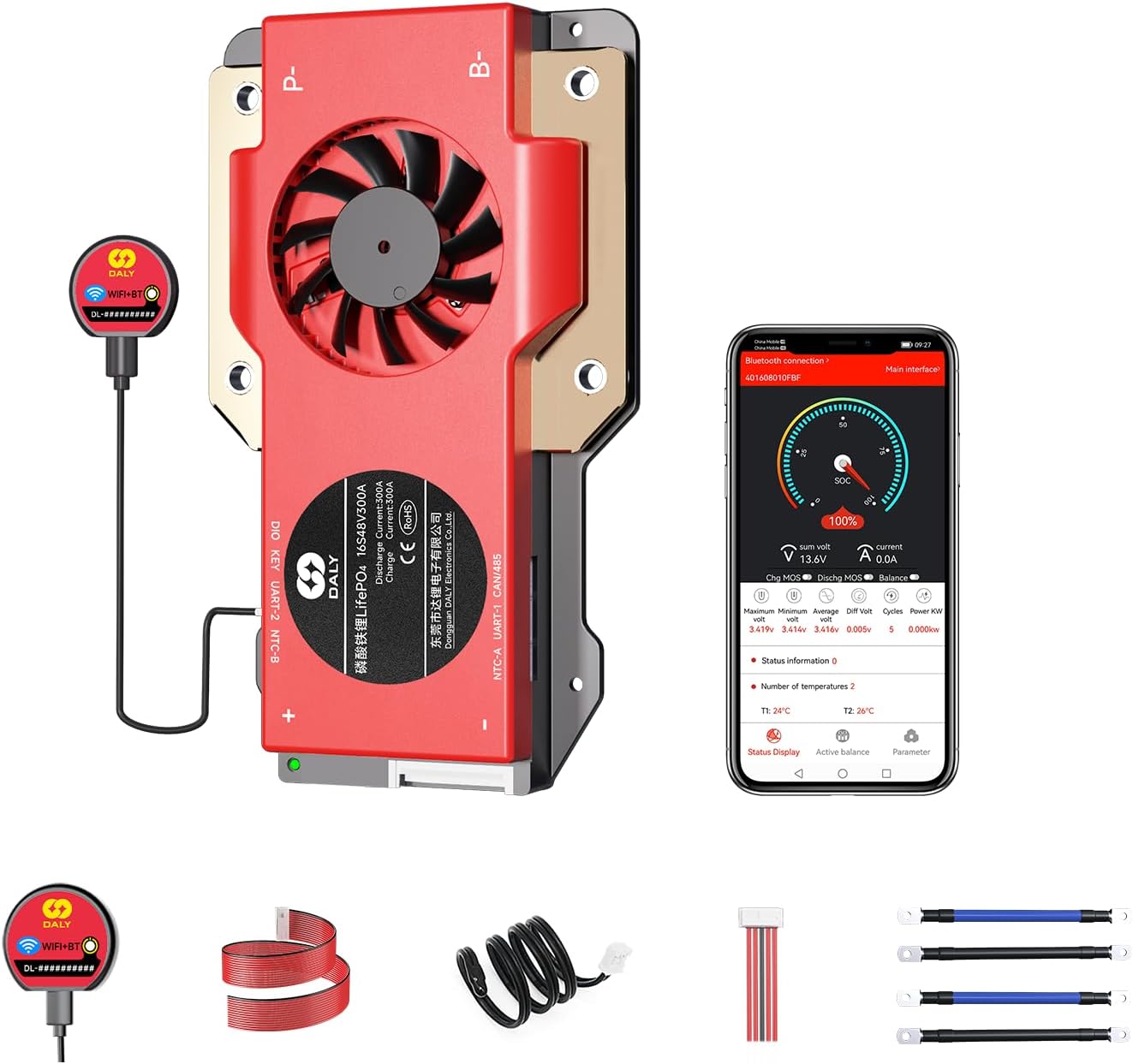
Image 1.1: DALY Smart BMS 16S 48V 300A and its accompanying components, including the Wi-Fi/Bluetooth module, sampling cable, and output lines.
2. Caratteristiche del prodotto
- Enhanced Battery Safety: Provides comprehensive protection against overcharging, over-discharging, overcurrent, short circuits, and extreme temperatures, safeguarding the battery pack.
- 2-in-1 Bluetooth/Wi-Fi Dongle: Enables remote monitoring and parameter adjustment via a mobile app (Bluetooth) or PC software (Wi-Fi, requires router connection).
- Forte capacità di sovracorrente: Utilizes high-performance MOSFETs and TVS diodes to manage regenerative currents, preventing power-off issues in applications like golf carts.
- Multiple Interface Functions: Supports dual UART communication, compatible with BT&WIFI modules and touch displays. Features a Bluetooth activation-free function for easy wake-up via the app.

Immagine 2.1: Passoview of the DALY Smart BMS's advanced features and design.
3. Specifiche
The following table details the technical specifications for the DALY Smart BMS 16S 48V 300A.
| Specificazione | Valore |
|---|---|
| Tipo di prodotto | LiFePO4 16S 300A common port with balance |
| Corrente di scarica | 300A |
| Overdischarge Current | 450±9A |
| Corrente di carica | 300A |
| Overcharge Current | 450±9A |
| Sovraccarico voltage | 3.75V±0.05V (Can be set) |
| Vol. sovrascaricatage | 2.2V±0.05V (Can be set) |
| Volume di caricatage | 58.4V |
| Modello | R24S (11~24S) |
| Dimensioni (L x P x A) | 183 x 108 x 26 mm (7.2 x 4.25 x 1.02 pollici) |
| Cavo di uscita | 4AWG*2/200mm |
| Cavo | 24 AWG/450 mm |
| Peso dell'articolo | 2.7 pounds (approx. 600-700g) |
| Temperatura di esercizio | Charging: -35~75°C, Discharging: -35~75°C (Can be set) |
| Temperatura di conservazione | -40~85°C |
| Corrente di lavoro | < 20 mA |
| Corrente di riposo | < 600 µA |
| Tempo di sonno | Anni 3600 |

Image 3.1: Visual representation of the DALY Smart BMS specifications.
4. Installazione e cablaggio
Proper installation is crucial for the safe and effective operation of your DALY Smart BMS. Follow these steps carefully:
- Step 1: Solder the sampcavi di collegamento. The first black cable in the sampling cable set connects to the negative terminal of the battery (B-). The second cable (red) connects to the positive terminal of the first string of batteries. Continue this pattern for all subsequent cables until all strings are connected.
- Step 2: Check the cables. After connecting the cables, use a multimeter to measure the voltage between two adjacent cables starting from the header. Ensure there are no incorrect connections or missing connections.
- Step 3: Connect the output wires. Connect the B- wire of the BMS to the total negative terminal of the battery pack. Then, plug the sampling cable to the BMS. After activating the BMS, verify that the voltage (batteria voltage) between B+ & B- and the voltage between P+ & P- are consistent.

Image 4.1: Detailed wiring diagram for connecting the DALY Smart BMS to a battery pack, load, and charger.
5. Istruzioni per l'uso
5.1 Mobile App and PC Software Monitoring
The DALY Smart BMS can be monitored and configured using a dedicated mobile application or PC software. The included 2-in-1 Bluetooth/Wi-Fi dongle facilitates this connectivity.
- Connessione Bluetooth: For local monitoring, connect the dongle to the BMS and pair it with your mobile device via Bluetooth. Open the DALY app to view real-time battery status and adjust parameters. The BMS supports a Bluetooth activation-free function, allowing direct wake-up via the app.
- Connessione Wi-Fi: For long-distance control and monitoring, connect the dongle to a Wi-Fi router. This enables remote access to battery data and settings through the mobile app or PC software from any location with internet access.

Image 5.1: The DALY Smart BMS mobile application interface for monitoring battery parameters.
5.2 Dimostrazione video
Guarda questo video ufficiale per una panoramica visivaview of the DALY S-series Smart BMS features and capabilities.
Video 5.2: An official DALY video showcasing the features and comprehensive upgrade of the S-series Smart BMS, highlighting its professional resistance to high current.
6. Manutenzione e buone pratiche
To ensure the longevity and optimal performance of your LiFePO4 battery pack and DALY Smart BMS, adhere to the following maintenance guidelines:
- Monitoraggio regolare: Controllare periodicamente i parametri della batteria tramite l'app mobile o il software per PC per individuare tempestivamente eventuali anomalie.
- Condizioni ambientali: Operate the battery system within the specified temperature ranges for charging and discharging. Avoid extreme heat or cold.
- Integrità della connessione: Regularly inspect all wiring and connections for tightness and corrosion. Loose connections can lead to resistance and heat buildup.
- Aggiornamenti del firmware: Check for and apply any available firmware updates for the BMS to ensure you have the latest features and bug fixes.
- Bilanciamento cellulare: The BMS actively balances cells. Ensure the battery pack is allowed sufficient time for balancing, especially after deep discharges or prolonged use.
7. Risoluzione Dei Problemi
This section addresses common issues you might encounter with your DALY Smart BMS.
- BMS Not Responding/Waking Up: If the BMS does not broadcast a Bluetooth signal or appears unresponsive after prolonged inactivity, try connecting a load or charger to the battery pack to force a wake-up. The Bluetooth activation-free function should allow app-based wake-up.
- Problemi di connettività dell'app: Ensure the Bluetooth/Wi-Fi dongle is securely connected to the BMS. For Wi-Fi, verify your router connection and internet access. If using Bluetooth, ensure your mobile device is within range.
- Volume erratotage Letture: Ricontrolla tuttoampling cable connections as per the installation instructions. Loose or incorrect connections can lead to inaccurate cell voltage letture.
- Battery Shutting Down Unexpectedly: This could be due to protection triggers (overcharge, over-discharge, overcurrent, temperature). Check the app for fault codes or protection status. Ensure your load does not exceed the BMS's current limits. Regenerative current from certain loads (e.g., golf carts) is managed by the BMS, but extreme conditions can still trigger protection.
- Poor Cell Balancing: While the BMS provides balancing, significant cell voltage differences may require extended balancing time. Ensure the battery pack is fully charged and allowed to rest for the BMS to perform passive balancing effectively.
8. Lista di imballaggio
Verifica che tutti i componenti siano presenti nel tuo pacchetto:
| Articolo | Quantità |
|---|---|
| Smart BMS 16S 48V 300A | 1 |
| B-P- Output Line | 2 |
| 2-in-1 BT/Wi-Fi Dongle | 1 |
| SampCavo di ling | 1 |
| NTC (sensore di temperatura) | 1 |
| CAN/485 5-pin Cable | 1 |
| Manuale d'uso | 1 |

Image 8.1: Contents of the DALY Smart BMS package.
9. Garanzia e supporto
The DALY Smart BMS 16S 48V 300A comes with a Garanzia di 3 anno. For technical support, warranty claims, or additional product information, please visit the official DALY Store or contact customer service through your purchase platform.
Official DALY Store: Visit the DALY Store on Amazon
Documenti correlati - 16S 48V 300A
 |
Approvazione delle specifiche del prodotto e manuale Daly Smart BMS 8-16S 100-200A Specifiche dettagliate del prodotto e manuale utente per Daly Smart BMS 8-16S 100-200A, che coprono parametri tecnici, funzioni di protezione, indicatori LED, protocolli di comunicazione e istruzioni di installazione. |
 |
Daly DL-R16LM-B TJ Smart BMS 8-16S 150A-200A Specification & User Manual Technical specification and user manual for the Daly DL-R16LM-B TJ Smart BMS, supporting 8-16S battery strings and 150A-200A current with active balance. |
 |
DALY LM-B BMS User Manual for Energy Storage Systems User manual for the DALY LM-B Battery Management System (BMS) designed for energy storage applications, covering product introduction, wiring diagrams, functional descriptions, and precautions. |
 |
DALY Battery Management System (BMS) User Manual Comprehensive user manual for the DALY Battery Management System (BMS) with Bluetooth module. Includes information on package contents, safety instructions, connection diagram, activation, and declaration of conformity. |
 |
DALY LiFePO4 8S24V200A BMS con 4G e GNSS - Scheda tecnica Scheda tecnica del sistema di gestione della batteria (BMS) DALY LiFePO4 8S24V200A con connettività 4G, GNSS, UART e rilevamento della temperatura NTC. Include specifiche, pinout e informazioni sullo stato dei LED. |
 |
DALY A-Series Smart BMS Software Manual User manual for the DALY A-Series Smart BMS, covering product specifications, wiring instructions, software configuration, and safety precautions for Li-ion and LiFePO4 battery management systems. |
Ask a question about this manual
Ask about setup, troubleshooting, compatibility, parts, safety, or missing instructions. Manuals+ will review the question and use this page’s manual context to help answer it.