
1. Introduzione
This document provides essential instructions for the setup, operation, and troubleshooting of your KRPTQJoo replacement remote control, Model CXE5116. This remote is designed as a replacement for specific Pioneer AVH series car receivers and is not a universal remote control. Please ensure compatibility with your unit before use.
Compatible Pioneer Models include: AVH-3850DVD, AVH-X7850BT, AVH-X6850DVD, AVH-X5850BT, AVH-X4850DVD, AVH-X2850BT, AVH-X1850DVD, AVH-X5750BT, AVH-P3450DVD, AVH-2500NEX, AVIC-W6600NEX, AVI-C6100NEX, AVH-P8400BH, AVH-X8500BHS, AVH-290BT, AVH-291BT, AVH-195BT, AVH-295BT, AVH-1300NEX, AVH-X390BS, AVH-2300NEX, AVH-X490BS, AVH-190DVD.
2. Impostazione
2.1 Installazione della batteria
Il telecomando richiede due (2) batterie alcaline AAA (non incluse). Per installarle, seguire questi passaggi:
- Aprire il coperchio del vano batterie situato sul retro del telecomando.
- Inserire due batterie AAA nuove, assicurandosi che i terminali positivo (+) e negativo (-) siano allineati correttamente con le marcature all'interno del vano.
- Chiudere saldamente il coperchio del vano batterie.
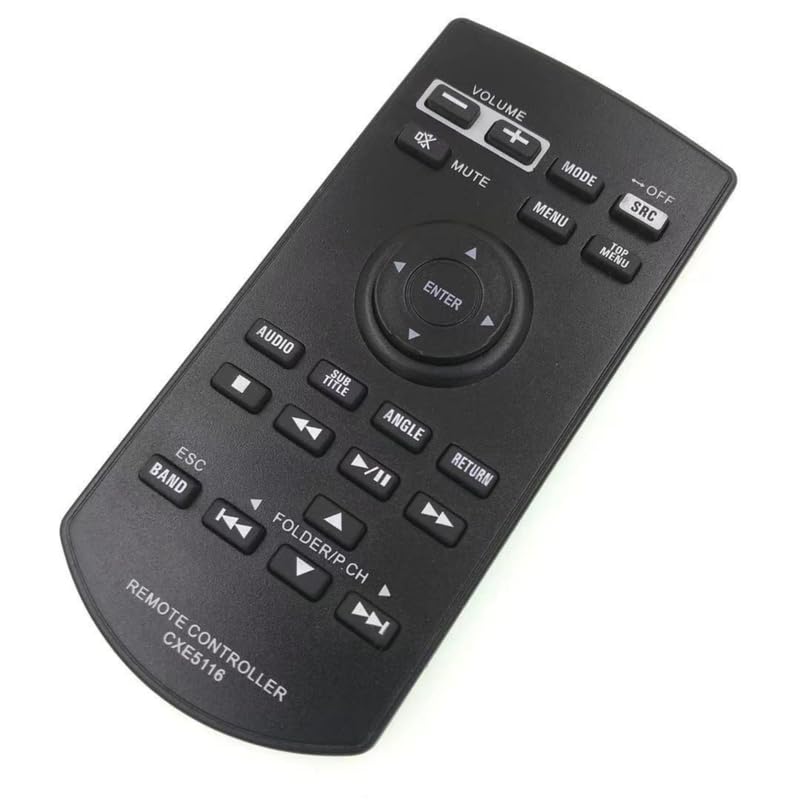
Figure 1: Remote control with the battery compartment open for battery installation.
2.2 Uso iniziale
No programming or setup code is required for this replacement remote control. Once batteries are installed, it should function immediately with compatible Pioneer AVH series car receivers.
- Plug one end of the power cord into your car receiver unit, and the other end into an electrical outlet (if applicable for bench testing) or ensure the car receiver is powered on in your vehicle.
- Aim the transmitter end of the remote control directly at the infrared receiver on your car unit. Ensure there are no obstructions between the remote and the unit.
- Press any button (e.g., Power, Volume) to test functionality.
3. Istruzioni per l'uso
The KRPTQJoo replacement remote control provides direct access to various functions of your Pioneer AVH series car receiver. Familiarize yourself with the button layout for optimal use.

Figura 2: Oltreview dei pulsanti del telecomando.
3.1 Funzioni di base
- VOLUME (+/-): Regola il livello del volume audio.
- MUTO: Disattiva l'uscita audio.
- DIREZIONI: Cycles through available audio/video modes (e.g., Radio, CD, USB).
- SRC (Fonte): Seleziona la sorgente di ingresso.
- OFF: Spegne l'unità.
- MENU: Accesses the main menu of the car receiver.
- MEN SUPERIORE: Navigates to the top level of a disc menu.
- Frecce direzionali (su, giù, sinistra, destra) e INVIO: Utilizzato per la navigazione e la selezione del menu.
- AUDIO: Accede alle impostazioni audio.
- SOTTOTITOLO: Changes subtitle language/display for compatible media.
- ANGOLO: Changes camera angle for compatible media.
- RITORNO: Torna alla schermata o al menu precedente.
- Play/Pause (►/⏸): Controlla la riproduzione multimediale.
- Skip/Fast Forward/Rewind (◀◀, ►►): Salta le tracce o avanza/riavvolge rapidamente i contenuti multimediali.
- ESC (Esc): Esce dalla funzione o dal menu corrente.
- GRUPPO MUSICALE: Cambia le bande radio (ad esempio, FM1, FM2, AM).
- FOLDER/P.CH: Navigates folders or preset channels.
4. Risoluzione Dei Problemi
If your remote control is not functioning as expected, please review i seguenti problemi comuni e le relative soluzioni:
4.1 Il telecomando non risponde
- Batterie: Ensure batteries are new and installed correctly. Old or improperly inserted batteries are a common cause. Try rolling the batteries within the compartment to ensure good contact with the springs.
- Linea di vista: Verify there are no obstructions between the remote control and the car receiver's infrared sensor. The remote operates using infrared signals, which require a clear path.
- Compatibilità: Double-check the model number on your car receiver's sticker label against the list of compatible models. If your model is not listed, the remote may not be compatible.
- Danni remoti: Although remotes are tested before shipping, physical damage during transit can occur. Inspect the remote for any visible damage.
4.2 Testing Remote Functionality
You can test if the remote control is emitting an infrared signal using a smartphone camera (iPhones may not work for this test):
- Apri l'app della fotocamera sul tuo smartphone.
- Point the front end of the remote control (where the IR emitter is located) towards the smartphone camera lens.
- Press any button on the remote control. If the remote is functional, you should see a light flashing on your phone screen from the remote's LED.
4.3 Car Receiver Reset
Sometimes, resetting the car receiver can resolve communication issues:
- Unplug your car receiver unit for approximately 50 seconds, then plug it back in.
- Concurrently, consider restoring the default settings of your car receiver. Refer to your car receiver's user manual for instructions on how to use the 'Reset' option to restore factory-default settings.
- After resetting the unit, remove and re-install the batteries in the remote control, then attempt to use it again.
4.4 Pairing or Code Mismatch
In rare cases, if the remote control code does not match the main unit, pairing or a code change might be necessary. If this issue arises, please contact customer support for specific steps, as these procedures vary by car receiver model.
5. Specifiche
| Marca | KRPTQJoo |
| Numero di modello | CXE5116 |
| Caratteristica speciale | No Programming Required, Not Universal Replacement |
| Colore | Nero |
| Numero massimo di dispositivi supportati | 1 |
| Dispositivi compatibili | Stereo System (Pioneer AVH Series) |
| Tecnologia di connettività | Infrarossi |
| Tipo di controllore | Controllo dei pulsanti |
| Portata massima | 8 metri |
| Numero di batterie | Sono necessarie 2 batterie AAA |
| Tipo di batteria | Alcalino |
| Peso dell'articolo | 45 grammi |
| Dimensioni articolo (L x P x A) | 6 cm L x 1 cm P x 2 cm A |
6. Garanzia e supporto
6.1 Informazioni sulla garanzia
This KRPTQJoo remote control comes with a Garanzia di 100 giorni from the date of purchase. This warranty covers manufacturing defects under normal use. It does not cover damage caused by misuse, accidents, or unauthorized modifications.
6.2 Assistenza clienti
If you have any questions, encounter issues not covered in this manual, or require assistance, please contact us via Amazon Messages. To expedite support, please provide the following information:
- Your specific car receiver model number.
- Una descrizione dettagliata del problema.
- Photos of your original remote control (if available) and the new remote.
Your cooperation in troubleshooting helps us provide the best possible solution.